Multi-cloud security is the practice of protecting data, applications, and infrastructure across two or more cloud providers in a consistent manner. Most large organizations today run workloads across multiple clouds, sometimes by design, but often due to acquisitions, team preferences, or choosing the best tool for each job.
While this brings flexibility and resilience, it also introduces significant security complexity. Each cloud provider has its own security model, default configurations, and tooling, making consistent protection genuinely difficult.
In this article, we will look at what multi-cloud security involves, why it is harder than single cloud security, and what you can do about it.
What we’ll cover:
What is multi-cloud, and why do organizations adopt it?
Multi-cloud means using two or more public cloud providers to run your workloads. Organizations adopt multi-cloud for several reasons. Some teams choose specific clouds because of regulatory requirements.
Data residency laws might force you to run certain workloads in regions only available on a particular provider. Other organizations want to have all the available tools and services from multiple providers in their arsenal and pick and choose what they need accordingly.
A good example here is access to AI models and GPU availability. Not all cloud providers offer all AI models, and GPU capacity can vary across providers and regions. Others have vendor lock-in concerns related to running everything on a single provider. There is also the resilience argument. If a major outage hits one provider, workloads running on another provider can keep going.
It is worth mentioning that multi-cloud is not the same as hybrid cloud. A hybrid cloud combines public cloud with on-premises infrastructure or private cloud. Multi-cloud refers specifically to using multiple public cloud providers. You can have both at the same time, and many organizations do.
What is multi-cloud security?
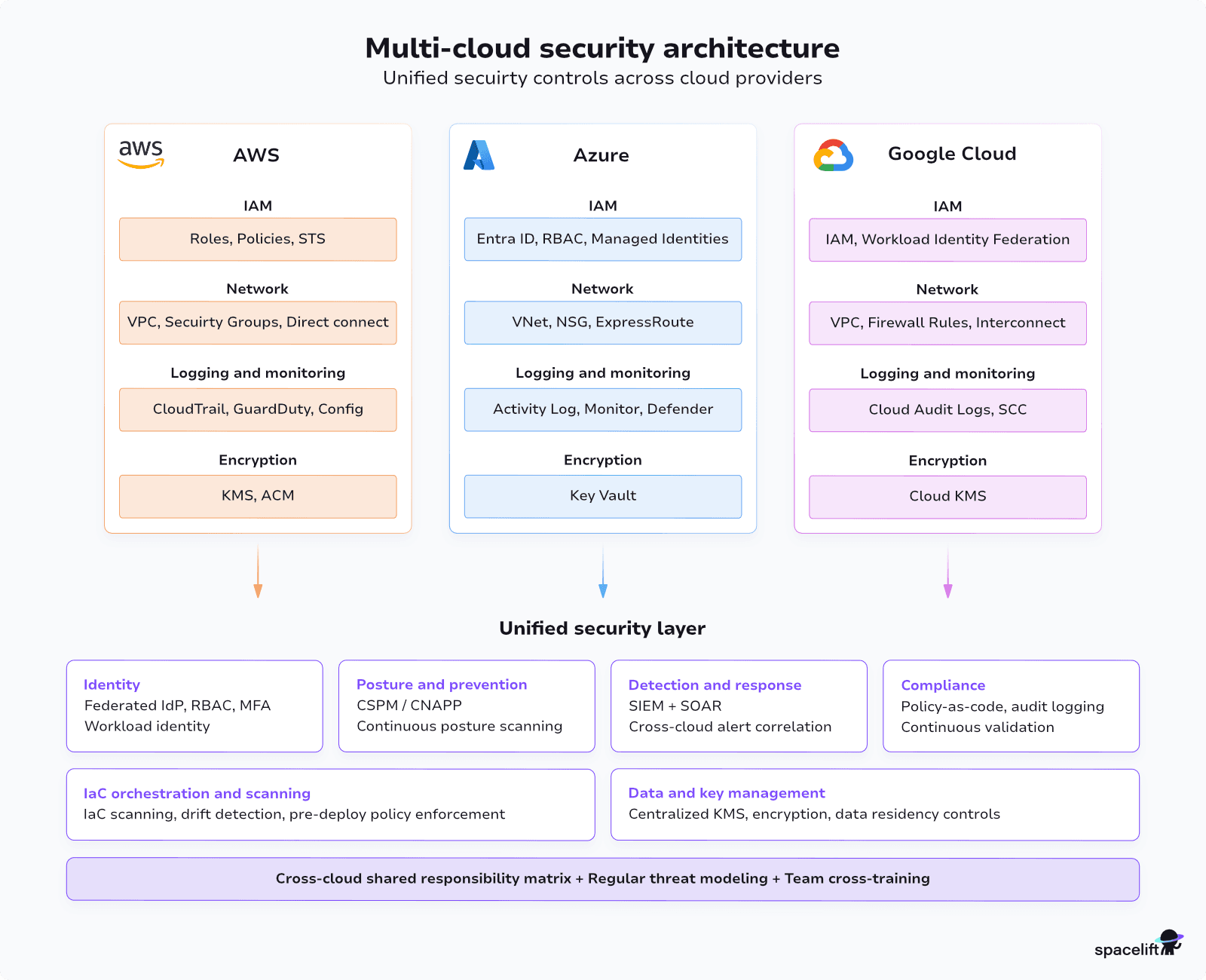
Multi-cloud security refers to the tools, policies, and practices used to protect data, applications, and infrastructure spread across two or more cloud environments. Security teams must maintain consistent protection across providers like AWS, Azure, and Google Cloud, each of which has its own security model, defaults, and tooling.
This makes multi-cloud security more than just applying the same policies in multiple places. It requires a deliberate strategy to achieve visibility and consistency across all environments, without creating gaps between them.
Why is multi-cloud security harder?
Securing a single cloud provider properly already requires serious, continuous effort. Each provider comes with hundreds of services, configuration options, and security controls. When you add a second or third provider, the complexity multiplies.
Every cloud provider has its own security model. AWS IAM works differently from Azure RBAC, which works differently from GCP IAM. Although some concepts could be the same, the terminology and default configurations vary.
Then there is the visibility problem. Most cloud provider security tools are designed for their own ecosystem. Without an effort to centralize visibility, you end up with a fragmented ecosystem of tools.
A major blocker is often the lack of deep human expertise across multiple cloud platforms. It is already complicated to master one provider, so knowledge tends to get fragmented.
The AWS team knows AWS security, but treats the Azure environment as someone else’s problem. This kind of organizational fragmentation could introduce blind spots across multi-cloud and hybrid setups.
Read more: Multicloud Challenges: Key Issues & Best Practices
Key aspects of multi-cloud security
The following areas form the backbone of any multi-cloud security strategy. Each one requires attention not just within individual clouds but across all of them.
Identity and access management across clouds
Identity is a fundamental piece of cloud security. In a multi-cloud setup, identity management becomes much more complicated because you could be dealing with multiple identity systems that were not designed to work together. After you have a setup in place, investing in regular access reviews and automated tooling to flag unused permissions is worth the effort.
- Identity federation – The starting point for most organizations is identity federation. Instead of maintaining separate user directories in each cloud provider, you federate identity through a centralized provider, typically Okta, Azure Entra ID, or Google Workspace. Users authenticate once, and that identity propagates across clouds via standards such as SAML, OAuth 2.0, or OIDC. This reduces the number of credentials floating around and allows for easier identity management.
- Role-based access control – Consistent role-based access control (RBAC) is also complicated because each provider implements roles and permissions differently. You need to define a consistent access model that works across providers and map it to the native role systems in each cloud.
- Service-to-service authentication – Service-to-service authentication spanning multiple cloud environments needs attention. Passing long-lived credentials between clouds isn’t recommended. Workload identity federation, where a cloud-native identity in one provider is trusted by another, is the better approach.
Network and data security in multi-cloud environments
For network connectivity between clouds, the options range from VPN tunnels to dedicated interconnects, such as the AWS and Google Interconnect new offering. The choice depends on your throughput and latency requirements. VPN tunnels work fine for low-volume traffic. For high-throughput, latency-sensitive connections, dedicated interconnects are worth the cost.
Either way, encryption in transit is not optional. Service meshes can also help manage cross-cloud service communication through mutual TLS and fine-grained traffic policies, though they add an additional layer of operational complexity.
Encryption at rest is generally straightforward since every major cloud provider offers it by default. The harder question is key management. Do you use each provider’s native KMS, or do you centralize key management with an external tool? Native KMS is simpler but means your encryption keys are spread across multiple providers.
A centralized approach gives you a single point of control, which makes key rotation and access policies easier to manage. The trade-off is added operational complexity.
In multi-cloud setups, inevitably, there will be data movement between clouds. These data movement paths need to be secured. And unlike traffic within a single cloud’s network, cross-cloud traffic often traverses the public internet unless you set up private connectivity.
Data residency and sovereignty deserve their own consideration. If you operate in the EU, GDPR places restrictions on where personal data can be stored and processed. Similar regulations exist in other jurisdictions. In a multi-cloud setup, you need clear policies on where data can live and automated controls to enforce them.
A misconfigured replication rule that copies data to an unapproved region is the kind of mistake that can lead to regulatory fines.
Compliance and governance in multi-cloud environments
Compliance is another area where regulatory requirements (SOC 2, ISO 27001, GDPR, HIPAA, or whatever applies to your industry) must be mapped to the specific controls available in each cloud provider. Those controls are not identical across clouds, so the mapping is rarely one-to-one.
Policy-as-code is one of the most practical approaches to maintaining consistency here. Tools like Open Policy Agent (OPA) and cloud-native policy engines (AWS SCP, Azure Policy, GCP Organization Policies) let you define security and compliance rules as code. You write the rule once, test it, and enforce it automatically. That is far more reliable than manual reviews or checklists.
Centralized audit logging is another requirement that gets harder with multiple clouds. AWS CloudTrail, Azure Activity Log & Azure Monitor, and GCP Cloud Audit Logs all produce audit trails, but they use different formats and different retention models. Consider aggregating these logs and data points into a central system, whether that is a Security Information and Event Management (SIEM) platform or a dedicated log management tool, and normalize the data so you can query across providers.
Modern approaches push for continuous compliance versus point-in-time audits. Traditional compliance involved periodic assessments as needed. You prepared for an audit, passed it, and then the environments drifted until the next audit.
In a multi-cloud environment where infrastructure changes constantly, continuous compliance validation works much better. Automated checks that run against your infrastructure on every change catch problems when they are introduced.
Read more: Multicloud Compliance: Frameworks, Controls, and Evidence
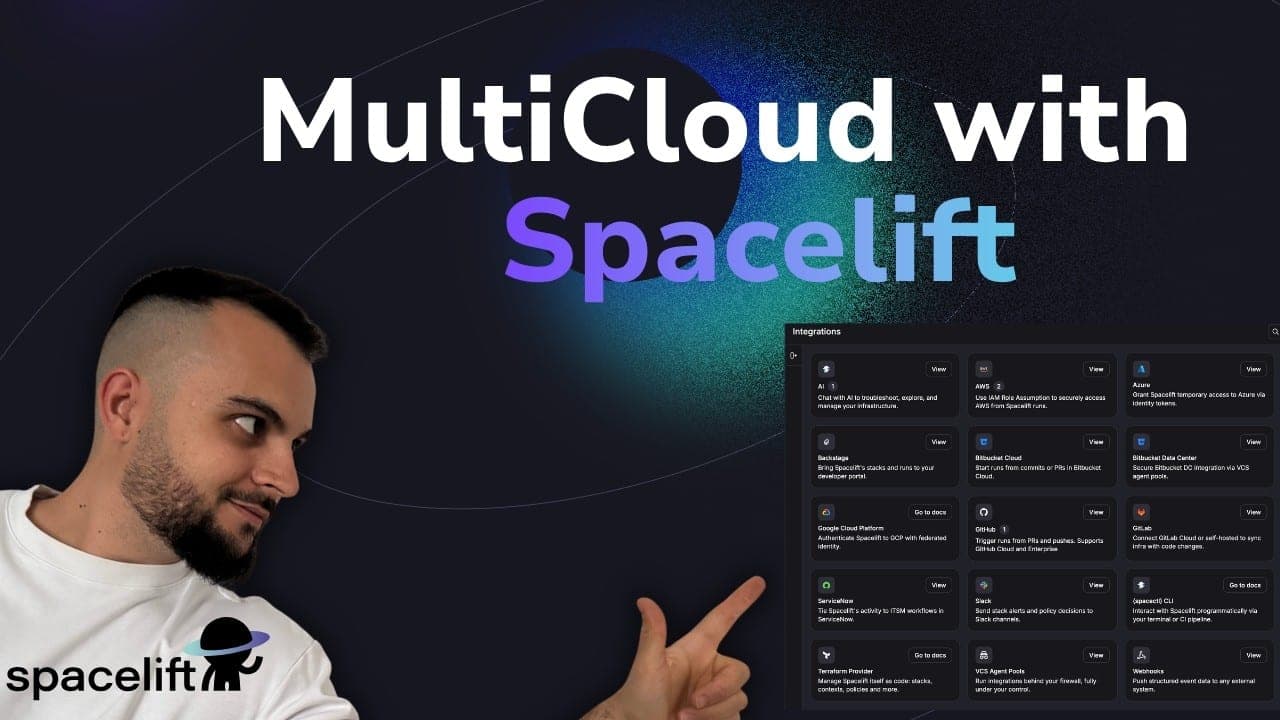
Three clouds means three identity systems, three permission models, and three audit trails to keep in sync. Here’s how Spacelift governs all of them from a single control plane:
Shared responsibility in multi-cloud environments
Every major cloud provider operates on a shared responsibility model, where the provider secures the underlying infrastructure and the customer is responsible for securing what they build and store on top of it. The exact split varies by provider and service type, but the principle is consistent: security in the cloud is always a joint effort.
In a multi-cloud environment, this creates an added layer of complexity. You are not managing one shared responsibility model but several simultaneously, each with different boundaries, default settings, and assumptions about what the customer handles. A misconfiguration that is caught automatically in one cloud may go undetected in another simply because the defaults differ.
This is where many organizations develop blind spots. When teams work within a single cloud, they build familiarity with where their responsibilities start and end. Spread across multiple providers, that clarity is harder to maintain, and gaps in ownership can emerge without anyone noticing.
Multi-cloud security best practices
An effective multi-cloud security strategy takes a combination of practices and is applied consistently.
1. Unified security posture management
Start with a unified security posture management approach. Cloud Security Posture Management (CSPM) platforms evaluate your configurations across providers against security benchmarks and compliance frameworks. They give you a single view of your security posture instead of checking each cloud separately. This is one of the highest-value investments you can make early on.
2. Centralize security observability
Centralize your observability. Aggregate logs, metrics, and security alerts from all providers into a single platform. This does not mean abandoning cloud-native monitoring tools.
It means feeding their outputs into a central system where you can correlate events across clouds.
3. Plan for data gravity
Whichever cloud holds the majority of your workloads will naturally accumulate the most security telemetry. Shipping logs cross-cloud gets expensive fast due to egress costs.
Some orgs solve this with regional deployments that selectively feed specific data into a central analytics layer; others accept the cost and centralize everything. This is a financial and architectural decision you need to make.
4. Unified IaC orchestration
Standardize infrastructure provisioning with infrastructure as code (IaC). When your infrastructure is defined in tools such as Terraform or Pulumi across cloud providers, you can apply automated security checks before anything gets deployed.
Look to unify your IaC management with a modern IaC orchestration and collaboration platform, such as Spacelift. Linting, policy checks, and security scanning in IaC pipelines catch misconfigurations before they reach production.
5. Cross-cloud shared responsibility matrix & threat modeling
Build a shared responsibility matrix for each provider. The shared responsibility model differs slightly between AWS, Azure, and Google Cloud. Document what each provider is responsible for regarding the services that you use and what your team owns. Make sure everyone on the team understands these boundaries.
Then, with this understanding in place, conduct regular cross-cloud threat modeling and perform regular well-architected reviews. Look at your architecture end to end and ask where the weakest points are. Don’t neglect the boundaries between clouds.
6. Enhance cross-cloud skills
Finally, invest in cross-cloud training for your teams. The engineers securing your AWS environment should have at least a working understanding of Azure and GCP security primitives, and vice versa.
You do not need everyone to be an expert in everything, but eliminating the knowledge silos between cloud teams goes a long way toward closing security gaps.
Common multi-cloud security tools and approaches
The tooling for multi-cloud security has matured a lot in recent years. The choice between cloud-native tools and third-party platforms depends on how many clouds you actually operate in and how much effort you want to spend integrating separate tools.
If the majority of your workloads live in a single provider, that provider’s native security tools might be enough. If your workloads are broadly split across two or three providers, a multi-cloud platform could be a good investment.
Here is a quick overview of the major options.
1. Posture and prevention (CSPM/CNAPP layer)
CSPM/CNAPP (Cloud-Native Application Protection Platform) platforms like Wiz, Prisma Cloud (Palo Alto), and Orca Security provide cross-cloud visibility into misconfigurations, vulnerabilities, and compliance violations. They connect to your cloud accounts via APIs and continuously scan your environments.
These platforms provide a single policy framework that evaluates across AWS, Azure, and GCP, without you having to maintain separate rule sets per cloud.
2. Detection and analytics (SIEM layer)
A single place where security-relevant telemetry from all clouds converges. The critical architectural choice is what you ingest and how. Cloud provider logs (CloudTrail, Azure Activity Logs, GCP Audit Logs) are critical, but you might also want VPC flow logs, DNS logs, container runtime events, identity events, and the posture findings from your CSPM layer.
Splunk is a well-established cloud-agnostic player in the space. The recommendation here is to dedicate some engineering effort to schema normalization, enrichment pipelines, and tuning for effective security monitoring.
3. Response and automation (SOAR layer)
SOAR (Security Orchestration, Automation, and Response) picks up where SIEM leaves off. Once an alert fires, SOAR provides playbook-driven automation to triage, enrich, and respond to incidents. Examples include auto-isolating a compromised host, querying threat intel feeds, or opening a ticket. The core value is reducing mean time to respond and cutting out manual work.
Whatever solution you select here needs robust API integrations with all clouds you use, and your playbooks need to be cloud-aware. This is an argument for either choosing a SOAR that’s tightly coupled with your SIEM (e.g, Palo Alto’s Cortex suite, or Splunk + Splunk SOAR) to reduce integration overhead, or going with a flexible automation platform like Tines that’s designed to be connector-agnostic.
Think of these three layers as a stack, not separate tools. They should work together as part of your architecture. The line between SIEM and SOAR is now blurred. For example, Splunk bought Phantom, Palo Alto includes XSOAR with Cortex, and Microsoft Sentinel has built-in automation with Logic Apps. Most modern SIEMs now include some orchestration features.
CSPM is now part of larger “CNAPP” (Cloud-Native Application Protection Platform) suites. Vendors like Wiz, Prisma Cloud, and Orca include CSPM along with container security, CIEM (cloud infrastructure entitlement management), vulnerability scanning, and runtime protection. So, CSPM is now just one feature in a bigger cloud security platform.
4. Infrastructure orchestration & management
Having unified infrastructure orchestration and management is key for strong multi-cloud security. For Infrastructure as Code (IaC) scanning, tools like Checkov and tfsec can check your IaC files for security problems before you deploy.
You can use Spacelift and its Custom Inputs feature to bring in tools like tfsec, Checkov, Terrascan, Kics, and more. Spacelift also includes advanced security features, such as Policy as Code, built right into the product.
Keeping your infrastructure secure with Spacelift
A platform like Spacelift can help your organization manage cloud infrastructure more efficiently. Spacelift is the infrastructure orchestration platform built for the AI-accelerated software era. It manages the full lifecycle for both traditional infrastructure as code (IaC) and AI-provisioned infrastructure, working with tools like OpenTofu, Terraform, Ansible, Pulumi, Kubernetes, and CloudFormation.
Security is one of Spacelift’s top priorities, with features such as policy as code, encryption, Single Sign-On (SSO), MFA, and private worker pools built into the product. Spacelift is SOC 2 Type II audited and provides compliance and security artifacts, including GDPR resources and its DPA, through the Spacelift Trust Center.
It is also the first IaC orchestration platform to receive FedRAMP authorization, delivering flexible, policy-driven automation to federal agencies and contractors seeking secure, compliant infrastructure workflows.
The power of Spacelift lies in its fully automated hands-on approach. Once you’ve created a Spacelift stack for your project, changes to the IaC files in your repository will automatically be applied to your infrastructure.
Spacelift’s pull request integrations keep everyone informed of what will change by displaying which resources are going to be affected by new merges. Spacelift also allows you to enforce policies and automated compliance checks that prevent dangerous oversights from occurring.
Spacelift includes drift detection capabilities that periodically check your infrastructure for discrepancies compared to your repository’s state. It can then launch reconciliation jobs to restore the correct state, ensuring your infrastructure operates predictably and reliably.
With Spacelift, you get:
- Policies to control what kind of resources engineers can create, what parameters they can have, how many approvals you need for a run, what kind of task you execute, what happens when a pull request is open, and where to send your notifications
- Stack dependencies to build multi-infrastructure automation workflows with dependencies, having the ability to build a workflow that, for example, generates your EC2 instances using Terraform and combines it with Ansible to configure them
- Self-service infrastructure via Templates and Blueprints, enabling your developers to do what matters – developing application code without sacrificing control
- Creature comforts such as contexts (reusable containers for your environment variables, files, and hooks), and the ability to run arbitrary code
- Drift detection and optional remediation
- Spacelift Intelligence for natural language provisioning, diagnostics, and operational insight across your infrastructure workflows
If you want to learn more about Spacelift, create a free account today or book a demo with one of our engineers.
Key points
Multi-cloud security complexity comes from the fact that each cloud provider was designed as a self-contained ecosystem, and making them work together securely takes extra effort.
The fundamentals are the same as single-cloud security: manage identity holistically and tightly, encrypt everything, log everything, and automate your compliance checks.
The difference is that you need to apply these fundamentals consistently across providers that implement them differently. That consistency is where most organizations struggle, and it is where the investment of time and tooling pays off the most.
Start with the areas that give you the highest return. Centralized identity, a tool to unify security posture and prevention (CSPM/CNAPP layer), and aggregated logging cover a lot of ground. Build from there, adding policy-as-code and automated threat modeling as your multi-cloud practice matures. This should be an ongoing practice, not a one-time project.
Integrate with your existing tools
Connect to and orchestrate your infrastructure tooling. Infrastructure as code, version control systems, observability tools, control and governance solutions, and cloud providers. Spacelift connects to all of them to help you deliver secure infrastructure faster.
Frequently asked questions
What are the risks of multi-cloud security?
The primary risks of multi-cloud security include an expanded attack surface, inconsistent security policies across providers, visibility gaps, and fragmented identity management, all of which increase breach and compliance exposure.
How is multi-cloud security different from hybrid cloud security?
Multi-cloud security protects workloads across multiple public cloud providers with distinct native controls. Hybrid cloud security focuses on securing the boundary between private and public cloud infrastructure.
What are the biggest multi-cloud security challenges?
Maintaining consistent policies across providers, achieving unified visibility, managing cross-platform identity and access, and preventing misconfigurations are the top multi-cloud security challenges.
How do you build a multi-cloud security strategy?
Establish centralized identity management, adopt provider-agnostic security tooling, enforce a zero-trust model, and use CSPM platforms to monitor configurations across all environments.
How do you manage multi-cloud cost and security together?
Use centralized tooling that provides cross-provider visibility into both spending and security posture. Enforce least-privilege access, automate resource tagging, and integrate cost and security reviews into a single governance workflow.