
Multicloud architectures boost resilience by distributing data across multiple data center regions. They provide you with more disaster recovery options by allowing you to fail over to a secondary cloud or restore a backup stored with another provider. However, multicloud disaster recovery can also increase operational complexity because of the number of components involved.
In this article, we will unpack the benefits, pitfalls, and best practices to consider when designing a multicloud disaster recovery strategy. We’ll learn the key steps to building reliable recovery processes that support business continuity during cloud outages.
What we’ll cover:
What is multicloud disaster recovery?
Disaster recovery is the process of restoring applications, data, and infrastructure to their original states after a major incident. Multicloud refers to the practice of utilizing more than one cloud provider, such as AWS, Azure, and Google Cloud.
Using a multicloud architecture enhances redundancy by allowing you to partition or replicate data across multiple cloud providers. Workloads and backups hosted in Azure will still be accessible if there’s an AWS outage, for example. This makes your business more resilient by letting you fail over to another cloud or redeploy your services from a backup, even if your main provider experiences a catastrophic incident.
Multicloud disaster recovery is the process of utilizing these capabilities. It’s how you trigger a failover or access your backups to bring your services back online. Successful strategies should enable quick, easy, and low-cost disaster recovery, enhancing your incident response posture.
See also: What is Multi-Cloud Security? Challenges & Best Practices
Benefits of multicloud disaster recovery
Implementing a multicloud disaster recovery strategy enables flexibility that is impossible when you’re dependent on a single cloud. It ensures there’s always a fallback option available if you accidentally delete data or there’s an issue with a specific cloud provider.
Here are some more of the main benefits you’ll notice:
- Ability to fail over to another cloud: Advanced multicloud systems with redundant infrastructure can seamlessly fail over to another cloud provider. This enables rapid disaster recovery when your primary provider goes down.
- Access to more cloud data protection tools: Combining the data storage and disaster recovery options of multiple clouds lets you access a wider range of services. You can use the latest features in each cloud to enhance data protection.
- Multiple options for restoring data: Multicloud gives you more choices during incidents. When there are multiple copies of your data to choose from, you can use the one that’s best-suited to each scenario. For instance, critical failures can be recovered using fast backups from Azure, while less serious incidents can be restored from S3 cold storage, which is cheaper to access.
- Geographic redundancy: Leveraging multiple cloud providers enables you to distribute data over several geographic regions, including locations that may only be available from certain providers. This increases redundancy and can aid compliance with local data privacy legislation.
- Cost optimization opportunities: Combining the services of multiple cloud providers enables you to optimize costs and balance your budget. You can achieve robust redundancy while still minimizing spending. For instance, you may find it’s cheapest to store warm backups in Google Cloud, but use Azure for cold storage archiving.
In summary, multicloud disaster recovery lets you mitigate more data protection risks at scale. It eliminates dependencies on specific cloud providers. This provides opportunities to fine-tune restoration processes and reduce operating costs.
Common multicloud disaster recovery pitfalls
Despite the benefits discussed above, multicloud disaster recovery also has drawbacks. Most significantly, it increases recovery complexity because each cloud provider has its own disaster recovery tools, services, and workflows. These different systems must be orchestrated to assemble a consistent restoration process.
Storing data in multiple places also broadens your attack surface. This poses additional security and compliance risks. It’s important to understand the trade-off between resilience and operational complexity when designing your multicloud recovery strategy.
Here are a few more pitfalls to consider:
- Increased storage and recovery costs: Storing multiple copies of data in different clouds means you’re paying for additional services, so your total bill could increase substantially. Recovery costs may also be affected if you need to retrieve data from several clouds. You’ll have to pay each provider’s storage access and network egress fees.
- Larger surface area to govern: Multicloud architectures require additional work to govern and secure. You need dedicated processes to synchronize your security controls across each cloud you use. Overlooking differences between providers can create dangerous compliance blind spots.
- Greater configuration and maintenance complexity: Implementing multicloud recovery workflows is more complex. You need to coordinate backups across each cloud and synchronize governance requirements, such as retention policies.
- Requires additional specialist team knowledge: The extra complexity of multicloud workflows impacts operator skill requirements. Team members need a deep understanding of the data storage and recovery mechanisms available in each cloud. This is crucial to prevent oversights and ensure real-world recoveries run smoothly.
- Makes testing and auditing more complicated: Multicloud data recovery creates significant testing requirements. Disaster response testing is naturally complex, but adopting a multicloud strategy means there are additional data flows to inspect, audit, and document. Tests will often touch multiple cloud vendors and could take longer to complete.
These issues don’t mean you should avoid implementing multicloud disaster recovery. Carefully planning how you’ll address each problem will enable you to strike a balance between ease of recovery and security, scalability, and cost.
How to build a multicloud disaster recovery plan
Building a multicloud disaster recovery strategy requires meticulous planning, evaluation, and analysis. You must identify which data needs to be protected, how it’ll be accessed, and which governance controls you require to maintain security and compliance. You can then select cloud provider services and backup tools that meet your disaster recovery aims.
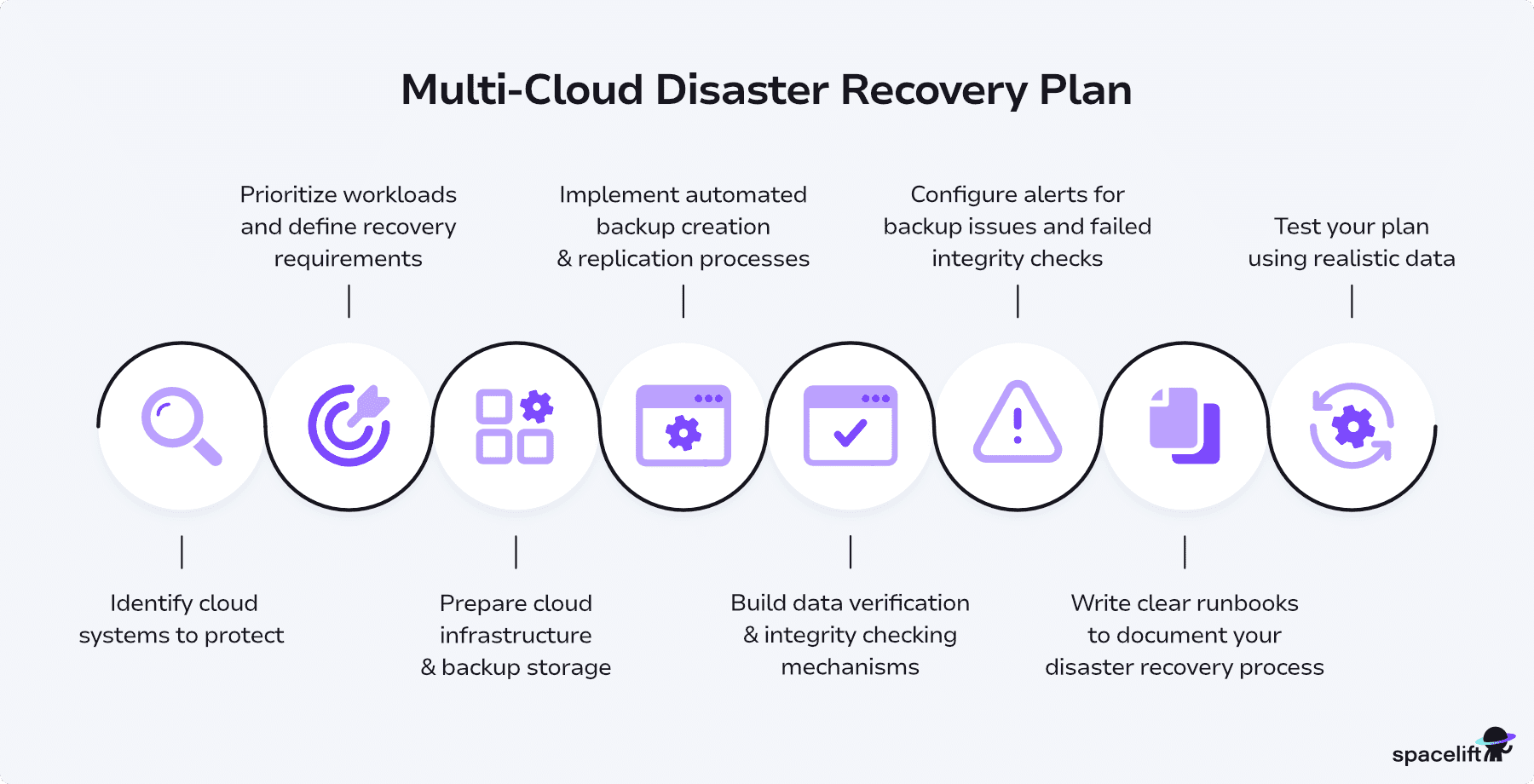
Here’s a high-level guide to the key steps involved. Remember that this is just a starting point: Your own strategy should be tailored to align with your operational needs and the cloud providers that you use.
Step 1. Identify cloud systems to protect
Start by identifying what needs to be protected. Audit your cloud environments to identify applications, infrastructure states, and datastores that could cause disruption if they become unavailable. Any service that generates persistent data should generally be included in your disaster recovery strategy.
Step 2. Prioritize workloads and define recovery requirements
Not all workloads require the same level of redundancy, so your next step is to determine the ideal disaster response for each asset.
For instance, recovery from a daily backup may be acceptable for infrequently accessed, low-value data, but critical systems may require an instant failover to a standby cloud provider. Prioritizing your recovery needs across different service types will help you build disaster recovery processes that are both relevant and cost-effective.
Step 3. Prepare cloud infrastructure & backup storage
Once you’ve defined your recovery priorities, you can proceed to provision the cloud infrastructure you’ll use to operate your disaster response processes. This involves configuring object storage buckets, IAM policies, encryption keys, replication settings, and audit logs to securely store backups in each cloud.
Now’s also the time to configure infrastructure components such as load balancers and routers so you can fail over to secondary providers during outages. This will ensure traffic is always served from a healthy provider.
Step 4. Implement automated backup creation & replication processes
After you’ve prepared your infrastructure, you can begin backing up your systems to your storage locations. Use automated tools to create backups on a regular schedule. Look for tools that are easy to configure and offer multiple backup destinations.
For instance, you could use Velero to back up multi-cluster Kubernetes data across different cloud providers, or use AWS Backup and Azure Backup to protect your infrastructure resources. You may need to build custom tooling to unify the services available from individual clouds.
Step 5. Build data verification & integrity checking mechanisms
Backups can’t just be enabled and forgotten: they need to be regularly verified to ensure you can actually restore them.
At this stage, implement automated backup integrity checking mechanisms to avoid unexpected restoration failures.
For example, you could write a script that attempts to download the latest backup from each cloud provider, sanity-checks its size, and then verifies that a list of expected assets exists within the archive.
Step 6. Configure alerts for backup issues and failed integrity checks
Building upon the previous stage, real-time monitoring is a vital control for defending against the risks of backup failures. Configuring alerts for backup problems and integrity errors allows you to resolve issues sooner, before using the backup. Implementing alerts for when failovers complete or fail keeps you further informed of what’s happening in your infrastructure.
Step 7. Write clear runbooks to document your disaster recovery process
Once you’ve built the technical parts of your strategy, you should take the time to document your work in practical runbooks.
Concise, actionable documentation will allow operators to quickly find relevant information during incidents. It prevents confusion when disaster strikes. Runbooks inform everyone of the necessary steps to begin recovery from one or more of your cloud providers.
Step 8. Test your plan using realistic data
Disaster recovery plans should be regularly tested to ensure they’ll work effectively during real incidents. If you don’t test your failover processes and backup restoration runbooks, you may find yourself unprepared when an incident occurs. Conduct drills using runbooks and production-like data to check your strategy remains viable. This allows you to identify recovery coverage gaps sooner, such as missing backup data for a newly added cloud provider.
How to define RTO and RPO for multicloud workloads
Defining the recovery time objective (RTO) and recovery point objective (RPO) for multicloud workloads starts by understanding how each application behaves across providers. The RTO is the maximum acceptable downtime for a service, and the RPO defines how much data you can afford to lose during an interruption.
Group workloads into tiers, for example, Tier 1: customer-facing, Tier 2: internal tools, Tier 3: batch and analytics, and assign stricter RTO and RPO targets to higher tiers. In a multicloud setup, ensure each cloud provider can realistically meet those targets based on its regions, storage options, and network paths.
A reliable approach is to classify workloads by business impact, document the dependencies that span clouds, and test failover paths regularly. Clear RTO and RPO targets help you validate whether your disaster recovery plans work as designed and confirm that your cloud strategy supports operational continuity.
Multicloud disaster recovery best practices
Multicloud disaster recovery reinforces your business continuity plans, but it needs to be carefully planned to ensure success. Below are some key best practices that will help you avoid the potential pitfalls discussed above.
1. Automate multicloud restoration workflows
Automation eliminates the chaos that arises when you attempt a manual recovery across multiple cloud providers.
Automating restoration workflows across cloud providers reduces the cognitive load on operators when it matters most. Use pipelines, orchestrators, and developer platform services to encode the full restoration sequence:
- How to bring up replacement infrastructure
- How to attach the right storage
- How to hydrate data and verify integrity
- How to cut traffic over safely
Custom scripts are a starting point, but they’re difficult to audit and easy to fork. Instead, aim to express your recovery steps as reusable, versioned workflows. For example, you can use Spacelift to orchestrate Terraform- or Pulumi-based restore plans, so the same “restore stack” runs consistently across AWS, GCP, and Azure with clearly defined inputs and approvals.
The goal is to have engineers trigger a known, tested workflow in an incident — not improvise a one-off fix. Automation keeps your recovery repeatable, observable, and less dependent on individual expertise
2. Clearly document your tools, processes, and data stores
Clear documentation is a crucial element of any disaster recovery plan, particularly when multiple clouds are involved. Make sure to document:
- Which providers are in use (and for what)
- Which regions and accounts are primary vs. secondary
- What data lives where (databases, object storage, logs, state)
- Which tools handle backups and restores for each environment
Create a single, easily discoverable disaster recovery guide that links to provider-specific runbooks. For each critical workload, document:
- RPO/RTO targets
- Primary and secondary locations
- Exact procedures to start a recovery (including CLI commands and dashboards)
Clarity here prevents people from following the wrong path. For example, running an AWS-specific restore flow while the workload actually failed over to GCP. Good documentation makes it obvious: “For service X, use this provider, this data store, this workflow.”
3. Prioritize restoration stages based on workload criticality
Executing a full multicloud data recovery process can take hours, days, or even weeks at scale. Recovery times vary depending on the amount of data and number of cloud providers involved, as well as storage performance. Separating your restore process into smaller stages lets you bring essential functionality back online sooner.
Define clear restoration stages based on workload criticality and data freshness:
- Stage 1 – Keep the business alive. Restore the smallest possible set of services and data needed to process transactions, serve customers, or keep SLAs intact. Think: live customer data from fast storage, critical APIs, control planes.
- Stage 2 – Restore supporting systems. Bring back analytics pipelines, internal tools, or non-critical apps that improve usability but aren’t existential.
- Stage 3 – Backfill history and low-priority data. Gradually stream in older logs, archives, and cold storage.
You might, for example, restore a minimal read/write dataset on high-performance storage first, then backfill older events in the background as the system stabilizes.
4. Configure alerts for backup errors and anomalies
A single failed or incomplete backup can cause unexpected data loss during an incident. You can mitigate the risk by using monitoring tools to configure alerts when anomalies are detected.
You might write a lightweight tool or Lambda/Cloud Function that checks whether new backups have appeared in your cloud storage buckets across providers. If any bucket is missing a backup for the expected period, it can trigger a Slack message to #oncall or automatically open a ticket.
The key is to make backup health part of your normal observability story, not a once-a-quarter manual audit. If you use Spacelift for infrastructure workflows, you can even include periodic backup verification jobs in your regular runs, failing a stack or raising a notification when checks detect drift or missing artifacts.
Monitoring backups like you monitor production means you’re far less likely to discover a broken pipeline in the middle of a disaster.
5. Provision backup storage buckets and policies using IaC
If your backup infrastructure is clicked together in web consoles, it’s almost guaranteed to be inconsistent across clouds, accounts, and environments. That’s the opposite of what you want for disaster recovery.
Infrastructure-as-code (IaC) tools like Terraform, Pulumi, and others make it easier to:
- Provision storage buckets and vaults in each provider
- Apply consistent access controls and encryption settings
- Standardize lifecycle and retention policies
- Enforce tagging and naming so you can actually find things
By committing these definitions to Git, you gain review, history, and the ability to reproduce the exact same setup in a new region or account. Need to extend DR to a new cloud? Reuse the same patterns, tweak inputs, ship.
Spacelift can help here by managing the full lifecycle of your IaC-based DR stacks: planning, approvals, and automated applies when configurations change. Similarly, declarative backup tools like Velero integrate well into this model, letting you describe cross-cloud backup schedules and targets as code instead of manual configuration.
6. Regularly test all cross-cloud disaster recovery workflows
Any disaster recovery process must be regularly tested so you know it’ll work when you need it most. Testing multicloud disaster recovery workflows enables you to assess the effectiveness of your strategy, including the interactions between cloud providers.
Design regular tests that simulate realistic failure scenarios, such as:
- Loss of a primary region in one cloud
- Unavailability of a specific managed service (e.g., database or messaging)
- Compromised account or credentials requiring failover to another provider
Your tests should validate both backup restoration and automated failover to standby providers. This includes infrastructure bring-up, data restore, app deployment, DNS or traffic routing changes, and post-failover verification.
Why use Spacelift to improve your cloud infrastructure management?
Spacelift takes cloud automation and orchestration to the next level. It is a platform designed to manage infrastructure-as-code tools such as OpenTofu, Terraform, CloudFormation, Kubernetes, Pulumi, Ansible, and Terragrunt, allowing teams to use their favorite tools without compromising functionality or efficiency.
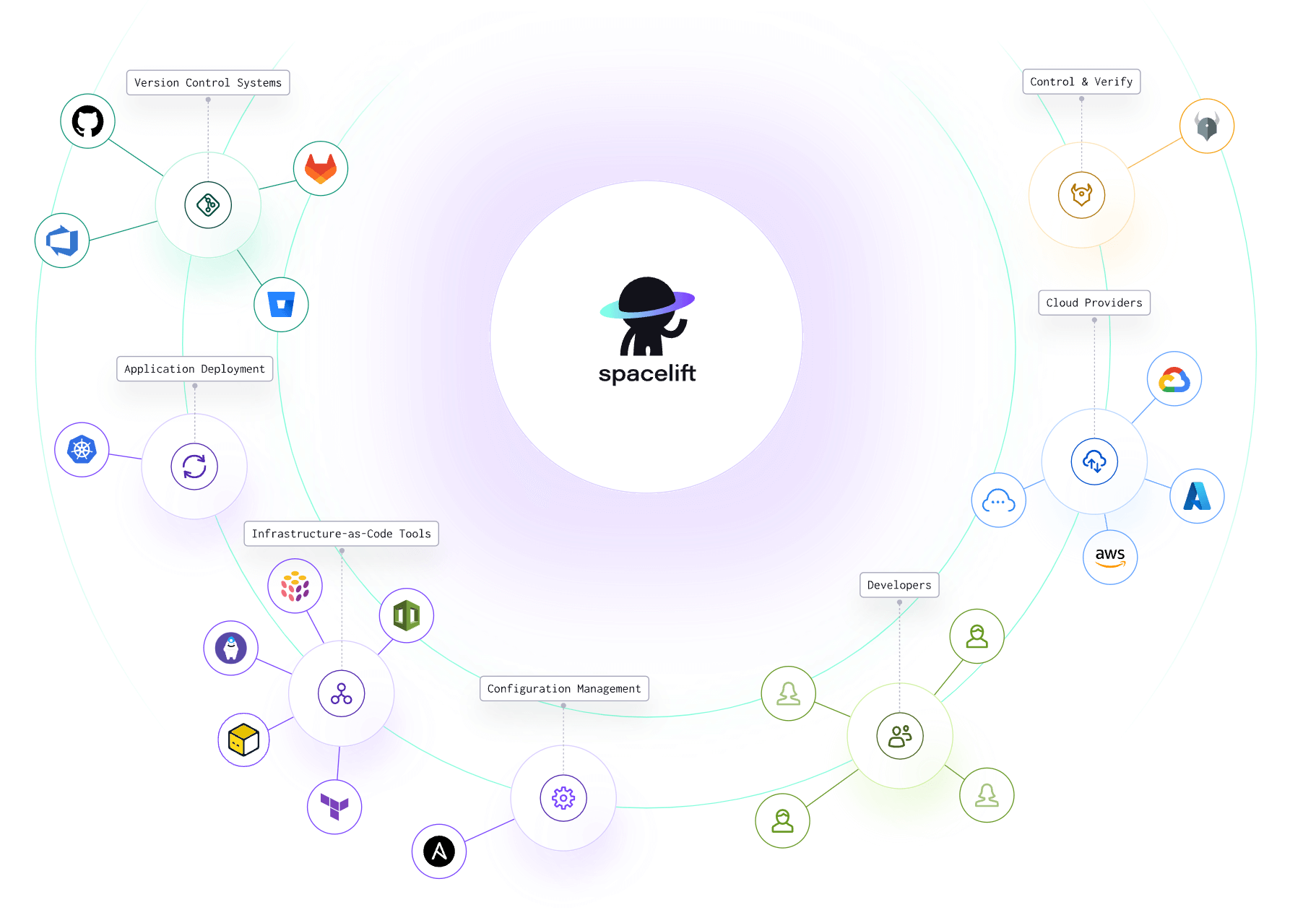
Spacelift provides a unified interface for deploying, managing, and controlling cloud resources across various providers. It is cloud-agnostic, so you can connect to the cloud of your choice from the platform. Still, it is API-first, so whatever you can do in the interface, you could do via the API, the CLI it offers, or even the OpenTofu/Terraform provider.
The platform enhances collaboration among DevOps teams, streamlines workflow management, and enforces governance across all infrastructure deployments. Spacelift’s dashboard provides visibility into the state of your infrastructure, enabling real-time monitoring and decision-making, and it can also detect and remediate drift.
You can leverage your favorite VCS (GitHub/GitLab/Bitbucket/Azure DevOps), and executing multi-IaC workflows is a question of simply implementing dependencies and sharing outputs between your configurations.
With Spacelift, you get:
- Multi-IaC workflow
- Stack dependencies: You can create dependencies between stacks and pass outputs from one to another to build an environment promotion pipeline more easily.
- Unlimited policies and integrations: Spacelift allows you to implement any type of guardrails and integrate with any tool you want. You can control the number of approvals you need for a run, which resources can be created, which parameters those resources can have, what happens when a pull request is open, and where to send your notifications data.
- High flexibility: You can customize what happens before and after runner phases, bring your own image, and even modify the default workflow commands.
- Self-service infrastructure via Blueprints: You can define infrastructure templates that are easily deployed. These templates can have policies/integrations/contexts/drift detection embedded within them for reliable deployment.
- Drift detection & remediation: Ensure the reliability of your infrastructure by detecting and remediating drift.
If you want to learn more about Spacelift, create a free account today or book a demo with one of our engineers.
Key points
Multicloud disaster recovery is the process of restoring multicloud systems after incidents. It also describes the use of multiple cloud providers to improve fault tolerance and aid the recovery process. Failing over to a second cloud provider lets you recover service quickly, while replicating backups across several clouds ensures there’s always a copy of your data available.
Multicloud disaster recovery can be complex to set up and maintain in a multicloud environment that spans multiple cloud platforms, but it provides crucial additional resilience when you’re operating at scale. Following the techniques discussed in this article will let you build reliable recovery strategies that meet your performance, compliance, and cost optimization needs.
Solve your infrastructure challenges
Spacelift is a flexible orchestration solution for IaC development. It delivers enhanced collaboration, automation, and controls to simplify and accelerate the provisioning of cloud-based infrastructures.