By itself, Terraform is a formidable infrastructure-as-code tool, but as you add complexity to your infrastructure, you may find it occasionally needs a helping hand. Let’s look at some of the most popular tools used in Terraform-managed deployments today.
We will cover:
- CI/CD tools
- Native tools
- IDE tools
- Linting tools
- Security tools
- Drift tools
- Costing tools
- Terraform HCL generation tools
- Documentation generation tools
- Management tools
- AI-assisted tools
How we review software at Spacelift
We aim to make our recommendations practical and vendor-neutral. For each tool we include, we evaluate category fit, core capabilities, integrations, documentation quality, security/governance features (when relevant), and pricing transparency.
CI/CD and pipeline automation tools
This is the layer that takes a merged pull request and actually runs your plan and apply, so deployments happen on every commit instead of from someone’s laptop.
1. Atlantis
Atlantis is a great open-source project for Terraform pull-request automation. While that sounds a little niche, it’s actually incredibly important to nail down your GitOps workflow. When dealing with multiple developers, committing code, creating a pull request, and having a platform inspect that pull request and deploy your code is critical to maintaining deployment velocity.
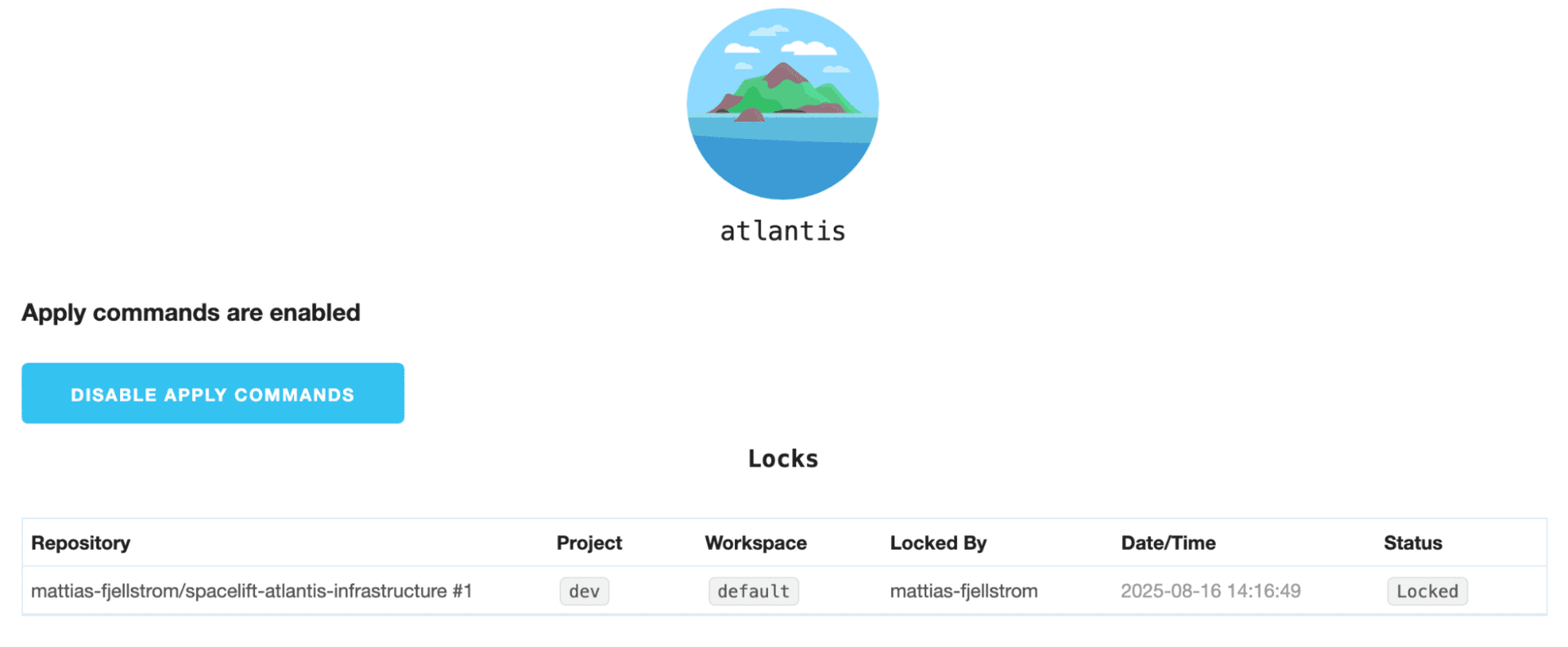
Within Atlantis, you can also integrate other tools listed in this article to further enrich your pipeline and add functionality and guardrails to ensure reliable deployments. Atlantis is fairly opinionated about its pull request workflows, but if the workflow fits your GitOps strategy, it’s an excellent open-source option if you use Terraform for your IaC.
Check out a great comparison of Spacelift and Atlantis.
2. HashiCorp Cloud Platform (HCP) Terraform (formerly Terraform Cloud)
HCP Terraform (formerly Terraform Cloud), like Atlantis, manages Terraform deployments triggered by commits to your VCS.
HCP Terraform has excellent state management features, and the deployment pipeline can be customized with most of the tools featured in this article. Unfortunately, the ability to integrate external applications currently requires a paid plan. Policy as code with Hashicorp’s proprietary Sentinel engine or with OPA is also possible, but requires a paid plan as well.
HCP Terraform manages your variables, secrets, resources, and more in its offering. It also allows you to script it in Terraform, so everything can be automated. While it only supports Terraform, it does so very well.
Note that the economics have changed: the legacy free tier was retired on March 31, 2026, and HCP Terraform now runs on a per-resource (Resources Under Management) model, with a free allowance capped at 500 managed resources and paid tiers priced per resource per month. Following IBM’s acquisition of HashiCorp, several previously free capabilities have moved behind paid plans, so check the current pricing before committing at scale.
3. Spacelift
Spacelift shares the core of what Atlantis and HCP Terraform do, but it isn’t limited to Terraform. It supports OpenTofu, CloudFormation, Ansible, Pulumi, and Kubernetes from the same workflow, so you aren’t running a different tool for every IaC language in your estate. You sign in with SSO from your VCS provider and start from there.
Policies are the part most teams notice first. Spacelift uses OPA across the whole platform, from login to stack access to what a plan is allowed to do, and you can wire in tools from the other sections of this article (Infracost, Terrascan, and others) to gate deployments on their findings.
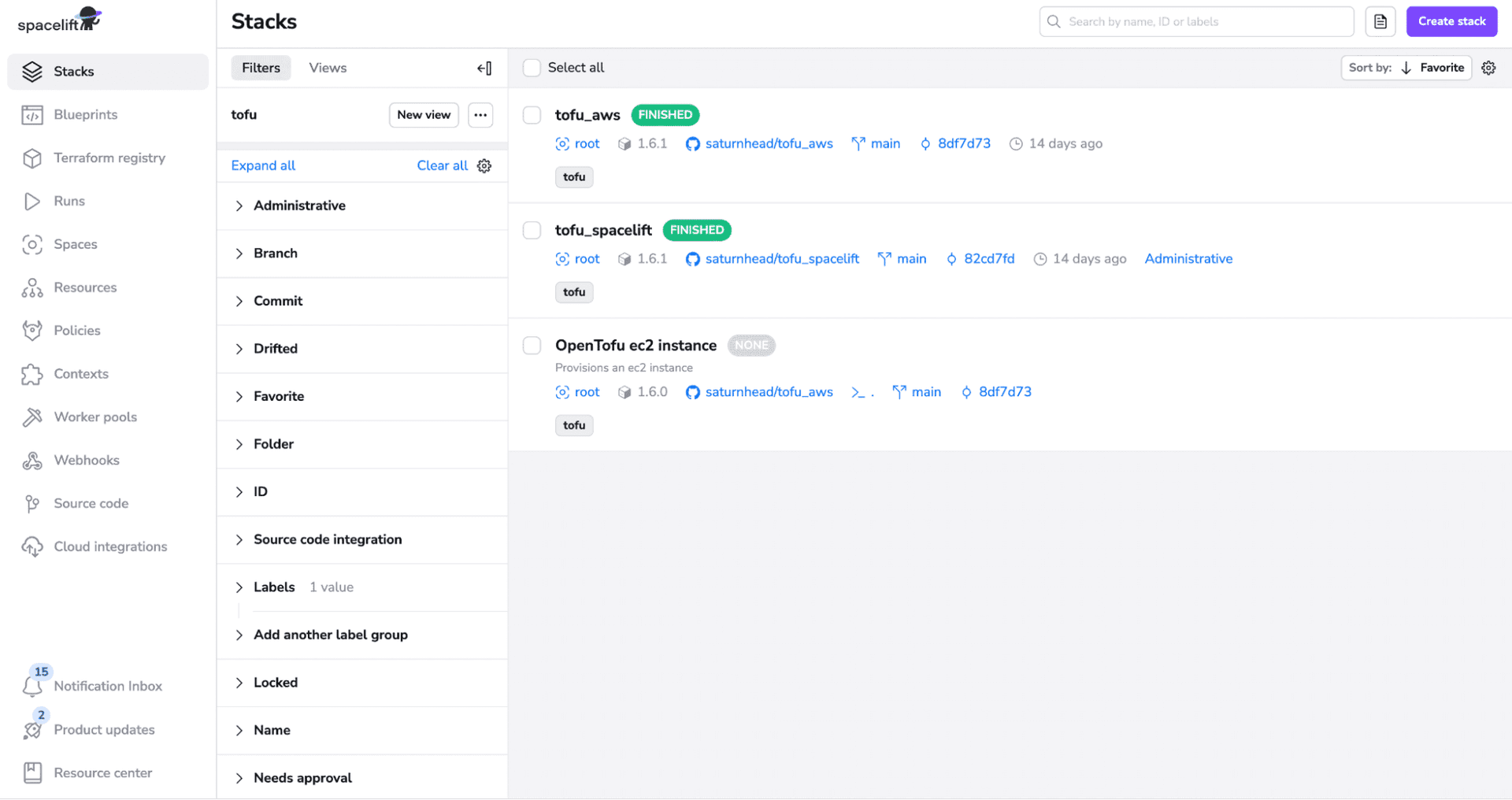
State, secrets, and cloud credentials are managed for you, and stacks chain together when one run depends on another. With Spacelift Intent, developers can provision non-critical infrastructure in natural language without writing HCL, while the same policies and audit trails still apply.
The free tier covers a single user and most features; private workers, scheduling, and drift detection sit on the paid plans.
Spacelift is the publisher of this article. We’ve included ourselves so you can compare, but treat that entry as a vendor perspective, not an independent ranking.

IaC and immutable infrastructure are really important concepts to Kin. They chose Terraform as their platform, and very quickly adopted a full-blown GitOps workflow. When you shift to treating infrastructure like a software project, you need all of the same components that a software project would have. That means having a CI/CD platform in place, and most aren’t suited to the demands of IaC. Kin discovered that Spacelift was purpose-built to fill that gap.
Built-in Terraform commands
Before reaching for anything third-party, it’s worth knowing what already ships inside the Terraform binary.
4. Terraform Console
The Terraform Console is probably one of the most overlooked tools in the arsenal. This is surprising because it’s native to Terraform and is packaged within the binary!
The terraform console command provides an interactive console that can be used to test and evaluate any Terraform expressions you may wish to use in your code. Instead of endlessly experimenting, writing awkward outputs, and banging your head against the desk, the Terraform Console allows you to test out complicated expressions before you run your code.
Let’s take a quick look at an example:
$ terraform console

> 10 + 20
30

> "hello, world"
"hello, world"

> length("hello, world")
12

> substr("hello, world", 0, 5)
"hello"

> exit
As you can see above, it’s useful for experimenting with expressions before you add them to your code. You can also evaluate variables and manipulate anything else in the state that you need.
One thing to note is that the configuration must be able to pass a plan before the terraform console command will work, so make sure you comment out any issues you’re trying to solve before you enter the console to troubleshoot.
IDEs and editor extensions
Where you write HCL matters, and the right editor extensions catch mistakes long before you run a plan.
5. Visual Studio Code
VS Code has just absolutely eclipsed other IDEs in the development world. There are certainly some great IDEs out there, but the integrations and plugins in VS Code are unparalleled.
VS Code has two very popular Terraform extensions:
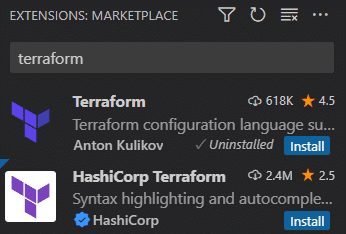
One is the official HashiCorp Terraform extension. It has more installations but also some pretty iffy reviews. It has seemed pretty stable whenever I’ve used it, but I typically default to the Terraform extension by Anton Kulikov. It has been solid and works very well. Your organization may have some policies around which extensions should be installed, so you should be good with either if they’re allowed.
6. PyCharm
PyCharm is an IDE developed by JetBrains, and it is mostly used by Python developers.
It has many free plugins available, and some Terraform plugins offer code auto-completion, syntax highlighting and even error detection.
In addition, PyCharm offers an integrated terminal and version control support, speeding up the entire workflow from writing infrastructure-as-code, making the tool exceptionally beneficial for developers working on infrastructure projects. Unfortunately, all JetBrains tools incur some costs, but these won’t break the bank.
Since the 2025.1 release, PyCharm is a single unified product with a free core tier — including Jupyter notebook support and standard Python development features — while a paid Pro subscription unlocks web-framework support, database tools, and remote
Read more: 6 Best IDEs for Terraform
Linting and code-quality tools
Linters catch the cheap-but-costly stuff like invalid instance types, deprecated syntax, and naming drift before any of it reaches review.
7. TFLint
Tflint is a handy Terraform framework that lets you lint your Terraform code based on a prewritten ruleset or your own custom rules. These rules are added using “plugins.”
Some of the most common issues you may want to uncover using TFLint, as cited from GitHub, are:
- Find possible errors, such as invalid instance types, for the major cloud providers, including AWS, GCP, and Azure.
- Warn about deprecated syntax and unused declarations.
- Enforce best practices and naming conventions.
An example is below.
# example.tf
provider "aws" {
  version = "2.70.0"
  region  = "us-west-2"
}

resource "aws_instance" "example" {
  ami           = "ami-0c55b159cbfafe1f0"
  instance_type = "t2.micro"
}
$ tflint
example.tf
on example.tf line 4:
4: version = "2.70.0"
| ^ Error: AWS provider version should be specified in the required format: X.Y.Z (e.g. 2.1.0)
Summary:
Count: 1
Invalid: 1
Warnings: 0
Errors: 1Security and policy scanning tools
These tools scan your configuration for misconfigurations and policy violations while it’s still code, not after it’s become live infrastructure.
8. Open Policy Agent
Open Policy Agent isn’t specifically a Terraform framework or tool, but it can be used directly with Terraform. OPA, as it is commonly called, is written in the Rego language, which is inspired by the old Datalog language. It is also used by several tools as their policy language when analyzing Terraform code.
Tools such as Terrascan, Spacelift, HCP Terraform, and others all support it to varying degrees. Spacelift, for instance, uses it for every aspect of the experience. From the time a user logs in to Spacelift to the point where they’re launching stacks, OPA Policies are there, ensuring everything goes according to plan.
Here is an example of a policy that prevents Terraform from deploying AWS IAM access keys:
package spacelift

# Note that the message here is dynamic and captures resource address to provide
# appropriate context to anyone affected by this policy. For the sake of your
# sanity and that of your colleagues, please always include the resource address.
#
# You can read more about plan policies here:
# https://docs.spacelift.io/concepts/policy/terraform-plan-policy

deny[sprintf(message, [resource.address])] {
	message := "Static AWS credentials are evil (%s)"

	resource := input.terraform.resource_changes[_]
	resource.change.actions[_] == "create"

	# This is what decides whether the rule captures a resource.
	# There may be an arbitrary number of conditions, and they all must
	# succeed for the rule to take effect.
	resource.type == "aws_iam_access_key"
}

# Learn more about sampling policy evaluations here:
# https://docs.spacelift.io/concepts/policy#sampling-policy-inputs
sample = true9. Terrascan
Although the name “Terrascan” leads one to believe that it’s Terraform-specific, it actually works for many IaC providers. Terrascan supports Terraform, Kubernetes, Ansible, CloudFormation, and more thanks to its extensive set of pre-written policies. Of course, you can write your own policies as well for custom use cases.
Terrascan integrates with several CI/CD tools and is extremely flexible when designing your pipelines.
Here is a basic Terrascan usage example:
$ terrascan scan -t aws
results:
  violations:
  - rule_name: scanOnPushDisabled
    description: Unscanned images may contain vulnerabilities
    rule_id: AWS.ECR.DataSecurity.High.0578
    severity: MEDIUM
    category: Data Security
    resource_name: scanOnPushDisabled
    resource_type: aws_ecr_repository
    file: ecr.tf
    line: 1
  count:
    low: 0
    medium: 1
    high: 0
    total: 1
Note: Terrascan was archived by Tenable in November 2025 and is no longer maintained — the repository is read-only with no new releases. It still runs as a CLI, but for new pipelines you’ll want an actively maintained scanner such as Trivy or Checkov.
10. Checkov
Checkov is very similar to Terrascan, but it uses a Python policy-as-code framework instead of the Rego syntax found in OPA. Many engineers may find this more approachable as Python is one of the most popular programming languages today.
Check an example of using Checkov in IaC scanning for vulnerabilities.
Although Python is more approachable for many, the syntax is still a little wordy and can get a little complex, as shown from the official docs below:
from lark import Token

from checkov.terraform.checks.resource.base_resource_check import BaseResourceCheck
from checkov.common.models.enums import CheckResult, CheckCategories


class S3PCIPrivateACL(BaseResourceCheck):
    def __init__(self):
        name = "Ensure PCI Scope buckets has private ACL (enable public ACL for non-pci buckets)"
        id = "CKV_AWS_999"
        supported_resources = ['aws_s3_bucket']
        # CheckCategories are defined in models/enums.py
        categories = [CheckCategories.BACKUP_AND_RECOVERY]
        guideline = "Follow the link to get more info https://docs.bridgecrew.io/docs"
        super().__init__(name=name, id=id, categories=categories, supported_resources=supported_resources, guideline=guideline)

    def scan_resource_conf(self, conf):
        """
            Looks for ACL configuration at aws_s3_bucket and Tag values:
            https://www.terraform.io/docs/providers/aws/r/s3_bucket.html
        :param conf: aws_s3_bucket configuration
        :return: <CheckResult>
        """
        if 'tags' in conf.keys():
            environment_tag = Token("IDENTIFIER", "Scope")
            if environment_tag in conf['tags'][0].keys():
                if conf['tags'][0][environment_tag] == "PCI":
                    if 'acl' in conf.keys():
                        acl_block = conf['acl']
                        if acl_block in [["public-read"], ["public-read-write"], ["website"]]:
                            return CheckResult.FAILED
        return CheckResult.PASSED


check = S3PCIPrivateACL()
The “wordiness” may be completely subjective. Python is an excellent language, and I’m sure people would happily debate Rego vs. Python for hours on end.
Overall, the differences between Terrascan and Checkov come down to the policy language, as most other features are at parity with each other.
11. Trivy
Trivy is Aqua Security’s open-source scanner, and it’s where tfsec’s Terraform checks now live. It’s a single Go binary that runs on Linux, macOS, and Windows, and it scans well beyond IaC: container images, filesystems, git repositories, and running Kubernetes clusters, plus vulnerabilities, exposed secrets, and licenses.
For Terraform, the command you want is trivy config, which checks your configuration against a library of misconfiguration rules.
$ trivy config ./terraform

Tests: 12 (SUCCESSES: 9, FAILURES: 3)
Failures: 3 (HIGH: 2, CRITICAL: 1)

AVD-AWS-0107 (CRITICAL): Security group rule allows ingress from 0.0.0.0/0 on port 22
AVD-AWS-0086 (HIGH): S3 bucket does not block public ACLs
AVD-AWS-0089 (HIGH): S3 bucket does not have logging enabled
The same command also covers CloudFormation, Kubernetes manifests, Helm charts, Dockerfiles, and Azure ARM templates, so one tool handles every config format in a mixed estate. You can write custom checks in Rego when the built-in rules don’t cover a policy you need.
The trade-off against Checkov is depth: Trivy spreads across more surfaces, while Checkov ships a larger IaC-specific ruleset and graph-based cross-resource analysis.
A note on tfsec: tfsec used to be the go-to standalone Terraform scanner, but Aqua folded its check library into Trivy in 2023 and stopped adding new rules. The repo still exists, but if you’re running tfsec in CI today, the migration is small: swap tfsec . for trivy config ., and your old rule IDs map to Trivy’s AVD-prefixed equivalents. There’s no reason to start a new pipeline on tfsec.
Read more in our Terraform scanning tools guide.
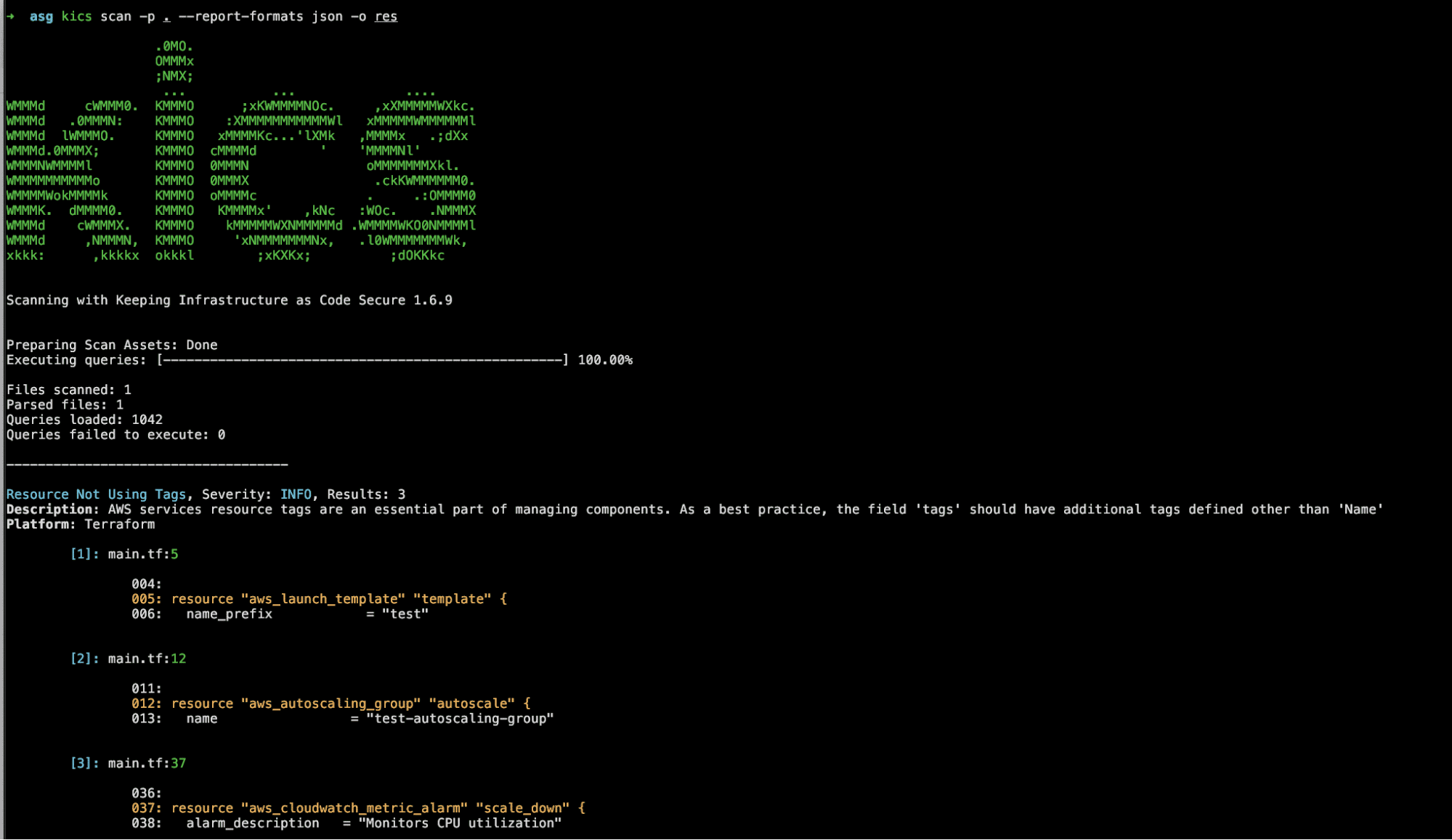
12. Checkmarx Kics
Checkmarx Keeping Infrastructure as Code Secure (KICS), is responsible for finding vulnerabilities, compliance issues, and infrastructure misconfiguration early in the development cycle. This tool is open-source, and it can be a viable alternative to Trivy, Terrascan, or Checkov.
13. Snyk
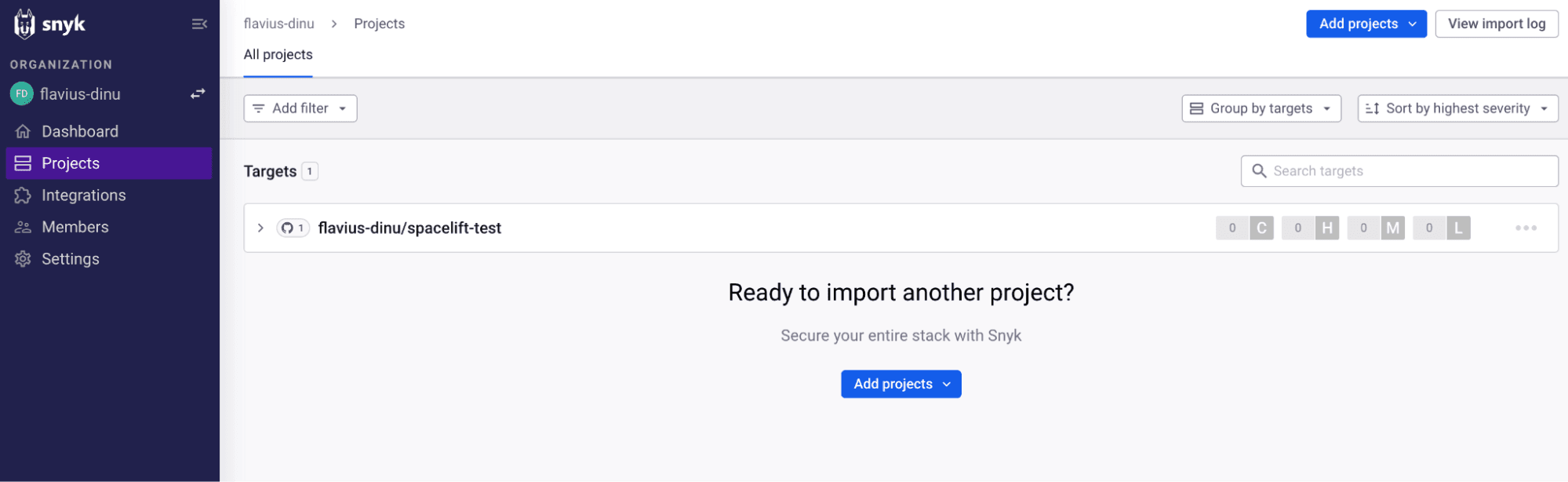
Snyk is a security platform that helps software developers find and fix vulnerabilities in their open-source dependencies, container images, code, and also infrastructure as code (IaC), including Terraform.
It has a free tier for individual developers and a UI that shows all the vulnerabilities in the repositories you have added as projects in the application.
Drift detection tools
Drift is what happens when reality stops matching your state file, and these tools surface it before production does.
14. Driftctl
Driftctl lets you perform one of the most important aspects of IaC management: detecting resources that have drifted from your desired state. It is capable of finding managed resources that have drifted as well as unmanaged resources that were created outside of driftctl.
An example output is here:
Found missing resources:
  aws_s3_bucket:
    - driftctl-bucket-test-2
Found resources not covered by IaC:
  aws_s3_bucket:
    - driftctl-bucket-test-3
Found changed resources:
  - driftctl-bucket-test-1 (aws_s3_bucket):
    ~ Versioning.0.Enabled: false => true
Found 3 resource(s)
 - 33% coverage
 - 1 covered by IaC
 - 1 not covered by IaC
 - 1 missing on cloud provider
 - 1/1 changed outside of IaC
Note: driftctl is currently in maintenance mode and no longer under active feature development. It’s still usable as a CLI, but for greenfield adoption you’ll likely want a more actively maintained option or platform-level drift detection.
Cost estimation tools
Cost tools put a dollar figure on a plan before you apply it, so the surprise shows up in review rather than on next month’s bill.
15. Infracost
Infracost is probably one of the most popular tools used with Terraform in production deployments. It queries the pricing API of the provider and displays a cost based on what you plan to deploy.
The great thing isn’t only that it shows you what it’s going to cost, but you can use a policy tool, such as Open Policy Agent, to write policies that can block a deployment based on the cost. CI/CD tools, such as Spacelift, can easily add tools like this into the deployment pipeline with very minimal configuration. Talk about a CFO’s dream! The community version is completely free but will require some custom tooling to get functionality like the policies mentioned above. If you choose the paid version, all of that is included. There is even a VS Code extension to make things even more streamlined.
Here is an example of the truncated output:
Project: my-terraform-project
Region: us-west-2

+ aws_ebs_volume.my_volume
    Type: aws_ebs_volume
    Quantity: 1
    Monthly cost: $10.50

+ aws_instance.my_instance
    Type: aws_instance
    Quantity: 1
    Monthly cost: $100.00

Total monthly cost: $110.50
Read more about InfraCost and how to estimate cloud costs with Terraform.
HCL and code generation tools
When existing infrastructure needs to become code, or that code needs supporting pieces like IAM policies and tags, these tools generate it for you.
16. Terraformer
Terraformer is an extremely cool product that scans your cloud environment and outputs the necessary Terraform code to redeploy it. This is definitely not the preferred route to codify your resources, as most startups should have started with Terraform on day one by now.
Unfortunately, many companies started before Terraform was the great tool it is today, so tools like Terraformer are ideal for getting things under new management.
Terraformer is great in many ways, but you’ll want to be extremely careful about how you import resources and to truly understand the infrastructure it creates and how you structure it.
These types of tools rarely create perfect code at best and create an absolute mess of unreadable code at worst. I strongly recommend reading ALL of the code that’s been created and performing a thorough audit to ensure everything is in a readable, scalable structure.
17. Pike
Pike is an interesting tool that analyzes the resources you wish to create with Terraform and generates the necessary IAM permissions to complete that deployment.
An example of this is here:
./pike scan -d .\terraform\
{
    "Version": "2012-10-17",
    "Statement": {
        "Effect": "Allow",
        "Action": [
            "ec2:MonitorInstances",
            "ec2:UnmonitorInstances",
            "ec2:DescribeInstances",
            "ec2:DescribeTags",
            "ec2:DescribeInstanceAttribute",
            "ec2:DescribeVolumes",
            "ec2:DescribeInstanceTypes",
            "ec2:RunInstances",
            "ec2:DescribeInstanceCreditSpecifications",
            "ec2:StopInstances",
            "ec2:StartInstances",
            "ec2:ModifyInstanceAttribute",
            "ec2:TerminateInstances",
            "ec2:AuthorizeSecurityGroupIngress",
            "ec2:AuthorizeSecurityGroupEgress",
            "ec2:CreateSecurityGroup",
            "ec2:DescribeSecurityGroups",
            "ec2:DescribeAccountAttributes",
            "ec2:DescribeNetworkInterfaces",
            "ec2:DeleteSecurityGroup",
            "ec2:RevokeSecurityGroupEgress"
        ],
        "Resource": "*"
    }
}
As with any security-related tool, audit the permissions afterward to verify compliance.
18. Terracognita
Terracognita is a Terraform code importer, that currently supports AWS, Azure, Google Cloud, and the VMware VSphere providers. It doesn’t support all resource types for all these providers, but it can be a really helpful tool for transitioning from ClickOps to IaC.
The same concerns from Terraformer apply, so you will need to be careful with how you import the resources and be aware that the code it generates won’t respect the best practices.
19. Yor
While Yor is not an HCL generation tool, it adds informative and consistent tags across IaC tools. Yor can automatically add tags to Terraform, CloudFormation, and Serverless Frameworks.
It creates unique tags for your IaC resource code blocks, making it easier to trace code blocks to their respective cloud-provisioned resources without accessing sensitive data such as plan or state files.
Documentation generation tools
Nobody enjoys writing module docs by hand, so this category builds them straight from your configuration.
20. Terraform Docs
Let’s face it, writing documentation isn’t every developer’s dream job. Luckily, there’s an excellent tool to automatically generate your Terraform docs from configuration files. Terraform-docs is extremely useful and simple to use when creating documentation that shows exactly what your users need to know.
It exposes variables you can add to a template file and automatically generates the sections for you in an easy-to-read format.
You can find an example of a repository that uses this here.
An example of the format is below:
content: |-
  Any arbitrary text can be placed anywhere in the content

  {{ .Header }}

  and even in between sections

  {{ .Providers }}

  and they don't even need to be in the default order

  {{ .Outputs }}

  include any relative files

  {{ include "relative/path/to/file" }}

  {{ .Inputs }}

  # Examples

  ```hcl
  {{ include "examples/foo/main.tf" }}
  ```

  ## Resources

  {{ range .Module.Resources }}
  - {{ .GetMode }}.{{ .Spec }} ({{ .Position.Filename }}#{{ .Position.Line }})
  {{- end }}
Version and multi-stack management tools
These handle the housekeeping of working at scale: switching Terraform versions cleanly and keeping large, multi-stack codebases organized and DRY.
21. TFSwitch
TFSwitch is a simple utility that helps to manage multiple Terraform versions. You can switch between any available Terraform version. The tool will also download the required version if needed.
When working with multiple Terraform code bases, this is absolutely critical to keep pesky syntax errors and other headaches at bay if you’re dealing with code that has deprecated or newer features than your current version.
To use TFSwitch, you just need to install it using the instructions here, and run the tfswitch command to display all of the available versions:
tfswitch
Creating directory for terraform binary at: /home/user/.terraform.versions
Use the arrow keys to navigate: ↓ ↑ → ←
? Select Terraform version:
  ▸ 1.3.9
    1.3.8
    1.3.7
    1.3.6
↓   1.3.5
The exact versions you see will depend on what’s currently available. Once you choose the version you need, you are free to use Terraform!
22. Terramate
Terramate is an interesting tool that can help you manage large Terraform deployments by breaking the code into “stacks.” These stacks have separate states, allowing your code to be deployed with a smaller blast radius. It also has features that work with Git to automatically deploy on changes.
Where Terramate really shines is its ability to keep your code DRY (Do not Repeat Yourself). It is able to share variables, provider configurations, and other data between stacks and automatically generate any code necessary in pure Terraform.
The tool is fairly complex in all of its features, so it’s probably best to start with the Terramate docs to dive in.
23. Terragrunt
Terragrunt is a very popular Terraform tool that, like Terramate, helps keep your Terraform code DRY, manages multiple stacks, and more. It makes it easier to work with multiple cloud accounts, modules, and more with features that greatly increase the efficiency of your code. Terraform’s latest versions have honestly caught up with a lot of the features in Terragrunt, but definitely not all.
Here is a sample configuration file.
# Indicate where to source the terraform module from.
# The URL used here is a shorthand for
# "tfr://registry.terraform.io/terraform-aws-modules/vpc/aws?version=3.5.0".
# Note the extra `/` after the protocol is required for the shorthand
# notation.
terraform {
  source = "tfr:///terraform-aws-modules/vpc/aws?version=3.5.0"
}

# Indicate what region to deploy the resources into
generate "provider" {
  path = "provider.tf"
  if_exists = "overwrite_terragrunt"
  contents = <<EOF
provider "aws" {
  region = "us-east-1"
}
EOF
}

# Indicate the input values to use for the variables of the module.
inputs = {
  name = "my-vpc"
  cidr = "10.0.0.0/16"

  azs             = ["us-east-1a", "us-east-1b", "us-east-1c"]
  private_subnets = ["10.0.1.0/24", "10.0.2.0/24", "10.0.3.0/24"]
  public_subnets  = ["10.0.101.0/24", "10.0.102.0/24", "10.0.103.0/24"]

  enable_nat_gateway = true
  enable_vpn_gateway = false

  tags = {
    Terraform = "true"
    Environment = "dev"
  }
}
As you can see in the comments, it makes it very easy to generate provider blocks for all modules and inject variables where they’re needed without having to pass them manually all over the place. It’s definitely an interesting project and something worth checking out if you start to juggle a lot of modules.
Check out our Terragrunt vs. Terraform comparison to learn more.
24. Tenv
Tenv is a specialized version manager that helps with managing multiple versions of OpenTofu, Terraform, and Terragrunt. It simplifies development workflows by enabling developers to easily switch between different versions of these tools, ensuring compatibility and efficiency across different project environments. This is very useful, especially if you are working on multiple projects because usually, they won’t be using the same version.
It achieves the same as TFswitch, but it expands on OpenTofu and Terragrunt, too.
AI-assisted coding tools
AI assistants draft and refactor HCL from a plain-English description, as long as you keep the usual review and policy checks between them and real infrastructure.
25. Claude Code
Claude Code is Anthropic’s agentic coding tool. Instead of suggesting completions as you type, it reads your whole repository, plans a change, edits across multiple files, and runs commands in your terminal, all from natural-language instructions.
For Terraform work that means you can point it at an existing module, ask it to refactor a tangle of resources or add a new one, and have it run terraform fmt, validate, and plan to check its own output before you ever look at the diff.
It runs in the terminal, in your editor through native extensions for VS Code, Cursor, Windsurf, and JetBrains, and from the desktop and browser apps. It connects to external systems over the Model Context Protocol (MCP), so it can pull context from the same tools the rest of your stack already uses, and it works on macOS, Linux, and Windows.
Because it’s agentic, it can touch a lot of files in one run, so the usual caution applies harder than it does with autocomplete: read every diff, and keep plan review and policy enforcement sitting between Claude Code and anything that provisions real infrastructure.
26. GitHub Copilot for Terraform
GitHub Copilot is a general-purpose AI coding assistant that works well with Terraform files. Inside supported IDEs such as VS Code, it can suggest HCL snippets and complete resource blocks as you type, based on the structure of your existing code and the providers in use. You can describe the infrastructure you want in natural language and have Copilot draft initial Terraform configurations for common patterns like VPCs, networks, storage buckets, or Kubernetes clusters.
It’s especially useful for speeding up boilerplate and repetitive edits, while you still keep your usual Terraform workflow for reviews, testing, and policy enforcement before any changes are applied to real infrastructure.
Read more: How to Use GitHub Copilot for Terraform Infrastructure
Key points
That’s a quick run-through of several popular Terraform tools you’ll find in the wild today. New tools come out daily, and their popularity ebbs and flows frequently. Luckily, most of these tools work in very similar ways, making it very easy to switch between them.
The best Terraform tool
Spacelift is a Terraform tool that helps you manage the complexities and compliance challenges of using Terraform. It supports Git workflows, policy as code, programmatic configuration, context sharing, drift detection, complex multi-IaC workflows, and many more.