
As Terraform codebases grow, it becomes increasingly difficult to understand how everything connects just by reading HCL or plan output. Terraform visualization tools turn your configurations, state, or plans into graphs and diagrams.
In this article, we provide a brief definition of Terraform visualization and then walk through a few practical tools.
What is Terraform visualization?
A Terraform visualization is a graphical representation of the infrastructure resources defined in Terraform configurations. It helps users understand resource relationships, dependencies, and the layout of the architecture. These visualizations are particularly useful for large-scale environments, helping teams audit, plan, and communicate infrastructure design more effectively.
Core concepts to visualize
Key concepts to visualize in Terraform include resources, modules, dependencies, and data sources, as they define the structure and behavior of the infrastructure.
- Resources are the fundamental building blocks (e.g., AWS EC2 instances, S3 buckets) and should be shown as distinct nodes.
- Modules encapsulate reusable groups of resources and help organize infrastructure in a hierarchical manner.
- Dependencies represent the ordering and relationships between resources, typically indicated by arrows or connectors.
- Data sources are used to fetch external information and should be visualized separately to clarify their read-only nature.
Best Terraform visualization tools
Terraform visualization tools help map and understand infrastructure by converting Terraform configurations into visual diagrams or graphs.
These tools include:
1. Built-in option: terraform graph + Graphviz
Terraform’s built-in terraform graph command, combined with Graphviz is a lightweight way to visualize your infrastructure as a dependency graph.
terraform graph outputs your configuration or plan in DOT format, which you then feed into Graphviz to render images such as PNG or SVG. The result is a structural view of resources and their relationships that helps you understand complex modules, debug ordering issues, and explain your setup to others without adding any extra Terraform-specific tooling.
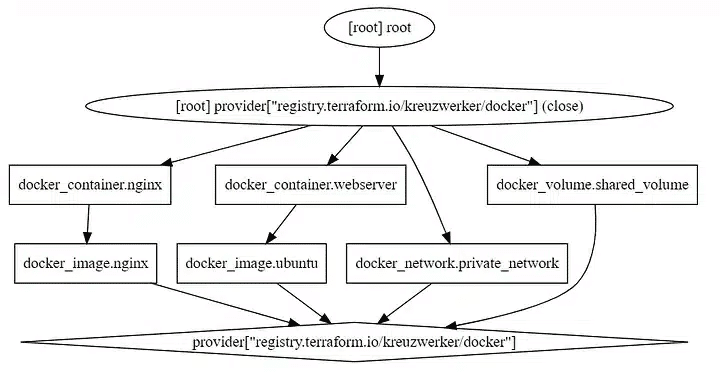
This combo is especially useful if you want a low level view of how Terraform sees your infrastructure. You run terraform graph, pipe the output to Graphviz’s dot command, and get a visual dependency graph that you can drop into docs, pull requests, or internal runbooks.
Since both pieces are CLI-based and scriptable, they fit well into CI pipelines and ad hoc debugging workflows.
Key features
- Native Terraform integration: Uses the official
terraform graphcommand, so you always visualize exactly what Terraform plans to do with your configuration or execution plan. - DOT format and Graphviz rendering: Outputs standard DOT language, then relies on Graphviz to render diagrams in various formats, such as SVG, PNG, and PDF, which makes it easy to embed in documentation and reports.
- Dependency focused views: Shows the dependency ordering between resources and data sources, which helps you spot unexpected relationships, missing dependencies, or unnecessary coupling in your Terraform code.
- Scriptable and CI-friendly: Both
terraform graphand Graphviz are command-line tools, so you can automate graph generation in CI jobs, nightly documentation builds, or one-off debugging scripts without extra UI components. - Flexible layout and styling: Graphviz offers multiple layout engines and rich styling options, allowing you to tune the graph for large configurations, highlight specific resource types, or adapt the output for presentations.
Terraform graph command documentation: https://developer.hashicorp.com/terraform/cli/commands/graph
Graphviz official website: https://graphviz.org
Read more: How to Generate Images with Terraform Graph Command
2. Spacelift
Spacelift is an IaC management platform that helps teams orchestrate Terraform and other tools, while giving a clear visual picture of how stacks (Spacelift units that combine code, state, and configuration) relate to each other.
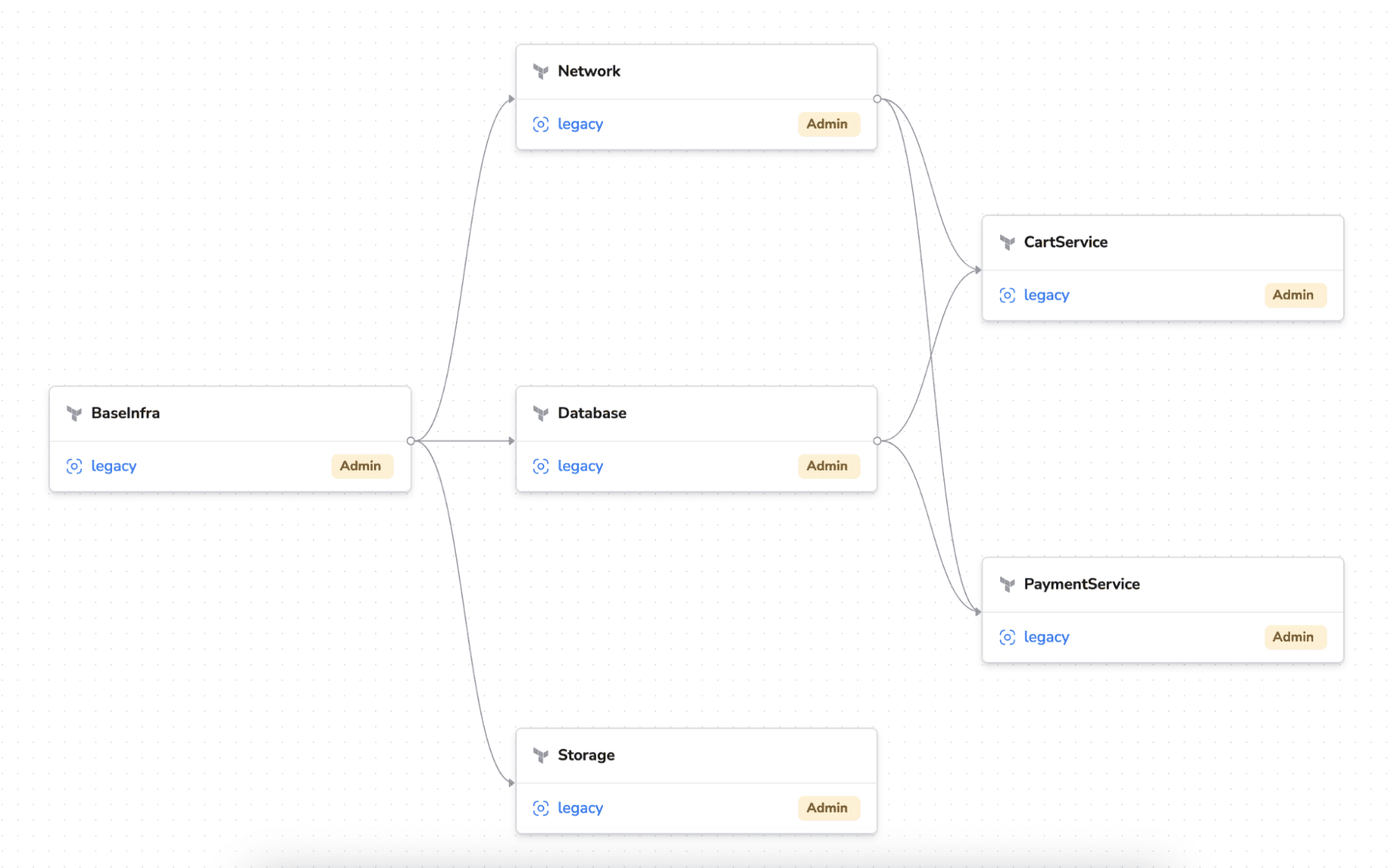
Through stack dependency views, drift detection, and run histories, Spacelift provides platform and DevOps teams with an at-a-glance understanding of how infrastructure pieces fit together and what will be affected by a change.
In this context, drift means the gap between what your Terraform code defines and what actually exists in your cloud provider.
Key features of Spacelift
- Stack dependency graph: Visualizes Terraform (and other IaC) stack dependencies as a directed acyclic graph, so you can see which stacks depend on which others and in what order they should run.
- Run and workflow visualization: Shows runs, their status, and the steps in each workflow in a web UI, helping teams review plans, applies, and failures without digging through raw logs.
- Drift detection with UI indicators: Runs scheduled drift checks on your stacks and surfaces differences between desired and actual state in the UI, so you can review and remediate changes.
- Multi-IaC and multi-cloud support: Supports Terraform, OpenTofu, Terragrunt, Pulumi, CloudFormation, Kubernetes, and Ansible, so the same visual and governance model applies across tools and clouds.
- Policy-driven governance: Integrates policy as code into the workflow, allowing visualized runs and stack relationships to be governed by reusable rules for security, compliance, and approvals.
Website: https://spacelift.io/
Read more: What is Spacelift? Key Features, Benefits & Use Cases
3. Inframap
Inframap is an open-source Terraform visualization tool that reads your Terraform state or HCL configuration and turns it into infrastructure diagrams.
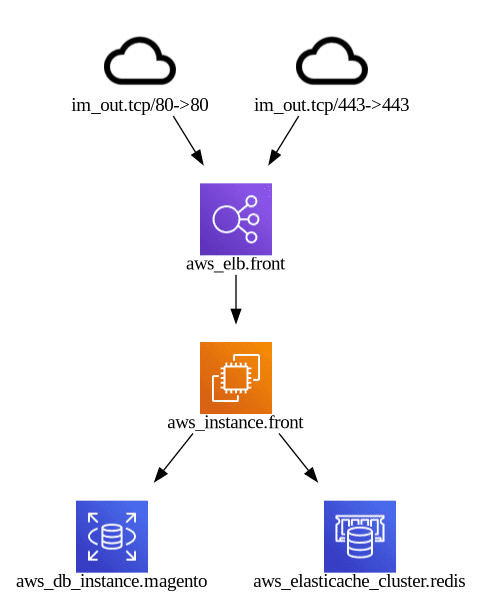
Instead of drawing every single resource like terraform graph, it focuses on the most important and relevant resources for each provider, which produces cleaner, higher-level graphs that are easier to understand at a glance.
You run it from the command line, point it at your .tfstate file or Terraform code, and it generates a graph that can be rendered with tools like Graphviz or integrated into documentation and CI workflows.
Key features of Inframap
- Provider-aware pruning: Reads Terraform state or HCL and generates a graph specific to each cloud provider, hiding low-level noise so you see the core architecture rather than every minor resource.
- Simplified diagrams: Produces a human-friendly view of your Terraform infrastructure that is easier to read than the raw Terraform dependency graph, closer to a high-level architecture diagram.
- Supports tfstate and HCL: Can work directly from
.tfstatefiles or from Terraform configuration, which fits both existing environments and code-first workflows. - Graph output in DOT format: Outputs graphs in DOT so you can render them with Graphviz or other DOT-compatible tools and embed the resulting images in wikis, design docs, or pull requests.
- Security-conscious pruning: Uses pruned infrastructure as code data and reduces how much sensitive information from Terraform state appears in diagrams, although you should still treat state files as sensitive data, while still providing a useful diagram of your cloud resources.
4. Blast Radius
Blast Radius is an open source tool that visualizes Terraform dependency graphs as interactive diagrams in your browser.
Note: Blast Radius has compatibility issues with Terraform 1.x+ and is no longer actively maintained as of 2025. While historically popular, users should consider alternatives like Rover or Terraform Visual for modern Terraform workflows.
It takes your Terraform configuration, runs it through Graphviz to lay out the graph, and then uses d3.js to let you pan, zoom, and explore how resources depend on each other. The goal is to make it easier to document infrastructure, understand resource relationships, and reason about the impact of changes before you apply them.
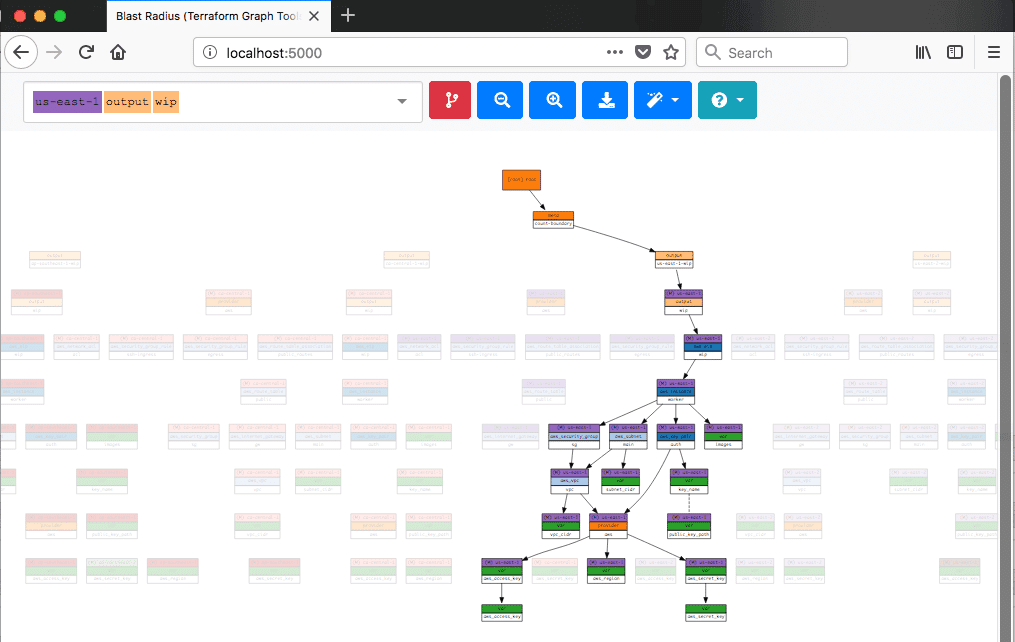
You typically install Blast Radius with pip, point it at an initialized Terraform directory, and run it in --serve mode, which starts a local HTTP server where you can explore the graph. Because it is state and config-driven, it gives you a direct visual view of how Terraform sees your infrastructure.
It is worth noting that some users report compatibility problems with newer Terraform versions and you may need to pin Terraform or use community workarounds in some setups.
Key features of Blast Radius
- Interactive dependency graphs: Renders Terraform dependency graphs as interactive diagrams with pan, zoom, and tooltips, which helps you explore complex infrastructures more easily than static images.
- Terraform aware visualization: Reads Terraform configuration and uses Terraform’s own understanding of dependencies to show how resources, data sources, and modules relate to each other in the graph.
- Browser based UI: Runs a local web server (for example, at
http://127.0.0.1:5000) so you can inspect the graph in any modern browser without extra desktop tooling. - Graphviz and d3.js pipeline: Uses Graphviz for layout and d3.js for rendering and interaction, which produces clear layouts and smooth graph navigation even for larger configurations.
- Examples and docs site: Provides a dedicated documentation site with example Terraform configurations and prebuilt graphs, which makes it easier to see how the tool behaves before applying it to your own code.
GitHub repository and main documentation: https://github.com/28mm/blast-radius
5. Terraform Visual
Terraform Visual is an open-source tool that converts Terraform plan output into an interactive visual report, enabling you to understand the structure and impact of your changes at a glance.
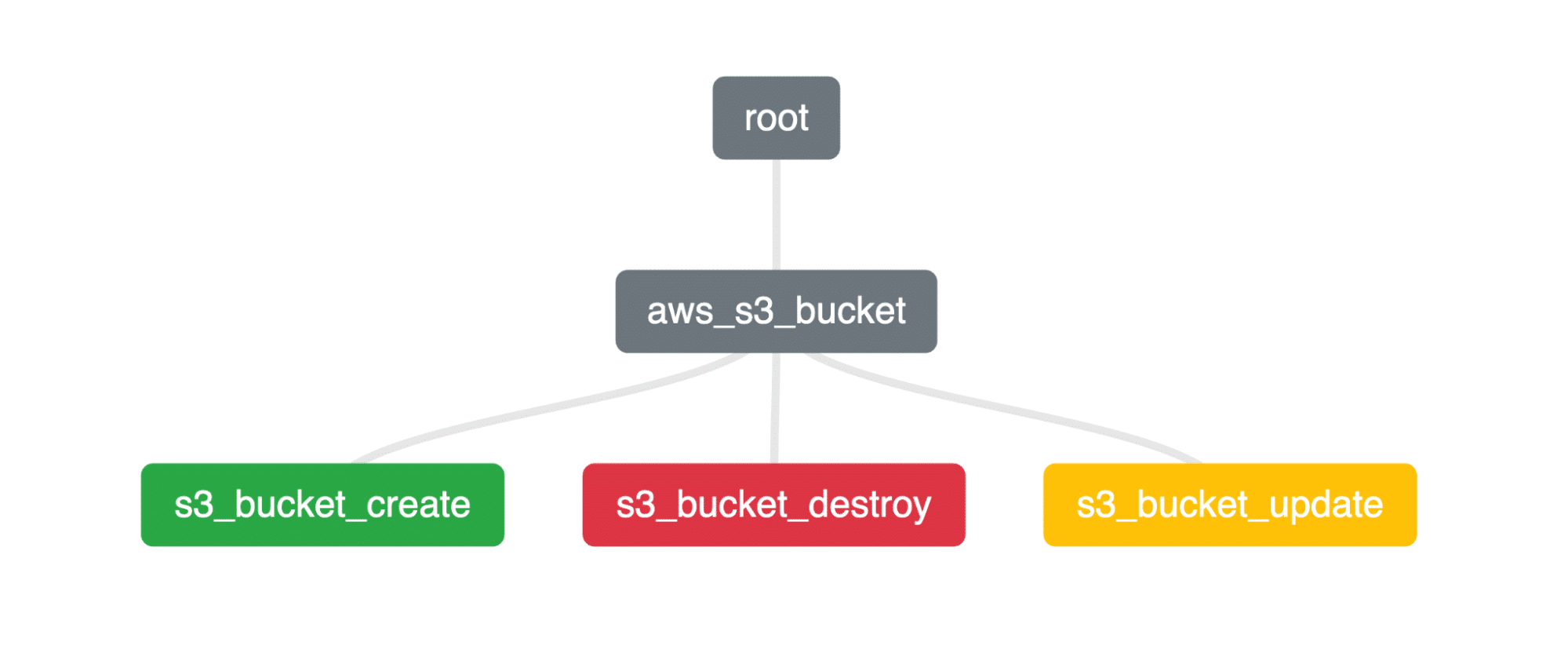
It reads a JSON representation of your Terraform plan and generates an HTML report that shows resources and their relationships in a more approachable way than raw CLI output. This makes it useful when you want to review complex plans, explain changes to teammates, or document infrastructure without wiring up heavier visualization platforms.
Key features of Terraform Visual
- Plan-based visualization: Consumes
terraform show -jsonoutput and renders a visual representation of the plan, focused on helping you reason about what will change rather than only showing a dependency graph. - Web UI and static reports: Provides a simple web interface where you can upload a JSON plan file, and can also generate a static HTML report that you can open locally or share with others for review.
- CLI workflow: Offers a CLI package (
@terraform-visual/cli) that enabling you to generate visualization reports entirely from the command line, making it particularly useful for local workflows and scripted usage. - CI/CD and Docker support: Publishes a Docker image that combines Terraform and the Terraform Visual CLI, so you can drop it into CI/CD pipelines and automatically produce visual reports from plan runs.
- Runs locally, open source: Because it can run via CLI or Docker on your own infrastructure, you don’t have to upload plans to a third-party service, which is particularly helpful for sensitive environments. The project is fully open source and available on GitHub.
Project website: https://hieven.github.io/terraform-visual/
Key points
Terraform visualization helps you see how resources, modules, and dependencies fit together without needing to read everything from HCL and CLI output. This article covered built-in graphing, open-source tools, and an IaC platform that all turn Terraform code, state, or plans into diagrams.
The main idea is simple: Pick the level of detail you need, and keep your diagrams close to your Terraform source of truth.
Manage Terraform better and faster
If you are struggling with Terraform automation and management, check out Spacelift. It helps you manage Terraform state, build more complex workflows, and adds several must-have capabilities for end-to-end infrastructure management.