
Your developers are shipping AI-written code faster than your pipeline can validate it. The agent that wrote the change is still sitting on someone’s laptop, so every retry, every fix, and every follow-up PR waits for a human to open a terminal. The pipeline runs at machine speed. The loop around it runs at laptop speed.
Moving the agent into CI/CD closes that gap. An agent that lives in your pipeline reviews the diff, triages the failed build, patches the CVE, and verifies the deploy, on every push, with the same behavior for every engineer. It also inherits every problem your pipeline already has, plus a few new ones.
Spacelift’s 2026 State of Infrastructure Automation report found that AI has already caused an incident at 93% of organizations, but only 19% have the governance foundations to handle it.
In this article, we examine how, why, and where AI agents fit into CI/CD pipelines. We’ll discuss their use cases and point out the potential pitfalls you should keep in mind. You’ll then be ready to build agentic pipelines that let you ship code faster and more safely.
What we’ll cover:
TL;DR
- AI agents fit into CI/CD at five points: pull request review, test selection and repair, build-failure triage, security remediation, and post-deploy verification.
- Run them as pipeline jobs rather than laptop sessions, so their behavior is consistent, logged, and governed.
- Keep the agent in the proposal role and let deterministic checks verify what it produces.
- Give it short-lived, least-privilege credentials, cap the token spend, and keep a human approval gate on anything that reaches production.
What is agentic AI in CI/CD pipelines?
AI agents in CI/CD are autonomous systems that read the state of a pipeline, decide what to do, and act through a set of tools you grant them. Unlike a scripted job, an agent is given a goal rather than a command list, so it chooses its own steps at runtime.
In a CI/CD context, agentic AI enables pipelines to become smarter and less error-prone. Pipelines automate the DevOps lifecycle, but they do it with a fixed set of manually configured tasks. It can be challenging to set up complex workflows with multiple steps and conditions. In addition, pipeline failures and bottlenecks are often tricky to diagnose, placing strain on engineering teams.
Integrating agents into pipelines helps to solve these problems. With their deep understanding of project and pipeline context, agents add extra layers of automation that let you implement advanced real-time workflows. They evolve CI/CD into a dynamic system of events, decisions, and autonomous actions.
For example, an agent could trigger just the tests affected by a codebase or dependency change, or automatically revert pipelines that introduce anomalies in live environments.
Traditional CI/CD vs. agentic CI/CD
Traditional CI/CD is a machine that does exactly what you tell it, every time. That determinism is the whole point: The same commit produces the same result, and when it does not, you have a bug you can find. The cost is that every branch of behavior you want has to be written down in advance, and the YAML grows until nobody wants to touch it.
Agentic CI/CD trades some of that determinism for judgment. The agent reads pipeline state at runtime and decides what to do, which means it handles cases you never anticipated and also means two runs against the same commit can diverge. You are not replacing the pipeline. You are adding a step that reasons.
The table below summarizes the differences between the two:
| Traditional CI/CD | Agentic CI/CD | |
| Instruction model | A command list you wrote in advance | A goal the agent plans against at runtime |
| Same commit, two runs | Identical result | Can diverge |
| Handles the unanticipated case | No, it fails or skips. | Yes, that is the point. |
| Failure mode | Loud and reproducible | Quiet and plausible |
| Cost model | Compute minutes | Compute minutes plus tokens, variable per run |
| Debugging | Read the log | Read the log, the prompt, and the tool calls |
How do AI agents work inside a CI/CD pipeline?
Agents elevate CI/CD pipelines in many ways, but they’re particularly well-suited when you need to run a process or adjust pipeline behavior depending on a particular event. That event could be a change included in the pipeline, a governance aspect such as code review requirements, or an infrastructure or environmental condition.
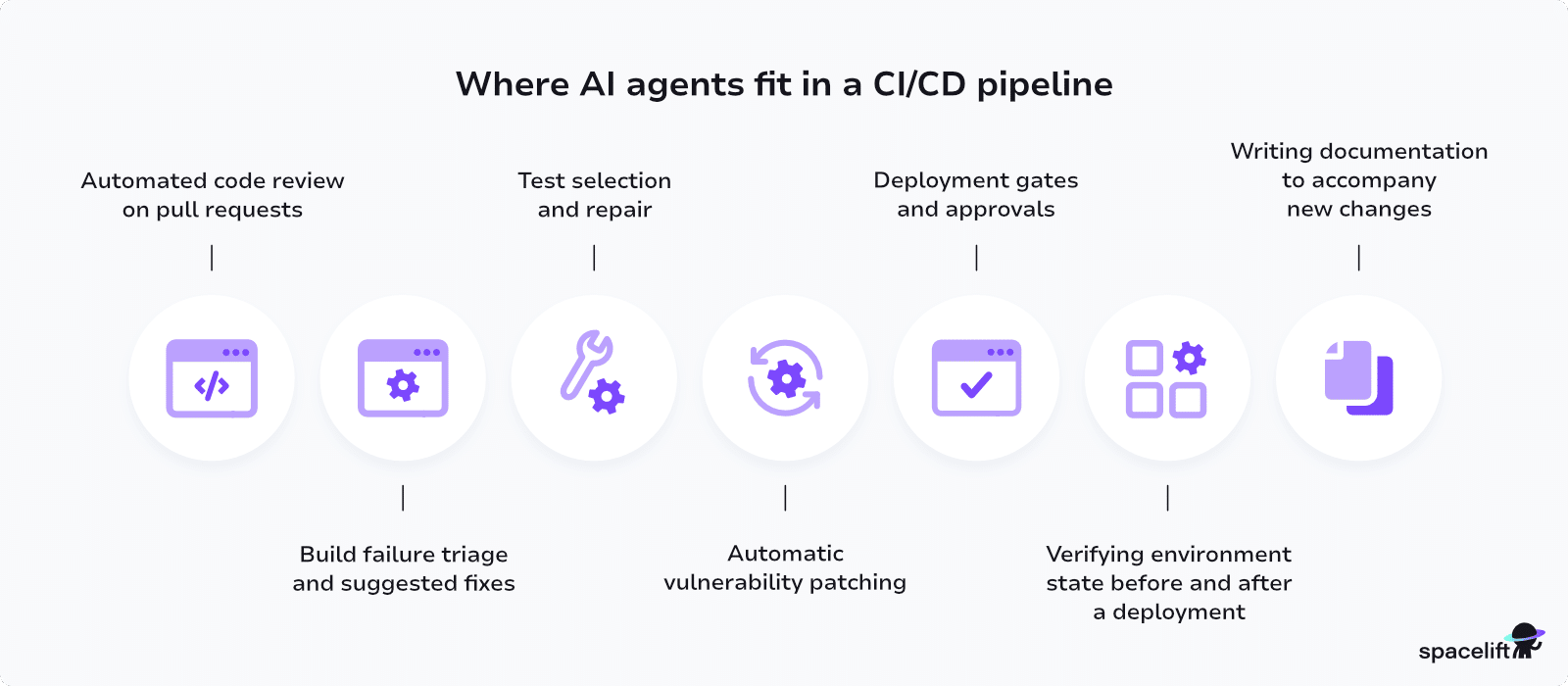
Some of the most common agentic CI/CD workflows, moving left to right through a pipeline:
- On a pull request, the agent reviews the diff and comments in the thread, but it never merges.
- When a build fails, it reads the log and opens a fix branch, and the build itself decides whether the fix worked.
- On tests, it selects what to run and drafts missing coverage, and your coverage gate still holds.
- On a security finding, it drafts the patch, and the scanner reruns on the patch branch to confirm it.
- At the deploy gate, it summarizes the risk, but policy decides whether the change ships.
- After a deploy, it compares live state against expected state and opens a revert if the two diverge.
1. Automated code review on pull requests
Agents hold two-way conversations with PR authors via comment threads. The agent conducts the code review, answers developer questions about how the changes will impact downstream environments, and leaves its findings inline on the diff.
Because the output is a comment rather than a commit, this stage runs with more autonomy than any later one. However, it’s not unlimited autonomy: The diff comes from whoever opened the pull request, so it is untrusted text landing in the model’s context, and prompt injection has no reliable fix.
Give the agent exclusively read-only access. It needs no write access to repository contents to review a diff, and an agent that can push commits to the branch it is reviewing carries far more risk for very little added value.
Here is the pattern in GitHub Actions. Note that the commit SHAs pass through environment variables rather than ${{ }} interpolation, which is the specific mistake behind the Nx compromise described later in this article.
name: agent-review
on: [pull_request]

permissions:
  contents: read
  pull-requests: write

jobs:
  review:
    runs-on: ubuntu-latest
    steps:
      - uses: actions/checkout@<pin-to-full-commit-sha>
        with:
          fetch-depth: 0

      - name: Review the diff
        env:
          BASE_SHA: ${{ github.event.pull_request.base.sha }}
          HEAD_SHA: ${{ github.event.pull_request.head.sha }}
          ANTHROPIC_API_KEY: ${{ secrets.ANTHROPIC_API_KEY }}
        run: |
          git diff "$BASE_SHA" "$HEAD_SHA" > diff.txt
          claude --bare -p "Review this diff for security regressions. Return JSON." \
            --tools "Read" \
            --allowedTools "Read" \
            --permission-mode dontAsk \
            --max-turns 10 \
            --max-budget-usd 1.00 \
            --output-format json \
            --json-schema '{"type":"object","properties":{"blocking":{"type":"boolean"},"findings":{"type":"array","items":{"type":"string"}}},"required":["blocking","findings"]}' \
            < diff.txt > result.json

      - name: Post the findings
        env:
          GH_TOKEN: ${{ secrets.GITHUB_TOKEN }}
          PR_NUMBER: ${{ github.event.pull_request.number }}
        run: |
          jq -r '.structured_output.findings[]' result.json > body.md
          gh pr comment "$PR_NUMBER" --body-file body.md

      - name: Gate the build
        run: jq -e '.structured_output.blocking == false' result.json
contents: read is the line that matters. pull-requests: write reads like a contradiction, but posting a comment is a write to the conversation and GitHub has no narrower scope for it.
Five flags do the guardrail work here:
-
--bareskips auto-discovery of hooks, skills, plugins, MCP servers, auto memory, and CLAUDE.md, so the run behaves identically on every machine.--permission-mode dontAskdenies anything outside your allow rules instead of waiting for an approval prompt that nobody is there to answer.--allowedToolsand--toolslook interchangeable and are not:--allowedToolssays which tools skip the approval prompt, whereas--toolscontrols which tools exist at all.--allowedTools "Read"on its own leaves Bash loaded and merely unapproved, so pair it withdontAskand add--tools "Read"so the agent cannot run a shell command even if someone later drops the permission mode.--json-schemaforces machine-readable output into astructured_outputfield, so the closingjqline decides whether the build passes, not the model.--max-turnsand
--max-budget-usd guard your invoice rather than your repository.
One gotcha with on: pull_request: GitHub withholds secrets from fork pull requests, so ANTHROPIC_API_KEY is empty and the step fails on exactly the pull requests you most want reviewed. Do not reach for pull_request_target to fix it.
That trigger runs with the base repository’s permissions and full access to secrets, and it is half of what made the Nx compromise possible. Gate the job on the head repository instead, or post the review from a workflow_run job.
The same command runs unchanged in GitLab CI, Jenkins, or any runner that can execute a shell command. On GitHub, anthropics/claude-code-action@v1 wraps it and handles the comment plumbing for you.
2. Build failure triage and suggested fixes
Agents can run within your pipelines to analyze new changes, identify buried problems, and automatically suggest fixes. This reduces errors and cuts iteration times, and build failures are the clearest case. A failed build is a log file and a question about what broke and whether the current change caused it.
Pipe the log to an agent, have it identify the root cause, and let it open a fix branch. Autonomy stops there. The fix is a proposal, and the build passing on that branch is what verifies it. If the fix does not build, you have spent a small amount on tokens and nothing has reached anyone’s queue.
Set a turn limit. Without one, an agent will retry the same unsuccessful fix repeatedly, and that is where unexpected token costs come from.
3. Test selection and repair
An agent can trigger just the tests affected by a codebase or dependency change, reading the diff, mapping it to the affected paths, and running the relevant suite instead of the full one. This is safe to automate. If the agent over-selects, you pay for compute you did not need.
Quarantining flaky tests and writing missing coverage are different. Both let an agent quietly weaken your safety net, so keep them as proposals rather than actions. Requiring every quarantine to arrive with a linked issue stops muted tests from staying muted indefinitely.
4. Automatic vulnerability patching
Embedding agents at the CI/CD infrastructure level enables them to trigger new pipelines independently. For instance, an agent might open a PR whenever a vulnerability is found in a dependency, eliminating the delay between a finding and a patch for zero-day issues.
Your scanner already reports that a dependency has a CVE. What it does not do is bump the version, check whether the API changed, run the tests, and open the pull request with its reasoning attached. An agent closes that gap, and the scanner rerunning on the patch branch is what verifies the work. If the finding is gone and the tests pass, a reviewer approves a green PR instead of working through a backlog.
This stage tends to deliver the most value for the least risk, because the work is repetitive, the success criteria are unambiguous, and reverting takes one click.
5. Deployment gates and approvals
At the gate, the agent’s job is to summarize rather than to decide. It reads the plan diff, flags anything that looks risky, and writes the short version for whoever is approving. Its role is advisory only.
Policy as code makes the call. An agent that can approve its own changes is not providing a guardrail, so the deciding logic should stay deterministic and live somewhere the agent cannot edit.
Below production, the calculus changes. In ephemeral and non-production environments, where an incorrect apply costs a rebuild, agents can apply directly. This split, freedom in low-risk environments, and a firm approval gate in front of production, is what most teams running agents in pipelines do today.
6. Verifying environment state before and after a deployment
As agents understand the expected states of environments, they can audit whether changes have been applied successfully. After a deployment, an agent compares live state against the expected state, watches error rates and health checks through the window that matters, and opens a revert PR when the two diverge.
Using AI to automate anomaly checks at the pipeline level supports continuous quality assurance without burdening operations teams, and it replaces the common alternative of an engineer watching a dashboard for 20 minutes after every release. The verification remains your existing drift detection and health checks rather than the agent’s opinion.
7. Writing documentation to accompany new changes
Keeping code annotations, API docs, and user manuals updated is a chore that can sap development capacity, and it is usually the first thing dropped under deadline. With an agent running in your pipeline, docs are generated whenever the code changes, so developers no longer need to ask a local agent to write them before they push.
This approach is low risk and easy to justify, which makes it a reasonable first workflow if your team is skeptical about giving agents a role in the pipeline at all.
Challenges and security concerns for agents in CI/CD pipelines
While AI agents have the potential to reinvent what CI/CD looks like, it’s important to stay focused on the bigger picture. Agents are still a relatively young concept, and many practical issues surround their use in CI/CD.
Key challenges include:
- Prompt injection reaches straight into your secrets: CI/CD pipelines handle cloud credentials, API tokens, and certificates. An agent reading a pull request title, an issue body, or a dependency’s README is reading attacker-controlled text, and if that job holds secrets, the injection has somewhere to go. This is not theoretical. It is the mechanism behind the Nx compromise described above.
- Loss of pipeline consistency and repeatability: Making pipelines repeatable prevents errors and their reproduction. This means pipelines must generally produce the same result each time they’re run against a specific commit. Agents break this model because they’re non-deterministic. The AI may come to a new conclusion and take different actions each time it’s invoked.
- Unclear visibility into pipeline and agent activity: Fix it by treating agent runs as first-class telemetry: Emit structured output, then instrument your pipelines so you can inspect the environment and every command the agent issued.
- Increased costs, overheads, and pipeline durations: Running agentic AI in every pipeline can lead to very high token consumption in busy projects. Besides the cost, unnecessary agent integrations can also increase pipeline run times while the agent gathers data and decides which actions to take. It’s best to begin by adding agents only to the workflows where they have the highest chance of success.
- Balancing agent capabilities with sandboxing requirements: Agents are most powerful when they have access to many different tools and data sources. However, increasing an agent’s capabilities also raises the risk that it’ll try to perform unauthorized actions. When configuring an agent’s access, apply the same principles as for human actors: Agents should hold the minimum privileges they need to operate their workflows.
- Ensuring governance and accountability: Besides security, compliance, and cost concerns, the use of agents in CI/CD also poses more general governance issues. If an agent fails or makes a mistake, developers and business leaders need to know who’s responsible for resolving it. Name an owner for every agent before you turn it on. Someone with budget authority, a target outcome, and the ability to switch it off.
These pitfalls all need to be planned for as you experiment with agentic AI in CI/CD. Agents allow you to automate more DevOps processes than ever before, but they must be backed by guardrails that protect against hallucinations, data leaks, and governance breaches.
Start by focusing on the basics, such as read-only access to specific resources, then layer additional permissions and capabilities as your agent operating framework matures.
Tools and platforms supporting agentic CI/CD
Ready to give agentic CI/CD pipelines a try? Here are a few top tools to get started with:
- GitLab: GitLab is one of the most popular CI/CD platforms. Its Duo Agent Platform, generally available since January 2026, ships prebuilt agents for planning and security review, plus built-in flows for code review and CI/CD migration.
- GitHub Copilot: GitHub Copilot is one of the most popular and best-known developer-facing AI tools. Its cloud agent runs on GitHub Actions infrastructure rather than as a step in your own workflow, and automations can trigger it on a schedule or in response to repository events.
- GitHub Agentic Workflows: In technical preview, this lets you write the workflow in Markdown and compiles it to standard GitHub Actions YAML. It ships the guardrails most teams end up building themselves: network egress control, a policy that validates proposed actions before they are applied, and token and cost auditing.
- Claude Code: Claude Code is an agentic coding assistant for automating all kinds of developer tasks. You can invoke Claude within CI/CD pipelines by calling the tool’s CLI in headless mode, with flags that pin its tool permissions, cap the run, and return JSON your pipeline can branch on.
- Snyk: Snyk’s Evo platform governs AI agents rather than being one, which differentiates it from the other options on this list. Its Agentic Development Security component enforces controls inside the agent’s workflow, covering the tools agents use, the actions they take, and the code they generate.
- Spacelift: Spacelift is an infrastructure orchestration platform for IaC. Spacelift Intelligence adds three agentic surfaces: Infra Assistant answers questions and makes changes from chat, Saturnhead Assist explains failed runs, and Intent deploys from natural language. Every AI action runs under the same policies and audit trail as the rest of your pipeline.
There are plenty of other options available if none of these tools fit your existing stack. If you have complex custom requirements, then you could also try building a bespoke integration between your CI/CD service and favored AI platform.
What's next for agentic AI and CI/CD?
Agentic AI automates repetitive tasks, flags issues before anyone notices them, and suggests fixes with real project context behind them. As agents mature, the bigger change over the next couple of years is happening in the pipelines rather than in the models. CI/CD platforms are being rebuilt to treat agents as participants rather than add-ons, and whether your platform runs agents natively is becoming a procurement question rather than a differentiator.
AI that understands your project’s context changes what you configure by hand. Time-consuming tasks like pipeline configuration and infrastructure management move to agents that provision the right infrastructure for your tech stack.
Eventually, a single pipeline that runs your agent after you push code is the only thing you configure manually, and the agent works out which builds, tests, and deployments the change actually needs.
Governance and cost controls are catching up, and faster than the tooling did. Models are also getting better at picking up how a project is structured, so they need fewer prompts and fewer tokens to do the same job.
AI-native CI/CD platforms are adding built-in controls that block unauthorized actions, alongside the token budgets and per-workflow ceilings that make agent spend predictable.
Together, these developments let organizations of all sizes innovate faster with fewer disruptions.
How to future-proof your infrastructure with Spacelift
Spacelift Intelligence extends agentic tooling such as Claude Code so it can operate on IaC safely inside an organization, with policy, state, audit, and access control around every change.
Spacelift orchestrates Terraform, OpenTofu, Terragrunt, CloudFormation, Pulumi, Kubernetes, and Ansible from one control plane. Spacelift Intelligence gives an agent a way into that control plane, so a change an agent makes is governed exactly like a change an engineer makes.
Slowing the agent down is the wrong instinct. Give it deterministic guardrails and good tooling, and it moves as fast as you like on the work that doesn’t need production ceremony, while IaC and GitOps stay the system of record for everything that does.
An agent reaches that control plane through the Spacelift MCP server, authenticating with browser-based OAuth or, for headless and CI environments, a spacectl-issued bearer token. Either way, its session carries only the access you already granted under RBAC and login policies.
Grant it read access, and it explores your GraphQL API and reads your Spacelift and cloud state without touching anything.
Grant it write access and it can alter stacks, policies, and runs, or provision cloud resources through Intent. Attach an Intent policy to the project and every create, update, delete, import, and refresh is evaluated before it executes. A denied operation stops. One that matches no rule waits for a human. The same policies govern Infra Assistant Build mode inside the Spacelift UI, so the rules don’t change based on where the request comes from.
If you want to see what this looks like on your own stacks, start a free trial or book a demo with our engineers.
Key takeaways
AI agents allow CI/CD pipelines to host fully autonomous workflows. They let you automate code reviews, flag potential vulnerabilities, and take action to resolve failures without human developers having to intervene. This makes the DevOps lifecycle faster and more responsive.
If your team already uses AI locally, moving it into the pipeline is the next step, and it is mostly a governance exercise rather than a technical one. Running agents in CI/CD lets you decouple AI workflows from individual developers to improve consistency. However, using agents within pipelines has implications for security, scalability, and costs, so it’s best to start cautiously before gradually layering in new capabilities.
Ready to learn more about how AI can power DevOps processes? Check out our guides to other use cases and the top tools you should know.
Keep infrastructure moving at AI speed
Spacelift Intelligence keeps platform teams ahead. Fuse traditional IaC and GitOps pipelines with an AI deployment model and a powerful Infrastructure Assistant.
Frequently asked questions
What is agentic CI/CD?
A delivery pipeline that embeds AI agents directly into build and deployment workflows, giving them authority to interpret goals, select tools, and execute actions rather than follow fixed YAML scripts. The agent reasons about pipeline state and adapts based on runtime signals like build failures, test flakiness, or infrastructure drift.
Can AI agents deploy to production autonomously?
Technically yes. In practice, almost nobody runs it ungated. The prevailing pattern is tiered autonomy: agents act freely in ephemeral and non-production environments, and anything reaching production passes through the same approval policy a human change would.
Can AI agents replace DevOps engineers?
Not at present. Agents handle scoped work like incident triage, pipeline self-healing, and drift remediation reliably, but they still hallucinate, misread business context, and depend on engineers to define guardrails, review sensitive changes, and own accountability for outcomes.