
Bottlenecks in software delivery have now shifted toward code review, operations, and deployments. Just like software development, infrastructure work needs to keep up with advances in AI and coding agents.
The difference is that infrastructure as code (IaC) maps to real cloud resources, and a misconfiguration there can have catastrophic consequences for critical systems, such as deleting a production database.
The reasons infrastructure hasn’t kept pace with software development are structural. AI agents introduce a new level of indeterminism due to the nature of their probabilistic text generation. This is incompatible with how platform engineering and operations teams have been optimizing for predictability and stability in the mission-critical production systems they run over the years.
How can we reap the benefits of code generation speed from AI agents without compromising reliability? It’s all about how you configure controls, guardrails, and a harness around them to help you move fast with confidence.
In this article, we’ll explain where Claude Code fits in IaC work, what it does well, and where it needs guardrails and human review. We’ll also look at the features that make it configurable for production teams, the failure modes to plan for, and how Spacelift can help you move faster and safely with IaC agentic workflows.
What we’ll cover:
- Why is infrastructure as code a good fit for AI coding agents?
- What is Claude Code?
- Mental model – How to use Claude Code with IaC?
- What are the core Claude capabilities for IaC Work?
- Where Claude Code fails on infrastructure work
- Best practices for using Claude Code safely on production infrastructure
- How Spacelift Intelligence extends Claude Code
TL;DR
Claude Code is an agentic, terminal-based coding tool that speeds up infrastructure-as-code (IaC) work by generating, refactoring, and testing Terraform, OpenTofu, and other configurations from plain-language instructions.
It’s a strong fit for the repetitive, structured parts of IaC, but because infrastructure maps to real cloud resources, it needs guardrails and human review before anything reaches production.
Why is infrastructure as code a good fit for AI coding agents?
IaC plays directly to an AI coding agent’s strengths. The work is structured, declarative, and reviewable, so an agent can generate it, a plan can preview the change, and policy can catch mistakes before they ever reach production.
IaC has characteristics that suit an agent well:
- Repetitive module boilerplate. Much of IaC is mechanical, involving predictable structures such as variables, resources, outputs, a README, and basic tests. Generating IaC code based on specific guidelines and guardrails is the kind of task agents shine at.
- Policy and security automation. Encoding various security and compliance rules as policy and wiring them into a workflow is repetitive work that an agent can scaffold and maintain.
- Cross-tool work. Production environments often involve a mix of technologies and tools. You might have Terraform for cloud resources, Helm for Kubernetes, Ansible for patching virtual machines, and a CI system tying them together. An agent can reason and maintain context across all of them if properly configured.
What is Claude Code?
Claude Code is an agentic coding tool that runs in your terminal. You give it a task in plain language. It plans the work, reads and edits files, runs shell commands, and iterates until the task is done or it needs your input. It is a command-line agent that reads your repository, writes and edits files, and works through multi-step tasks on its own.
For infrastructure as code, that means generating modules, refactoring existing configurations, reading plan output, and writing tests and policies. It also has a self-improving loop embedded in its workflow that can search your whole codebase, open several files, run a Terraform/OpenTofu plan, read the output, and adjust its changes based on what it finds.
Three characteristics that make Claude Code a good fit for IaC:
- Extensible – You can extend Claude Code with project context, annotations, and conventions it must follow, custom workflows, automation triggers, and connections to external systems.
- Configurable – You control the level of autonomy it operates. For example, you define which commands it runs without asking, and when it pauses for review. That is also true for several layers of controls and guardrails you can configure.
- Flexible – It can work across various formats and technologies. One session can reason about a Terraform plan, a Rego policy, and a CI configuration together within the same repository.
Where does that leave the engineer? Doing less typing and code generation while shifting focus more to expressing effective intent, orchestrating agents, and reviewing output.
Mental model: How to use Claude Code with IaC?
People are having considerable success using IaC for tedious code-generation tasks, while still relying on robust platform engineering practices such as GitOps, CI/CD, and testing to ensure reliability.
The first principle for IaC work with coding agents is that the agent produces diffs, not deployments: Every infrastructure change travels through a pull request, CI, and your normal deployment pipeline, and the agent’s job ends where the code is written.
The second is least privilege by default, where the agent gets only the tools and credentials a given task needs, ideally short-lived read-only tokens injected at runtime rather than standing access.
In practice, that provides a well-defined loop with a clear separation of concerns: The agent writes code against your repo conventions, your guidelines, and the instructions you give it. A person reviews and approves the change in a pull request, exactly as they would for code a colleague wrote. The pipeline deploys it once the change is merged. The pull request is the control surface for AI-generated infrastructure.
Read more: IaC Modernization & How to Future-Proof Your Infrastructure
Common use cases for IaC work with AI coding agents
An agent earns its keep on the repetitive, structured parts of IaC. Here’s where teams put it to work:
Generating IaC resources and modules from intent
You describe what you want, and Claude Code produces the configuration according to your pre-defined standards.
Ask for a Terraform/OpenTofu module for an S3 bucket with versioning, encryption, and access logging, plus variables for the name and tags, and it writes the resources, wires up the variables and outputs, and adds a README.
Refactoring existing IaC
Refactoring is often more useful than greenfield generation: splitting a monolithic configuration into modules, renaming resources without destroying them, updating deprecated provider syntax, or extracting repeated blocks into reusable modules.
These tasks are cumbersome and easy to get wrong by hand. Claude Code can read the existing code and propose a plan for migrations that otherwise would take way longer by hand.
Tests and policy
Writing module unit tests, plan-time policy checks, and integration tests, although important, take time and are often neglected in practice. Claude Code can generate test cases for a module, write Open Policy Agent rules from a plain description, and set up the harness to run them. Tests are also what make the agent safe to trust.
Key Claude Code features for IaC workflows
These are the features that earn Claude Code a place in an IaC workflow.
1. CLAUDE.md
CLAUDE.md is a file in your repository that Claude Code reads at the start of every session. It holds standing facts about the project providing useful context to the agent: the IaC tool and version you use, your directory layout, naming and module conventions, the environments that exist. Keep it short and factual.
A good rule of thumb here is when a section grows into a multi-step procedure, it belongs in a skill instead.
Here’s an example Claude.md for working with Terraform/OpenTofu code repository:
CLAUDE.md
# CLAUDE.md — Terraform/OpenTofu Project Guidelines
This is an AWS infrastructure as code repo managed with Terraform/OpenTofu.
## Repository Structure
- `modules/` - Reusable Terraform modules
- `environments/` - Per-environment configurations (dev, staging, prod)
- `variables.tf` - Input variable declarations
- `outputs.tf` - Output value declarations
- `main.tf` - Root module resource definitions
- `providers.tf` - Provider configuration and version constraints
- `backend.tf` - State backend configuration
- `terraform.tfvars` - Variable values (do NOT commit secrets)
- `.claude/settings.json` — Claude Code permissions, sandbox, and hooks
- `.claude/hooks/validate-tf.sh` — Post-edit validation hook
- `.terraform.lock.hcl` - Dependency lock file, shared by Terraform AND OpenTofu; always commit it
- `*.tofu` / `*.tofu.json` - OpenTofu-only overrides; a `*.tofu` file shadows the same-named `*.tf` for OpenTofu and is ignored by Terraform. Use sparingly, only where the two tools must diverge.
- `versions.tf` / `terraform.tf` - `required_version` + `required_providers` pins, consumed by both tools

## Code Style
- Use snake_case for all resource names, variables, and outputs
- Prefix resource names with the module or service name
- Group related resources in the same file
- Use locals for computed or repeated values
- Tag all resources with environment, team, and project
- Keep modules small and single-purpose

## Module Conventions
- Every module has a README.md with usage examples
- All inputs have descriptions and type constraints
- Use validation blocks for complex input rules
- Outputs should expose IDs, ARNs, and connection strings

## State Management
- Remote state, plans, and applies are owned by Spacelift regardless of tool. Local `tofu`/`terraform` runs are for `validate`/`fmt`/`plan` inspection only — never to deploy.
- Never edit .tfstate files manually
- Importing existing resources should be performed via Spacelift tasks
- State is wire-compatible between Terraform and OpenTofu, but treat each stack's tool as fixed — Spacelift pins it per stack (see "Workflow Tool Selection"). Do not run the other tool's CLI against a stack's state.
- OpenTofu supports client-side state & plan encryption (`encryption {}` block, GA since OpenTofu 1.7). If a stack enables it, never disable/bypass it and never commit unencrypted plan files. Terraform has no built-in equivalent.

## Rules
- Never run `terraform apply` / `terraform destroy` OR `tofu apply` / `tofu destroy`. All deployment changes go through PR workflows.
- Never modify files in `environments/prod/` without explicit instructions.
- Always reference existing modules in `modules/` before writing new ones.
- All resources MUST include tags: Environment, Team, ManagedBy.
- Always run `terraform validate` (or `tofu validate`) after editing any `.tf`/`.tofu` file — use whichever tool the stack is configured with.
- Never use `-target` or OpenTofu's `-exclude` to scope a partial apply/destroy from the agent shell. Scoping deployments is the PR pipeline's job.
- Never store secrets in .tf files. use Secrets Manager, Vault, or SSM Parameter Store

### Safe Commands (auto-allowed)
```
terraform fmt
terraform validate
tofu fmt
tofu validate
tflint
checkov
```

## OpenTofu / Terraform Compatibility & CLI Mapping
OpenTofu is a drop-in-compatible fork of Terraform: same `.tf` HCL, same module structure, same `.terraform.lock.hcl`. The only change is the binary name.
| Task                | Terraform            | OpenTofu        |
| ------------------- | -------------------- | --------------- |
| Initialize          | `terraform init`     | `tofu init`     |
| Validate syntax     | `terraform validate` | `tofu validate` |
| Format              | `terraform fmt`      | `tofu fmt`      |
| Plan                | `terraform plan`     | `tofu plan`     |
| Apply (via PR only) | `terraform apply`    | `tofu apply`    |
- `terraform <subcommand>` → `tofu <subcommand>` for every subcommand. Use the binary matching the stack's configured workflow tool; never mix tools against the same state.
- **Registry:** OpenTofu resolves providers from `registry.opentofu.org` (Terraform uses `registry.terraform.io`). A bare source like `hashicorp/aws` resolves to the OpenTofu registry under `tofu`. Both serve the standard providers, so source addresses normally need no change.

## Terraform Conventions
- Terraform >= 1.6, provider versions pinned in `versions.tf`
- All resources tagged: `Environment`, `Team`, `ManagedBy = "terraform"`
- Use `for_each` over `count` for named resources
- `lifecycle { prevent_destroy = true }` on all stateful resources
- No provider blocks inside modules. Inherit from root

## OpenTofu Conventions
- OpenTofu >= 1.6 for baseline parity with Terraform; current stable line is **1.12** (May 2026). The OpenTofu-only features below require the noted versions.
- Pin the version like Terraform: `required_version` in the `terraform { }` block (OpenTofu reads the same block name) plus pinned `required_providers`.
- `ManagedBy` tag: keep `"terraform"` as a generic IaC marker, OR use `"opentofu"` if your org distinguishes the tools — be consistent within an environment (see existing required-tags rule).
- Otherwise identical to the Terraform conventions: `for_each` over `count`, `lifecycle { prevent_destroy = true }` on stateful resources, no provider blocks inside modules.

## Workflow (Terraform)
1. `terraform init` — if needed for project initiatilization
2. `terraform validate` — check syntax
3. `terraform fmt` — normalize formatting
4. `tfsec .` / `checkov -d .` — security scan
5. `terraform plan -out=tfplan` — generate plan, present to user; deployment happens via the PR pipeline, never from the agent's shell.

## Workflow (OpenTofu)
1. `tofu init` — if needed for project initialization
2. `tofu validate` — check syntax
3. `tofu fmt` — normalize formatting
4. `tfsec .` / `checkov -d .` — security scan (both tools operate on `.tf`)
5. `tofu plan -out=tfplan` — generate plan, present to user; deployment happens via the Spacelift PR pipeline, never from the agent's shell.
Use this when the stack's Workflow Tool is `OPEN_TOFU`; use the Terraform workflow when it is `TERRAFORM_FOSS`.
2. Skills
A skill is a reusable workflow stored as a file in your project. It is stored under the .claude/skills directory on your repository. You invoke it by name, or Claude Code applies it when it judges the skill relevant.
Skills describe multi-step procedures in detail. Relevant examples include creating a new service module end to end, running a drift check and producing a report, and shipping code.
CLAUDE.md is a fact you always want in context. A skill is a procedure you want available on demand. Repeatable tasks are very good candidates for skills.
Here’s a high-quality example skill for working with Terraform/OpenTofu: Terraform & OpenTofu Skill for AI Agents. As you can see in this repo, skills can be broken down using a `references` subdirectory with more detailed instructions per topic.
You can create your own custom skills as well. For example, that’s a skill for how to create a new service module end to end with custom instructions:
.claude/skills/new-terraform-module/SKILL.md
---
name: new-terraform-module
description: Scaffold a new reusable Terraform-only module end to end with standard files, conventions, validation, and docs. Use when asked to create or add a new Terraform module under modules/.
disable-model-invocation: false
user-invocable: true
argument-hint: "[module-name e.g. s3-bucket]"
allowed-tools: Read Write Edit Bash(terraform fmt *) Bash(terraform validate *) Bash(terraform init -backend=false*) Bash(tflint *) Bash(checkov *)
---

# Create a New Terraform Module
Scaffold a reusable, single-purpose Terraform module under `modules/<name>/`. Reusable modules are pure abstractions: no hardcoded env values, no `provider` blocks, no backend, no `*.tfvars`. The caller (live config) supplies concrete values.

## Steps
1. **Scope & name.** One concern per module (single-responsibility) — if it combines unrelated resources, split it. Name the directory after the concern, matching existing ones: `modules/s3-bucket`, `modules/rds`, `modules/vpc`. Build resource names/tags from inputs as `{env}-{service}-{resource}` — never hardcode `env`/`service`.
2. **Scaffold files** in `modules/<name>/`:
  - `main.tf` — resources; `for_each` over `count` (reserve `count` for optional 0/1 singletons).
  - `variables.tf` — every variable gets `description` + `type`; add `validation` for constrained inputs and `sensitive = true` for secrets. Use typed objects, never `map(any)`, for core inputs.
  - `outputs.tf` — every output gets a `description`; expose only stable attributes (not whole resource objects); group related values into objects; mark `sensitive` where needed.
  - `versions.tf` — `required_version` + pinned `required_providers`. No `provider` block; for multi-provider modules declare `configuration_aliases` and accept providers via the caller's `providers` map.
  - `README.md` — purpose + Requirements/Inputs/Outputs tables (generate with `terraform-docs` if available) + a usage snippet.
  - `examples/complete/` — a minimal, working example that calls the module.
  - Optional: `locals.tf` (computation), `data.tf` (lookups instead of hardcoding), `tests/*.tftest.hcl` (incl. a case that asserts a `validation` block rejects bad input).
3. **Apply project conventions** (see CLAUDE.md):
  - Tag every resource: `Environment`, `Team`, `ManagedBy = "terraform"`.
  - `lifecycle { prevent_destroy = true }` on stateful resources (RDS, S3, DynamoDB…).
  - Never hardcode account IDs, regions, ARNs, or secrets — accept as variables / use data sources / reference Secrets Manager or SSM.

4. **Validate** from the module directory:
  - `terraform fmt`
  - `terraform init -backend=false` then `terraform validate`
  - `tflint`
  - `checkov -d .` — flag any remaining `0.0.0.0/0` or `*` wildcard as a review item.
5. **Document & finish.** Fill the README tables and the `examples/complete` snippet, then show the user the file tree and example usage. Do NOT run `terraform plan`/`apply` against live state — deployment goes through the PR pipeline.

## Rules
- Reusable modules contain NO `provider` blocks, NO `backend`, NO `*.tfvars`, NO hardcoded environment values.
- Every variable and output has a `description`; core inputs are typed (not `any`).
- Never write secrets into the module — reference Secrets Manager / SSM / Vault.
- Never run `terraform apply` or `terraform destroy` from this skill.
Something to be aware of here is that skills aren’t deterministic in nature. Agents can decide whether to use them where relevant, but they should be treated as guidance rather than as explicit security enforcement.
3. Permission model and controls
Having the right controls and guardrails in place is crucial for IaC work. As discussed in the mental model section, we leverage Claude Code for tedious code generation or migration tasks, but we deploy and control changes through robust platform engineering practices such as GitOps and CI/CD.
- Scoped-down agent credentials: The first controls we need to enforce are credential isolation and least privilege. If we don’t want our agent to deploy to systems, we should not enable it to do so. This can help us avoid unintended consequences if an agent hallucinates or receives unclear instructions. Use short-lived, read-only credentials scoped exactly to what an agent needs. Don’t share your human credentials and keys with agents.
- Sandboxing: Sandboxing is an OS-level, kernel-enforced isolation you turn on with
/sandboxapplied at filesystem and network access. It is interesting for IaC because it prevents agents from performing destructive operations, even if they attempt to do so. - Permission rules: Permission rules offer an allow/ask/deny model for bash commands and file system operations. Rules are evaluated in order: deny -> ask -> allow. The first matching rule wins, so deny rules always take precedence. Run
/permissionsto see every active rule and which file it came from for audit purposes.
For IaC cases, explicitly deny dangerous commands. For example, deny the apply, destroy, and catastrophic state operations, while allowing format, validate, and security scanners. Keep the ask rule for plans, production file changes, and state imports.
Here’s an example:
settings.json
{
  "permissions": {
   "defaultMode": "plan",
   "deny": [
     "Bash(terraform apply *)",
     "Bash(terraform destroy *)",
     "Bash(terraform state rm *)",
     "Bash(terraform state push *)",
     "Bash(terraform state replace-provider *)",
     "Bash(terraform force-unlock *)",
     "Bash(terraform taint *)",
     "Bash(terraform untaint *)",
     "Bash(tofu apply *)",
     "Bash(tofu destroy *)",
     "Bash(tofu state rm *)",
     "Bash(tofu state push *)",
     "Bash(tofu state replace-provider *)",
     "Bash(tofu force-unlock *)",
     "Bash(tofu taint *)",
     "Bash(tofu untaint *)",
     "Bash(rm -rf *)"
   ],
   "ask": [
     "Bash(terraform plan *)",
     "Bash(terraform state mv *)",
     "Bash(terraform import *)",
     "Bash(tofu plan *)",
     "Bash(tofu state mv *)",
     "Bash(tofu import *)",
     "Edit(environment/staging/**)",
     "Edit(environment/prod/**)",
     "Write(environment/prod/**)",
     "Read(./.env)",
     "Read(./.env.*)",
     "Read(**/.tfstate)",
     "Read(**/.terraform/**)"
   ],
   "allow": [
     "Bash(terraform fmt *)",
     "Bash(terraform validate *)",
     "Bash(tofu fmt *)",
     "Bash(tofu validate *)",
     "Bash(tflint *)",
     "Bash(checkov *)",
     "Read(modules/**)",
     "Read(environment/**/*.hcl)",
     "Edit(modules/**)"
   ]
 }
}- Permission modes: Modes set the baseline for how often Claude stops to ask for approval. You can switch modes mid-session, Shift+Tab cycles the common ones, or pin a default in settings.json:
-
- default mode is read-only until you approve each edit or command, which is the right starting point for anything that touches real infrastructure.
- plan mode lets Claude explore the repo and write up a proposed change without editing files, which is ideal for the review-first workflow.
- acceptEdits auto-approves file edits inside your working directory, useful when you are ok with an implementation plan.
- dontAsk auto-denies anything your rules have not already allowed, which makes it non-interactive and a good fit for CI workflows.
- auto is the newest mode and lets Claude run without prompts, but a separate classifier model vets each action before it executes and blocks the dangerous classes by default. Auto is aimed at long-running tasks, as a good way to reduce prompt fatigue on low-stakes work.
- bypassPermissions drops the prompts and permissions. Use this only on isolated containers or VMs, never on a machine with extended credentials or a production context, because it removes the guardrails this section is about.
These four permission layers are complementary and should be stacked and combined for optimal behavior:
- Credential isolation and least privilege control the blast radius in case of errors.
- Permissions rules control which tools Claude Code can use.
- Permission modes determine what type of operations it can perform autonomously.
- Sandboxing provides the extra OS-level enforcement that restricts what these commands can access at the filesystem and network level.
4. Hooks
Hooks are scripts that run automatically on specific events, such as before or after a tool call (here’s the full list of events you can use for triggering hooks). Hooks have the benefit of being deterministic, making them the right tool for enforcement. Policy checks, secret and security scans, formatters, and tests belong here.
Practical examples that you can set up with hooks for IaC:
- A PreToolUse hook that blocks or escalates to user-destructive Terraform commands (e.g.
terraform destroy). - A PostToolUse hook that runs formatters, validators, and security scanners on any file edits.
- A ConfigChange hook that logs critical configuration changes for audit purposes.
5. Parallelizing work with agents
Claude Code gives you four ways to split work across agents:
- Subagents: A subagent is a separate Claude Code instance with its own context window, tools, and instructions. The main session hands it a task, the subagent does the work in isolation, and it reports back the results. The main benefit is that the in-between work doesn’t pollute your current project’s context.Subagents help with large, noisy tasks: scanning a big state file, searching a monorepo for every use of a deprecated module, or working through logs. You can also assign a cheaper, faster model to a subagent doing mechanical work and keep the stronger model for the reasoning.
- Agent view: Agent view is a single screen to dispatch and monitor sessions running in the background for several independent tasks. You can check status at a glance, and step in only when an agent needs input.
- Agent teams: Agent teams involve multiple coordinated sessions with a shared task that involves inter-agent messaging. Helpful when you want Claude to break a project into pieces, assign them, and keep the workers in sync.
- Dynamic workflows: For large-scale work too big to coordinate one turn at a time, dynamic workflows offer a script that runs many sub-agents and cross-checks their results, like a codebase-wide audit, a large migration, or cross-checked research.
6. Plugins and MCP servers
Two features connect Claude Code to systems beyond your repository:
MCP, the Model Context Protocol, is an open standard for connecting AI tools to external services. Through an MCP server, Claude Code can query APIs, read from databases, or call platform tooling. The protocol standardizes how the tool and the service communicate, so any MCP-capable client can use any MCP server.
Configuring and installing MCP servers is easy. You can browse the official Anthropic Directory for useful MCP servers and connectors (they use the same MCP infrastructure behind the scenes).
Here’s how to add the Spacelift MCP server with a single command:
claude mcp add spacelift -t http https://<account-name>.app.spacelift.io/mcpA few relevant MCP servers and connectors for IaC projects:
Plugins are a next-level packaging layer. A plugin bundles skills, hooks, subagents, and MCP servers into one installable unit that you can reuse across repositories or share with others.
You can discover and install prebuilt plugins through marketplaces, for example, the official Anthropic plugins repository.
Where Claude Code fails on infrastructure work
Claude Code could be a very helpful tool, but it could also be wrong sometimes. With infrastructure, the cost of being wrong is high, so plan for these failure modes.
- Hallucinated arguments and versions: The agent can, at times, invent an argument that does not exist, or borrow one from a different provider version. The agent’s assumptions about a provider may not match the version your stack runs.
- Context limits: Claude Code operates within a predefined context window determined by the underlying large language model. This context represents the “working memory” of how much information Claude Code can effectively reason about. Each file read, command, research question, and conversation is filling up this context.
Claude Code automatically manages and compresses context over time, which means information might be lost in the process. Your CLAUDE.md file and your auto memory are loaded automatically at startup.
Practical tips:
-
- On big stacks, keep each task as narrow as possible.
- Use the
/clearcommand to reset context when moving to another task. - Keep your CLAUDE.md as crisp as possible
- Use subagents for explorative questions on large codebases or the internet, and well-defined side tasks.
- Mishandled secrets: An agent’s behavior is not always deterministic, and that’s why we should not be exposing critical secrets and keys to agents. Keep secrets out of the repository and out of the agent’s reach.
- Production still needs a human: Ultimately, operators are still accountable for what reaches production. You have to figure out at what level you have to embed human oversight for critical systems. Commonly, this is done at the PR level when humans review changes before they approve them to get deployed to production systems.
Best practices for using Claude Code safely on production infrastructure
A few practices turn Claude Code from a liability into an asset on infrastructure work.
- Keep a human in the loop for production. Let the agent draft and plan freely. Require human review and approval before any change applies to production.
- Run security, policy scans and tests as hooks. Wire your scanners and policy checks to fire automatically when files change. Make successful tests part of the definition of done for an agent task.
- Apply least privilege and sandboxing. Give the agent the narrowest credentials and permissions it needs and keep secrets out of its reach.
- Limit the blast radius: Scope each change to the smallest set of resources and environments that makes sense. Small changes are easier to review, easier to roll back, and less dangerous when something breaks.
How Spacelift integrates and expands Claude Code
Spacelift’s AI features offer a powerful layer of expansion to agentic tooling such as Claude Code, allowing them to operate on IaC safely inside an organization, with policy, state, audit, and access control around every change.
Spacelift is an IaC orchestration platform that supports Terraform, OpenTofu, Terragrunt, CloudFormation, Pulumi, Kubernetes, and Ansible from a single control plane. Its AI capabilities, grouped under Spacelift Intelligence, connect agents like Claude Code to that control plane, so AI-driven changes inherit the same governance as everything else.
The answer is not to slow the agent down. It is to wrap it in deterministic guardrails and offer it robust tooling.
Spacelift Intent
Spacelift Intent lets you provision and manage infrastructure by describing what you want in plain language, straight from Claude Code. Instead of asking the model to write HCL that later runs through a pipeline, Intent exposes an MCP server that Claude Code connects to.
The model queries cloud provider schemas, plans operations, and creates, updates, or deletes resources in close to real time, all under Spacelift’s control.
The guardrails are the point. Before any operation runs, Spacelift evaluates it against Open Policy Agent (Rego) policies and allows or denies it based on the resource type, the operation, or its attributes. State and audit history are handled for you, with no backend to configure.
From there, you work in natural language. Create a project and ask for resources: create an S3 bucket with encryption enabled, for example. Intent discovers the provider schema, proposes the operation, checks it against policy, and applies it. When a resource is ready for production, Intent to IaC generates HCL from the project and can create a Spacelift stack with the imported state.
Infra Assistant
Infra Assistant is an AI chat interface inside the Spacelift UI. In Ask mode, it answers questions about your infrastructure, reads the page you are on, searches the docs, and runs read-only queries against your account.
In Build mode, it uses the same MCP toolset as Intent to create, update, and delete resources through conversation, with every operation checked against your Intent policies and recorded in the audit trail. It asks for confirmation before anything destructive.
The two modes track the speed-and-control balance that every platform team manages. Ask mode is safe for anyone. Build mode sits behind an admin setting and policy, so you decide who can change what.
Model choice and AI integrations
Spacelift Intelligence does not tie you to a single model. Every account includes a default integration served through AWS Bedrock, offering Claude models, with no API key to manage.
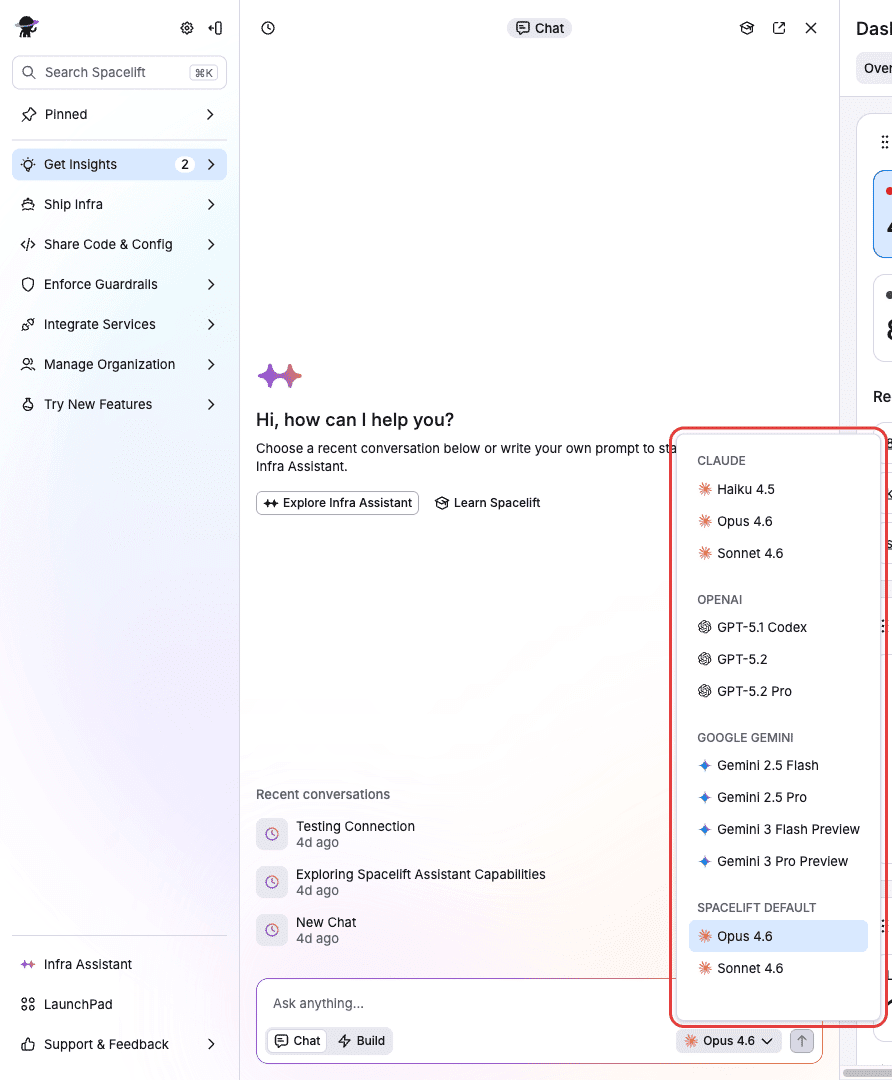
You can also bring your own. Spacelift supports Anthropic, OpenAI, Google, and your own AWS Bedrock inference profile, with each integration scoped to a Space so you control who can use it.
The Spacelift API integration via MCP
Spacelift runs a remote MCP (Model Context Protocol) server at the /mcp path of your account. It exposes the entire Spacelift GraphQL API to AI agents. The server introspects the schema and gives the agent tools to discover operations and generate working code.
With this connected, Claude Code can list and trigger stack runs, read run logs and changes, browse the module registry, and build tools against the Spacelift API in any language.
Saturnhead Assist
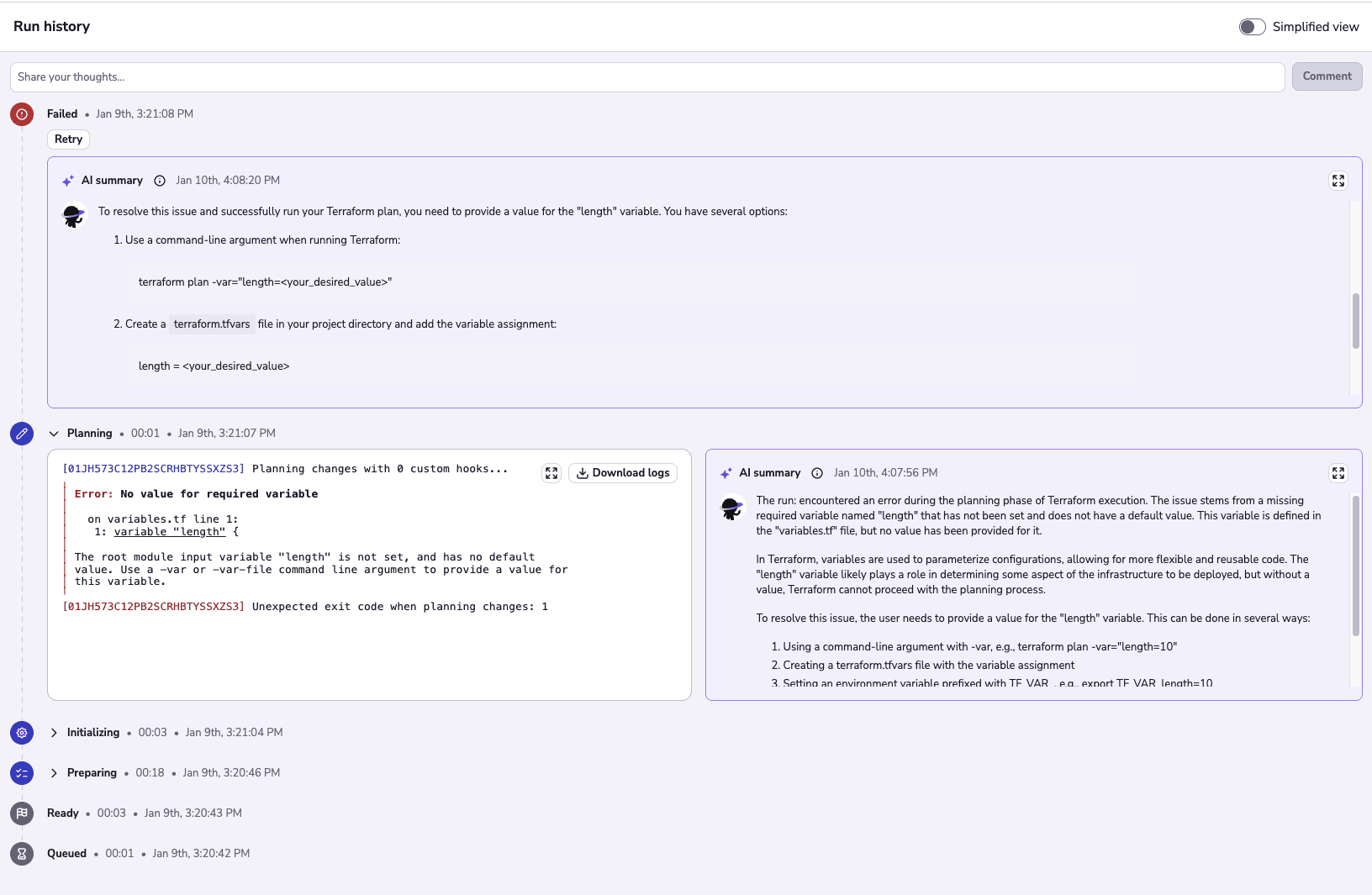
When a run fails, Saturnhead Assist summarizes the logs and suggests a fix. Click Explain on a failed run, and it reads the initialize, plan, and apply phases together to find the cause and propose a code change. It is available to Enterprise plans on Terraform and OpenTofu stacks.
Key takeaways
Claude Code is suited to infrastructure work that is repetitive and error-prone: module boilerplate, refactors, plan review, and tests. It does not replace human judgment, and on infrastructure, the cost of a bad change keeps that judgment necessary.
Get the configuration and guardrails right, and most of the risk is mitigated. Put standing facts in CLAUDE.md, procedures in skills, and enforcement in hooks. Use the permission model to separate read-only work from anything that writes to the state. Keep secrets out of context, require tests, and limit the blast radius of every change.
For production, the model writes, and the platform governs. Spacelift offers AI features that let you keep the speed of AI-driven infrastructure by wrapping agent-driven changes in policy, state, and audit, so you can move quickly without losing control.
Keep infrastructure moving at AI speed
Spacelift Intelligence keeps platform teams ahead. Fuse traditional IaC and GitOps pipelines with an AI deployment model and a powerful Infrastructure Assistant.
Frequently asked questions
How is Claude Code different from Copilot or Cursor?
Claude Code is Anthropic’s terminal-first agentic coding tool (with IDE extensions) where you describe a task and it plans, edits across files, runs commands, and iterates. GitHub Copilot has expanded past inline completions into agent mode, a CLI, and a cloud coding agent tied to GitHub issues and PRs. Cursor is a forked VS Code IDE built around chat, inline edits, and its Composer agent inside the editor.
What can Claude Code do with Terraform and OpenTofu?
Claude Code can read and write HCL, scaffold or refactor modules, manage variables and providers, and run terraform or tofu commands directly through its Bash tool. It interprets plan output, resolves validation and lint errors, and iterates until the configuration applies cleanly, treating both tools identically since they share the same CLI surface.
Does Claude Code work with Terragrunt?
Yes. Terragrunt is an orchestration layer over Terraform and OpenTofu, so Claude Code drives its CLI (terragrunt plan, terragrunt run –all apply, and similar) the same way it handles the underlying engines, while editing terragrunt.hcl files alongside your modules. No special integration is needed beyond having Terragrunt installed on your PATH.
How do I stop Claude Code from running terraform apply?
Add a deny rule under permissions in .claude/settings.json (or .claude/settings.local.json), since deny rules take precedence over allow and ask. For example, set “deny”: [“Bash(terraform apply*)”, “Bash(tofu apply*)”], or use the /permissions command inside Claude Code to add it interactively.