
AI agents are rapidly gaining adoption, and organizations of all sizes are experimenting with how to leverage them to optimize their processes, products, and customer experiences.
We see more and more organizations moving beyond proof-of-concept demos into production environments. Similar to any other software or infrastructure component, agent deployments require automation, security controls, and scalability built in from the start.
Infrastructure as code (IaC) has long been the foundation of effective platform engineering. In this post, we show how to use Terraform as the basis for production-grade AI agent deployments.
Combined with platform engineering principles, infrastructure as code helps ensure agents run consistently across environments, meet security requirements, and scale as demand grows.
What we’ll cover:
Core principles for agentic AI deployments
In this section, we will discuss a few overarching principles and core attributes essential for successful and robust agentic AI implementations.
1. Security and identity controls
In many cases, agents access sensitive data and execute actions on behalf of users. They need a way to leverage fine-grained permissions and guardrails to ensure they can access only approved data sources and perform only the specific actions they need.
Identity-based access control determines and restricts what each agent can do. Role-based permissions prevent unauthorized access to resources.
2. Runtime and session isolation
Each agent session should run in an isolated environment. This prevents data leakage between adjacent agents and users, thereby addressing potential security issues. Isolated execution environments protect against unintended cross-session information leakage.
3. Context awareness
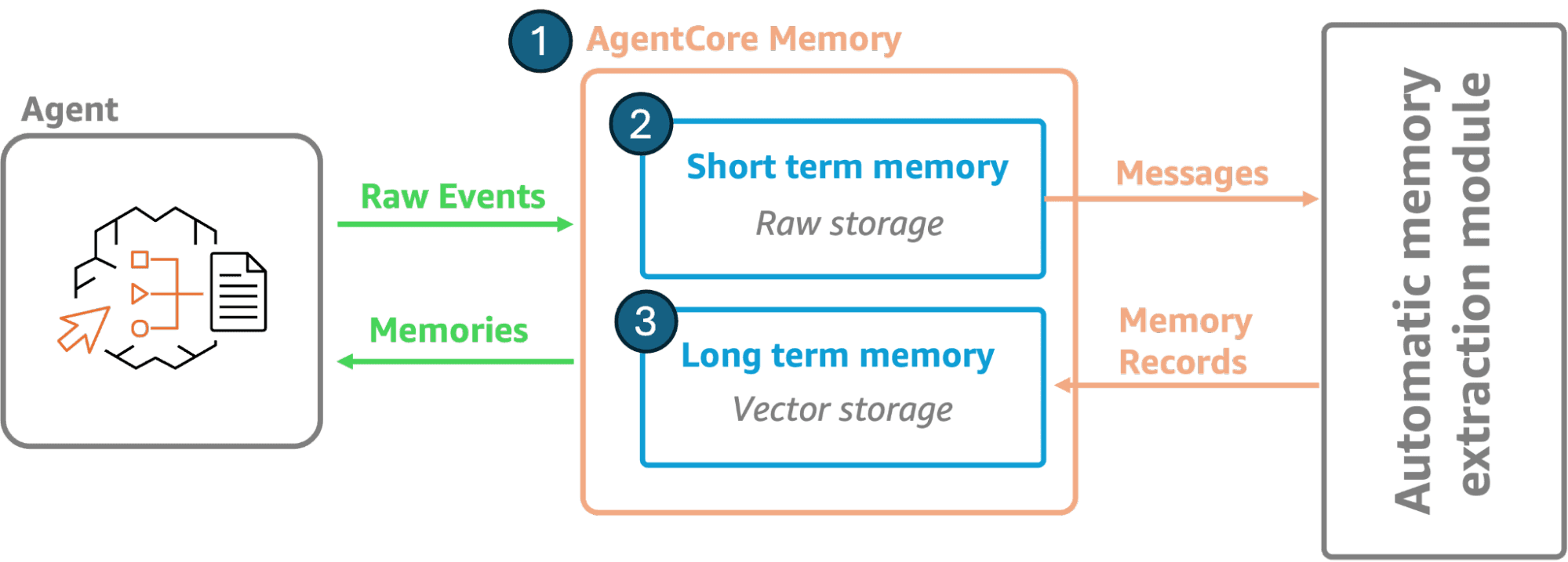
Agents often need to maintain state across interactions and remember user profiles, preferences, and past interactions. Agentic memory systems provide both short-term and long-term memory capabilities, including storing conversation history and learning preferences. This enables personalized responses without having to rebuild context each time.
4. Model and framework flexibility
AI models and frameworks are being introduced at an unprecedented rate, with providers competing to outdo one another every other month with their latest models and offerings.
Navigating this ecosystem and planning for future-proof setups isn’t easy. Agentic implementations shouldn’t lock you into specific models or frameworks.
Support for multiple providers lets you choose the right model for each use case. Framework agnosticism means you can switch between providers and tools as offerings evolve over time.
5. Easy integration with enterprise systems
Agents need to connect to existing systems through standardized interfaces. REST APIs, serverless code functions, and MCP servers become agent tools.
Agentic implementations need to consider how to effectively combine and integrate various enterprise systems.
What is Amazon Bedrock AgentCore?
Amazon Bedrock AgentCore is a managed, serverless platform from AWS for deploying and running AI agents at scale. It offloads the infrastructure complexity so developers and teams can focus on agent logic and delivering business value rather than servers or capacity planning.
The platform automatically scales from zero to thousands of concurrent sessions. You pay only for your actual usage.
AgentCore provides a few key built-in components for deploying and operating agents in production:
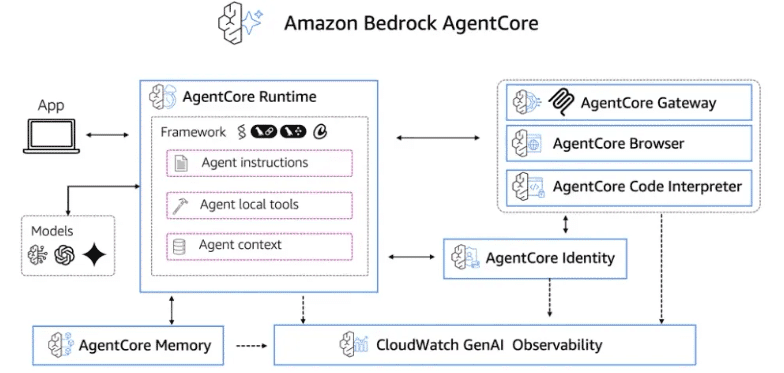
Image 1: AgentCore Overall Capabilities
- Runtime provides the execution environment. It supports extended workloads up to 8 hours for complex multi-step tasks. AgentCore Runtime provides complete session-isolation boundaries for each agent, ensuring security. The runtime works with any framework, protocol, or model, providing great flexibility for selecting your preferred tooling.
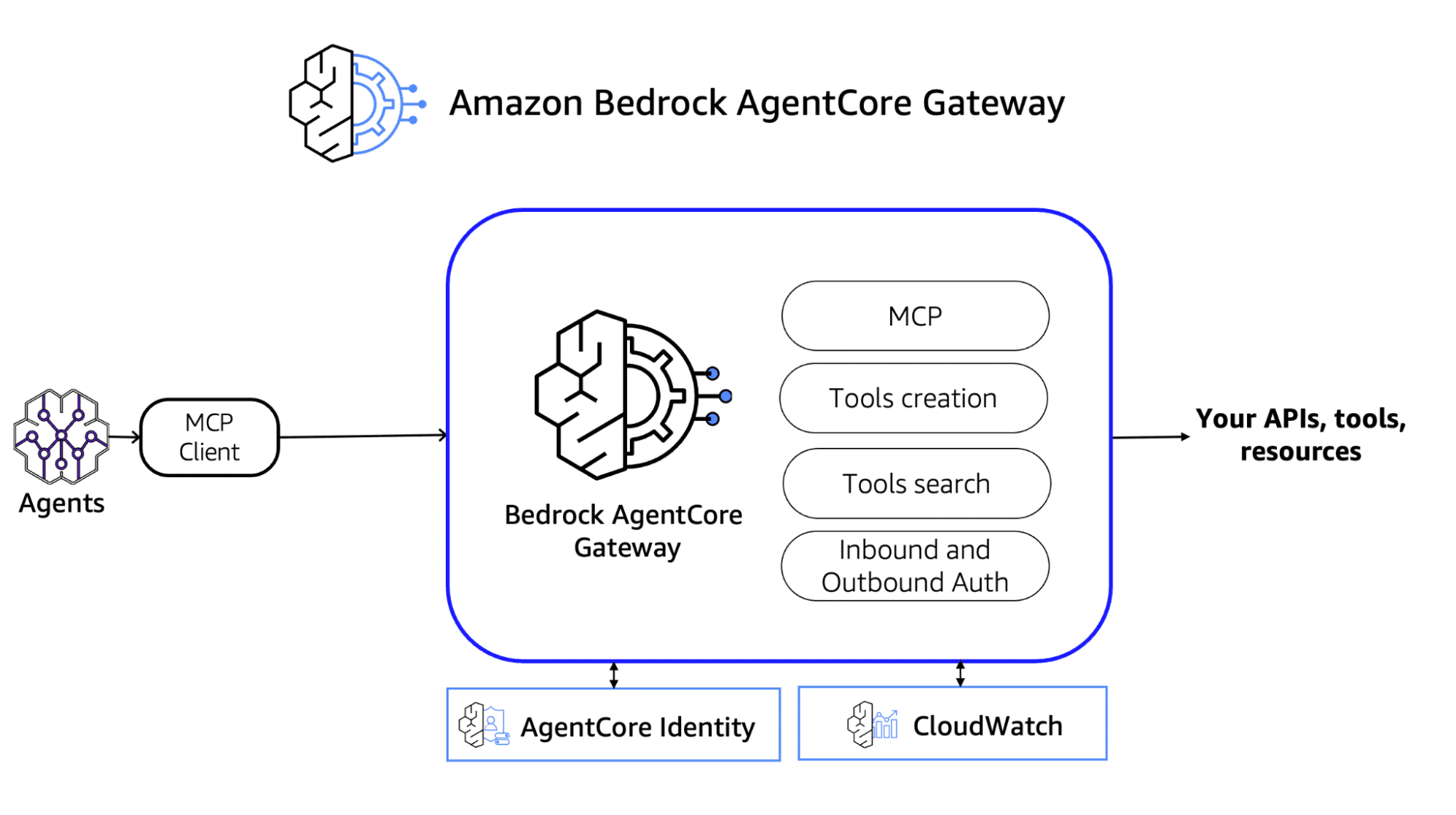
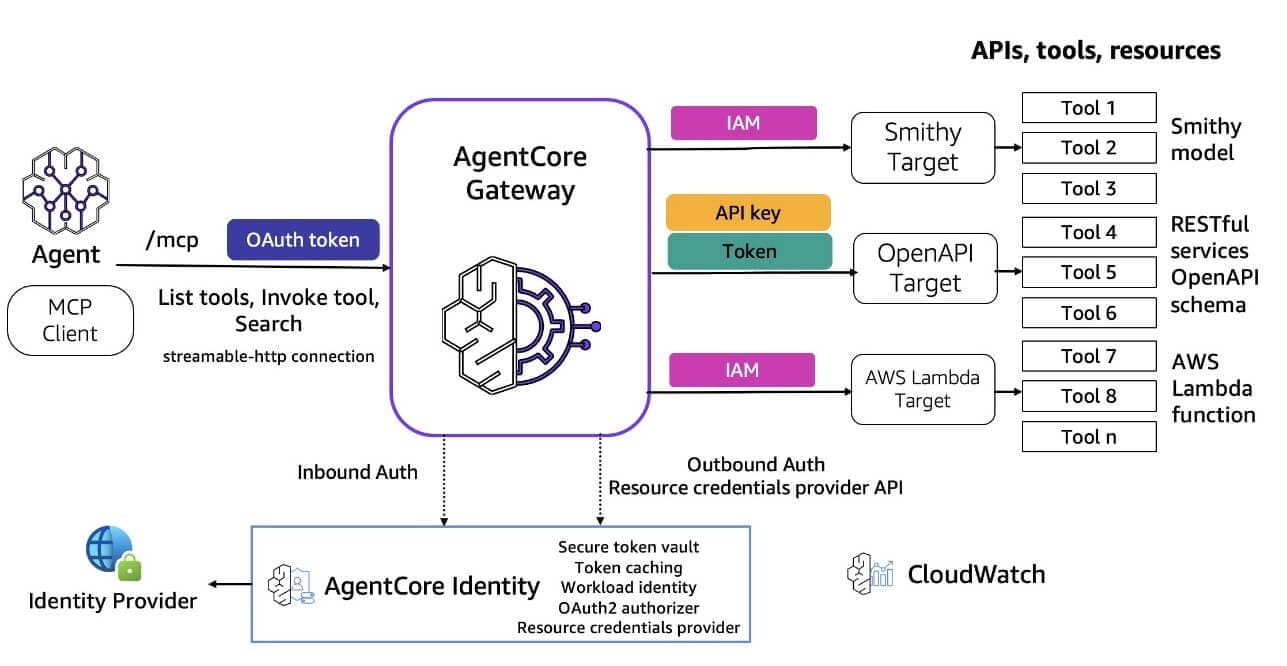
- Gateway connects agents to tools and data. It converts REST APIs and Lambda functions into agent-compatible tools. Semantic routing helps agents discover and select the right tools. The gateway also supports Model Context Protocol (MCP) servers, making this solution an ideal front door to your agentic implementations.
- Memory maintains context without infrastructure management. Short-term memory handles immediate conversation flow. Long-term memory stores persistent information across sessions. This feature allows agents to easily deliver personalized experiences based on historical interactions.
- Identity helps manage secure access to resources for inbound and outbound connections. It provides a token vault for storing OAuth 2.0 tokens, OAuth client credentials, and API keys with comprehensive encryption at rest and in transit. Agents often need to act on behalf of users with delegated permissions.
In such cases, pre-authorized consent flows let agents access third-party services while integration with existing identity providers (e.g., Okta) simplifies authentication. It provides native support for both the OAuth 2.0 client credentials grant (machine-to-machine) and the OAuth 2.0 authorization code grant (user-delegated access) flows, enabling comprehensive authentication patterns for different use cases.
- Observability provides operational visibility on your agentic solutions through built-in monitoring and dashboards. Real-time monitoring tracks agent behavior, and distributed tracing helps debug issues. According to industry standards, AgentCore provides OpenTelemetry integration to ensure compatibility with your existing monitoring tools.
- Policies allow you to build production-grade guardrails by enforcing real-time access controls and setting boundaries on what agents can do with data and tools. You write policies in natural language, which are then translated to code. Agent requests are intercepted at the AgentCore Gateway layer and evaluated against the defined rules before proceeding with execution and tool access.
- Evaluations enable users to continuously inspect agent quality and performance by checking for correctness, helpfulness, tool selection, safety, and other built-in evaluators. The feature also allows customization with scoring systems for your own prompts, tailored to specific needs.
Moreover, built-in tools can extend your agent’s capabilities. The Code Interpreter enables secure code execution outside the main agent process, supporting multiple languages. The Browser Tool enables dynamic web interactions with sub-second latency. These tools run in isolated sandbox environments.
Finally, IaC support through Terraform, CloudFormation, and AWS CDK allows automation and consistent environment deployment across development, staging, and production.
AgentCore cost model
The cost model of AgentCore follows consumption-based pricing for CPU runtime but only for active resource consumption (excluding I/O waiting for LLM responses, tool / API calls, or database queries), memory usage, and tool active usage with no upfront costs.
This pricing model can bring substantial cost savings for agentic workloads, which typically spend 30-70% of their time in I/O wait compared to deploying on infrastructure that is always on.
Check out AgentCore Pricing to learn more.
Step-by-step guide: Deploy an agent with IaC on AWS with Terraform
To demo deploying an agent with IaC and Terraform, we will utilize the end-to-end-weather-agent example from the Agentcore GitHub Samples repository.
This repository contains examples and tutorials to help you understand, implement, and integrate Amazon Bedrock AgentCore capabilities into your applications.
First step, let’s clone the GitHub code repository:
https://github.com/awslabs/amazon-bedrock-agentcore-samples.gitThen, navigate to the end-to-end weather example directory:
cd amazon-bedrock-agentcore-samples/04-infrastructure-as-code/terraform/end-to-end-weather-agentThis sample shows how to deploy a production-ready weather Q&A agent on AWS using AgentCore and Terraform. The project deploys a “weather agent” that can answer natural-language questions such as “What will the weather be in London this evening?” by calling a weather API behind the scenes.
It uses:
- AgentCore Runtime for hosting the agent logic
- AgentCore Browser tool to fetch weather data
- AgentCore Code Interpreter tool to execute Python analysis code
- AgentCore Memory to store and retrieve user preferences across sessions
- AgentCore Observability to store monitoring data
- S3-based artifact storage for analysis results
- IAM-based security with tool-specific permissions
- Automated Docker image building via CodeBuild
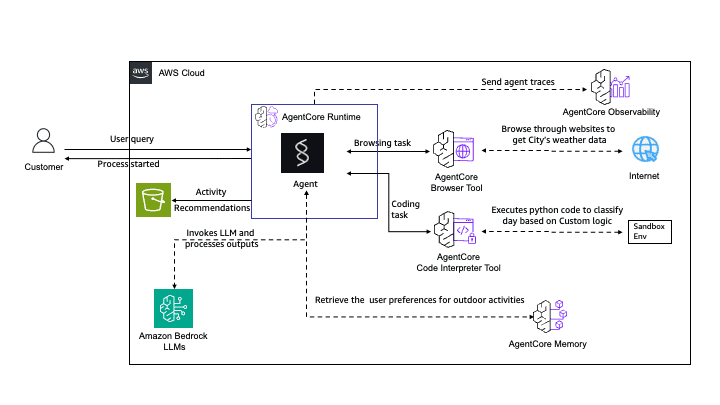
Image 5: Weather Agent Architecture and Components
Prerequisites
- Terraform (>= 1.6)
- Recommended: tfenv for version management
- Or download directly: terraform.io/downloads
Note: brew install terraform provides v1.5.7 (deprecated). Use tfenv or direct download for >= 1.6.
uv venv
source .venv/bin/activate
python --version  # Verify Python 3.11 or later
uv pip install boto3
Note: boto3 is required for:
-
- Running test scripts (test_weather_agent.py)
- Automatic memory initialization during deployment
- Docker (for local testing, optional)
- An AWS account with appropriate permissions to create S3 buckets, ECR repositories, CodeBuild projects, IAM roles and policies, and Bedrock AgentCore resources.
Note that running this example in your AWS account may incur costs, so be sure to clean up the resources afterwards using the destroy.sh provided script
Step 1: Configure Terraform variables, initialize, apply
First, let’s take a look at the resources Terraform will create as part of this demo.
Go to the example’s Terraform directory. Check the main.tf file defining the runtime component:
resource "aws_bedrockagentcore_agent_runtime" "weather_agent" {
  agent_runtime_name = "${replace(var.stack_name, "-", "_")}_${var.agent_name}"
  description        = "Weather agent runtime for ${var.stack_name}"
  role_arn           = aws_iam_role.agent_execution.arn

  agent_runtime_artifact {
    container_configuration {
      container_uri = "${aws_ecr_repository.weather_ecr.repository_url}:${var.image_tag}"
    }
  }

  network_configuration {
    network_mode = var.network_mode
  }

  environment_variables = {
    AWS_REGION          = data.aws_region.current.id
    AWS_DEFAULT_REGION  = data.aws_region.current.id
    RESULTS_BUCKET      = aws_s3_bucket.results.id
    BROWSER_ID          = aws_bedrockagentcore_browser.browser.browser_id
    CODE_INTERPRETER_ID = aws_bedrockagentcore_code_interpreter.code_interpreter.code_interpreter_id
    MEMORY_ID           = aws_bedrockagentcore_memory.memory.id
  }

  tags = {
    Name        = "${var.stack_name}-agent-runtime"
    Environment = "production"
    Module      = "BedrockAgentCore"
    Agent       = "WeatherAgent"
  }

  depends_on = [
    null_resource.trigger_build,
    aws_iam_role_policy.agent_execution,
    aws_iam_role_policy_attachment.agent_execution_managed,
    aws_bedrockagentcore_browser.browser,
    aws_bedrockagentcore_code_interpreter.code_interpreter,
    aws_bedrockagentcore_memory.memory
  ]
}
Explore also the other files and resources, such as the browser.tf for web capabilities:
# ============================================================================
# Browser Tool - For Web Browsing Capabilities
# ============================================================================

resource "aws_bedrockagentcore_browser" "browser" {
  name        = "${replace(var.stack_name, "-", "_")}_browser"
  description = "Browser tool for ${var.stack_name} weather agent to access weather websites and advisories"

  network_configuration {
    network_mode = var.network_mode
  }

  tags = merge(
    var.common_tags,
    {
      Name   = "${var.stack_name}-browser-tool"
      Module = "AgentCore-Tools"
      Tool   = "Browser"
    }
  )
}
Similarly, check out the memory.tf and memory-init.tf for setting up memory, the code_interpreter.tf for code execution, and the agent Python code. There, you will also find other files defining resources for S3 storage, IAM, Docker image building and hosting with CodeBuild and ECR, as well as automation scripts to deploy and destroy the infrastructure.
As a first step, let’s define the necessary Terraform environment variables.
cp terraform.tfvars.example terraform.tfvarsFeel free to explore and adjust the variables with your preferred values. For our example, we will leave the default values.
Take a look at the deploy.sh script next. There, we perform Terraform validation and prerequisite checks:
chmod +x deploy.sh
./deploy.sh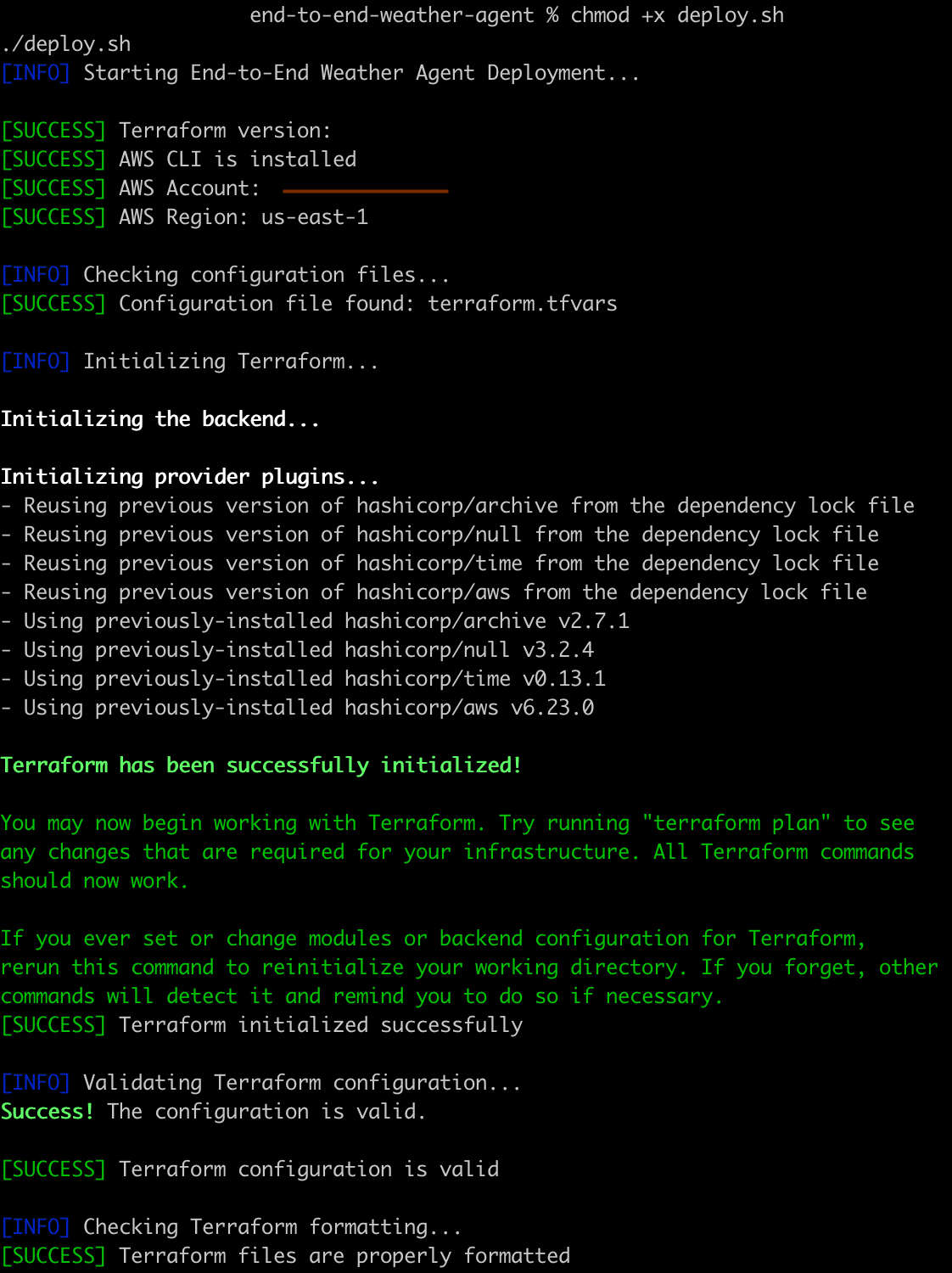
Initialize the Terraform config, plan, and apply the infrastructure changes:
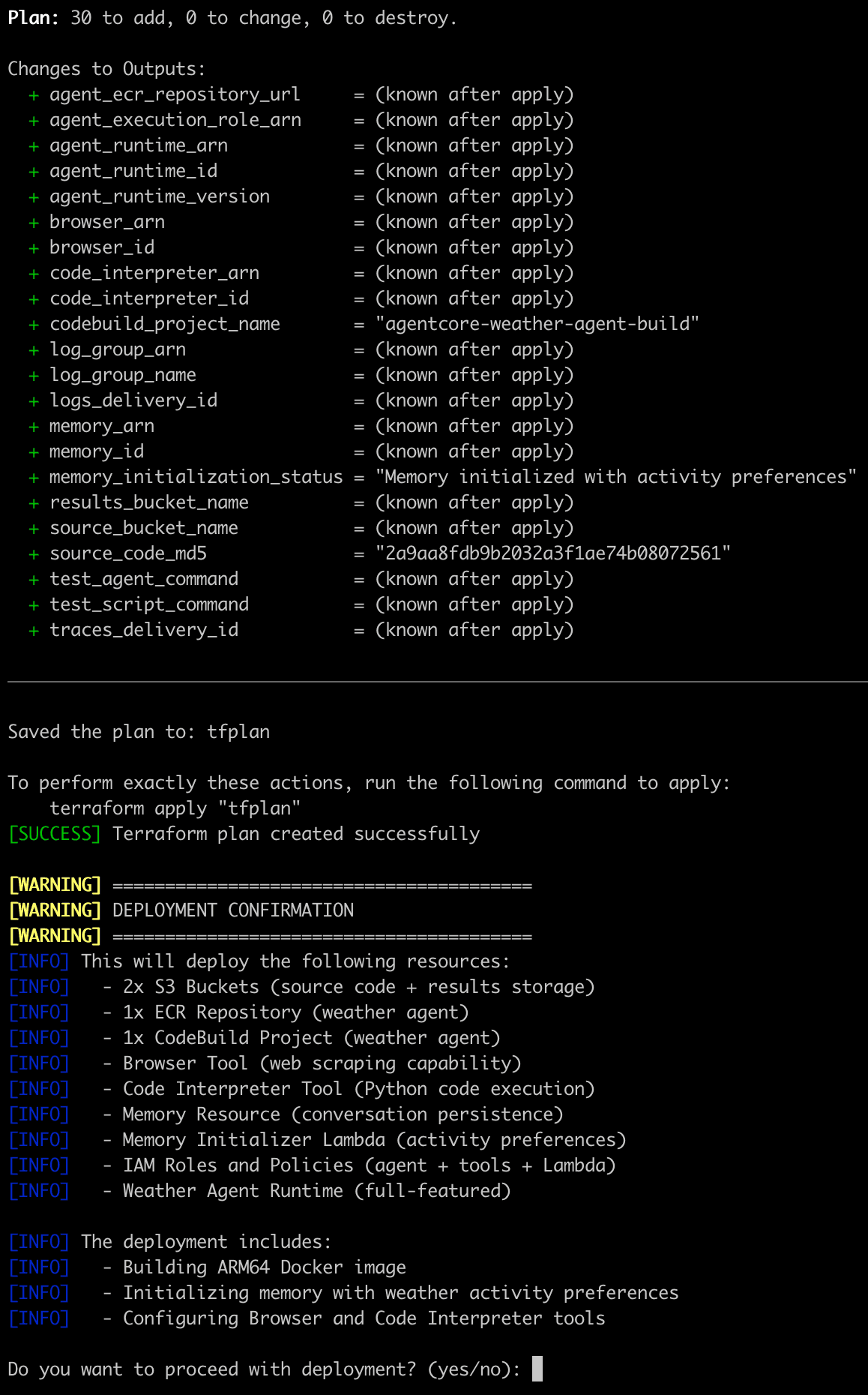
Type yes and let Terraform deploy the resources. After the deployment, you should then see a list of Terraform outputs and a message that the deployment completed successfully.
Step 2: Explore the deployed resources
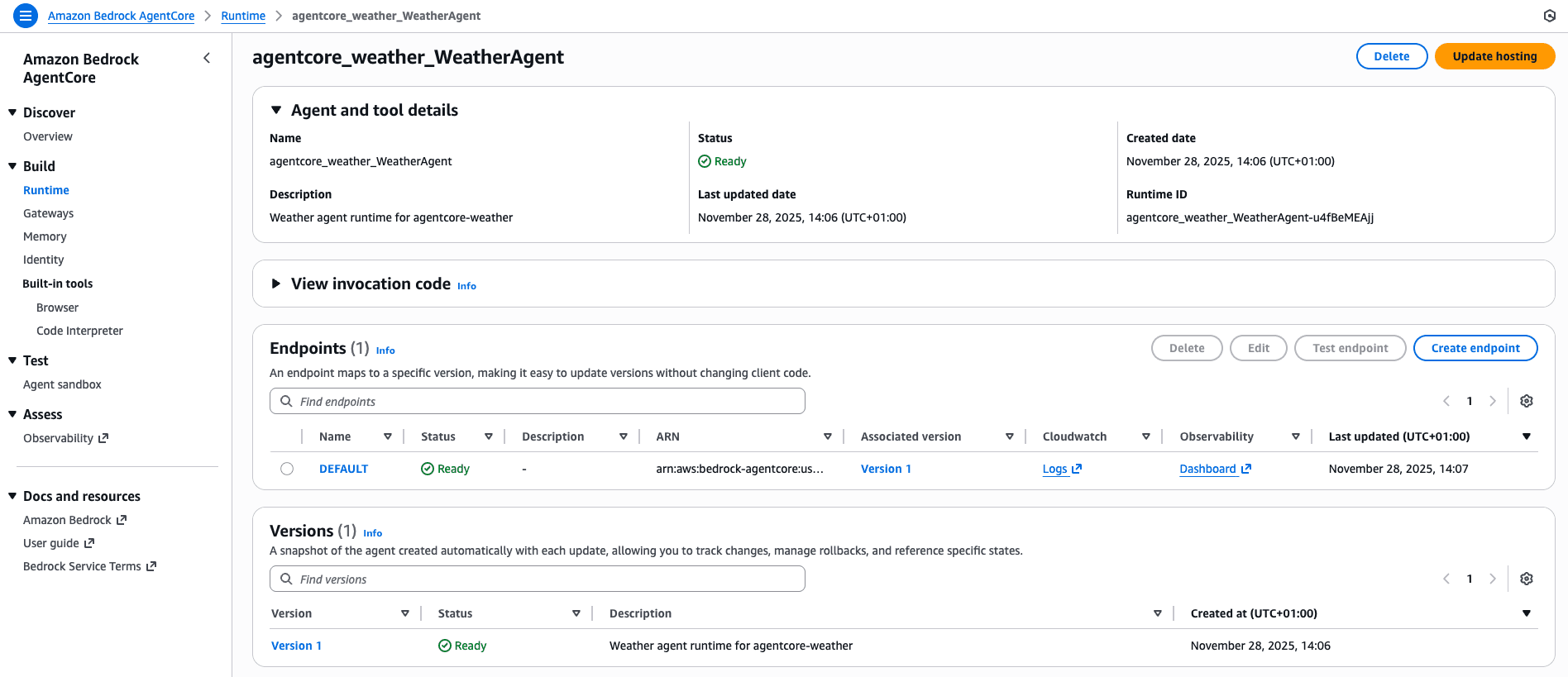
Next, let’s take a look at the AWS console. Navigate to your AWS account, to the Bedrock AgentCore service, and to the AWS region you selected for deployment. If you didn’t update the Terraform vars, the default is us-west-2.
Check the Runtime that was created to host our agent:
Similarly, you can check the Memory, Browser, and Code Interpreter tool configurations:
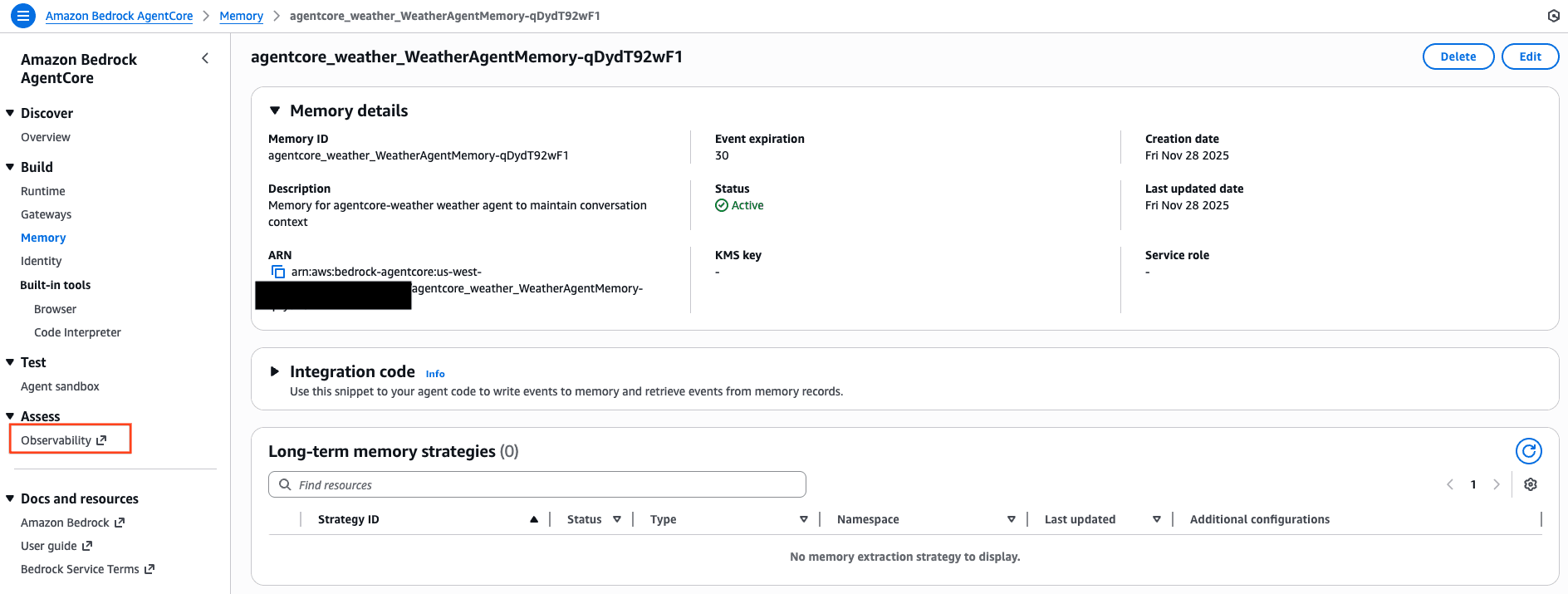
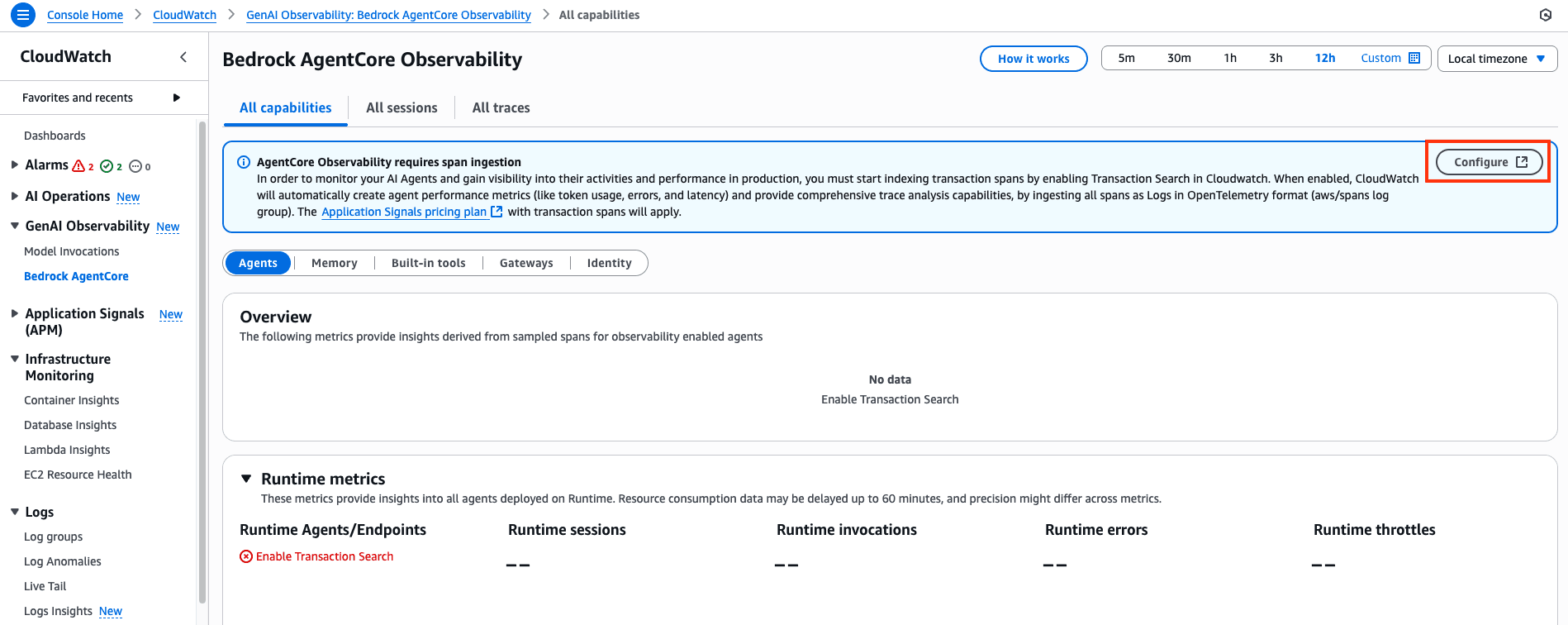
Click on the Assess/Observability left side panel, as you see on the screenshot above, and let’s set up a one-time configuration tracing for agent monitoring purposes.
You will be redirected to the CloudWatch console, which is AWS’s main observability solution. Select Configure on the pop-up to start indexing transaction spans:
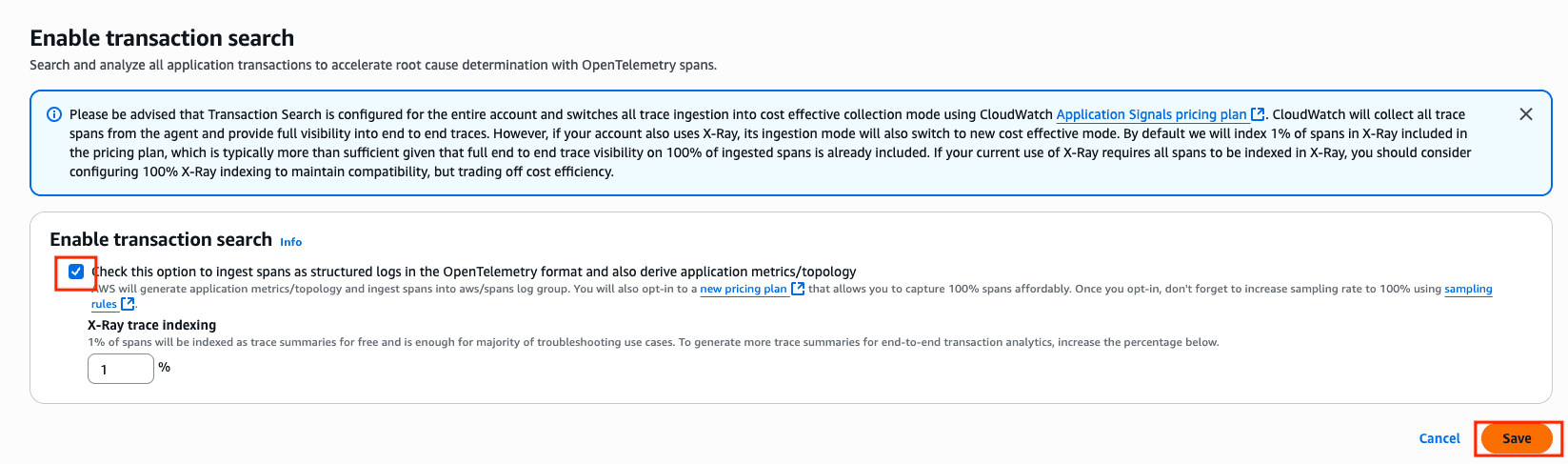
On the next page, enable the transactions search checkbox and hit save:
Step 3: Test the agent
We are now ready to test our agent. Let’s invoke it by running these commands on our terminal:
AGENT_ARN=$(terraform output -raw agent_runtime_arn)
python test_weather_agent.py $AGENT_ARN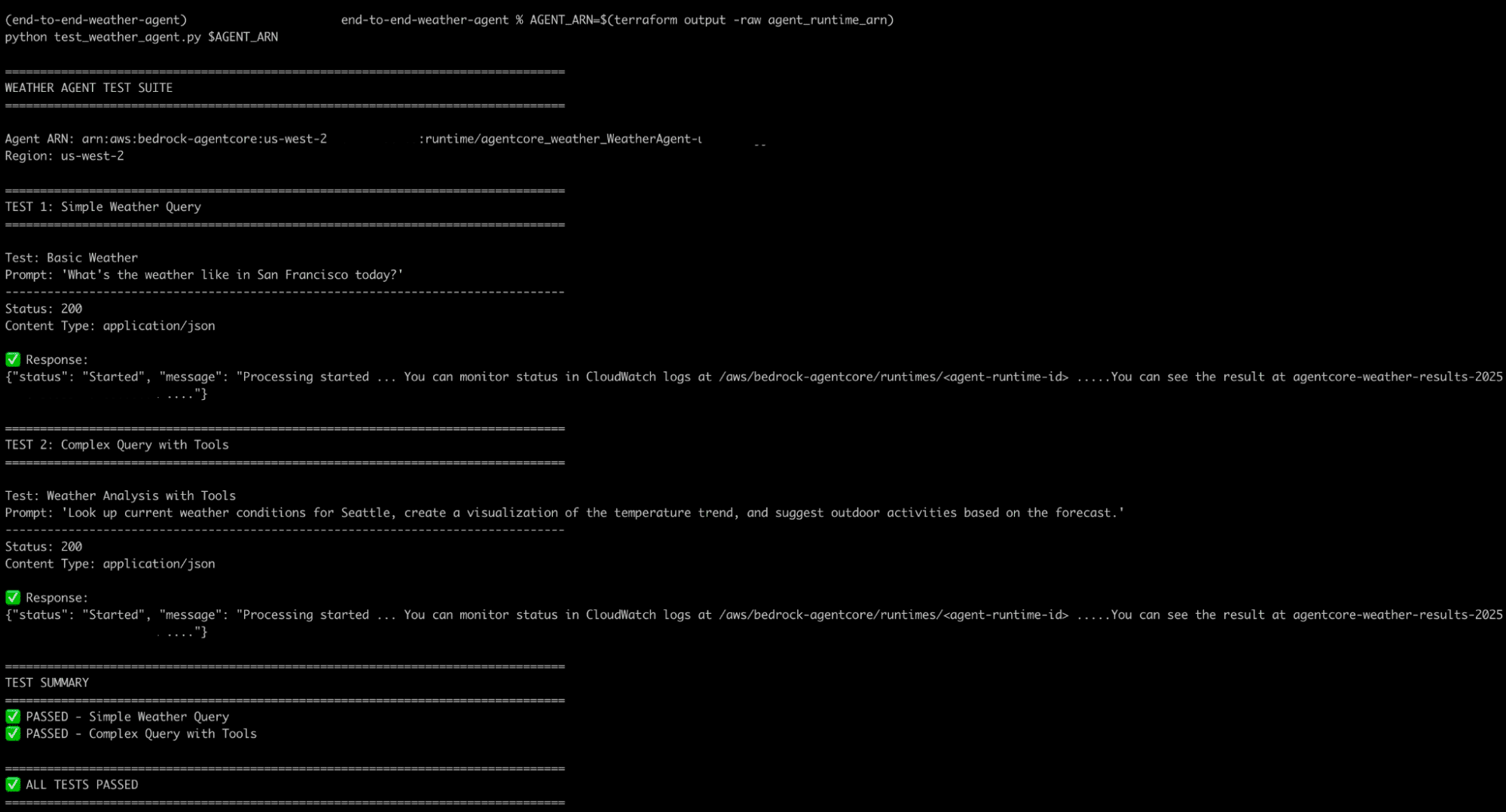
The script runs a simple weather query and then a more complex one that utilizes a combination of the browser, code interpreter, and memory.
Going back to CloudWatch in the AWS console, we can now start seeing observability data for our agent and invocations:
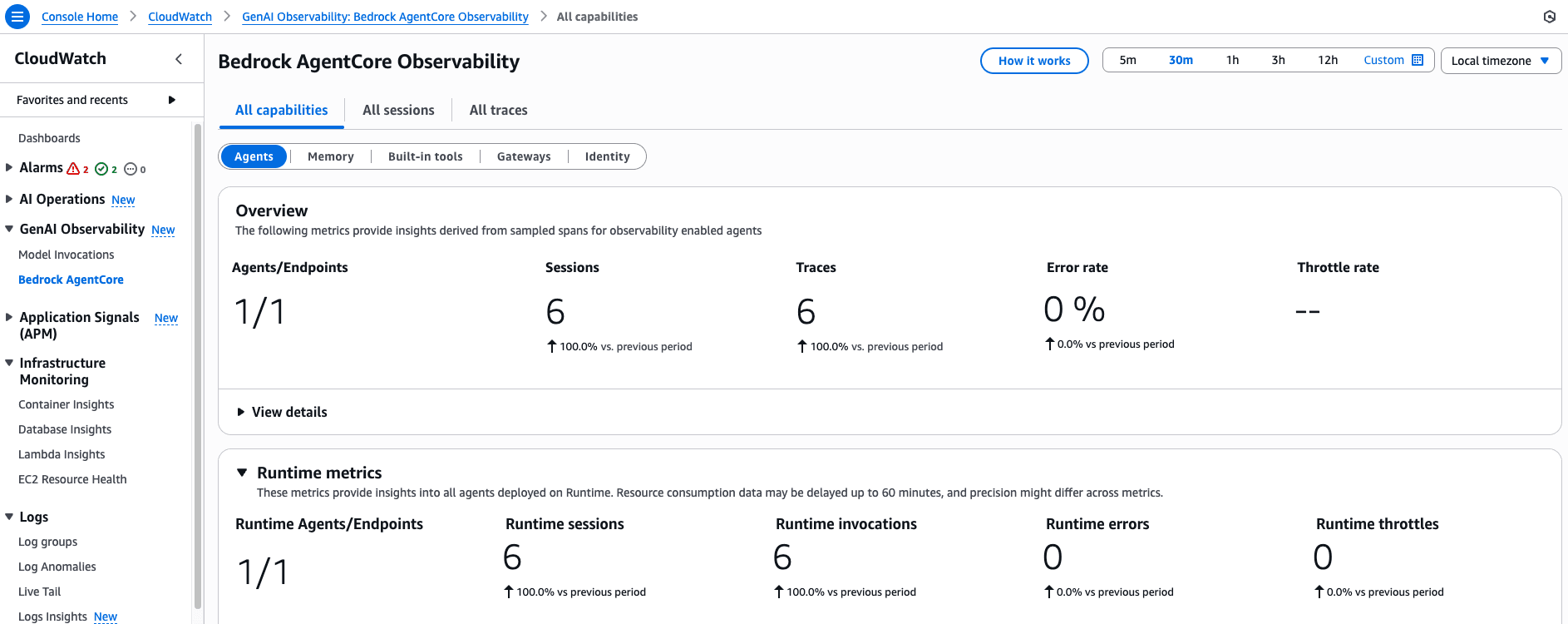
There, we can see metrics for our sessions, invocations, memory and CPU consumption, traces, error and throttle rates, and other relevant information.
Now, if we check CloudWatch Logs, you should see results and more information logged there for our invocations with our agent working to fetch data:
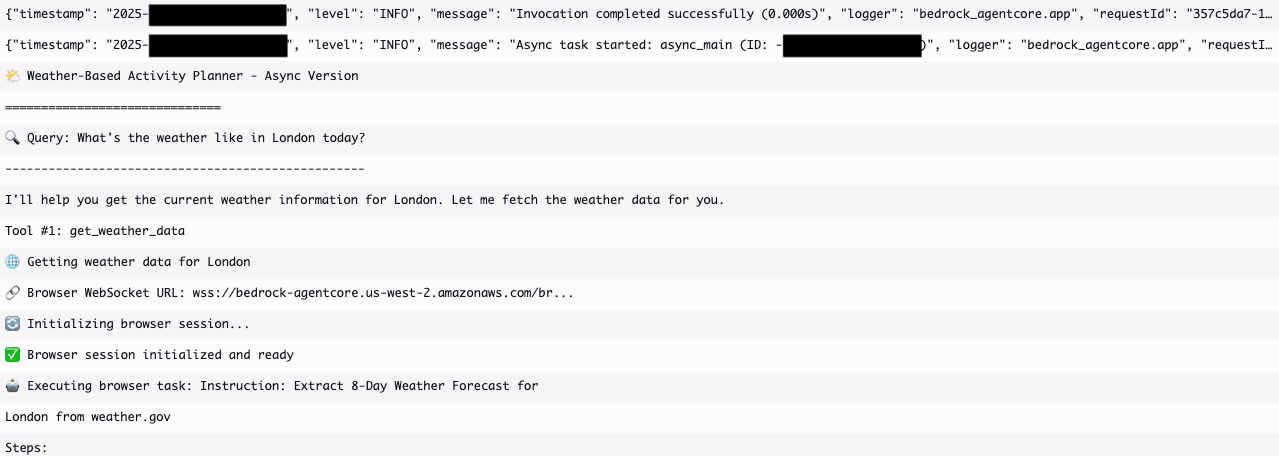
But also using the Code Interpreter tool to perform analysis using Python code:
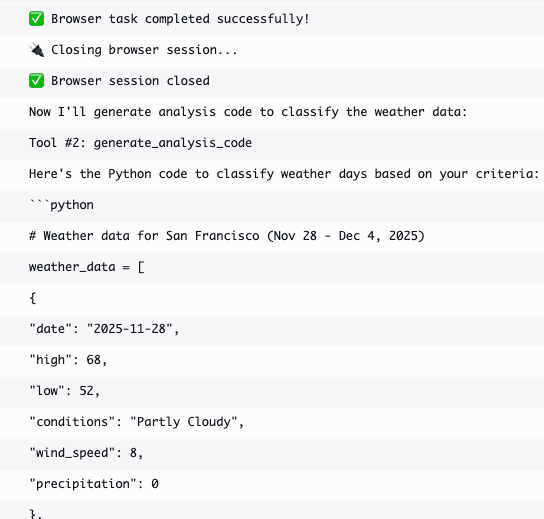
We could also modify the Python test_wearther_agent.py script and add a different query to leverage the memory tool:
User: "I'm planning a road trip from Boston to Miami next week. What should I expect?"
Agent: [Uses Browser + Memory] Provides route-based weather forecast, remembers trip details
That’s it, we have successfully deployed our own custom agent with Amazon Bedrock AgentCore and explored how we can leverage a few of its built-in tools and functionalities!
Step 4: Clean up
Make sure you clean up after you are done to avoid extra costs. Run this and follow the instructions:
chmod +x destroy.sh
./destroy.sh
Guidelines for working effectively with AgentCore
Working with AgentCore requires a serverless-first mindset. The following guidelines outline best practices for building agents that scale reliably and use resources efficiently.
- Use least privilege for agent permissions –Agents require permissions to access other resources and information. Since these systems can be semi-autonomous, it’s critical not to allow overly permissive policies and grant only the permissions required for the agents to perform their tasks.
- Understand the available interfaces for AgentCore – AgentCore offers various options for developing and operating agents. You can select from AgentCore Python SDK, AgentCore starter toolkit, AWS SDK, AWS CLI, and IaC tooling such as CloudFormation and Terraform.
- Learn to troubleshoot AgentCore runtime common issues –Your agentic implementations can become complex, involving multiple tools and combining many components. Understanding and identifying the various issues you can encounter could be handy. Check out this detailed troubleshooting guide for addressing timeout errors, Docker builds, permission issues, payload format issues, and HTTP errors, among others.
- Turn on debugging for gateways in development –You can leverage debugging messages to access details on target missconfigurations, lambda function errors, authorization issues, and parameter validation errors. Check Turn on debugging messages to learn more.
- Use the AgentCore MCP server to test and deploy agents –AgentCore offers its own MCP server that you can integrate with your favourite IDE or CLI tool to help you develop, deploy, and test your agentic implementations using natural language. With built-in support for runtime integration, gateway connectivity, and agent lifecycle management, the MCP server simplifies moving from local development to production deployment on Amazon Bedrock AgentCore services.
Future-proof your IaC with Spacelift
Spacelift can be used throughout the entire DevOps landscape, as it supports tools such as Terraform, OpenTofu, Pulumi, CloudFormation, Kubernetes, Ansible, and Terragrunt. It provides a default deployment workflow for all of these tools, making it easy for you to handle the CI and CD processes for your infrastructure without needing to write complex workflows.
This default workflow can also be tailored to your needs. You can control what happens between runner phases, making it easy to integrate third-party tools inside your workflows.
By leveraging Spacelift’s policy-as-code framework based on Open Policy Agent, you can easily build policies that restrict resources or resource parameters, require approvals for runs and tasks, control where to send notifications, or even control what happens when a PR is open or merged. This helps elevate your overall security and governance and minimizes the chances of human errors.

Since AI-driven commercial property risk platform Archipelago started working with Spacelift, they have eliminated manual processes around direct Terraform applications and streamlined change coordination among their engineers.
Spacelift’s built-in drift detection and remediation feature will inform you when infrastructure changes are made outside of your IaC processes, allowing you to automatically recover from them.
The quality of your self-service mechanism also influences DevOps maturity, as this is usually one of the greatest bottlenecks that impact software development. With Spacelift, you can build self-service with Blueprints, which are yaml templates for your Spacelift stacks and all associated configurations (policies, contexts, cloud integrations, lifecycle hooks, and more).
In addition, Blueprints can be easily integrated with ServiceNow, meeting your developers where they are and making it easier for them to create infrastructure from the tools they know and use.
If your organization favors Kubernetes, Spacelift also offers its own K8s operator that lets you easily create Spacelift resources from K8s and build workflows for your favorite tools.
If you’re exploring AI-powered workflows for infrastructure, also check out Spacelift Intent – our codeless, natural-language deployment model. Intent lets you provision cloud resources directly from natural language while still inheriting Spacelift’s policies, state management, and audit trails.
Key points
In this blog, we explored how we can deploy an agentic AI solution with IaC and Terraform using Amazon Bedrock AgentCore.
AgentCore enables the production deployment of AI agents using serverless infrastructure. IaC through Terraform automates resource creation and ensures consistency across environments. We also deep-dived into a deployment example, like the weather agent, to demonstrate practical use. The sample combines runtime, browser, code interpreter, and memory components.
It’s still early days for agentic solutions, but organizations of all sizes are increasingly experimenting and moving to production implementations. Start with small-scale deployments to validate agent logic and scale by using IaC for all changes to maintain audit trails and reproducibility.
Ready to let AI write the code while Spacelift maintains its security and compliance? Start free today or book a demo with our engineering team.
Solve your infrastructure challenges
Spacelift is a flexible orchestration solution for IaC development. It delivers enhanced collaboration, automation, and controls to simplify and accelerate the provisioning of cloud-based infrastructures.