

ChatOps is the practice of using chat platforms to manage operational processes. It allows developers to achieve their tasks by issuing commands to bots, agents, and conversational services within a unified chat interface.
Successful ChatOps implementations help development workflows to run more smoothly. Executing tasks directly from chats removes the need for developers to switch between tools, enabling them to stay focused on the information being presented. However, passing sensitive data through chat platforms like Slack or Microsoft Teams also creates new security and compliance risks, so careful planning is required.
In this article, we’ll explore how ChatOps improves DevOps workflows. We’ll discuss the model’s benefits and use cases, then share a high-level strategy for introducing ChatOps to your organization.
What we’ll cover:
What is ChatOps?
ChatOps is the use of chat apps to run your operations. Instead of clicking between ops platforms, CI/CD systems, and monitoring tools, you use chat commands and messages in solutions like Slack, Microsoft Teams, and Mattermost.
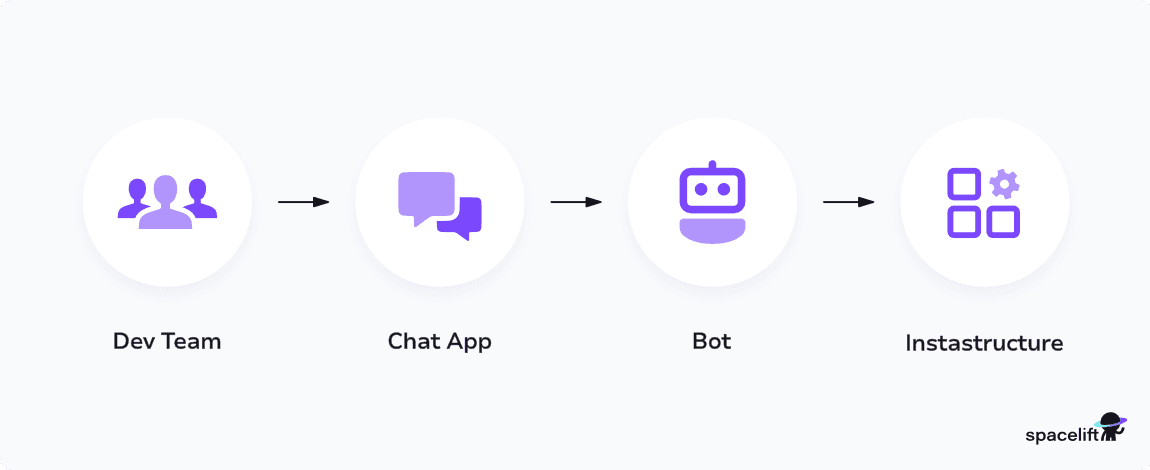
ChatOps is powered by custom slash commands and bot integrations. For instance, you could build a Slack bot that lets developers start new environments by sending simple messages to a channel. Your bot may then send follow-up replies to collect additional information, such as the project name to deploy.
ChatOps is a good fit for any operational process that involves a human-in-the-loop element. These are workflows that can be mostly automated, but which still require a degree of human oversight.
Common examples of these tasks include:
- Triggering and approving new deployments
- Managing CI/CD pipelines and monitoring their results
- Triaging incident alerts, then applying remedial actions
- Utilizing AI agents to gather information about problems and perform root cause analysis
ChatOps turns these processes into guided, conversational experiences. It standardizes how developers complete different tasks, without requiring them to learn complex dedicated systems. This breaks down knowledge silos and increases developer autonomy.
Having bots notify engineers when key events occur also reduces the need to manually monitor multiple platforms, improving productivity and focus.
What are the main benefits of using ChatOps?
Here are the main benefits of ChatOps:
- Faster workflows — Teams execute deployments, queries, and automation directly in chat, eliminating constant context switching between tools.
- Full transparency — Every action and decision happens in shared channels, creating a natural audit trail visible to the whole team.
- Easier onboarding — New members learn by observing real commands and workflows in chat history, which acts as living documentation.
- Better incident response — Centralizing communication and actions in one place keeps everyone aligned during outages and simplifies post-mortems.
- Fewer errors — Encoding tasks as bot commands ensures consistent execution every time, reducing manual mistakes.
- Searchable knowledge — Operational decisions and outcomes are captured in chat logs instead of staying as tribal knowledge.
How does ChatOps work?
From the developers’ perspective, ChatOps adds a simple chat-based interface to DevOps tasks and processes. It makes existing automation tools including IaC, CI/CD, and observability platforms accessible within your team’s chat solution.
When events occur, such as an anomaly being detected in an environment or a team member requesting a code review, ChatOps ensures developers receive messages directly where they’re working. They can view relevant context without leaving the chat platform and then send a reply to trigger actions such as approving or rejecting the request.
You implement ChatOps using the integration options provided by your chat apps. This normally involves using a mix of webhooks, custom apps, API integrations, and prebuilt connections provided by the services you use.
For example, Spacelift offers Slack and Microsoft Teams apps. These update you about activity in your Spacelift account.
ChatOps implementations increasingly also include conversational agentic AI. Agents allow you to query problems, request explanations, and run complex multi-step processes using natural language chat messages and replies.
But agentic AI isn’t essential to ChatOps success: At its core, ChatOps simply describes the methodology of using chat apps to manage end-to-end software operations.
How you achieve this depends on your organization’s scale and the technologies you depend on. You may find agents let developers manage their workloads more effectively, or you may only need simple alerts and slash commands like /deploy and /approve.
How to implement ChatOps in a DevOps team
As we’ve outlined above, implementing ChatOps requires unifying access to your team’s existing DevOps tools within your team’s chat platform. This doesn’t have to be complex if you carefully plan your architecture first. Popular chat apps are designed to be extended, so getting set up may not take as long as you think.
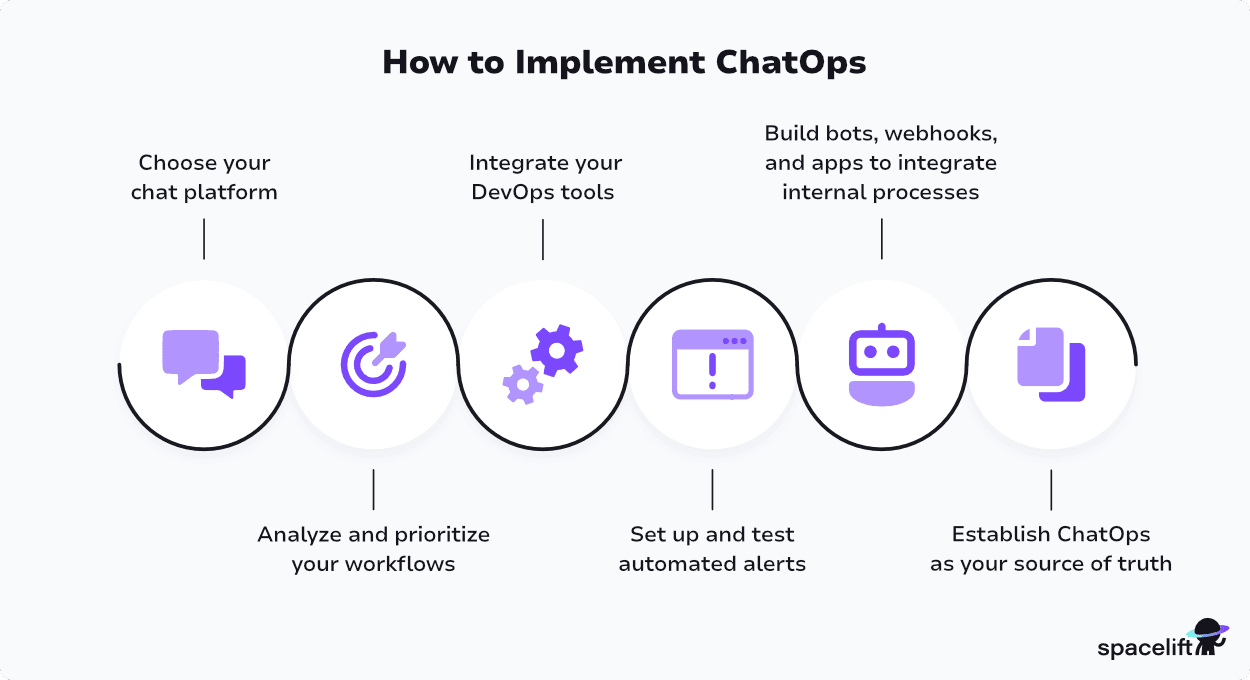
The following six steps cover the key tasks involved in building a ChatOps strategy.
Step 1. Choose your chat platform
ChatOps starts with your chat platform. Adopting ChatOps is much easier when your DevOps tools offer native integrations with your chat app of choice.
If you’re already happily using a solution, you may be tempted to skip this step, but it’s worth assessing whether alternative platforms could work better with the other services you use before you go all-in on ChatOps.
You should also evaluate each platform’s APIs, documentation, security controls, and wider ecosystem.
Step 2. Analyze and prioritize your workflows
Migrating all your workflows into ChatOps can be a large-scale undertaking. It’s best to start by identifying the high-priority, repetitive processes that most naturally align with how ChatOps works.
For instance, you could begin by making your incident response runbooks accessible as guided chat experiences. Taking a gradual approach lets you demonstrate value earlier and correct course faster if you run into any unforeseen issues.
Step 3. Integrate your DevOps tools
Once you’ve decided which workflows you’d like to run using ChatOps, use your chat app’s integration options to connect your DevOps tools. Where possible, use the native apps or webhooks provided by each vendor.
This will simplify the setup process and reduce maintenance overheads. For example, you could use GitHub’s Slack app to view information from your code repositories directly in your chats.
Step 4. Set up and test automated alerts
Chat platforms are the ideal place to send alerts from your observability and incident management systems.
Expand your ChatOps integrations by enabling real-time alerts in each of your monitoring solutions. Engineers can then triage, escalate, and resolve alerts from within message threads. This reduces response times by keeping incident conversations centralized in one place.
Step 5. Build bots, webhooks, and apps to integrate internal processes
Not all the DevOps systems you use will offer native chat integrations. In particular, bespoke internal platforms will typically require custom development to connect them. Use your chat app’s APIs, webhooks, and app development features to bring the other services you rely on into your chats.
Building these workflows takes time, but it pays off by allowing you to coordinate complex internal workflows using simple chat commands. It ensures chat becomes the real center of your operations.
Step 6. Establish ChatOps as your source of truth
ChatOps adoption doesn’t end with the technical integration of your chat apps and DevOps tools. It’s critical that everyone accepts your chat platform as your operational source of truth.
Teams must agree that migrated tasks and workflows are now handled through chat. Continuing to run commands manually will eliminate the visibility and consistency benefits of ChatOps. Providing clear documentation and training helps minimize this risk: Developers must know which commands, agents, and alerts are available in chat so they can use them effectively.
ChatOps best practices
Achieving success with ChatOps hinges on building useful bots, agents, and connectors that solve real-world developer needs. There’s no point investing in ChatOps if developers must still switch to other platforms to finish their tasks.
Here are six best practices that help improve ChatOps outcomes.
- Choose tools that cleanly integrate with your chosen chat platform: When selecting DevOps tools and services, favor ones that already offer native integrations with your chosen chat app. This reduces maintenance overheads and can help you get started more quickly.
- Start off small by focusing on key human-in-the-loop workflows: ChatOps is most successful when used for human-in-the-loop processes where operators review information and then request an action in response. Start by focusing on key workflows like incident response that naturally fit this model. This will help team members quickly get a feel for how ChatOps works.
- Develop custom integrations to connect bespoke processes: Not all services come with their own chat app connections, and unique internal processes will need custom middleware to interface with your chat solution. Building your own integrations for missing pieces requires upfront investment, but enables you to align all of your workflows around ChatOps.
- Regularly evaluate ChatOps usage and outcomes to identify potential improvements: Instrument your ChatOps services so you can see which commands are used most, where hold-ups occur, and which processes still require developers to move outside of chat. This data allows you to analyze how ChatOps is changing DevOps outcomes so you can plan further iterative improvements.
- Add conversational AI agents to build more powerful chat experiences: ChatOps and conversational AI agents aren’t the same thing, but they closely complement each other. Including agents as participants in your chat workspaces gives developers even more power, letting them use natural language to ask questions and analyze information.
- Don’t forget security and compliance: Adopting ChatOps can mean more sensitive data flows through your chat platform. It’s important to regularly audit the security controls you’ve enabled to make sure they’re still appropriate for your needs. Use access controls and channel membership restrictions to prevent unauthorized interactions with the ChatOps integrations, commands, and actions you’ve added.
Overall, your ChatOps strategy should be designed for cohesion and simplicity. Assemble bots, agents, and commands into a structured framework of tools and services that can share data automatically. This enables you to implement chat-based experiences that’ll scale with your organization.
Remember that ChatOps is more than just chatbots: It’s a chat-driven methodology for running operations.
What is the difference between ChatOps and AIOps?
ChatOps improves how teams communicate about operations. AIOps improves how teams detect and diagnose operational issues. They’re complementary, not competing.
ChatOps brings operational workflows into a chat platform like Slack or Microsoft Teams. Engineers trigger deployments, run queries, and approve changes directly from a conversation thread. The underlying logic is still human-driven; the chat interface simply replaces context-switching between dashboards and terminals.
AIOps applies machine learning and analytics to IT operations data — logs, metrics, traces, and alerts. The goal is to surface patterns, reduce alert noise, and accelerate root-cause analysis at a scale no human team could match manually.
Many organizations use both: AIOps as the intelligence layer and ChatOps as the interface, routing AI-generated insights into a shared channel where engineers can act on them immediately.
ChatOps with Spacelift
Spacelift is the infrastructure orchestration platform built for the AI-accelerated software era. It manages the full lifecycle for both traditional infrastructure as code (IaC) and AI-provisioned infrastructure, with centralized governance and visibility across both.
Spacelift Intelligence adds an AI-powered layer for natural language provisioning, diagnostics, and operational insight. Spacelift supports Terraform, OpenTofu, CloudFormation, Pulumi, Kubernetes, and Ansible, with OPA-based policy as code, drift detection, RBAC via Spaces, and dynamic credentials.
Spacelift integrates with Slack and Microsoft Teams so that infrastructure events surface directly in the channels your team uses every day.
Slack
The Slack integration connects your Spacelift account to your workspace via OAuth2, set up from Integrations > Slack by a Spacelift and Slack admin. Notifications are configured per stack using notification policies — OPA-based rules that control which events reach which channels, customize messages, mention users or groups, and thread related updates.
The integration is bidirectional. Users can confirm or discard tracked runs (write access) and view planned or actual changes (read access) directly from Slack. Access is governed by login policies that evaluate Slack workspace, team, and user data to grant scoped permissions.
By default, all Slack requests are denied, you must define explicit policy rules to allow access.
Microsoft Teams
The Teams integration sends one-way notifications to a channel when a tracked run needs confirmation, a run or task finishes, or a module version succeeds or fails.
Setup requires creating a Teams workflow using the Post to a channel when a webhook request is received template, then configuring Spacelift with the spacelift-io/msteams Terraform module, which creates the notification policy and webhook endpoint. This integration requires an active Cloud tier subscription.
Unlike Slack, Teams does not support bidirectional actions such as confirming runs.
Example ChatOps workflow
Here is a typical ChatOps workflow with the Slack integration:
- A developer opens a pull request that triggers a proposed run in Spacelift.
- A notification policy routes a summary of the planned changes to the team’s Slack channel.
- A teammate reviews the plan directly in Slack and confirms the tracked run — no context-switching to the Spacelift UI required.
- Once the run finishes, Spacelift posts the result to the same Slack thread, giving the team a complete, auditable record of the change.
This keeps infrastructure changes visible and governed without pulling engineers out of their communication workflow.
Key points
ChatOps makes chat apps such as Slack and Teams your entrypoint for managing DevOps workflows. It simplifies everyday tasks by consolidating alerts, commands, and approval actions within the chat platform you’re already using.
Implementing ChatOps lets you improve collaboration and reduce time spent switching between platforms. This increases productivity for all the stakeholders involved in the DevOps lifecycle. ChatOps also provides a foundation for effectively leveraging AI agents that evolve development tasks into guided conversational experiences.
Are you ready to give ChatOps a try? If you’re using Spacelift to orchestrate your infrastructure, you can enable our Slack or Microsoft Teams integrations to receive instant notifications when activity occurs in your stacks.
Keep infrastructure moving at AI speed
Spacelift Intelligence keeps platform teams ahead. Fuse traditional IaC and GitOps pipelines with an AI deployment model and a powerful Infrastructure Assistant.
Frequently asked questions
What does ChatOps mean?
ChatOps is a collaboration model that connects tools, automation, and workflows directly into a team’s chat platform (like Slack or Microsoft Teams). Engineers can execute commands, trigger deployments, query monitoring systems, and manage incidents from a shared conversation, making actions visible to the entire team and creating a natural audit trail.
What does ChatOps help with?
ChatOps brings DevOps workflows into team chat platforms, letting engineers trigger deployments, run scripts, query monitoring systems, and manage incidents directly from conversation threads.
Which tasks can be automated through ChatOps?
Common automations include CI/CD pipeline execution, incident response workflows, infrastructure provisioning, deployment approvals, monitoring alerts, access management, and runbook execution.
When should you not adopt ChatOps?
ChatOps is a poor fit when teams handle sensitive data that shouldn’t flow through chat logs, or when compliance requirements restrict where operational commands can be executed. It also adds unnecessary complexity for small teams with simple workflows, where direct CLI or UI access is faster. Organizations lacking a strong chat culture or bot maintenance capacity will see low adoption and quickly accumulate technical debt around unused integrations.