Cloud-based continuous integration and continuous delivery (CI/CD) is a software development approach where continuous integration and continuous deployment pipelines are hosted and executed on cloud infrastructure, rather than on-premises servers. It improves pipeline flexibility, scalability, and performance, allowing you to ship changes faster and at a lower cost.
In this article, we will explain the benefits of cloud-based CI/CD. We’ll compare it with on-premises infrastructure and analyze the potential pitfalls you may face. We’ll wrap up by summarizing some key strategies for building your own cloud-based CI/CD pipelines.
What is cloud-based CI/CD?
Cloud-based CI/CD is the use of cloud infrastructure to host all the components of your CI/CD environments. Instead of running pipelines on locally managed hardware, your CI/CD jobs execute on compute nodes within cloud accounts. Similarly, your source code repositories, artifact registries, and CI/CD platforms live in the cloud, removing private data center dependencies.
Types of cloud-based CI/CD approaches
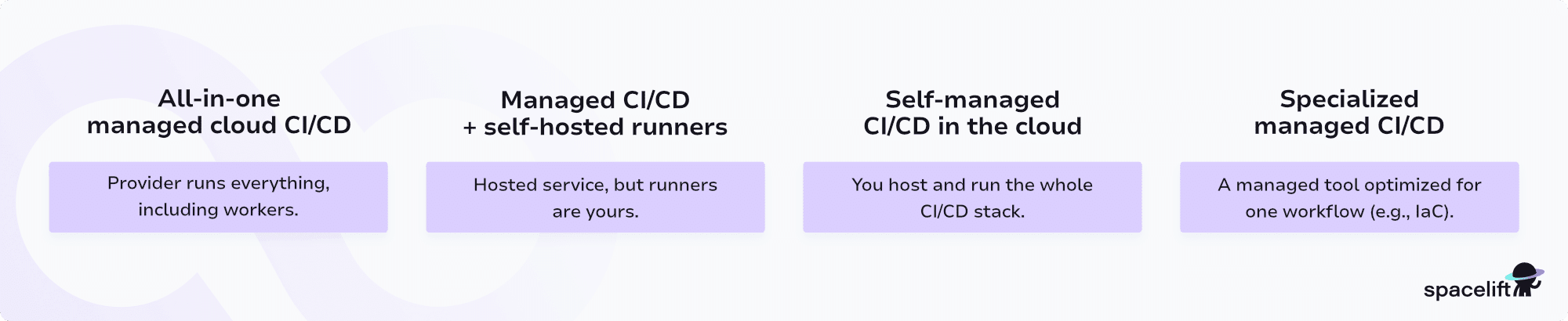
Cloud-based CI/CD comes in a few different flavors. They allow you to optimally balance customization and ease of use:
- All-in-one managed cloud CI/CD: This is where you use services like GitHub Actions and GitLab CI/CD with their provided worker nodes. The service provider maintains all aspects of the CI/CD system, including the worker fleet. You can start running your jobs instantly, but it can be harder to fine-tune performance and cost.
- Managed cloud CI/CD with self-hosted runners: With this model, you continue using the public deployments of CI/CD services like GitHub Actions and GitLab CI/CD.
However, instead of using the service’s worker fleet, you deploy your own runners to compute nodes in your cloud accounts. This lets you customize the resources available to run your jobs, but requires more manual configuration and maintenance. - Self-managed CI/CD running in the cloud: This method is ideal for scenarios where you require maximum control, perhaps due to data sovereignty concerns. It’s implemented by deploying a self-hosted CI/CD system such as a private GitLab, Jenkins, or TeamCity instance, running on your own cloud infrastructure. You then provision additional compute nodes to serve your worker fleet alongside.
- Specialized managed CI/CD services: Some cloud-based CI/CD platforms are optimized for specific types of workflow. They reduce manual configuration by implementing a fully automated end-to-end deployment process.
For example, Spacelift is a CI/CD platform for IaC deployments. It lets you provision, configure, and govern your infrastructure using IaC, without having to manually write complex CI/CD scripts to run your tools. Spacelift’s also available as a self-hosted version for on-premises use.
Adopting any of these cloud-based CI/CD approaches can simplify configuration, reduce maintenance overheads, and enhance scalability. For instance, if your build server is running slowly, you can quickly launch new pipeline worker instances to increase throughput. This isn’t possible in on-premises environments where you’d typically have to procure new hardware first.
Benefits of cloud-based continuous integration and continuous delivery
Cloud-based CI/CD allows you to focus on shipping changes instead of managing your CI/CD system. It also increases flexibility by letting you easily match resource allocations to developer activity. This removes the bottlenecks and slowdowns that occur in conventional CI/CD architectures.
Here are six key benefits of cloud-based CI/CD, including the ways in which they improve DevOps outcomes.
1. Enhanced scalability
Cloud-based CI/CD enables you to increase pipeline capacity by simply scaling your cloud resources up or down, letting you respond to sudden changes in demand. Have many changes to deploy? Provision new compute nodes to enlarge your worker fleet, spin up extra runners for heavy test suites, or parallelize more jobs without rewriting your pipelines. This allows you to maintain stable delivery throughput even during the busiest times, instead of watching builds queue for hours.
When activity subsides, you can scale back down to prevent waste, keeping your infrastructure tightly aligned with real workload needs and your DevOps budget under control.
2. Increased pipeline performance
Cloud-based infrastructure allows you to easily meet your CI/CD performance needs by utilizing a wide range of hardware options.
You can launch high-powered nodes with premium CPUs for jobs that need them, for instance, or provision GPUs to serve AI/ML testing jobs and performance benchmarks. This adds versatility to your development cycle by matching compute to the specific demands of each pipeline stage, rather than forcing every job to run on the same generic hardware.
The result is faster feedback loops, shorter lead times, and a smoother path from commit to production.
3. Cost savings
The scalability of cloud-based CI/CD helps reduce operating costs. Cloud compute nodes are typically billed per-minute or per-hour, so you can cut unnecessary spending by destroying nodes after jobs finish and only paying for what you actually use.
This boosts your DevOps return on investment in scenarios where high-performance hardware is only needed infrequently, such as an AI/ML job that runs on a predefined schedule or a large regression suite triggered before a major release.
Instead of overprovisioning permanent on-prem capacity “just in case,” teams can keep a lean baseline footprint and burst into the cloud when they really need it.
4. Ease of use
Cloud-based CI/CD improves ease of use throughout the DevOps lifecycle. Using managed CI/CD platforms and worker fleets means there’s no complex infrastructure for operators to maintain, patch, or upgrade — they can focus on pipelines and policies instead of servers.
Even if you host your runners on self-managed cloud infrastructure, you can easily manage their deployments and the underlying cloud resources using IaC, keeping everything version-controlled and reproducible.
Developers will also have less friction in their workflows when they can access all pipeline results through a single cloud service, with logs, artifacts, and environment details in one place, which speeds up debugging and reduces context switching.
5. Workflow flexibility
Flexibility is the common theme that runs throughout cloud-based CI/CD. Shifting pipelines into the cloud gives you more options for how you operate your workflows: you can run different stacks for different teams, experiment with new tools, or add temporary environments for feature branches without re-architecting your data center.
Whereas on-premises CI/CD requires a commitment to specific hardware resources and pipeline architectures, the cloud allows you to change things without restriction — add new stages, integrate new services, or re-balance workloads across regions with minimal friction.
This elasticity makes cloud-based CI/CD a compelling choice when you’re expanding your business, have unpredictable CI/CD usage patterns, or are experimenting with your workflows to improve lead time and deployment frequency.
6. Simpler integration with cloud platforms and deployment tools
Using cloud-based CI/CD environments often simplifies integration with other tools and services. This accelerates the pace of your software delivery lifecycle by reducing the glue code and custom networking you need to maintain.
For example, GitLab’s hosted CI/CD solution offers native Google Cloud integration, allowing you to deploy code directly to your Google Cloud account, configure service accounts securely, and reuse existing cloud identities. It removes the need to set up complex manual deployment pipelines or enable potentially risky connectivity between private CI/CD services and public cloud platforms.
As a result, DevOps teams ship faster with fewer integration headaches and a clearer, more secure path from repository to runtime.
How does cloud-based CI/CD compare to on-premises CI/CD
Cloud-based continuous integration and continuous delivery (CI/CD) runs on infrastructure managed by a vendor. On-premises CI/CD runs on infrastructure you own and operate, in your data center or a self-managed private cloud. The real difference is where the operational burden sits — and how quickly you can scale.
With cloud-based CI/CD, you usually get faster setup, simpler upgrades, and elastic capacity. If your build queue spikes, you can quickly add runners without buying or racking new hardware. The trade-off is less control over the underlying environment and tighter coupling to a vendor’s features, networking patterns, and pricing model.
With on-premises CI/CD, you get deeper control over the environment, network, and data boundaries. That matters when you need strict data residency, air-gapped operation, specialized hardware, or custom network access to internal systems.
On-premises CI/CD can also reduce latency by keeping your pipeline infrastructure physically closer to your developers and services. The trade-off is that you own availability, scaling, patching, and incident response for both the CI/CD platform and its workers.
Cloud-based CI/CD addresses common challenges associated with on-premises pipeline infrastructure:
- Less manual configuration: You can start using services like GitHub Actions, GitLab CI/CD, and Spacelift without manually deploying job workers. If you do want your own workers, you can still spin them up in your cloud accounts using IaC and configuration management templates.
- No hardware fleets to maintain: You don’t need to buy and manage dedicated machines just to run pipelines. The cloud allows you to upgrade the nodes that run your jobs whenever you need more performance instead of waiting for the next hardware refresh.
- Costs scale with usage: With cloud-based CI/CD, you generally pay only for the time your jobs are running. Public-hosted worker pools are usually billed per minute, so running fewer or faster pipelines directly reduces your bill. Alternatively, you can use IaC and autoscaling to provision workers in your own cloud accounts for each job, then tear them down as soon as they’re done.
Cloud-based CI/CD isn’t a perfect solution, however. While cloud hosting is simple, scalable, and versatile, on-premises alternatives have advantages too:
- Full control over your data: Owning your CI/CD infrastructure means you decide exactly how pipeline data is stored, processed, and protected. This can be critical when you’re handling sensitive artifacts or working under strict regulatory requirements.
- Fewer external dependencies and less vendor lock-in: Running CI/CD on-premises reduces your reliance on external services and cloud providers. Your workflows become more resilient — you can keep shipping even if a cloud region or vendor service goes down.
- Closer fit for legacy systems: Custom CI/CD systems on-premises can be easier to integrate with existing tools and processes that already reside in a private data center. Some legacy systems aren’t supported by cloud-hosted platforms or aren’t safe to expose to the internet. Keeping CI/CD in the same data center lets you move data safely over existing private networks.
Here’s a quick table comparison to summarize all this:
| Dimension | Cloud-based CI/CD | On-premises CI/CD |
| Set up and upkeep | Faster to start; vendor handles most ops | Slower to start; we run and maintain everything |
| Scaling | Elastic capacity for spikes | Limited by owned capacity and procurement |
| Control and isolation | Less control over the underlying environment | Full control; easier to meet strict boundary needs |
| Network access | Needs deliberate connectivity to private systems | Often simpler access to internal services |
| Cost model | Ongoing subscription/usage spend | Hardware + staffing cost over time |
| Best fit | Teams prioritizing speed and low ops overhead | Teams needing maximum control or special constraints |
Should I use a cloud-based CI/CD?
Cloud-based CI/CD is a strong default for most teams, but it’s not always the right answer. The choice between cloud-based and on-premises CI/CD depends on your specific operational needs.
You should evaluate both architectures against each of the following priorities:
- Pipeline performance and throughput requirements.
- Scalability and flexibility.
- Security and compliance needs.
- Upfront and ongoing cost.
- Ease of use and configuration complexity.
- Whether you’ll need specialist skills to maintain the solution.
Cloud-based CI/CD is typically the best fit for teams that want simplicity, scalability, and almost zero platform maintenance. You can focus on simply running your CI/CD jobs, instead of administering the underlying hardware.
On the other hand, on-premises CI/CD still has a real edge when you’re dealing with strict compliance requirements, tight data residency rules, or a strong desire to avoid deep dependency on a single cloud provider. In those cases, owning the stack can be worth the extra operational effort.
Cloud-based CI/CD tools
Cloud-based CI/CD tools are services that host and run your pipelines on infrastructure you don’t have to manage. You define your workflows as code, push changes, and let the platform handle scheduling, execution, scaling, and basic observability.
Common categories and examples include:
- Source-control-native CI/CD: Tools that live close to your repo and PR workflow (e.g., GitHub Actions, GitLab CI/CD, Bitbucket Pipelines). These make it easy to trigger builds on pushes, run checks on pull requests, and enforce policies before merges.
- CI specialists with broad ecosystem support: Platforms like CircleCI, Travis CI, and Buildkite (hybrid) offer flexible configuration, strong caching, and rich marketplaces of prebuilt steps.
- Cloud-provider CI/CD suites: AWS, Azure, and Google Cloud provide pipeline services tightly integrated with their identity, artifact, and deployment products — often a good fit if most workloads run on that provider.
- Kubernetes-native delivery tools: If your delivery model is cluster-centric, platforms and add-ons such as Argo CD/Workflows and Tekton (often hosted via vendors) can align closely with GitOps and multi-environment promotion.
- Infrastructure-as-Code automation platforms (CI/CD-adjacent): Tools like Spacelift focus on orchestrating and governing IaC workflows (Terraform, OpenTofu, Pulumi, CloudFormation, Kubernetes, etc.) with policy controls, approvals, drift detection, and environment-aware deployments. They often complement “classic” CI by handling infrastructure changes end-to-end — especially when you need stronger guardrails and visibility than a general-purpose CI pipeline typically provides.
See also: 20+ Best CI/CD Tools for DevOps
How can Spacelift help you improve your workflows?
Cloud-based continuous integration and continuous delivery (CI/CD) enables teams to automate delivery without having to run the pipeline infrastructure themselves. Instead of maintaining build servers and runners, we can focus on consistent workflows, faster feedback, and scalable execution across projects and teams.
Spacelift is an IaC management platform that adds a dependable CI/CD layer for infrastructure changes. It orchestrates automated workflows for tools such as OpenTofu, Terraform, Pulumi, Kubernetes, and Ansible, so teams can plan, review, and apply changes in a repeatable way.
Spacelift is designed for your whole team. Everyone works in the same space, supported by robust policies that enforce access controls, security guardrails, and compliance standards. You can manage your DevOps infrastructure much more efficiently, without compromising on safety.
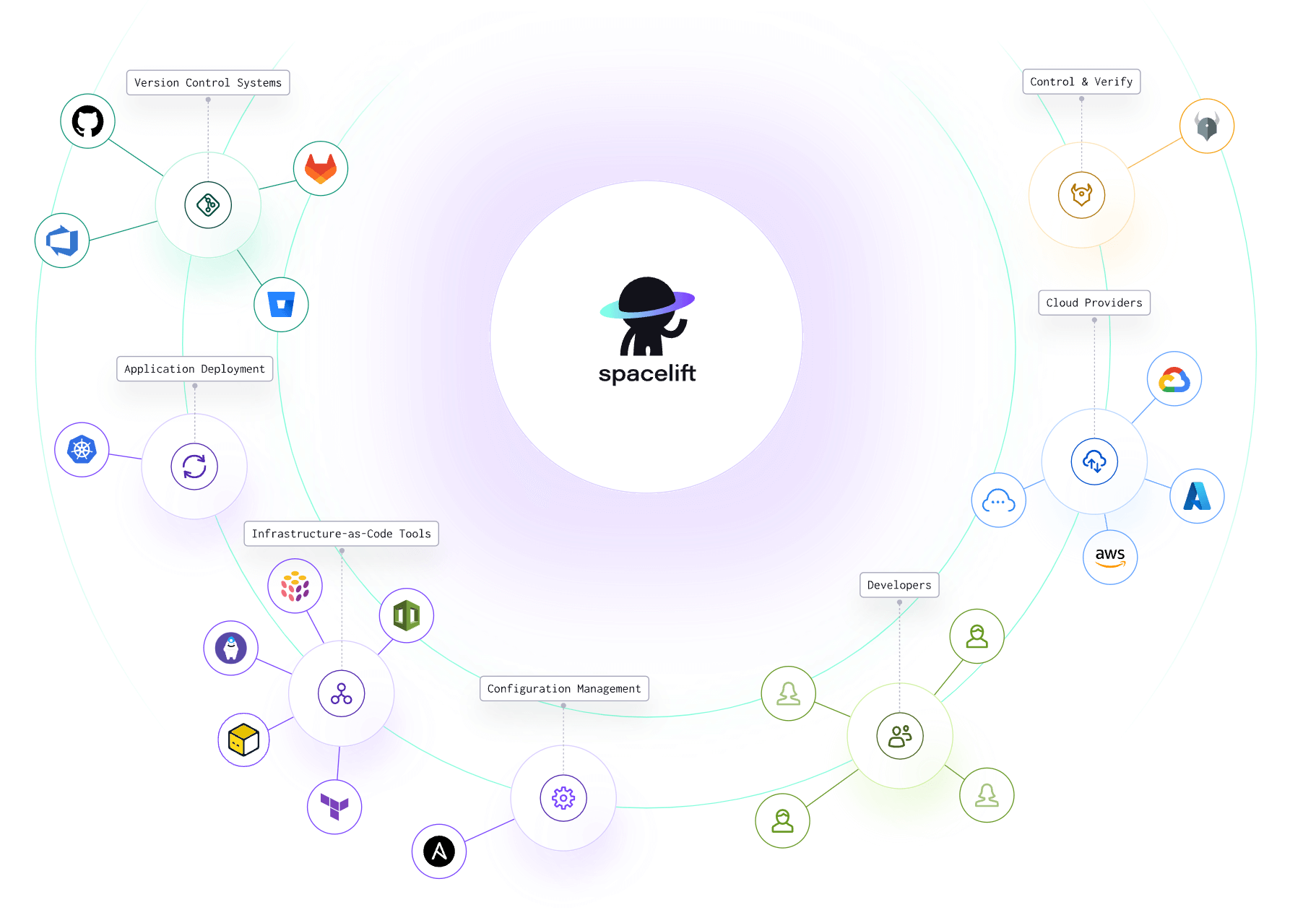
With Spacelift, you get:
- Policies to control what kind of resources engineers can create, what parameters they can have, how many approvals you need for a run, what kind of task you execute, what happens when a pull request is open, and where to send your notifications
- Stack dependencies to build multi-infrastructure automation workflows with dependencies, having the ability to build a workflow that, for example, generates your EC2 instances using Terraform and combines it with Ansible to configure them
- Self-service infrastructure via Blueprints, enabling your developers to do what matters – developing application code while not sacrificing control
- Creature comforts such as contexts (reusable containers for your environment variables, files, and hooks), and the ability to run arbitrary code
- Drift detection and optional remediation
If you want to learn more about what you can do with Spacelift, check out this article.
Key points
Cloud-based CI/CD refers to the use of public cloud infrastructure to run your CI/CD pipelines. It improves pipeline flexibility and scalability while reducing in-house maintenance overheads. You can either use fully managed cloud CI/CD platforms or operate dedicated worker pools on your own cloud infrastructure for a hybrid approach.
Ready to adopt cloud-based CI/CD for your infrastructure workflows? Check out Spacelift to automate your IaC deployment process, from Git repository to cloud account. If you’re not ready to use our cloud-managed platform, then don’t worry: we’ve got you covered with a self-hosted option that you can operate on-premises.
Solve your infrastructure challenges
Spacelift is a flexible orchestration solution for IaC development. It delivers enhanced collaboration, automation, and controls to simplify and accelerate the provisioning of cloud-based infrastructures.
Frequently asked questions
How is cloud-based CI/CD different from self-hosted CI/CD?
Cloud-based CI/CD is managed and hosted by a third-party provider, handling infrastructure, scaling, and updates automatically. Self-hosted CI/CD runs on your own servers, giving full control over environment configuration, security, and resource limits.
Is cloud CI/CD secure for proprietary code?
Cloud CI/CD can be secure for proprietary code if best practices are enforced. Leading providers encrypt data at rest and in transit, offer fine-grained access controls, audit logging, and support for private runners or self-hosted agents. Risks mainly arise from misconfigured permissions, exposed secrets, or third-party integrations.
Which tools support cloud-based CI/CD?
Popular options include:
- GitHub Actions: Native to GitHub, supports workflows for build, test, and deploy using YAML.
- GitLab CI/CD: Integrated into GitLab, offers robust pipeline configuration and built-in runners.
- CircleCI: Optimized for speed and parallelism, with support for Docker and multiple executors.
- Travis CI: Easy GitHub integration, though less commonly used in enterprise settings now.
- Bitbucket Pipelines: Built into Bitbucket, good for teams already using Atlassian products.
- AWS CodePipeline: Fully managed by AWS, integrates with CodeBuild, CodeDeploy, and third-party tools.
- Spacelift: Specializes in infrastructure CI/CD with strong policy controls, VCS integration, and support for Terraform, Pulumi, and Kubernetes workflows. Cloud-hosted with flexible automation and role-based access.