
AI DevOps is supposed to make delivery faster. It does. It also means AI now writes infrastructure code faster than any team can review it.
When we surveyed more than 400 infrastructure decision makers in 2026, 93% had already had an AI-caused infrastructure incident. Speed was never the hard part. Governance is.
What we’ll cover:
TL;DR
AI DevOps applies artificial intelligence across the software delivery lifecycle, for example generating infrastructure as code (IaC), reviewing changes, triaging incidents, analyzing logs, and controlling cloud spend.
Adopt it by starting with low-risk tasks, keeping a human on every change, and enforcing approval gates and least privilege before AI touches production. Spacelift pairs AI-driven infrastructure workflows with policy as code, so speed does not cost you control.
What is AI DevOps?
AI DevOps is the integration of AI into the DevOps toolchain. In practice that means an agent proposes the Terraform, a policy decides whether it can run, and an engineer owns the outcome.
Engineers use it to handle repetitive tasks, debug issues faster, and analyze large volumes of data, freeing up time to focus on more complex tasks.
AI can help DevOps engineers:
- Develop code: Create pipeline configurations, infrastructure templates, and various types of automation scripts.
- Improve governance and compliance: AI can help implement role-based access control (RBAC), policies to restrict the creation of certain resources or their parameters, and more.
- Implement better security: AI can offer recommendations on how to improve your security posture by helping you implement shift-left mechanisms such as vulnerability scanners, policy as code, and linters, and also help you improve your runtime security.
- Improve observability: AI analyzes telemetry, detects anomalies, predicts failures, and can act on them for you.
- Reduce costs: AI can give you insights into your resource costs and help you reduce them based on your utilization.
AI DevOps vs. AIOps vs. MLOps: what’s the difference?
AI DevOps, AIOps, and MLOps are three different practices. The terms are often used interchangeably, but they cover different parts of the stack.
- AI DevOps is the application of artificial intelligence across the software development lifecycle (SDLC). AI DevOps covers generating Terraform and OpenTofu modules, reviewing infrastructure changes, optimizing CI/CD pipelines, and deploying infrastructure. AI DevOps is the broadest of the three terms.
- AIOps stands for artificial intelligence for IT operations. AIOps was defined as combining big data and machine learning to automate IT operations processes, including event correlation, anomaly detection, and causality determination. AIOps covers incident triage, alert correlation, and log analysis. AIOps does not cover writing infrastructure code. AIOps is a subset of AI DevOps.
- MLOps stands for machine learning operations. MLOps applies DevOps principles to the machine learning lifecycle: versioning models, validating them, deploying them, and monitoring them in production. Building a pipeline that deploys a recommendation model is an MLOps task. MLOps is the reverse of AI DevOps where AI DevOps uses AI to improve DevOps, and MLOps uses DevOps to manage AI.
Platform teams work with all three practices. Each one solves a different problem and requires different expertise.
AI agents in DevOps
AI agents in DevOps differ from traditional automation; the latter is deterministic and executes exactly what you script, usually line by line. AI agents, on the other hand, are adaptive, goal-oriented, and determine the steps they need to follow based on the objective you give them.
1. Coding and IaC agents
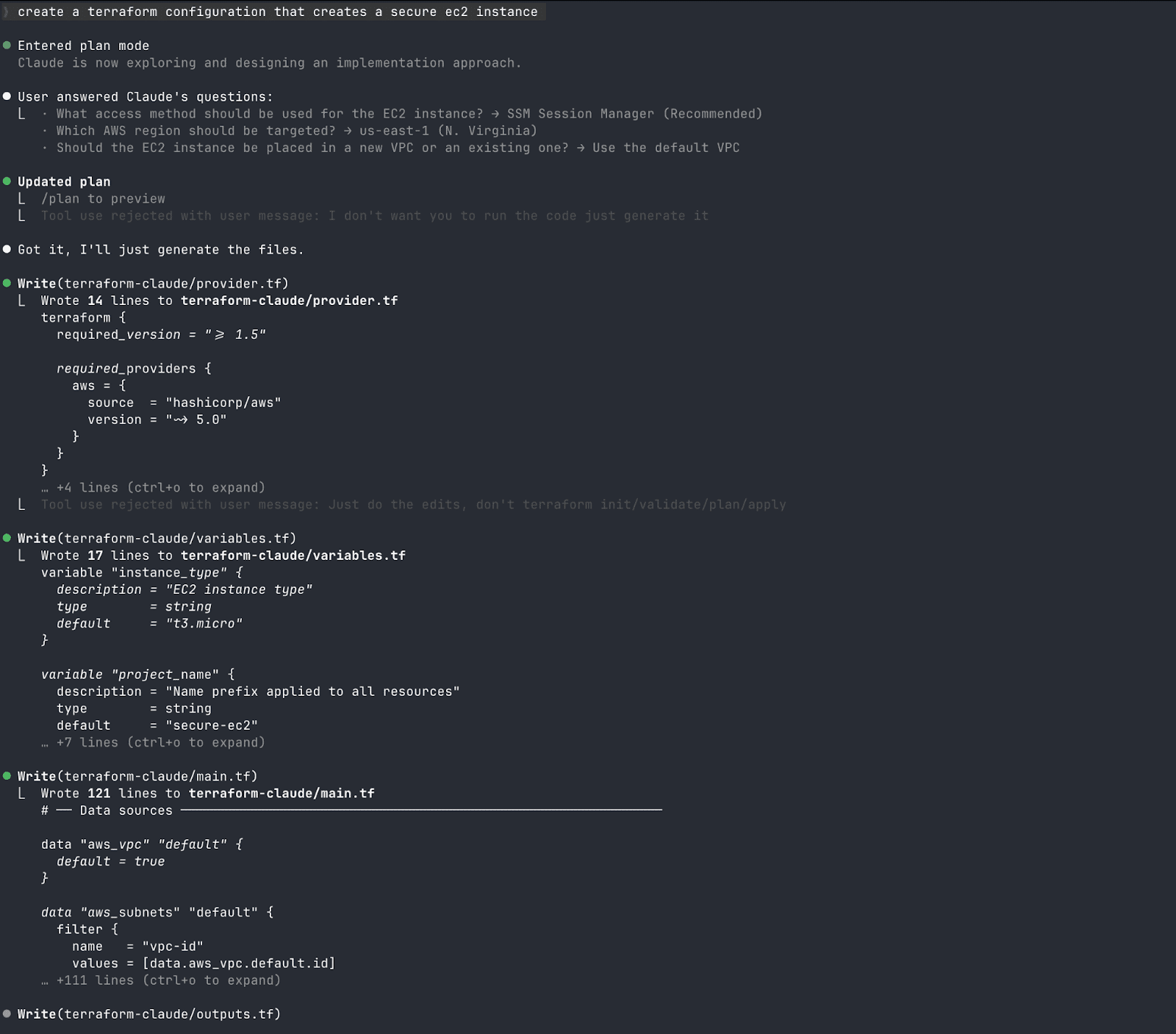
Many tools can help you generate full Terraform modules, Helm charts, or CI/CD pipeline definitions by providing only a description of the infrastructure you need.
These tools include GitHub Copilot, Cursor, Claude Code, and AWS Kiro. These agents are still evolving and helping engineers skip repetitive IaC work every day, compressing hours of work into minutes.
One tool that stands out for IaC is Spacelift Intent. It frees developers who need a lighter way to deploy infrastructure when they implement new features.
Traditionally, infrastructure required an entire provisioning process, even for something as ephemeral as a quick test. Now, with Spacelift Intent, you can easily spin up this infrastructure and tear it down once your work is complete.
2. Security agents
These agents secure the systems they interact with and protect them against various types of cyberattacks. They flag the vulnerability, explain it, and suggest a fix.
Security agents help developers who are not security specialists. Agents handle research and synthesis, but they must not make the decisions; human engineers must evaluate and decide whether the proposed solution is suitable.
3. Incident response agents
Incident response agents are very helpful when an alert fires, as they can correlate signals across metrics and logs and identify the root cause. After identifying the root cause, they suggest or execute remediation runbooks that you define.
In addition, incident response agents are particularly useful for addressing alert fatigue. Imagine you are working in a large enterprise with alerts set up for pretty much everything. If these alerts are also routed to Slack, your engineers might see hundreds of alerts daily, and nobody reads all of them.
In this case, having an incident response agent can help you triage these alerts, mark the important ones for review, and automatically resolve the easy tasks with a runbook.
Use cases: Where AI helps most in the DevOps lifecycle
The areas where AI helps most in the DevOps Lifecycle are:
- IaC and containers: AI helps DevOps engineers write Terraform modules, Kubernetes manifests, and Dockerfiles, resulting in faster iteration and fewer configuration errors. This helps them be more efficient and avoid manual errors.
- Log analysis: Many companies need to collect and process log data. The sheer volume of data makes it difficult for engineers to perform manual review. AI surfaces the patterns that matter, so DevOps engineers can see how systems and applications are actually behaving. For example, before releasing to the production environment, AI can flag anomalies and misconfigurations in your code, making it easier for developers to correct them before release.
- Cloud costs: AI tools can help analyze your infrastructure utilization, identify overprovisioned resources, and suggest right-sizing. This can easily result in savings that manual reviews often miss.
- Security scanning in your CI pipelines: In DevOps workflows, whenever code is committed, your CI system should automatically run tests and scan your code for vulnerabilities. In this way, security issues are detected early in the SDLC. You can also use AI-augmented static application security testing (SAST) to analyze your source code without executing it, and you can use supply chain security tools to catch vulnerabilities earlier and receive suggestions on how to fix these issues.
- Observability: You can gain better insights into which resources are running and how much CPU and memory they consume. You can also receive recommendations to improve your overall reliability, and, in some cases, get automatic adjustments.
- Incident triage: On-call engineers must manually review each of the many alerts they receive each day. AI can help you group alerts and route incidents to the appropriate responders, so engineers receive a single consolidated alert rather than multiple ones.
How to safely adopt AI in DevOps
Enterprises adopt AI in DevOps workflows to move faster. Naive adoption introduces real risks. In our 2026 survey, 76% of organizations said they would apply AI-generated Terraform to production with little or no scrutiny.
Here are five steps that reduce that risk.
Step 1. Start with low-risk tasks
Begin with lower environments and tasks such as code review assistance, documentation generation, and test writing. The output of these tasks is easy to verify, and there is no chance of downtime. Don’t give AI access to your production deployment pipeline from the start.
Step-by-step adoption with constant validation is the way to be safe. Once you are more familiar with your AI assistants and have more confidence in their abilities, you can start using them in more projects.
Step 2. Human review
Make human verification of all AI-generated code and configurations a team rule. The gap between confidence and practice is where incidents start.
In our survey, 86% of infrastructure leaders said they were confident in their AI governance. Only 30% had a formal policy in place.
Step 3. Adopt approval gates
Your production environment needs to be protected and secure. If you use AI agents to make changes in production, you should require human approval before making these changes.
Imagine that you upgrade your Kubernetes cluster to a newer version using AI for the first time, without reviewing or obtaining approval from the DevOps team. A mistake could result in substantial losses and damage to your organization.
Approval gates work best when they’re code, not a team norm. A Spacelift plan policy can flag any run that touches IAM for human confirmation, regardless of whether a person or an agent triggered it:
package spacelift

warn contains sprintf("IAM change requires approval: %s", [resource.address]) if {
    some resource in input.terraform.resource_changes
    resource.mode == "managed"
    resource.change.actions != ["no-op"]
    startswith(resource.type, "aws_iam_")
}
A single warning is enough to stop an autodeploy stack and hold the run for a human. The policy does not care who or what opened the run — the input carries a flag for that, and this rule ignores it. That is the point.
Step 4. Implement security as a first-class citizen for AI
You need to apply the same security rigor to your AI tools as to any other third-party integration. AI agents access your cloud credentials, monitor different data, and also have access to your code.
A good practice is to grant only the minimum necessary privileges to protect your data (principle of least privilege).
Step 5. Constantly evaluate AI outcomes
Monitor AI suggestions that your team accepts and what happens when they do, and then evaluate the data. Based on the outcome, you can easily adjust the trust you have in the AI tools you are using.
What are the best AI tools for DevOps?
The abundance of AI tools for engineers makes it challenging to choose the right ones. Here are some of the best AI tools for DevOps:
- Coding and IaC:
- GitHub Copilot is the most popular AI coding assistant for both application development and IaC. Developed by GitHub and OpenAI, it can assist users in Visual Studio Code, Neovim, Eclipse, and many other IDEs.
- Cursor is a leading AI-powered IDE. It integrates AI directly into the software development workflow, helping users generate, refactor, evaluate, and edit code.
- Claude Code works from the terminal on infrastructure code, explaining what a module does and why a plan is about to change something you did not expect.
- One product built for IaC is Spacelift Intelligence. Its deployment model, Spacelift Intent, frees developers who need a lighter way to deploy infrastructure when they implement a new feature. Traditionally, infrastructure required a full provisioning process, even for something as ephemeral as a quick test. With Intent, you spin that infrastructure up and tear it down when the work is done.
- Containerization:
- K8sGPT scans Kubernetes clusters, diagnoses issues, and returns remediation advice in plain English.
- Cast AI is a Kubernetes optimization platform. It turns workload, infrastructure, cost, and SLO signals into automated actions: rightsizing pods, consolidating nodes, and automating Spot placement. Reach for it when your clusters are overprovisioned, not when you need cluster diagnostics.
- Lens Prism is a context-aware AI assistant embedded directly within Lens Kubernetes IDE. Users can use their preferred language to interact with their Kubernetes clusters, troubleshoot issues quickly, and receive actionable insights.
- Observability:
- Datadog‘s AI SRE agent is Bits Investigation, part of the wider Bits AI suite. It reads the same telemetry your team does, understands your architecture, and follows your runbooks to identify likely root causes before you open your laptop.
- Grafana Cloud‘s AI offering reduces alert fatigue and speeds up multi-step incident investigations. It analyzes dashboards and logs to identify the root cause.
- Security:
- Snyk has AI features that explain vulnerabilities and suggest fixes. It helps engineers minimize alert fatigue, secure containers at scale and AI-generated code, and reduce the security backlog.
- Wiz specializes in cloud security posture management, mapping every relationship across code, cloud, data, and runtime.
Read more: Top 12 AI Tools For DevOps
How to future-proof your infrastructure with Spacelift
Spacelift is an infrastructure orchestration platform that helps you manage Terraform, OpenTofu, Terragrunt, Pulumi, CloudFormation, Ansible, and Kubernetes workflows from a single control plane.
Spacelift includes policy as code, so you can control which resources engineers can create, which parameters they can use, how many approvals a run requires, where notifications go, and more.
It brings together orchestration, governance, and visibility so teams can move quickly without losing control. That fits Spacelift’s two-path deployment model: rigorous IaC and GitOps workflows for production, and Intent for fast, non-critical work.
Spacelift also provides a native way to create dependencies between stacks and share outputs across them, which makes it easier to keep state files small and workflows modular. To balance speed and control, teams can extend governed self-service with offerings like Blueprints and Templates, as well as integrations with ServiceNow and Backstage.
Spacelift Intelligence adds an AI-assisted layer to that model:
- Spacelift Intelligence is an AI layer built into infrastructure workflows rather than bolted on top. It has two parts that platform teams use daily.
- Spacelift Intent provisions real cloud resources from natural language. You describe what you need in an AI client you already use, such as Claude Code, Cursor, or VS Code, and reach Intent through the Spacelift MCP server. The control plane enforces your OPA policies, manages state, and records the audit history. Intent also deploys modules straight from your Spacelift module registry, so AI provisioning resolves back to the modules you already approved.
- Infra Assistant is an AI chat panel inside the Spacelift UI. In Ask mode it answers questions about your infrastructure and explains failed runs. In Build mode it creates and manages resources through conversation, governed by the same Intent policies. Admins choose which mode is enabled.
When a project stabilizes, Intent to IaC generates the OpenTofu or Terraform code and imports the state into a stack, so the experiment becomes a governed workflow.
In practice, Spacelift can help with three distinct use cases:
- You can provision resources using natural language: Leveraging Spacelift Intent, you simply describe in plain English what infrastructure resources you need, and Intent will create them for you. Intent is designed for experimentation, and the best part is that you still get a centralized state, so all the resources that are generated with Intent can also be deleted easily
- Import existing resources into Intent: Most enterprises have orphaned resources inside their cloud providers that they know nothing about. With Spacelift Intent, these resources can be easily identified and added to Intent’s state. Check out this video to learn more:
- Detect and remediate infrastructure drift: Drift is inevitable, but it doesn’t have to be a big issue. In addition to built-in drift detection and remediation, Spacelift also supports drift detection and remediation via Spacelift Intent. If you create a resource through Intent and modify it elsewhere, you can use natural language to easily identify and fix it. Learn more in this video:
In short, Spacelift combines infrastructure orchestration, governance, and Spacelift Intelligence to help teams move faster without losing visibility or control. Intent reduces IaC ceremony for the right workloads, which makes experimentation easier even for engineers without deep infrastructure experience, while platform teams keep the guardrails they need.
Key points
Adopting AI in DevOps can help your engineers write code faster, troubleshoot issues quickly, improve observability, and even help you improve your overall security posture.
You should adopt a safe approach to AI in DevOps, starting with low-risk tasks, continuous human review, and security and audit controls. Having proper guardrails in place is the key difference between an organization that innovates and one that has to firefight AI misconfigurations.
If you want to learn more about how Spacelift can help you with adopting AI in your DevOps processes, book a demo with one of our engineers.
Keep infrastructure moving at AI speed
Spacelift Intelligence keeps platform teams ahead. Fuse traditional IaC and GitOps pipelines with an AI deployment model and a powerful Infrastructure Assist.
Frequently asked questions
What’s the difference between AI agents and copilots?
AI copilots mainly assist a human inside an existing workflow, whereas AI agents are designed to take action and complete work more autonomously. A copilot stays in the loop as a helper; an agent can plan steps, use tools, and pursue a goal with less continuous supervision.
Is DevOps being replaced by AI?
No, it is being reshaped into a more automated, platform-focused discipline. AI is already taking over narrow tasks such as code writing, summarization, and explanation, but teams still need engineers for reliability tradeoffs, security, incident response, governance, and coordination across development and operations.
What are the top use cases for AI in DevOps?
The top use cases for AI in DevOps are incident detection and response, predictive monitoring, intelligent CI/CD optimization, automated root cause analysis, and infrastructure management. These areas matter because AI improves signal quality, reduces manual triage, and shortens recovery time across complex distributed systems.
What are the risks of AI-powered DevOps automation?
AI-powered DevOps automation can introduce risks around false positives, unsafe changes, and reduced human oversight, especially when models act on incomplete telemetry or ambiguous intent. The main failure modes are misconfigured infrastructure, insecure code or policy changes, incident escalation errors, and automation loops that propagate mistakes across environments faster than a human would.
Which DevOps tasks should not be fully automated with AI?
AI should not fully automate high-impact DevOps tasks where context, risk judgment, and accountability matter. These tasks include production approvals, incident response decisions, access control changes, secret handling, destructive infrastructure actions, and compliance sign-off.
Can AI replace DevOps engineers?
No. AI already writes a large share of infrastructure code, but it does not carry accountability. Reliability tradeoffs, security decisions, incident command, policy design, and coordination between development and operations all need engineers.