Terraform AI refers to using AI assistants to write, review, and troubleshoot infrastructure as code. In practice, that means generating HCL from a plain-English description, explaining a failed plan in readable terms, catching destructive changes before apply, and flagging insecure defaults such as open ingress rules or over-permissive IAM policies.
AI does not change how Terraform itself works. The plan and apply cycle stays deterministic, which is what makes infrastructure reproducible. What changes is how the configuration gets written, how quickly it reaches your pipeline, and how much of the review a human still has to do.
That speed is the tradeoff. AI-generated Terraform ships faster than most teams can review it, which makes automated policy checks, security scanning, and drift detection more important rather than less.
In this article, we’ll explore how to integrate AI into your Terraform workflows safely and efficiently. You’ll discover practical use cases, essential tools, and key security considerations, and see how platforms like Spacelift help teams harness AI-driven IaC with confidence and control.
What we’ll cover:
- Can AI write Terraform code?
- How to use Terraform with AI for code assistance
- Example: Infrastructure provisioning with Terraform and AI
- Other ways AI can improve Terraform workflows
- AI tools for working with Terraform
- How does the Terraform MCP server reduce hallucinated Terraform?
- Security risks and compliance risks when using AI-generated IaC
Can AI write Terraform code?
Terraform users have long copied snippets from provider docs, tweaked variables, and hoped the plan would run cleanly. While this manual approach worked, it slowed teams down and made infrastructure prone to inconsistencies and security gaps, especially at scale.
AI is changing that dynamic entirely. By learning from past configurations, understanding provider schemas, and predicting intent, AI turns Terraform workflows into intelligent feedback loops. Instead of just writing HCL, you’re now collaborating with a system that reviews, suggests, and optimizes your code in real time.
Here’s what that looks like in practice:
- Faster module creation: Type “Create an S3 bucket with versioning and server-side encryption” in your IDE. AI writes the full module in seconds, complete with required arguments and default tags.
- Provider-aware fixes: Start typing
aws_instancewith the wrong AMI format, and AI will flag it instantly and suggest the correct AMI filter, pulling from the latest Terraform AWS provider schema. - Smarter refactoring: Paste a 200-line main.tf file, and AI splits it into reusable modules (network, compute, storage) with proper inputs, outputs, and version pins, all ready for large teams.
- Built-in policy checks: AI scans your code against custom Rego policies or HashiCorp Sentinel rules, catching missing tags or unencrypted resources before
terraform planruns.
How to use Terraform with AI for code assistance
Let’s look at the core areas where AI is reshaping how Terraform engineers work:
1. Code generation and scaffolding
Large Language Models (LLMs) like those behind GitHub Copilot or Claude can take natural language input and translate it into valid Terraform HCL, automatically generating variables, locals, dependencies, and even provider configurations. This eliminates boilerplate for common resources such as VPCs, S3 buckets, or Kubernetes clusters, and helps enforce naming conventions, tagging standards, and provider version compatibility across your codebase.
As a result, even non-experts can quickly prototype cloud architectures while staying aligned with best practices.
Example prompt:
“Create a production VPC in AWS with public and private subnets across three Availability Zones, NAT gateways for outbound traffic from private subnets, and route tables configured for internet access in public subnets.”
AI-generated Terraform (simplified):
resource "aws_vpc" "prod_vpc" {
   cidr_block = "10.0.0.0/16"
   tags = { Name = "prod-vpc" }
}

resource "aws_subnet" "public" {
   count					= 3
   vpc_id					= aws_vpc.prod_vpc.id
   cidr_block				= cidrsubnet(aws_vpc.prod_vpc.cidr_block, 4, count.index)
   availability_zone			= data.aws_availability_zones.available.names[count.index]
   map_public_ip_on_launch	= true
   tags = { Name = "public-${count.index}" }

resource "aws_internet_gateway" "igw" {
   vpc_id = aws_vpc.prod_vpc.id
}
While the exact output depends on the model, the initial scaffold typically gives a clean foundation to build upon: the model handles syntax and naming consistency while the engineer focuses on architecture.
2. Real-time code completion in IDEs
Tools like GitHub Copilot and Amazon Q Developer (the evolution of AWS CodeWhisperer) plug straight into VS Code, so as a platform engineer types a resource like aws_security_group "app_sg" , the editor can suggest ingress blocks with CIDR variables, sensible egress defaults, and revocable rules on the fly.
That means less context-switching and fewer documentation trips, Terraform that stays in sync with provider schemas, and faster day-to-day authoring with fewer syntax and validation errors.
Live example suggestion:
resource "aws_security_group" "app_sq" {
   name		= "app-sg"
   description 	= "Allow inbound HTTP/HTTPS fromm ALB"
   vpc_id		= aws_vpc.prod_vpc.id

   ingress {
	description		= "HTTP from ALB"
	from_port		= 80
	to_port			= 80
	protocol			= "tcp"
	security_groups	= [aws_security_group.alb_sg.id]

   engress {
	from_port	= 0
	to_port		= 0
	protocol		= "-1"
	cidr_blocks	= ["0.0.0.0/0"]

   tags = {
	Name = "app-sg"
   }
}
In practice, these live suggestions feel like pair-programming with a Terraform-aware assistant that keeps your code valid as you type.
3. Refactoring and optimization for scale
At scale, managing hundreds of Terraform files can quickly create redundancy and drift. However, AI can now analyze entire repos, spot repeated resources, and propose cleaner modular structures using for_each and parameterized inputs.
It can even flag over-provisioned instances and recommend rightsizing based on CloudWatch or cost data, effectively enforcing DRY principles automatically, improving maintainability across environments, and keeping resource usage efficient without the pain of constant manual audits.
Before (Repeated blocks):
resource "aws_instance" "web1" { ami = "ami-123", instance_type = "t3.medium" }
resource "aws_instance" "web2" { ami = "ami-123", instance_type = "t3.medium" }
AI-Suggested module:
module "web_servers" {
   source			= "./modules/ec2"
   for_each		= toset(["web1", "web2"])
   instance_type	= "t3.micro" # Downgraded based on CPU utilization < 20%
   ami			= data.aws_ami.latest.id
   subnet_id		= aws_subnet.private[0].id
}
Instead of repeated blocks, AI can propose a single parameterized module using for_each across environments, keeping tagging, versions, and instance types consistent. In multi-account setups, AI enforces uniform tagging and module versions.
4. Automated documentation
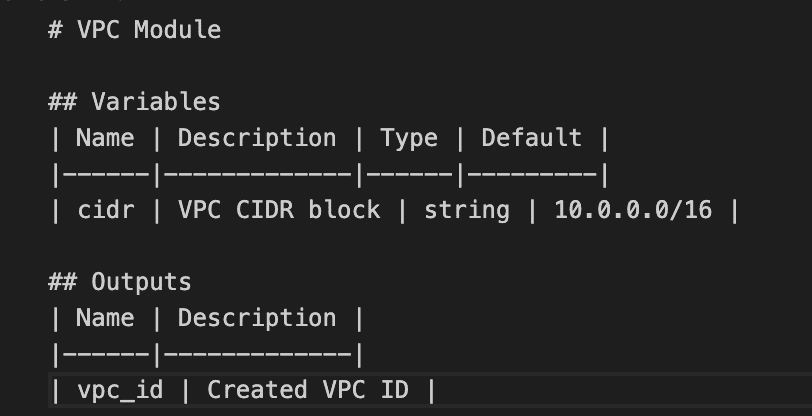
AI generates module READMEs with input/output tables, example usages, and dependency graphs, so teams experience less handoff friction, audits and reviews move faster, and documentation stays continuously in sync with the codebase.
The VPC module section of a README file would look like this:
5. Error detection and plan interpretation
Terraform plan errors are often verbose, cryptic, and hard to scan under pressure. AI tools cut through that noise by translating them into plain, actionable insights. Instead of staring at something like: “Error: Invalid index — Subnet count (3) exceeds AZ data source length (2). Use slice or filter AZs,” you get a clear explanation of what broke and how to fix it.
The result is faster debugging cycles, less trial-and-error when correcting plans, and a noticeable boost in confidence before you hit “apply.” Teams spend less time deciphering stack traces and more time shipping changes they actually trust.
Example: provisioning a three-tier AWS app with AI-assisted Terraform
To see how AI and Terraform work together in practice, let’s walk through a realistic platform engineering scenario.
Your platform team needs to provision a secure, production-grade 3-tier web app on AWS. At a minimum, you need:
- VPC with public and private subnets across 3 AZs
- Application Load Balancer in public subnets
- EC2 Auto Scaling Group in private subnets
- RDS PostgreSQL in private subnets
- Least-privilege security groups and encryption
Traditionally, this means writing dozens of Terraform resources by hand, wiring up dependencies, and double-checking every security and compliance detail. With AI-assisted Terraform, the workflow becomes faster, more consistent, and easier to evolve.
Step 1: Seed the AI with an initial Terraform prompt
You start with a clear, infrastructure-focused prompt:
“Generate modular Terraform for AWS 3-tier app: VPC with public/private subnets (3 AZs), ALB in public, ASG in private, RDS in private, SGs with minimal ports.”
This gives the AI enough context to:
- Target AWS
- Use Terraform best practices
- Respect network isolation
- Default to least-privilege security groups
Because the prompt is specific to Terraform on AWS, the model can generate infrastructure as code that’s close to deployable from the start.
Step 2: AI generates a modular Terraform project structure
In seconds, the AI returns a structured Terraform project instead of a single, messy file:
variables.tf
outputs.tf
networking.tf
compute.tf
database.tf
security.tf
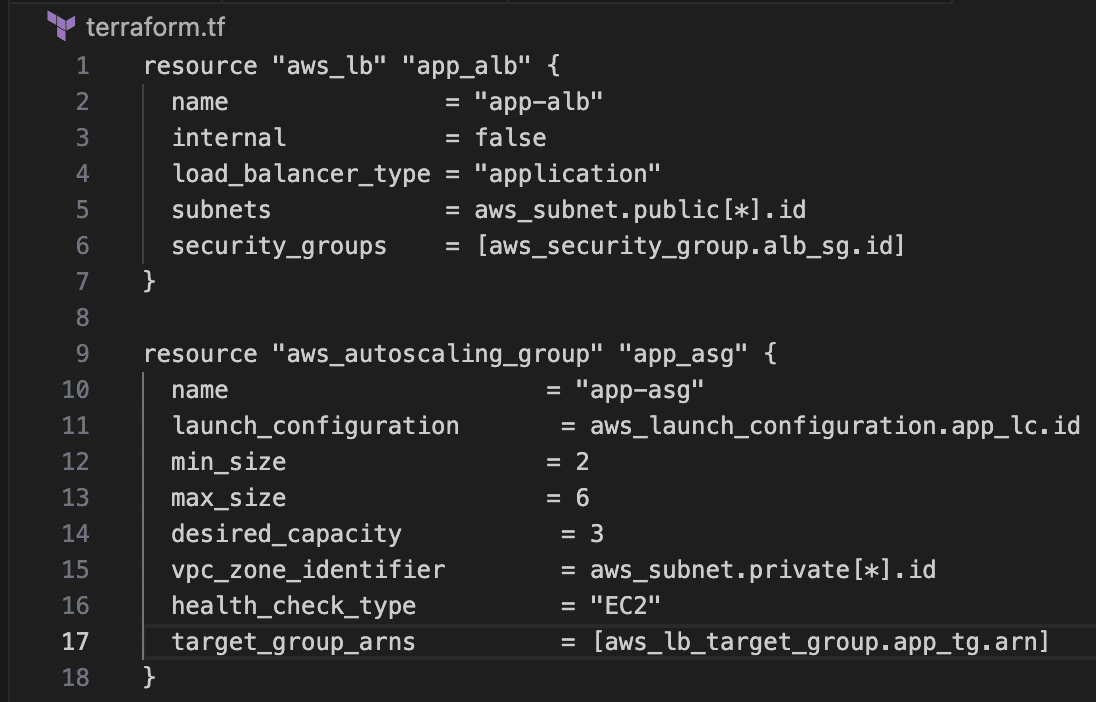
Key snippet (compute.tf with ASG and Launch Config):
Step 3: Iterate with simple, high-level prompts
Instead of hunting down every resource block and flag by hand, you refine the infrastructure with short follow-up prompts:
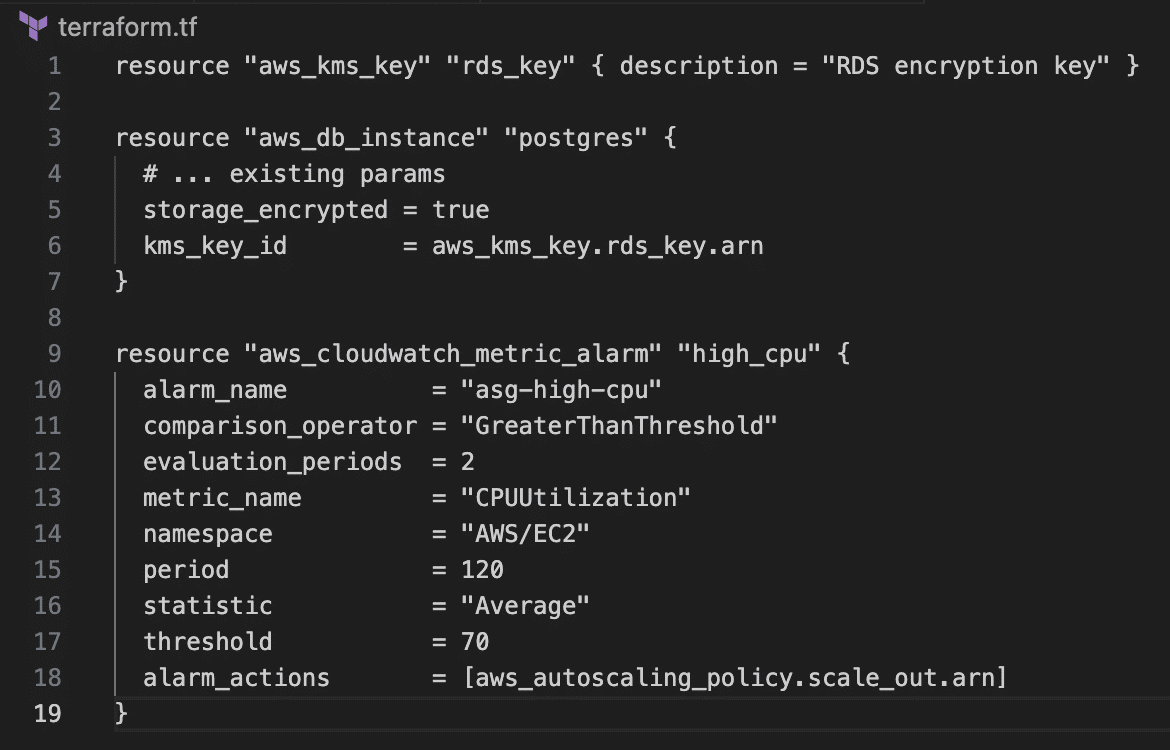
- “Add KMS encryption for RDS and EBS.”
- “Include CloudWatch alarm for ASG CPU > 70%.”
- “Enable access logs for ALB to S3.”
The AI updates or appends Terraform blocks accordingly
Step 4: AI-assisted security and compliance review
Existing CI-integrated tools (e.g., Checkov, tfsec) can scan IaC for vulnerabilities and enforce CIS benchmarks via automated gates. However, AI-assisted reviews differ in that they are interactive and contextual.
They analyze code in real-time, suggest tailored fixes conversationally, and regenerate configurations iteratively, all within the same workflow. This eliminates context-switching, handles custom policies or edge cases beyond static rules, and catches issues during initial generation, not just post-commit.
A simple prompt might be:
“Scan this Terraform for vulnerabilities and apply CIS AWS benchmarks for ALB, EC2, and RDS.”
The AI could respond with findings like:
| Issue | Rationale | Fix |
| ALB SG allows 0.0.0.0/0 on HTTP | Violates least-privilege; CI flags post-write, but AI prevents upfront. | Restrict to CloudFront/known IPs; AI updates SG rules inline. |
| RDS public access | Increases attack surface ; static tools detect later in pipeline. | Set publicly_accessible = false; AI ensures private subnet placement. |
| No deletion protection | Risks data loss; CI enforces via policy, AI adds proactively. | Add deletion_protection = true; AI suggests snapshot policies. |
Outcome: Hours instead of days, with stronger defaults
Building this stack by hand means writing dozens of resources, wiring dependencies, and checking every security and compliance detail. On most teams, that’s multiple days of focused work spread across a review cycle.
With AI-assisted Terraform for AWS:
- You generate a modular, production-ready baseline in minutes.
- You iterate on features and security using natural language prompts.
- You run AI-assisted reviews alongside static analysis tools.
The end result: a compliant, well-structured Terraform configuration ready to deploy in under 2 hours, with reduced manual effort, fewer missed edge cases, and a workflow that scales as your infrastructure grows.
What are the other ways AI can improve Terraform workflows?
AI can plug into almost every stage of the Terraform lifecycle, not just “generate some code for me.”
Here are several high-impact ways AI can improve Terraform workflows end to end:
| Capability | How AI helps | Terraform integration |
| Drift detection | Compares tfstate vs. live state; highlights unauthorized changes | terraform plan -refresh-only + AI diff summaries |
| Policy compliance | Validates plans against OPA/Sentinel policies pre-apply | Spacelift AI generates OPA rules from natural language |
| Cost optimization | Analyzes plan JSON; suggests spot instances or Reserved Instances | Infracost + AI forecasting |
| Change impact analysis | Predicts downtime via dependency graphs | terraform graph + AI blast radius visualization |
What are the best AI tools for Terraform?
AI-powered infrastructure as code is already transforming how engineers build and manage cloud infrastructure. From intelligent code suggestions to automated policy enforcement, several tools are helping Terraform users work smarter and safer.
Here’s a closer look at the leading tools driving this evolution and how each contributes to smarter, safer, and faster IaC workflows.
- GitHub Copilot – AI-coding assistant inside IDEs like VS Code and JetBrains that understands Terraform syntax and intent. It generates Terraform blocks from natural language, auto-completes variables/resources/outputs, and suggests names and docs, so it’s ideal for teams that want fast, context-aware Terraform help without leaving their editor.
- Kiro – AWS’s agentic IDE and the replacement for Amazon Q Developer (formerly CodeWhisperer). Built on Code OSS, so VS Code settings and Open VSX extensions carry over, with models running on Amazon Bedrock and full MCP support. Spec-driven rather than autocomplete-driven, which suits multi-file Terraform changes.
- Claude Code and Cursor – Repo-aware assistants that read an entire Terraform monorepo, trace module dependencies, and handle bulk refactors across dozens of files. Both support MCP, so you can point them at the Terraform MCP server for current provider schemas instead of relying on training data.
- Spacelift Intelligence – Spacelift orchestrates Terraform, OpenTofu, Pulumi, CloudFormation, and Kubernetes, and applies AI to operations and governance rather than only to code generation. Infra Assistant explains failed runs in plain language and suggests code-level fixes across init, plan, and apply. Intent provisions infrastructure from a natural language description, calling provider APIs directly rather than generating .tf files, with every action checked against your Intent policies. Both reach the same governed projects through the Spacelift MCP server.
- Checkov, Trivy, and KICS – Actively maintained IaC scanners that catch Terraform misconfigurations and policy violations in CI/CD.
Cloud provider AI tools for Terraform
While general-purpose AI coding assistants are incredibly powerful, each major cloud provider has started releasing Terraform-optimized AI accelerators that are deeply aware of their own services, best practices, pricing models, and latest feature releases. These tools go beyond generic HCL generation and bake in cloud-native intelligence from the outset.
1. AWS: Kiro and Amazon Q Developer + Terraform
Kiro is AWS’s current recommendation for AI-assisted development, including Terraform. It runs on Bedrock models, supports MCP, and is designed around writing a spec before generating code, which produces more reviewable multi-file Terraform than autocomplete does.
Amazon Q Developer still exists in the AWS Management Console, the Console Mobile App, and the Slack and Teams integrations. What’s going away is the IDE plugin and paid subscription side, on 30 April 2027.
For grounded AWS provider documentation, point your assistant at the HashiCorp Terraform MCP server rather than relying on the model’s training data.
2. Google Cloud: Gemini Code Assist and the Gemini CLI + Terraform
Google’s Codey models (code-bison, codechat-bison, code-gecko) have been retired, and the Vertex AI documentation now carries a notice that its services have moved to the Gemini Enterprise Agent Platform. Any guide still recommending Codey for Terraform is out of date.
The current path is Gemini Code Assist in the IDE and the Gemini CLI in the terminal, both of which handle HCL and can be pointed at MCP servers for current provider schemas.
3. Azure: the Azure Terraform MCP Server and GitHub Copilot for Azure
Microsoft publishes @azure/terraform-mcp-server, which gives your assistant grounded azurerm provider documentation instead of guessed arguments. It runs in any MCP-aware client: VS Code, Cursor, Claude Desktop.
Azure MCP Server 2.0 is generally available and covers 40+ Azure services, either standalone or alongside the GitHub Copilot for Azure extension. Copilot for Azure also ships an Azure IaC Generator agent for producing Terraform and an Azure IaC Exporter agent for exporting existing Azure resources into IaC.
4. Cloud-native CI/CD platforms built for AI-augmented Terraform
Some platforms are going further by coupling cloud-specific AI with full lifecycle governance:
- Spacelift MCP server — Connect Claude Code, Cursor, or VS Code to your Spacelift account over MCP. With read scope, your assistant can query stacks, runs, and policy outcomes. With write scope, it can provision through Intent, and every write is checked against your Intent policies before it runs.
- HCP Terraform (formerly Terraform Cloud) – HashiCorp’s AI work is happening in two places. The Terraform MCP server went generally available in June 2026 for both HCP Terraform and Terraform Enterprise. HCP Terraform powered by Infragraph, a centralized infrastructure knowledge graph, entered public preview in May 2026 and is now in limited availability for Standard and Premium customers.
The common thread across all three clouds is MCP. Every vendor has converged on the same fix for hallucinated Terraform: stop asking the model to recall provider schemas and give it a live connection to the source instead.
How does the Terraform MCP server reduce hallucinated Terraform?
The most common failure mode for AI-generated Terraform is a confidently wrong argument. A provider attribute that was renamed two versions ago, a resource that never existed, a block nested where it doesn’t belong. The model isn’t guessing randomly. It’s recalling a provider schema from training data that has since moved on.
The Terraform MCP server fixes this by giving your AI client live access to the source. Instead of recalling what arguments aws_instance accepts, the assistant queries the Registry and gets the real answer.
It covers four things:
- Public Terraform Registry lookups for providers, modules, and Sentinel policies
- Private registry access for HCP Terraform and Terraform Enterprise
- Workspace, variable, and run management, so an assistant can create a workspace or trigger a plan
- The Terraform style guide and module development guide, exposed as MCP resources so generated code follows official conventions
It runs over stdio or streamable HTTP and enforces your existing Terraform authentication, so the assistant never handles credentials directly. HashiCorp does note that it should not be pointed at untrusted MCP clients or models.
Two other things are worth knowing. The AWS Labs Terraform MCP server has been deprecated in favor of HashiCorp’s, and the same protocol is how Spacelift Intent connects to Claude Code, Cursor, and VS Code.
For setup and a full tool reference, see our guide to the Terraform MCP server.
Is AI-generated Terraform safe to deploy?
Here are the main risk categories to watch for when using AI with Terraform:
| Risk | Description | Real-world impact |
| Insecure defaults | AI may allow 0.0.0.0/0 ingress or attach an over-permissive IAM role | The 2019 Capital One breach chained a misconfigured WAF, an SSRF flaw, and an over-permissioned IAM role into 106 million exposed records |
| Sensitive data exposure | Secrets in prompts sent to public LLMs | Credential leakage |
| Hallucinated configurations | Invalid arguments (e.g., deprecated count in modules) | Apply failures, state corruption |
| Module supply chain | Suggests unvetted registry modules | Providers get SHA256-pinned in .terraform.lock.hcl. Modules do not. A module can change between the plan you reviewed and the apply you ran (see HashiCorp bulletin HCSEC-2024-04) |
| Over-reliance | Blind deployment without review | Outages from misunderstood logic |
Mitigation strategies
You don’t have to choose between speed and safety. To make AI-assisted Terraform secure and compliant:
- Treat AI like a junior engineer – Every AI-generated Terraform change should go through peer review before merge. No exceptions.
- Shift security left with automated checks – Run Checkov, Trivy, or Spacelift policy checks on every PR.
- Enforce guardrails with policy-as-code – Use OPA, Sentinel, or similar to encode org-wide rules (no 0.0.0.0/0, no unapproved regions, required tags, etc.) so unsafe AI suggestions are blocked automatically.
- Protect secrets at all costs – Keep keys and credentials in Vault, AWS Secrets Manager, or Azure Key Vault, and keep them out of prompts. Redact, mock, or tokenize anything sensitive.
- Prefer private or self-hosted AI for sensitive environments – Where possible, run AI assistants inside your VPC or on private models, so prompts and code never leave your security boundary.
- Stage before prod, always – Apply AI-generated IaC to dev or staging first, validate behavior, and only then promote to production.
- Log and audit everything – Track who requested AI changes, who reviewed them, and who deployed them. This makes incident response and compliance audits far easier.
- Whitelist approved modules – Lock down which Terraform modules can be used, and block anything outside your approved, vetted list in CI.
- Train engineers on AI’s limits – Make sure teams understand that AI can speed up Terraform — but can’t replace fundamentals like least privilege, blast radius analysis, and careful reviews.
How Spacelift governs AI-generated Terraform
Action blocks are powerful, but on their own, they won’t solve the problems you have with running Terraform safely at scale. In most cases, you need policy enforcement, drift detection, run visibility, and a way to manage multiple stacks across cloud providers.
Spacelift is the infrastructure orchestration platform built for the AI-accelerated software era, managing the full lifecycle of both traditional IaC and AI-provisioned infrastructure.
It helps you manage all your IaC, Ansible, and Kubernetes from a single control plane, making it easy to implement a GitOps workflow that handles all your governance, including built-in policy as code, drift detection and remediation, dependency management across your stacks, self-service infrastructure with Templates, and more.
Spacelift Intelligence adds an AI-powered layer for natural language provisioning, diagnostics, and operational insight across both your traditional and AI-driven workflows.
Watch the video below:
Spacelift takes Terraform further with purpose-built infrastructure orchestration, including:
- Policy as code with Open Policy Agent (OPA): Control approvals, restrict the resources teams can create, validate configuration parameters, and define how runs behave when pull requests are opened or merged.
- Multi-IaC workflows: Orchestrate Terraform alongside Kubernetes, Ansible, OpenTofu, Pulumi, CloudFormation, and other tools. Model dependencies between workflows and share outputs across them.
- Governed self-service infrastructure: Use Templates to give developers a curated catalog they deploy from by filling out a form. Inputs are validated before anything runs, and every version is pinned to a VCS commit for repeatable results. Platform teams define what can be deployed and how, so developers self-serve without learning the underlying IaC. Blueprints remain available when you just need to create an independent, editable stack.
- AI-assisted provisioning with Spacelift Intelligence: An Infrastructure Assistant that understands your stacks, state, and runs, so you can ask questions, diagnose failed runs, and create policies in plain language. It pairs with Intent, an agentic deployment model that provisions non-critical infrastructure from natural language, no HCL required, while your policies, credentials, and audit trail still apply.
- Integrations with third-party tools: Connect Spacelift to the tools your teams already use, and extend governance across them. For example, you can integrate security tools into your workflows using Custom Inputs.
Ready to let AI write the code while we maintain its security and compliance? Start free today or book a demo with our engineering team.

As Evan Strat, Senior Platform Engineer at Duolingo, explains: "The thing that really sold Duolingo on Spacelift was the fact that it is deeply customizable. Duolingo is really particular about some things, so if there’s something that the Spacelift platform can’t do directly, there’s always been a way to pivot slightly and do whatever we want. Having that flexibility makes it very easy to extend and customize the platform. And that’s really nice."
Key points
AI is transforming Terraform from a static infrastructure-as-code tool into an intelligent, proactive assistant capable of provisioning, optimizing, and securing resources. Engineers still own the architecture, the review, and the approval. AI handles the boilerplate and the first pass at debugging.
In this post, we have seen how tools like Spacelift AI, GitHub Copilot, and CodeWhisperer simplify the process of writing compliant, cost-efficient infrastructure code. We also saw the importance of maintaining strong guardrails like human review, policy enforcement, and security scanning before deploying any AI-generated IaC configurations.
In essence, success lies in combining AI’s speed with human expertise. When automation and judgment come together, teams can achieve faster, safer, and cheaper infrastructure without losing control or trust.
Keep infrastructure moving at AI speed
Spacelift Intelligence keeps platform teams ahead. Fuse traditional IaC and GitOps pipelines with an AI deployment model and a powerful Infrastructure Assistant.
Frequently asked questions
Does Terraform use AI?
No, Terraform does not use AI. It can integrate with AI-driven systems, but its core workflow remains predictable and rules-based, which is important for reproducible infrastructure management.
Can AI generate production-ready Terraform?
AI can generate a solid modular baseline in minutes: VPCs, subnets, security groups, and module structure with sensible defaults. What it cannot do is know your naming conventions, your tagging policy, your approved regions, or your blast radius. Treat the output as a first draft from a capable junior engineer: reviewed by a human, scanned in CI, and gated by policy as code before it reaches apply.
Can AI help reduce Terraform plan noise?
AI can help reduce Terraform plan noise by identifying low-value changes and highlighting the actions that actually matter. It can analyze patterns in resource updates, detect drift that is safe to ignore, and summarize repetitive churn that would otherwise clutter reviews.