Ansible and Jenkins dominate the automation and IT infrastructure landscape, so DevOps engineers and IT professionals need to understand the differences between them to make informed decisions about their overall automation strategy. Although they share some similarities, they are built to serve different purposes.
Ansible is primarily a configuration management and automation tool that helps users manage infrastructure and system configurations, whereas Jenkins is one of the open-source leading continuous integration and continuous delivery (CI/CD) tools.
This article will explore the distinctions and similarities between these two DevOps tools and how they can work together to create a reliable automation ecosystem.
Before going further, one thing is worth saying plainly. Ansible and Jenkins are not really rivals. Ansible manages the state of your systems and Jenkins orchestrates the pipeline that builds and ships your software.
The useful question is rarely “which one wins,” but “where does the pipeline hand off to configuration management?” The rest of this article maps that boundary, then shows how the two tools work together on either side of it.
How we compared these platforms
We aim to make our recommendations practical and vendor-neutral. We based this comparison on each vendor’s public documentation and pricing pages, hands-on experience using both tools, and the dimensions that matter most in practice.
What is Ansible?
Ansible is an open-source IT automation software backed by Red Hat. It automates and orchestrates infrastructure across large fleets of machines and has become the de facto choice among IT automation tools.
Ansible is built around two design choices. The first is that it is agentless. Unlike Puppet or Chef, which run a daemon on each managed machine, Ansible connects over SSH, pushes small modules to the target, runs them, and removes them afterward. This keeps setup simple and limits what has to be installed and maintained on managed nodes.
The second is idempotency. Playbooks describe the desired state of a system rather than a sequence of steps, so running the same playbook more than once produces the same result. You define what a server should look like, and Ansible reconciles the system to match that definition.
Check out these blogs and tutorials on the Spacelift blog page to learn more about Ansible.
How does Ansible work?
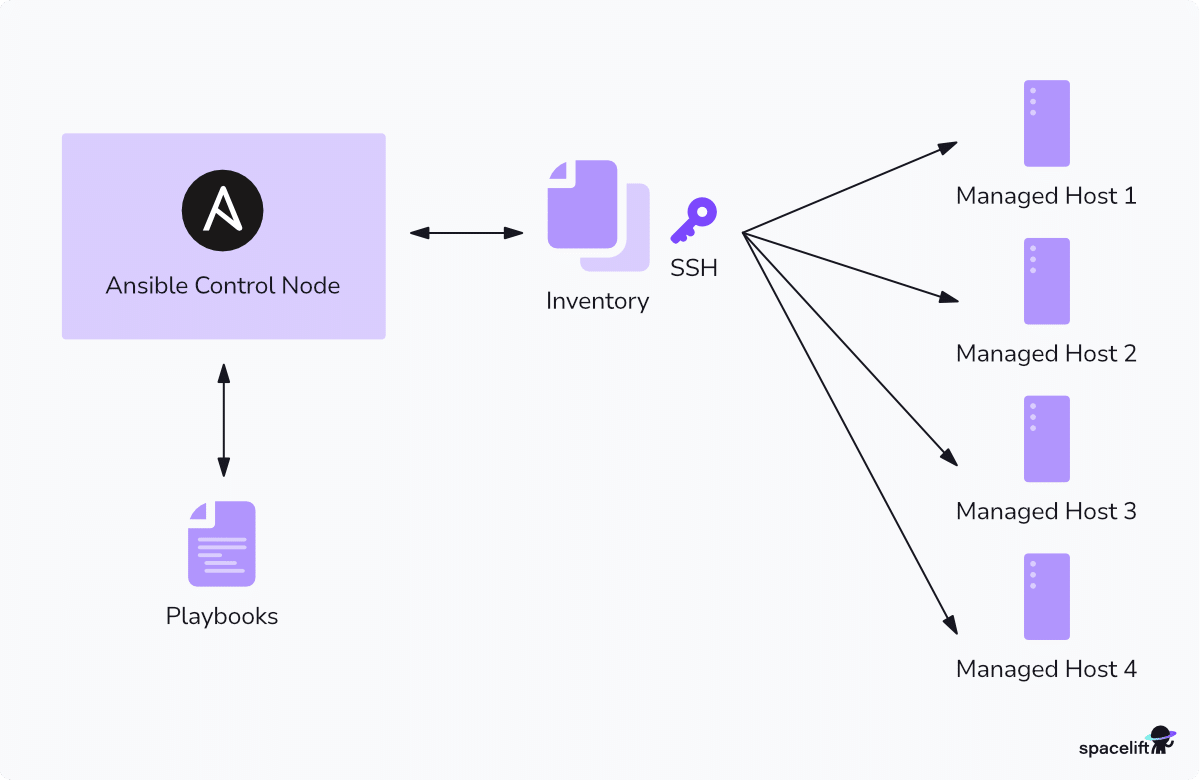
Let’s look at the basic concepts behind Ansible architecture and functionalities. Here’s a high-level diagram of Ansible’s main concepts:
Key features of Ansible
- Control and managed nodes – Ansible distinguishes between control nodes and managed nodes. A control node is any machine with Ansible installed; it acts as the center of operations. Managed nodes are the target machines that receive commands and instructions.
A great benefit of Ansible is that no extra tooling or agents need to be installed on the managed nodes, which makes it easy to use for most target environments. Managed machines are represented in an inventory file, either statically or dynamically generated from different targeted environments. This inventory file usually groups nodes into various categories and allows for fine-grained control of operations.
- Language and implementation – One reason Ansible became so popular is its use of YAML, a declarative, human-readable configuration language that is simple and widely adopted by many software tools and professionals.
- Execution structure – Execution is based on the concept of modules, which are the basic units of code executed on managed nodes. Ansible modules abstract away complexity and provide end users with an easier way to perform their automation tasks without needing all the details.
Each task invokes a module, and an ordered list of tasks together form a playbook. Users write playbooks with tasks and modules to define the system’s desired state.
What is Jenkins?

Jenkins is a popular DevOps tool for automating repetitive tasks and speeding up software delivery. It’s an open-source automation tool primarily focused on CI/CD in software development.
Jenkins’s power comes from its automation capabilities for building, testing, and deploying software applications. These capabilities enable efficient software delivery while ensuring quality. Jenkins automation is usually triggered by code changes in Git code repositories while integrating with container technologies such as Docker and Kubernetes and build tools like Maven.
How does Jenkins work?
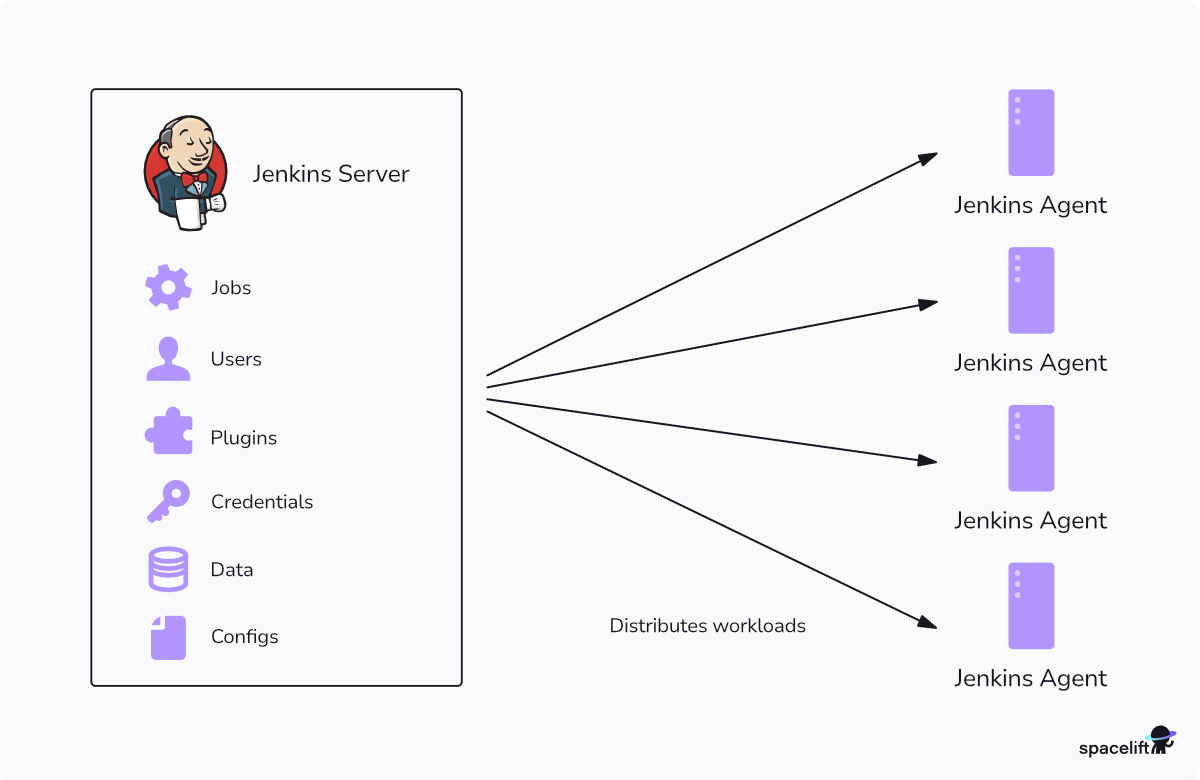
Next, let’s look at Jenkins’s core concepts and architecture.
Key features of Jenkins
- Nodes and distributed builds – Jenkins is a Java-based application that runs as a web application after installation. One node acts as the controller (formerly called the master), which holds the central configuration and distributes work to agents (formerly called slaves). The agents execute the assigned tasks, such as building code or running tests.
- Extensibility – Jenkins supports a wide array of plugins, allowing integration with other automation tools and technologies. Plugins are usually community-developed modules that extend Jenkins functionality.
- Pipelines – Jenkins uses an imperative model. A pipeline is an ordered list of steps that Jenkins runs in sequence, so running it twice performs the work twice. Jenkins offers the option to create pipelines via the web-based graphical user interface (GUI) or describe them using code, providing version control and facilitating complex workflows.
To get started with Jenkins, look at our article What is Jenkins? and the Jenkins tutorial for beginners.
Key differences between Ansible and Jenkins
Both products are prominent tools in the DevOps ecosystem. They serve distinct purposes in the software development lifecycle. Understanding their key differences is essential for selecting the appropriate tool for your project’s needs.
1. Purpose, functionality, and use cases
Ansible is an automation and configuration management tool used for provisioning, managing, and deploying infrastructure and applications. Jenkins, on the other hand, is a CI/CD tool designed to automate software build, test, and deployment processes.
Ansible focuses on infrastructure automation, allowing users to configure servers, enforce desired states, and deploy applications across environments. However, Jenkins automates the development pipeline, ensuring code is continuously integrated, tested, and deployed.
For example, you might use Ansible to configure a set of virtual machines and install the necessary software, while Jenkins would automate the testing and deployment of an application to those machines. In many workflows, these tools complement each other. Jenkins can trigger Ansible playbooks as part of a deployment process.
2. Architecture and agent approach
Ansible operates using an agentless architecture, connecting to target nodes over standard protocols like SSH. This design simplifies deployment, as no additional software needs to be installed on managed nodes. Ansible executes tasks by pushing small programs called modules to the nodes, which are executed and then removed after completion.
Jenkins uses a controller-agent architecture. The controller orchestrates tasks and distributes workloads to agent nodes, which can run on various machines. Agents execute the tasks assigned by the controller, such as building code or running tests.
3. Configuration language
Ansible uses YAML, whereas Jenkins primarily uses Groovy-based scripting for pipeline automation.
Ansible relies on declarative YAML-based playbooks, which define infrastructure and configuration tasks in a human-readable format. This makes it easier for beginners to understand and implement automation workflows.
Jenkins is configured through its web-based GUI (Graphical User Interface) or Groovy-based Domain Specific Language (DSL) scripts, allowing for code-based pipeline definitions. Groovy provides more flexibility and control but has a steeper learning curve compared to YAML. This flexibility enables both simple and complex pipeline setups tailored to project needs.
4. Security
Security requires careful consideration for both Ansible and Jenkins.
- Ansible is agentless, connecting over SSH for Linux/macOS and over WinRM or SSH for Windows (SSH for Windows became officially supported in ansible-core 2.18), which minimizes the attack surface compared to agent-based tools.
- Jenkins is a server-based automation tool that requires persistent services and proper authentication/authorization. Security risks include plugin vulnerabilities, exposed credentials, and potential privilege escalation in build pipelines, so hardening Jenkins (e.g., limiting plugin use, securing credentials, enabling RBAC) is essential.
While Ansible and Jenkins share some overlapping concerns, such as secrets management, their core security challenges and approaches differ. Securing Ansible ensures that automation doesn’t introduce vulnerabilities, whereas securing Jenkins protects the CI/CD pipeline from attacks that could compromise builds and deployments.
5. Learning curve
The main difference between Ansible and Jenkins in terms of learning curve is that Ansible is generally easier to learn, while Jenkins has a steeper learning curve due to its extensive configuration options.
For users looking for quick automation with minimal setup, Ansible may seem more accessible. However, Jenkins provides greater flexibility and customization, making it more suitable for advanced CI/CD workflows despite its higher initial learning effort.
Ansible uses a simple, agentless, and YAML-based approach, making it more intuitive for beginners, especially those familiar with scripting and system administration. On the other hand, Jenkins involves setting up pipelines, managing plugins, and configuring build processes, which can be complex for newcomers.
Similarities between Jenkins and Ansible
Even though Ansible and Jenkins are designed for different purposes, they share some similarities.
1. Open-source and community
Both Ansible and Jenkins are open-source tools, allowing organizations to use them without licensing costs. Their open-source nature fosters active community engagement and leads to continuous improvements.
2. Infrastructure automation
At their core, both tools automate repetitive tasks to improve efficiency and reduce human error. Ansible automates infrastructure provisioning and configuration management, whereas Jenkins automates CI/CD stages of the software development lifecycle.
3. Extensibility and integrations
Ansible and Jenkins are both designed to be highly extensible, supporting integration with various third-party tools and services.
Ansible achieves this through its modular architecture and extensive collection of modules. Jenkins has a vast plugin ecosystem, allowing it to adapt to a wide range of CI/CD requirements and workflows.
Ansible vs Jenkins table comparison
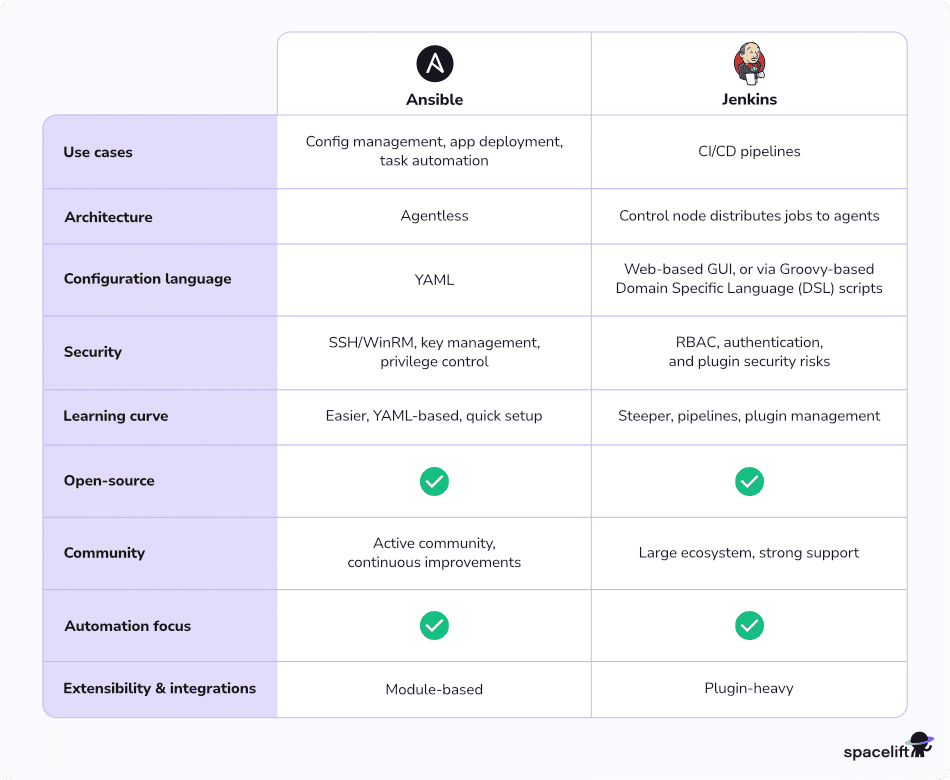
The table below summarizes the comparison between Ansible and Jenkins:
| Feature | Ansible | Jenkins |
| Use cases | Config management, Application deployment, Task automation | CI/CD pipelines |
| Architecture | Agentless | Control node distributes jobs to agents |
| Configuration language | YAML | Web-based GUI, or via Groovy-based Domain Specific Language (DSL) scripts |
| Security | SSH (WinRM or SSH on Windows), Key management, Privilege control | RBAC, Authentication, and Plugin security risks |
| Learning curve | Easier, YAML-based, Quick setup | Steeper, Pipelines, Plugin management |
| Open-source | ✅ | ✅ |
| Community | Active community, continuous improvements | Large ecosystem, strong support |
| Automation focus | ✅ | ✅ |
| Extensibility & integrations | Module-based | Plugin-heavy |
Using Ansible and Jenkins together
Now that we have examined both tools in terms of purpose and use cases, let’s examine how we can combine them. By pairing Jenkins CI/CD functionality with Ansible configuration management and deployment capabilities, we can build pipelines that cover everything from environment creation and configuration to application deployment and testing.
The actual deployment process often involves complex configurations and interactions with multiple systems and environments. Instead of relying on custom scripts on Jenkins to perform various configuration actions, users can rely on Ansible roles and playbooks for provisioning and deployment. This allows Jenkins to act only as a process orchestrator instead of a script executor.
Jenkins can also trigger Ansible playbooks at specific stages of the CI/CD pipeline, such as after a successful build for testing purposes or before deploying to production.
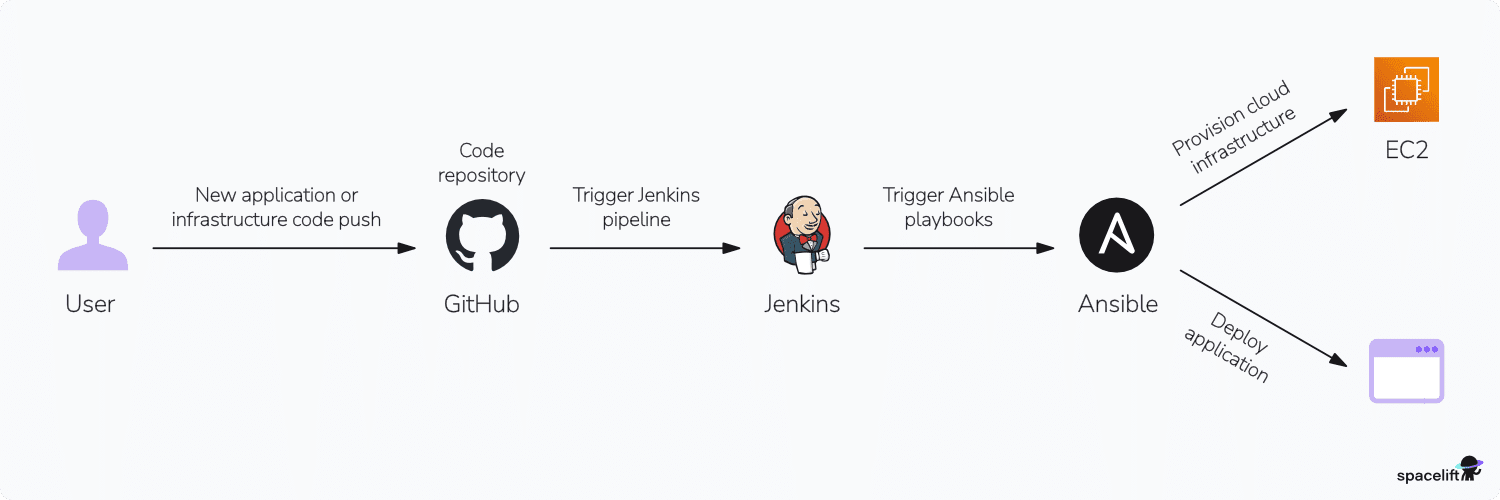
Similarly, by combining the tools, we can automate multi-stage deployments, roll back deployments if tests fail, and integrate application testing with infrastructure updates.
Another interesting use of the combination of these tools is when performing configuration management of systems or devices at scale. Combining Ansible and Jenkins allows you to set up and schedule configuration update pipelines across multiple machines.
Configuration management is crucial for ensuring compliance and consistency of IT and networking systems. Although Ansible can automate configuration updates, it lacks the orchestration capabilities provided by Jenkins.
In practice, the handoff is small. A Jenkins pipeline stage calls the playbook and lets Ansible own the configuration work:
pipeline {
    agent any
    stages {
        stage('Configure servers with Ansible') {
            steps {
                // Jenkins orchestrates; Ansible owns desired-state config
                sh 'ansible-playbook -i inventory/production site.yml'
            }
        }
    }
}
Jenkins decides when the configuration runs and what happens around it; Ansible decides what the servers should look like when it does. That is the boundary in one screen of code.
Benefits of combining Ansible with Jenkins
The main benefit of combining Ansible with Jenkins is streamlined automation for both infrastructure provisioning and application deployment. Jenkins handles continuous integration/continuous deployment (CI/CD) workflows, while Ansible automates configuration management and infrastructure setup. Also:
- Separation of concerns: Jenkins focuses on orchestrating the pipeline, whereas Ansible handles the deployment and configuration tasks.
- Automated and on-demand infrastructure provisioning: The combined Ansible and Jenkins pipelines can initiate infrastructure provisioning as needed, reducing manual effort and lead times.
- One automated workflow: Combining Jenkins and Ansible automates the full software development lifecycle, from infrastructure provisioning to code integration to deployment, reducing manual intervention and the potential for errors.
- Scalability: This integration supports scalable deployments, allowing teams to manage complex infrastructures and applications efficiently.
- Consistency: Automating processes with Jenkins and Ansible ensures consistent application deployments and infrastructure configurations across different environments.
Can Jenkins replace Ansible?
Jenkins and Ansible serve different primary purposes, so Jenkins cannot fully replace Ansible. However, Jenkins can integrate with Ansible to automate infrastructure-related tasks as part of a deployment pipeline.
While Jenkins can run scripts that perform some of Ansible’s functions, it lacks Ansible’s advanced configuration management, idempotency, and infrastructure orchestration capabilities.
In most cases, Jenkins and Ansible complement each other rather than being direct replacements.
Why use Spacelift for your DevOps strategy?
A successful DevOps implementation requires capable tools that automate your processes, including CI/CD, IaC, and infrastructure management. These practices can be tricky to get right, but dedicated platforms make it easy to control your infrastructure resources — saving valuable time that can be returned to your business.
Spacelift is an IaC management platform that helps you implement DevOps best practices. Spacelift provides a dependable CI/CD layer for infrastructure tools including OpenTofu, Terraform, Pulumi, Kubernetes, Ansible, and more, letting you automate your IaC delivery workflows.
Spacelift is designed for your whole team. Everyone works in the same space, supported by robust policies that enforce access controls, security guardrails, and compliance standards. This means you can manage your DevOps infrastructure far more efficiently without compromising on safety.
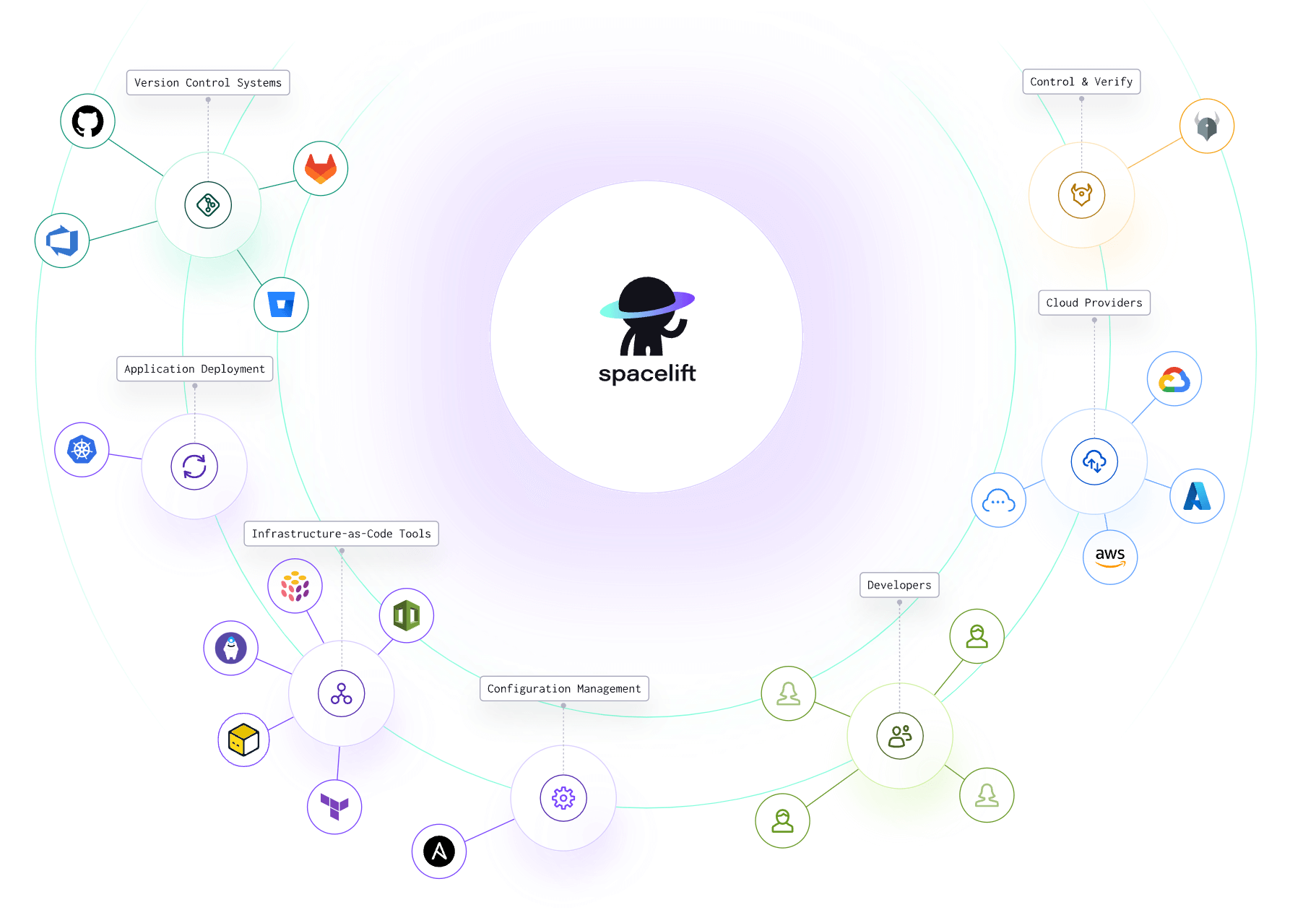
Let’s see how Spacelift avoids the limitations of generic CI/CD tools:
- Policies to control what kind of resources engineers can create, what parameters they can have, how many approvals you need for a run, what kind of task you execute, what happens when a pull request is open, and where to send your notifications
- Stack dependencies to build multi-infrastructure automation workflows with dependencies, having the ability to build a workflow that, for example, generates your EC2 instances using Terraform and combines it with Ansible to configure them
- Self-service infrastructure via Blueprints, enabling your developers to do what matters – developing application code while not sacrificing control
- Creature comforts such as contexts (reusable containers for your environment variables, files, and hooks), and the ability to run arbitrary code
- Drift detection and optional remediation
Spacelift’s Ansible functionality solves three of the biggest challenges engineers face when using Ansible:
- Having a centralized place in which you can run your playbooks
- Combining IaC with configuration management to create a single workflow
- Getting insights into what ran and where
Provisioning, configuring, governing, and even orchestrating your containers can be performed with a single workflow, separating the elements into smaller chunks to identify issues more easily.
Would you like to see this in action, or just get a tl;dr? Check out this video showing you Spacelift’s new Ansible functionality:

To learn more about Spacelift, create a free account today or book a demo with one of our engineers.
Key takeaways
In this article, we explored the strengths and use cases of Ansible and Jenkins, two of the most popular tools in the modern DevOps ecosystem.
To summarize the Ansible vs. Jenkins comparison: Ansible excels at configuration management, infrastructure provisioning, and automation, whereas Jenkins specializes in CI/CD pipelines, enabling efficient software builds, testing, and deployments. Used together, the two tools cover the full path from infrastructure provisioning to code integration to deployment, reducing manual errors and giving teams one consistent workflow across environments.
Solve your infrastructure challenges
Spacelift is an alternative to using homegrown solutions on top of a generic CI. It helps overcome common state management issues and adds several must-have capabilities for infrastructure management.