Infrastructure as Code transforms infrastructure management from manual steps and configuration into automated, repeatable operations. Ansible, although better known for its configuration management use cases, is one of the tools used to address this challenge, thanks to its agentless architecture and focus on automation.
This tutorial demonstrates how to use Ansible for provisioning cloud infrastructure. You will learn the fundamentals of Ansible, understand how it fits into the IaC landscape, and deploy a complete web application and its infrastructure on AWS.
What we will cover:
TL;DR
Ansible brings Infrastructure as Code to provisioning and configuration by defining desired state in YAML playbooks and applying it from an agentless control node. Its modules are typically idempotent, so rerunning playbooks converges systems to the same result and helps reduce drift.
In practice, it can automate an AWS web stack (VPC, security groups, EC2, ALB) and consistently deploy software such as Nginx across environments.
What is Ansible, and how is it used?
Ansible is an agentless IT automation tool that connects to target systems mostly via SSH. It allows running automation from an Ansible control node targeting managed nodes. It pushes small modules and executes them without requiring agents on these managed nodes. This architecture reduces overhead and simplifies deployment compared to agent-based alternatives.
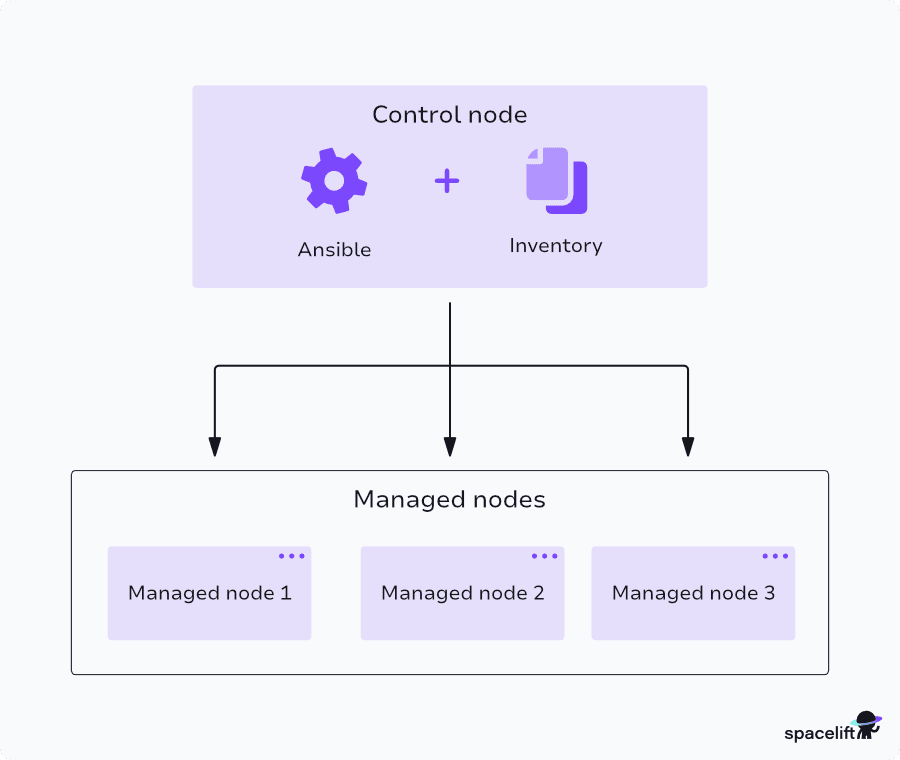
Backed by RedHat and a loyal open-source community, Ansible is considered an excellent option for configuration management, infrastructure provisioning, and application deployment use cases. Its automation opportunities are endless across hybrid clouds, on-prem infrastructure, and IoT, and it’s an engine that can greatly improve the efficiency and consistency of your IT environments.
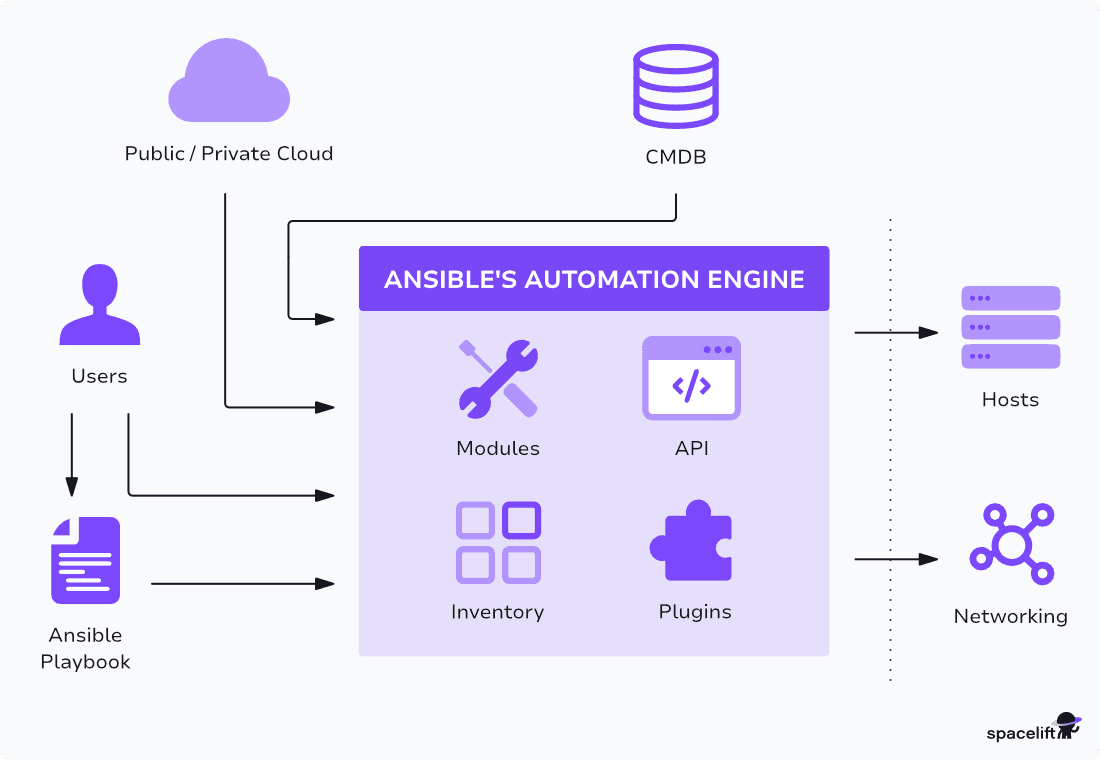
Ansible operates through four core concepts:
- Ansible tasks are individual actions that Ansible executes on target systems. Each task calls a module with specific parameters defined in YAML.
- Ansible inventory specifies the hosts where tasks will execute. Inventories can be either static or dynamic.
- Ansible plays map inventory groups to task sequences. A play targets specific hosts and defines the execution context.
- Ansible playbooks contain one or more plays that define the desired system state. Playbooks serve as the most common interface for Ansible automation.
Ansible implements idempotency across most modules. Running the same playbook multiple times produces identical results. The system checks the current state before applying changes. If the desired state already exists, Ansible skips the task.
For more details, check out Ansible Architecture: Key Components Overview, and if you are new to Ansible, check out the Ansible Tutorial for Beginners.
Ansible use cases enabled by infrastructure as code
Organizations deploy Ansible across multiple automation domains.
- Configuration management remains Ansible’s primary strength. The tool ensures consistent system configurations by installing packages, managing services, and updating configuration files across server fleets.
- Application deployment leverages Ansible to distribute applications to multiple targets simultaneously integrating the tools with CI/CD pipelines. Inventory files enable environment-specific variables, allowing the same playbook to deploy across development, staging, and production environments.
- Infrastructure provisioning extends Ansible’s capabilities to cloud resource creation. While not Ansible’s original purpose, modules for AWS, Azure, and other providers enable infrastructure provisioning through playbooks.
- Network automation focuses on efficiently managing network devices and operations, shifting away from manual configurations and interventions towards a model where tasks are performed automatically and consistently.
- Security automation is another area where Ansible can help automate the deployment of security best practices across an entire IT infrastructure. This includes configuring firewalls, managing users and permissions, deploying intrusion detection systems, and ensuring that only necessary services run on servers. It can audit existing systems against compliance standards, identify gaps, and automatically apply the required configurations to ensure compliance.
Infrastructure as code with Ansible
What separates Ansible from more focused infrastructure provisioning tools like Terraform? Terraform and similar infrastructure as code (IaC) tools excel at creating infrastructure from scratch. Ansible can also create and manage infrastructure from scratch, but specializes in configuring provisioned infrastructure and maintaining it over time.
Unified approach for configuration management and infrastructure as code
The dual nature of Ansible, expanding in both IaC and configuration management, provided a unified approach that could simplify toolchains but also introduced trade-offs. Even more, Ansible offers ready-to-use modules and plugins for managing public and private cloud platforms.
Ansible implements IaC principles using a declarative interface over procedural implementation. You specify the desired end state, and Ansible determines the required steps to achieve that state.
This differs from pure declarative tools such as Terraform. Ansible playbooks execute tasks sequentially, introducing procedural elements.
However, individual tasks operate declaratively through module idempotency. The combination creates an approach that balances flexibility with automation.
Mutable versus immutable infrastructure represents another consideration. Ansible supports mutable infrastructure, where changes are applied directly to existing systems. This model offers flexibility for rapid changes but can accumulate configuration drift over time.
Organizations can address drift through periodic playbook execution and monitoring in order to detect unexpected configuration changes and achieve infrastructure immutability through a process.
How to provision cloud infrastructure on AWS with Ansible (example)
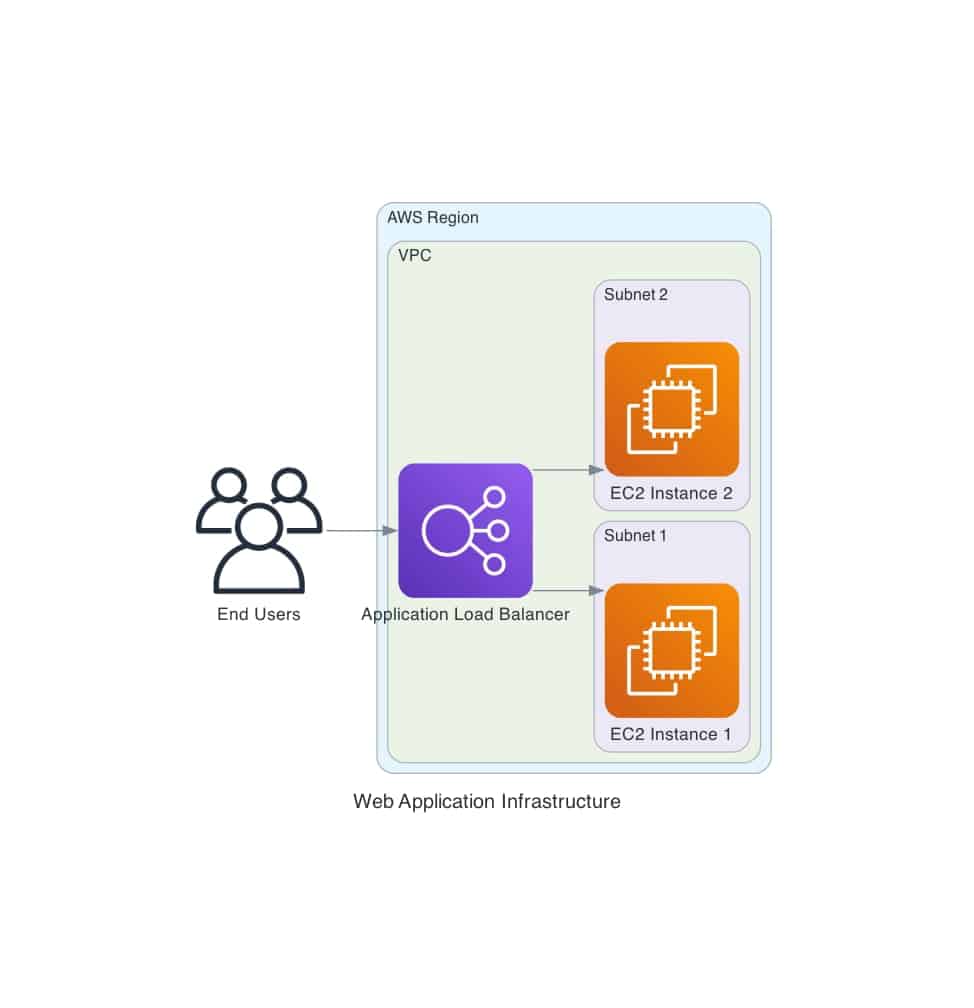
This tutorial provisions infrastructure on AWS for a web application. It demonstrates how to use Ansible to deploy a complete VPC networking stack, security groups, EC2 instances, and an Application Load Balancer. It then uses Ansible to deploy an Nginx web server on the EC2 instances previously created.
1. Prerequisites and Setup
For your control node (the machine that runs Ansible), you can use nearly any UNIX-like machine with Python installed. Make sure you have installed:
- Python 3.8 or higher
- Ansible 2.14 or higher
- AWS CLI configured with appropriate credentials
- Boto3 and botocore Python libraries
- AWS account with the necessary permissions to create the resources
- AWS Systems Manager Session Manager Plugin for connecting to EC2 instances and provisioning the web server securely
Note that following along with this tutorial might incur AWS costs. Make sure to follow the Clean Up section to remove the AWS resources after you are done experimenting.
2. Ansible project structure
Here’s the Ansible-based AWS infrastructure as code project structure that provisions a full web application stack:
- ansible.cfg – Ansible configuration (inventory, SSH settings, roles path)
- group_vars/all.yml – Central configuration (region, VPC CIDRs, instance type, key pair, tags)
- inventory/aws_ec2.yml – Dynamic EC2 inventory plugin, discovers instances by tags
- playbooks/ – Three playbooks: provision.yml → deploy.yml → teardown.yml
- roles/ – Five roles: vpc, security_group, ec2, alb, webapp
ansible-iac-aws-tutorial/
├── Configuration Files
│   ├── ansible.cfg              # Ansible settings
│   ├── requirements.txt         # Python dependencies
│   └── group_vars/
│       ├── all.yml              # Main configuration
│
├── Infrastructure Code
│   ├── roles/
│   │   ├── vpc/                 # VPC and networking
│   │   ├── security_group/      # Firewall rules
│   │   ├── ec2/                 # Compute instances
│   │   ├── alb/                 # Load balancer
│   │   └── webapp/              # Application deployment
│   │
│   └── playbooks/
│       ├── provision.yml        # Create infrastructure
│       ├── deploy.yml           # Deploy application
│       └── teardown.yml         # Destroy resources
│
├── Documentation
│   ├── README.md                # Complete tutorial
│   ├── QUICKSTART.md            # 5-minute guide
│   ├── CONTRIBUTING.md          # Contribution guidelines
│   ├── TESTING.md               # Testing procedures
│   └── PROJECT_SUMMARY.md       # Summary
│
├── Helper Scripts
│   └── scripts/
│       ├── validate.sh          # Validation tests
│       ├── check_cleanup.sh     # Cleanup verification
│       └── get_ami.sh           # Find AMIs
│
└── Utilities
   ├── Makefile                 # Common operations
   ├── inventory/               # Dynamic inventory
   └── LICENSE                  # MIT License
To follow along, clone the code repository:
git clone https://github.com/Imoustak/ansible-iac-aws-tutorial.git3. Provision infrastructure Ansible playbook
As a first step, create an EC2 SSH key pair in the AWS region where you plan to deploy this solution:
aws ec2 create-key-pair \
  --key-name ansible-tutorial-key \
  --query 'KeyMaterial' \
  --output text > ~/.ssh/ansible-tutorial-key.pem

chmod 400 ~/.ssh/ansible-tutorial-key.pem
Edit the ansible.cfg main Ansible configuration file to update the SSH key path:
private_key_file = ~/.ssh/ansible-tutorial-key.pemThen, edit the group_vars/all.yml file and customize the following:
# REQUIRED: Update this to your key pair name
key_name: ansible-tutorial-key

# AWS Region (change if needed)
aws_region: us-east-1

# AMI ID - Update for your region if not using us-east-1
# Find latest Amazon Linux 2023 AMI:
# aws ec2 describe-images --owners amazon --filters "Name=name,Values=al2023-ami-*" --query 'sort_by(Images, &CreationDate)[-1].ImageId'
ami_id: ami-04fdc0a2bb4908035
We should now be ready to deploy the AWS resources. Take a look at the playbooks/provision.yml file:
---
- name: Provision AWS Infrastructure
  hosts: localhost
  connection: local
  gather_facts: false

  vars_files:
    - ../group_vars/all.yml

  pre_tasks:
    - name: Display playbook information
      ansible.builtin.debug:
        msg:
          - "=========================================="
          - "AWS Infrastructure Provisioning Playbook"
          - "=========================================="
          - "This playbook will create:"
          - "  - VPC with 2 public and 2 private subnets"
          - "  - Internet Gateway"
          - "  - Security Group"
          - "  - 2 EC2 instances"
          - "  - Application Load Balancer"
          - "=========================================="

    - name: Verify AWS credentials are configured
      ansible.builtin.command: aws sts get-caller-identity
      register: aws_identity
      changed_when: false
      failed_when: aws_identity.rc != 0

    - name: Display AWS account information
      ansible.builtin.debug:
        msg: "Using AWS Account: {{ (aws_identity.stdout | from_json).Account }}"

    - name: Verify required variables are set
      ansible.builtin.assert:
        that:
          - key_name is defined
          - key_name != "your-key-pair-name"
        fail_msg: "Please set 'key_name' in group_vars/all.yml to your EC2 key pair name"
        success_msg: "Configuration validated successfully"

  roles:
    - role: vpc
      tags: vpc

    - role: security_group
      tags: security_group

    - role: ec2
      tags: ec2

    - role: alb
      tags: alb

  post_tasks:
    - name: Display provisioning summary
      ansible.builtin.debug:
        msg:
          - "=========================================="
          - "Infrastructure Provisioning Complete!"
          - "=========================================="
          - "VPC Configuration:"
          - "  - VPC ID: {{ vpc_id }}"
          - "  - CIDR: {{ vpc_cidr }}"
          - "  - NAT Gateway: {{ nat_gateway_id | default('Not created') }}"
          - ""
          - "Public Subnets (for ALB):"
          - "  - Subnet 1: {{ public_subnet_1_id }}"
          - "  - Subnet 2: {{ public_subnet_2_id }}"
          - ""
          - "Private Subnets (for EC2):"
          - "  - Subnet 1: {{ private_subnet_1_id }}"
          - "  - Subnet 2: {{ private_subnet_2_id }}"
          - ""
          - "Security Groups:"
          - "  - ALB SG: {{ alb_sg_id }}"
          - "  - EC2 SG: {{ ec2_sg_id }}"
          - ""
          - "EC2 Instances (in private subnets):"
          - "  - Instance 1: {{ instance_1_id }} ({{ instance_1_private_ip }})"
          - "  - Instance 2: {{ instance_2_id }} ({{ instance_2_private_ip }})"
          - ""
          - "Load Balancer (in public subnets):"
          - "  - DNS: {{ alb_dns_name }}"
          - ""
          - "=========================================="
          - "Architecture:"
          - "  Internet → ALB (public) → EC2 (private)"
          - "=========================================="
          - ""
          - "Next Steps:"
          - "1. Install SSM plugin: https://docs.aws.amazon.com/systems-manager/latest/userguide/session-manager-working-with-install-plugin.html"
          - "2. Run: ansible-playbook playbooks/deploy.yml"
          - "3. Access: http://{{ alb_dns_name }}"
          - "=========================================="

    - name: Save infrastructure state
      ansible.builtin.copy:
        content: |
          vpc_id: {{ vpc_id }}
          public_subnet_1_id: {{ public_subnet_1_id }}
          public_subnet_2_id: {{ public_subnet_2_id }}
          private_subnet_1_id: {{ private_subnet_1_id }}
          private_subnet_2_id: {{ private_subnet_2_id }}
          nat_gateway_id: {{ nat_gateway_id | default('') }}
          alb_sg_id: {{ alb_sg_id }}
          ec2_sg_id: {{ ec2_sg_id }}
          instance_1_id: {{ instance_1_id }}
          instance_2_id: {{ instance_2_id }}
          target_group_arn: {{ target_group_arn }}
          alb_dns_name: {{ alb_dns_name }}
        dest: "{{ playbook_dir }}/../.infrastructure_state.yml"
      delegate_to: localhost
This file loads the necessary variables from the central location, verifies AWS credentials, and triggers the four Ansible roles vpc, security_group, ec2, and alb. Each of these roles has its own main.yaml files to deploy the different components of the solution.
As an example, let’s take a look at the roles/ec2/tasks/main.yaml file that deploys the two EC2 instances:
---
- name: Launch EC2 instance in private subnet 1
  amazon.aws.ec2_instance:
    name: "{{ app_name }}-instance-1"
    instance_type: "{{ instance_type }}"
    image_id: "{{ ami_id }}"
    key_name: "{{ key_name }}"
    vpc_subnet_id: "{{ private_subnet_1_id }}"
    security_group: "{{ ec2_sg_id }}"
    network:
      assign_public_ip: false
    region: "{{ aws_region }}"
    tags: "{{ common_tags | combine({'Name': app_name + '-instance-1', 'Role': 'webserver', 'Tier': 'private'}) }}"
    state: running
    wait: true
  register: ec2_instance_1

- name: Launch EC2 instance in private subnet 2
  amazon.aws.ec2_instance:
    name: "{{ app_name }}-instance-2"
    instance_type: "{{ instance_type }}"
    image_id: "{{ ami_id }}"
    key_name: "{{ key_name }}"
    vpc_subnet_id: "{{ private_subnet_2_id }}"
    security_group: "{{ ec2_sg_id }}"
    network:
      assign_public_ip: false
    region: "{{ aws_region }}"
    tags: "{{ common_tags | combine({'Name': app_name + '-instance-2', 'Role': 'webserver', 'Tier': 'private'}) }}"
    state: running
    wait: true
  register: ec2_instance_2

- name: Set instance facts
  ansible.builtin.set_fact:
    instance_1_id: "{{ ec2_instance_1.instances[0].instance_id }}"
    instance_2_id: "{{ ec2_instance_2.instances[0].instance_id }}"
    instance_1_private_ip: "{{ ec2_instance_1.instances[0].private_ip_address }}"
    instance_2_private_ip: "{{ ec2_instance_2.instances[0].private_ip_address }}"
    instance_ids:
      - "{{ ec2_instance_1.instances[0].instance_id }}"
      - "{{ ec2_instance_2.instances[0].instance_id }}"

- name: Wait for instances to pass status checks
  amazon.aws.ec2_instance_info:
    instance_ids:
      - "{{ instance_1_id }}"
      - "{{ instance_2_id }}"
    region: "{{ aws_region }}"
  register: instance_info
  until: instance_info.instances | selectattr('state.name', 'equalto', 'running') | list | length == 2
  retries: 30
  delay: 10

- name: Display EC2 instance information
  ansible.builtin.debug:
    msg:
      - "=========================================="
      - "EC2 Instances Configuration"
      - "=========================================="
      - "Instance 1:"
      - "  - ID: {{ instance_1_id }}"
      - "  - Private IP: {{ instance_1_private_ip }}"
      - "  - Subnet: {{ private_subnet_1_id }} (private)"
      - "  - AZ: {{ ec2_instance_1.instances[0].placement.availability_zone }}"
      - ""
      - "Instance 2:"
      - "  - ID: {{ instance_2_id }}"
      - "  - Private IP: {{ instance_2_private_ip }}"
      - "  - Subnet: {{ private_subnet_2_id }} (private)"
      - "  - AZ: {{ ec2_instance_2.instances[0].placement.availability_zone }}"
      - ""
      - "Note: Instances are in private subnets (no public IPs)"
      - "Access via ALB or AWS Systems Manager Session Manager"
      - "=========================================="
Similarly, you can take a look at the other roles here. From the top level of this code repository, run this command to provision the AWS resources:
ansible-playbook playbooks/provision.ymlThis playbook:
- Creates VPC with DNS support (10.0.0.0/16)
- Creates 2 public subnets for ALB (10.0.1.0/24, 10.0.2.0/24)
- Creates 2 private subnets for EC2 (10.0.10.0/24, 10.0.11.0/24)
- Sets up Internet Gateway for public subnet internet access
- Creates a NAT Gateway in public subnet for private subnet outbound access
- Allocates Elastic IP for NAT Gateway
- Configures route tables (public → IGW, private → NAT Gateway)
- Creates ALB Security Group (allows HTTP/HTTPS from internet)
- Creates EC2 Security Group (allows HTTP from ALB only)
- Launches 2 EC2 instances in private subnets (no public IPs)
- Creates Application Load Balancer in public subnets
- Creates a target group and registers instances
- As an output, you should get the public DNS for the Application Load Balancer:
Load Balancer DNS: ansible-tutorial-alb-XXXXXXXXX.us-east-1.elb.amazonaws.comLet’s deploy our web server with Ansible as the next step.
4. Deploy web server Ansible playbook
Now that we have our AWS set up, it’s time to deploy our application. Here’s where Ansible’s power comes into play: it can effectively simplify workflows and automate end-to-end infrastructure creation and application deployment with a single tool.
Take a look at the playbooks/deploy.yml playbook used to install NginX on our EC2 instances:
---
- name: Deploy Web Application
  hosts: localhost
  connection: local
  gather_facts: false

  pre_tasks:
    - name: Display deployment information
      ansible.builtin.debug:
        msg:
          - "=========================================="
          - "Web Application Deployment Playbook"
          - "=========================================="
          - "This playbook will:"
          - "  - Install Nginx on EC2 instances"
          - "  - Deploy custom web application"
          - "  - Configure and start services"
          - ""
          - "Note: Instances are in private subnets"
          - "Connection method: AWS Systems Manager (SSM)"
          - "=========================================="

    - name: Refresh dynamic inventory
      ansible.builtin.meta: refresh_inventory

- name: Configure web servers
  hosts: role_webserver
  gather_facts: true

  vars_files:
    - ../group_vars/all.yml

  vars:
    ansible_connection: ssh
    ansible_user: ec2-user
    ansible_ssh_common_args: '-o ProxyCommand="aws ssm start-session --target %h --document-name AWS-StartSSHSession --parameters portNumber=%p --region {{ aws_region }}"'

  roles:
    - role: webapp

  post_tasks:
    - name: Test Nginx locally
      ansible.builtin.uri:
        url: http://localhost
        return_content: true
      register: local_test

    - name: Display local test result
      ansible.builtin.debug:
        msg: "Nginx is responding correctly on {{ ansible_hostname }}"

- name: Display deployment summary
  hosts: localhost
  connection: local
  gather_facts: false

  tasks:
    - name: Load infrastructure state
      ansible.builtin.include_vars:
        file: "{{ playbook_dir }}/../.infrastructure_state.yml"
      ignore_errors: true

    - name: Final deployment summary
      ansible.builtin.debug:
        msg:
          - "=========================================="
          - "Deployment Complete!"
          - "=========================================="
          - "Your web application is now running!"
          - ""
          - "Architecture:"
          - "  Internet → ALB (public) → EC2 instances (private)"
          - ""
          - "Access your application at:"
          - "  http://{{ alb_dns_name }}"
          - ""
          - "Security:"
          - "  ✓ EC2 instances in private subnets (no direct internet access)"
          - "  ✓ ALB in public subnets (internet-facing)"
          - "  ✓ Security groups restrict traffic (ALB → EC2)"
          - "  ✓ NAT Gateway for outbound traffic from private subnets"
          - ""
          - "Management:"
          - "  - Instances accessible via AWS Systems Manager"
          - "  - No SSH keys required for SSM access"
          - ""
          - "Refresh the page multiple times to see load balancing in action!"
          - "=========================================="
      when: alb_dns_name is defined
This playbook loads variables and files, displays relevant information, triggers the webapp role tasks, and performs connectivity tests to validate the deployment.
After the successful deployment, your Application Load Balancer DNS should return a “Hello from Ansible!” page:
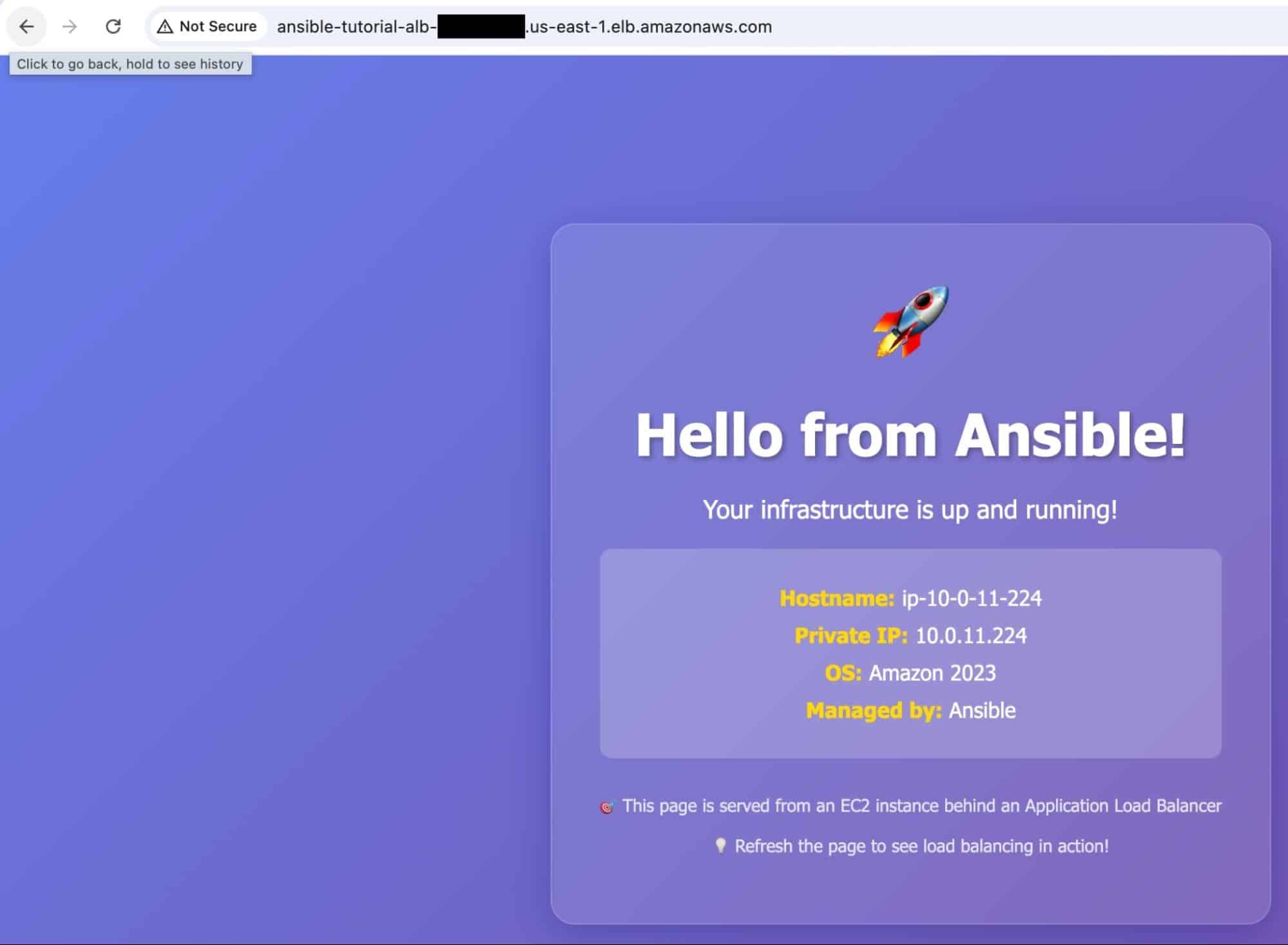
That’s it, we have successfully provisioned and deployed all the components for a classic web application setup on AWS!
5. Clean up
Make sure that you clean up all the resources to avoid charges:
ansible-playbook playbooks/teardown.ymlWhy use Spacelift for your Ansible IaC projects?
Spacelift’s vibrant ecosystem and excellent GitOps flow are helpful for managing and orchestrating Ansible. By introducing Spacelift on top of Ansible, you can easily create custom workflows based on pull requests and apply any necessary compliance checks for your organization.
Another advantage of using Spacelift is that you can manage infrastructure tools like Ansible, Terraform, OpenTofu, Pulumi, AWS CloudFormation, and even Kubernetes from the same place, combining their stacks with building workflows across tools.
You can bring your own Docker image and use it as a runner to speed up deployments that leverage third-party tools. Spacelift’s official runner image can be found here.
Our latest Ansible enhancements solve three of the biggest challenges engineers face when they are using Ansible:
- Having a centralized place in which you can run your playbooks
- Combining IaC with configuration management to create a single workflow
- Getting insights into what ran and where
Provisioning, configuring, governing, and even orchestrating your containers can be performed with a single workflow, separating the elements into smaller chunks to identify issues more easily.
To see this in action or just get an overview, watch this video on Spacelift’s Ansible functionality:

If you want to learn more about using Spacelift with Ansible, check our documentation, read our Ansible guide, or book a demo with one of our engineers.
Key points
In this blog, we explored how you can leverage Ansible as a unified approach to combine both Infrastructure as Code and configuration management use cases. We also went over a detailed tutorial on provisioning infrastructure and deploying a web application on AWS.
Ansible excels at end-to-end automation workflows that require tightly integrated infrastructure provisioning and configuration, providing a unified automation framework.
Manage Ansible better with Spacelift
Managing large-scale playbook execution is hard. Spacelift enables you to automate Ansible playbook execution with visibility and control over resources, and seamlessly link provisioning and configuration workflows.
Frequently asked questions
Is Ansible considered infrastructure as code?
Ansible is generally considered infrastructure as code because it defines desired system configuration and provisioning in version-controlled playbooks that you can run repeatedly.
In practice, Ansible sits in the configuration management and orchestration slice of infrastructure as code, rather than the infrastructure provisioning slice. It’s well suited to installing packages, managing services, templating config files, enforcing OS hardening, and coordinating deployments across fleets.
When to pair Ansible with a dedicated IaC tool?
Pair Ansible with a dedicated IaC tool when you need both reliable infrastructure lifecycle management and detailed OS or application configuration. Use Terraform, OpenTofu, CloudFormation, or Pulumi to provision and track cloud resources with state and dependency graphs, then use Ansible to configure packages, files, services, and app deploy steps on the instances.