
Infrastructure as code (IaC) has become the gold standard for maintaining consistency across deployed systems and complex setups that span multiple clouds and on-premises environments.
Over the years, testing IaC has become increasingly important as the pace of infrastructure creation and the complexity of these environments have increased. In such environments, even a minor misconfiguration can cascade into a costly production outage.
In this blog, we will analyze why testing IaC is critical for organizations, the different types and patterns of testing, and specific details for popular IaC tools.
What is IaC testing?
Infrastructure-as-code (IaC) testing is the practice of automatically validating cloud infrastructure configurations to ensure they work as intended, are secure, and don’t introduce errors into production environments. It typically includes syntax validation, unit tests for IaC modules, integration tests for real cloud environments, and policy-as-code checks for security and compliance.
Testing as a foundational DevOps practice for IaC
Cloud and on-premises infrastructure are components everyone expects to be operational at all times to maintain business continuity. However, infrastructure failures carry catastrophic consequences.
A few examples of issues include compliance violations, security vulnerabilities and incidents, costs due to over-provisioned resources, and lost developer productivity. Testing IaC proposes a fundamental shift left to these problems, catching and blocking errors before they reach production environments, where fixes cost exponentially more.
Infrastructure forms the foundation on which applications run. To have a system or product end-to-end tested, organizations must invest in both application testing to verify business logic and user interactions, as well as in infrastructure testing to validate configurations, resource dependencies, and compliance requirements.
IaC testing landscape
Modern IaC testing involves different layers. You need to validate syntax correctness, enforce security standards, verify resource configurations, test interactions between components, and ensure the entire system functions as designed. Each testing layer serves a distinct purpose in your quality assurance strategy.
A handy mental model for thinking and preparing your IaC testing strategy is the pyramid below:
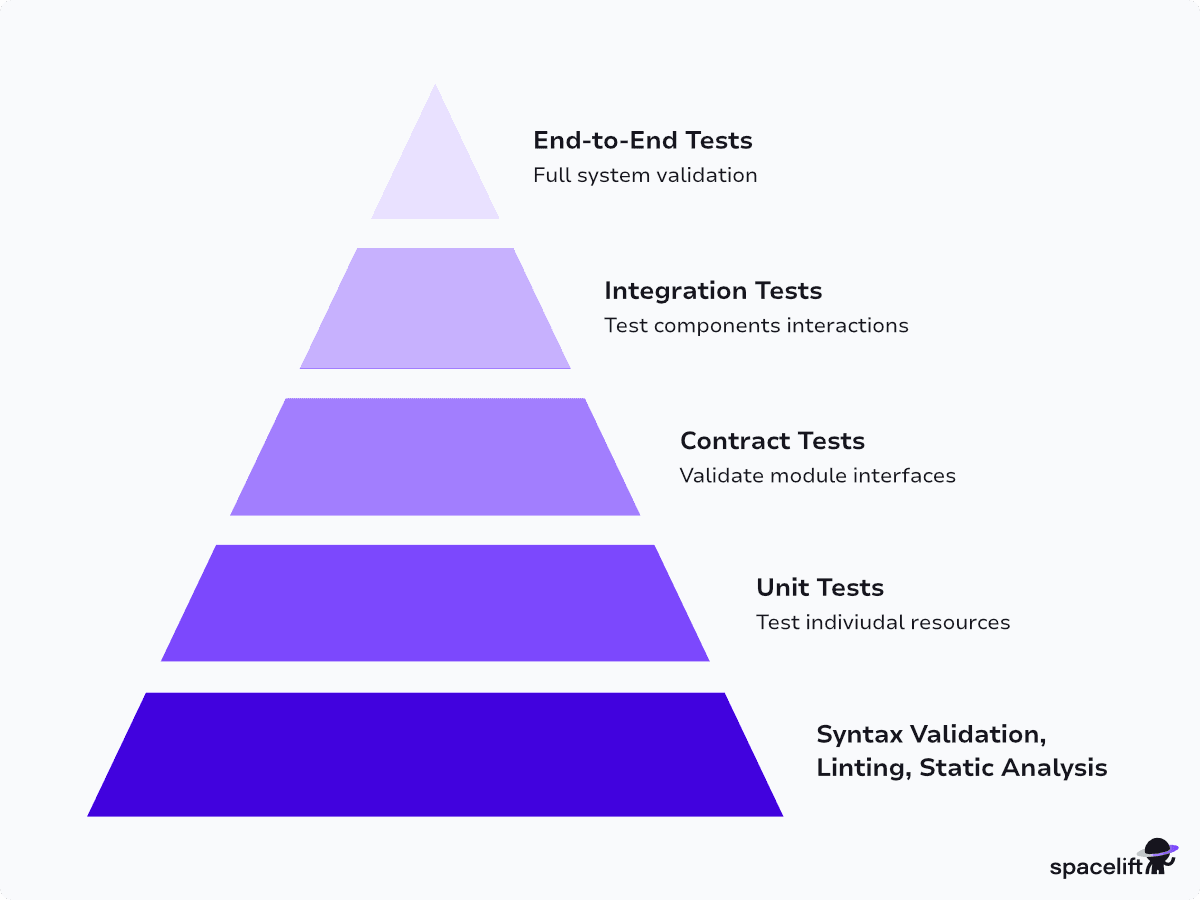
Iac testing pyramid
This model provides a framework for organizing these efforts.
At the base, fast syntax validation and linting catch basic errors. Unit tests verify individual resource configurations. Contract tests validate module interfaces. Integration tests ensure components work together correctly. End-to-end tests validate complete system functionality.
The higher you go, the higher the cost of running this type of testing. In practice, you might decide not to use all the layers in your testing strategy, or choose an uneven strategy based on them. You must build your testing strategy according to your needs while balancing speed, cost, and coverage.
How does testing IaC differ from application testing?
Testing IaC differs significantly from application testing due to the nature of the systems involved. IaC testing involves stateful, external resources that introduce unique challenges, such as dependency management, environment lifecycle, and cost control.
Unlike application testing, which typically involves stateless code and fast execution in isolated environments, IaC tests must account for the real-world provisioning of infrastructure. This means:
- Provisioning times are longer, especially with cloud resources like VMs or networks.
- Tests rely on cloud provider APIs, making them susceptible to rate limits and service delays.
- Environments must be explicitly cleaned up after testing to avoid accumulating costs.
- Test failures can leave resources orphaned, requiring automated teardown logic.
Additionally, since infrastructure is stateful, tests must verify both the presence and configuration of resources over time, not just functional outputs.
Types of IaC testing
As we’ve seen above, IaC testing typically falls into the following main categories:
1. Pre-testing: Syntax validation, linting, and static analysis
Start with the fastest, cheapest tests. Syntax validation confirms your IaC files are correctly formatted and parseable. You can run these checks on every commit, as they execute in seconds, and catch obvious errors before the code reaches review. Also, linting enforces coding standards and best practices.
Tools like TFLint for Terraform and language-specific linters maintain consistent code quality across teams. These tools detect unused variables, incorrect resource naming, and non-idiomatic patterns.
Static analysis goes deeper, identifying security misconfigurations and compliance violations without requiring infrastructure deployment. Static analysis tools contain pre-built rules based on cloud security best practices and compliance frameworks.
You can also define custom rules for organization-specific policies. Tools like tfsec, Checkov, and Terrascan scan your IaC templates for known security issues, such as overly permissive security groups. These scans are fast, cheap, and integrate into CI/CD pipelines.
2. Unit tests: Testing individual resources and configurations
Unit tests validate individual infrastructure resources and components in isolation. They execute quickly because they work with mocked or minimal infrastructure.
In Terraform, unit tests examine the plan output without creating real resources. Pulumi’s unit testing framework uses mocks to validate resource properties without cloud provider calls.
On this layer, we focus on resource configuration logic and default values. Unit tests excel at validating that resources meet policy requirements before deployment.
3. Contract tests: Validating module interfaces and inputs
Contract tests sit between unit and integration tests. They verify that modules expose correct interfaces, accept valid inputs, and produce expected outputs.
Modules and components are reused across multiple projects. Breaking a module interface impacts every consumer.
Contract tests ensure backward compatibility and catch interface changes before they propagate.
4. Integration tests: Testing component interactions
Integration tests deploy real infrastructure and verify that components interact correctly. Integration tests uncover issues that only appear when components work together. You might have perfectly configured individual resources that fail when integrated due to various reasons, such as permission issues, network policies, or timing dependencies.
These tests are slower and more expensive than unit tests because they provision actual cloud resources. Teams often run them selectively on pull requests or at scheduled intervals, rather than on every commit. Always implement proper cleanup to avoid orphaned resources.
A common pattern is also to deploy infrastructure for testing, validating that it works, and tearing it down automatically to avoid costs.
5. End-to-end tests: Full system functionality validation
End-to-end tests validate complete system functionality in production-like environments. They test not just infrastructure but also deployed applications and their interactions. Can users authenticate, access the application, and complete key user flows?
These are your slowest, most expensive tests. Reserve them for critical paths and pre-release validation. Run them in isolated environments to avoid impacting production systems. End-to-end tests provide the highest confidence that everything works together.
Testing examples for different IaC tools & how to build an IaC testing pipeline
In this section, we will explore testing approaches, strategies, and useful tooling for common IaC solutions such as Terraform, OpenTofu, Pulumi, and Ansible.
Terraform testing
Testing your Terraform code starts from running terraform validate, terraform fmt -check to validate the format and configuration syntax. The popular solutions include:
- TFLint helps teams enforce Terraform style conventions and best practices, improving code consistency and collaboration.
- Checkov performs static analysis on IaC to detect security misconfigurations, such as exposed resources or policy violations, and provides remediation guidance.
- Terrascan analyzes Terraform code for compliance and security risks, helping prevent vulnerabilities before deployment.
- terraform test runs HCL-based test files to validate infrastructure behavior during development, enabling test cases to reside alongside Terraform configurations.
Most unit testing focuses on the Terraform plan representation. Test files use .tftest.hcl or .tftest.json extensions and contain one or more run blocks that execute sequentially. Each run block can execute either plan or apply commands (defaulting to plan).
For unit testing, use command = plan to verify configuration logic without creating resources. Here’s an example of testing local variables:
# main.tf
locals {
  test_var_one  = "true"
  test_var_two  = “false”
}
This assertion will pass:
# example_1.tftest.hcl
run "test_var_one_is_true" {
  assert {
    condition     = local.test_var_one == "true"
    error_message = "local.test_var_one did not match the expected value"
  }
}
This example demonstrates positive testing with expected inputs. Terraform also supports negative testing using the expect_failures attribute to verify that validation fails appropriately for incorrect inputs.
Terraform also features a test mocking framework, enabling tests without cloud provider authentication or resource creation. Mock providers replace traditional provider blocks in test files:
mock_provider "aws" {}Mock providers share the global namespace with real providers and generate fake data for computed attributes. This capability allows testing configuration logic and module behavior without incurring cloud costs or requiring provider credentials.
You can also leverage input variable validation with custom rules, such as:
variable "port" {
  type        = number
  default     = 0
  description = "well-known TCP port range"

  validation {
    condition     = var.port >=1  && var.port <= 1023
    error_message = "The port must be between 0 to 1023."
  }
}
Two other helpful functionalities are preconditions and postconditions. Preconditions effectively allow you to test configuration assumptions before Terraform creates the resources and are executed during plan generation.
Contrarily, use postconditions to verify results after Terraform creates resources or reads data sources. Postconditions prevent cascading changes to dependent resources by catching configuration issues after resource creation.
For integration testing purposes, you can leverage the terraform test command with the command=apply option enabled. The test creates resources via terraform apply and destroys them afterward with terraform destroy. Focus integration tests on verifying outputs contain correct values, checking resource counts, and testing configurations that can only be validated post-apply.
Lastly, you can define end-to-end tests that verify that changes haven’t broken the overall intended functionality. To do so, you can leverage checks that are decoupled from the lifecycle of a specific resource or data source.
Checks also let you verify your assumptions about your infrastructure on an ongoing basis, rather than just at provisioning time.
Here’s an example checking if our service returns a healthy status:
check "service_red_status" {

 data "http" "service_red_health" {
   url = "${service_red.main.public_endpoint_url}/v1/sys/health"
 }

 assert {
   condition     = data.http.service_red_health.status_code == 200
   error_message = "${data.http.service_health.url} returned an unhealthy status code"
 }

}
You can also leverage a solution like Terratest, an open-source testing framework for running various Terraform tests, such as unit, integration, and end-to-end tests.
If you are looking for a detailed guide on Terraform testing, check out How to Test Terraform Code – Strategies & Tools.
OpenTofu testing
Given the many similarities and common functionality between terraform test and tofu test, we won’t duplicate information shared previously.
OpenTofu also provides a native testing framework, allowing you to write comprehensive unit and integration tests directly in HCL. When you execute the tofu test command, the framework creates real infrastructure, validates it against your assertions, and then automatically destroys the resources.
The framework supports two directory layouts for organizing your tests. In a flat layout, you place *.tftest.hcl files directly alongside your *.tf files, making it easy to locate tests for specific configuration files.
Alternatively, a nested layout places all test files in a separate tests directory, providing cleaner separation between production code and testing code. Both approaches are valid, and the choice depends on your team’s preferences and project structure.
For a detailed deep dive, check out the tofu test command documentation and Testing your Configuration with OpenTofu video.
Pulumi testing
Pulumi enables development teams to apply proven software engineering practices, such as comprehensive testing strategies, to IaC. Pulumi offers multiple complementary testing approaches, each suited to different validation needs and development workflows.
Unit testing provides the fastest feedback loop without provisioning real infrastructure or requiring the Pulumi CLI, making it ideal for test-driven development and rapid iteration. Unit tests validate resource inputs using the same programming language you use with Pulumi, like TypeScript, Python, Go, C#, or Java.
Mocks enable unit testing in Pulumi by replacing the engine with mock data for testing. Here’s an example of Pulumi Python code that creates a simple virtual machine on AWS:
import pulumi
from pulumi_aws import ec2

group = ec2.SecurityGroup('web-secgrp', ingress=[
    { "protocol": "tcp", "from_port": 22, "to_port": 22, "cidr_blocks": ["0.0.0.0/0"] },
    { "protocol": "tcp", "from_port": 80, "to_port": 80, "cidr_blocks": ["0.0.0.0/0"] },
])

server = ec2.Instance('web-server;',
    instance_type="t2.nano",
    security_groups=[ group.name ],
    tags={'Name': 'webserver'},
    ami="ami-12345678")
Next, we add code to mock the calls to Pulumi:
import pulumi

class MyMocks(pulumi.runtime.Mocks):
    def new_resource(self, args: pulumi.runtime.MockResourceArgs):
        return [args.name + '_id', args.inputs]
    def call(self, args: pulumi.runtime.MockCallArgs):
        return {}

pulumi.runtime.set_mocks(
    MyMocks(),
    preview=False,  # Sets the flag `dry_run`, which is true at runtime during a preview.
)
With mocks configured, tests can be written using standard testing frameworks. Let’s define a test to make sure we always create virtual machines with a Name tag:
# check 1: Instances have a Name tag.
@pulumi.runtime.test
def test_server_tags(self):
    def check_tags(args):
        urn, tags = args
        self.assertIsNotNone(tags, f'server {urn} must have tags')
        self.assertIn('Name', tags, 'server {urn} must have a name tag')

    return pulumi.Output.all(infra.server.urn, infra.server.tags).apply(check_tags)
Next, check out property tests that validate that cloud resources meet specific policy requirements. These tests run during deployment and have access to both input and output values of all resources in the stack. Using Pulumi’s policy-as-code framework, property tests can enforce security, cost, and compliance constraints.
Integration tests in Pulumi can deploy infrastructure to ephemeral environments. They verify the properties of the created resources and then destroy the infrastructure again. Pulumi has an integration test framework written in Go. You can use the Go test framework no matter the language your Pulumi program is written in.
Here’s a basic example that tests the creation, update, and destruction of an S3 bucket and some dummy data from a GitHub repository:
import (
    "os"
    "path"
    "testing"

    "github.com/pulumi/pulumi/pkg/v2/testing/integration"
)

func TestExamples(t *testing.T) {
    awsRegion := os.Getenv("AWS_REGION")
    if awsRegion == "" {
        awsRegion = "us-west-1"
    }
    cwd, _ := os.Getwd()
    integration.ProgramTest(t, &integration.ProgramTestOptions{
        Quick:       true,
        SkipRefresh: true,
        Dir:         path.Join(cwd, "..", "..", "aws-js-s3-folder"),
        Config: map[string]string{
            "aws:region": awsRegion,
        },
    })
}
Runtime validation extends integration testing by verifying provisioned infrastructure actually works. The `ExtraRuntimeValidation` option provides access to the complete deployment state, including configuration, outputs, resources, and dependencies.
This validation runs immediately after stack deployment, enabling comprehensive testing of actual infrastructure behavior, including HTTP endpoints, database connectivity, and any other runtime characteristics.
Another option for rapid iteration is local testing with Pulumi’s Docker provider. This approach is particularly valuable during the inner development loop before pushing to version control.
Ansible testing strategies
The Ansible testing ecosystem spans two primary domains: deployment testing (verifying playbook execution and infrastructure state) and development testing (ensuring module code quality and correctness).
Sanity tests enforce Ansible coding standards through static code analysis, linters, and validators. These tests run automatically in CI/CD pipelines and can be executed locally using ansible-test sanity. Here’s a full list of sanity tests, along with details on how to fix the identified issues.
Integration tests verify the functional behavior of modules and Ansible core functionality against real or simulated infrastructure. These tests are particularly valuable for end-to-end workflow validation and can be run locally using ansible-test integration.
Unit tests directly examine individual code components, primarily focusing on module internals. Located in test/units/, these tests mirror the codebase structure and are organized by module groups.
For testing deployments, you can embed testing in playbooks. Ansible modules like wait_for, uri, stat, assert, and script enable inline validation without external frameworks.
Port availability check example:
tasks:
  - ansible.builtin.wait_for:
      host: "{{ inventory_hostname }}"
      port: 22
    delegate_to: localhost
File state verification example:
tasks:
  - ansible.builtin.stat:
      path: /path/to/something
    register: p
  - ansible.builtin.assert:
      that:
        - p.stat.exists and p.stat.isdir
Ansible’s --check mode functions as a drift detection layer. Running playbooks with this flag against existing systems reports whether any changes are required to achieve the desired state, providing early warning of configuration drift without making modifications.
For more details, check out Ansible Testing Strategies.
Common testing patterns across IaC tools
These patterns are tool-agnostic and form the basis for reliable and scalable IaC testing workflows.
1. Syntax validation and linting
Every IaC tool provides syntax validation. Run terraform validate, tofu validate, pulumi preview, or ansible-playbook --syntax-check to verify basic correctness. Linting enforces consistency and catches common mistakes.
TFLint for Terraform, ansible-lint for Ansible, and language-specific linters for Pulumi maintain code quality. Configure linters to match your organization’s standards. Integrate validation and linting into pre-commit hooks. Catch errors before code reaches version control and configure CI/CD pipelines to reject code that fails validation.
2. Drift detection and monitoring
Configuration drift occurs when actual infrastructure diverges from your IaC definitions due to manual changes. Drift hides security risks, compliance violations, and configuration errors.
Most IaC tools provide mechanisms to detect drift. The Terraform plan command shows proposed changes, CloudFormation provides built-in drift detection, and pulumi preview reveals drift.
Spacelift automates drift detection across tools. Schedule regular checks, receive alerts when drift is detected, and track drift history. It offers a consistent drift management experience across Terraform, CloudFormation, and other tools.
What should you do when drift is detected?
- Evaluate whether manual changes should be incorporated into IaC or reverted.
- Update IaC to match new requirements or apply IaC to restore the desired state.
- Document the decision and root cause. In such cases, prevention is always preferable to detection in the long term.
- Restrict console access, enforce IaC workflows through policy, and educate teams about drift risks, effectively making it easier to follow IaC processes than to bypass them.
3. Testing in automation workflows
Manual testing doesn’t scale and introduces delays; hence, modern infrastructure requires automated testing workflows. A typical IaC testing workflow includes syntax validation and linting, unit tests, security scans, generating a plan, reviewing the plan for unexpected changes, applying approved changes, running integration tests, and cleaning up test resources.
Not all environments and tests are created equal. As you advance your testing strategy, aim to build separate workflows for different environments:
- Development workflows can run comprehensive tests on every pull request.
- Staging workflows can deploy changes after merging for additional validation.
- Production workflows require manual approval and run final checks before deployment.
Linting and validation run first and quickly, while unit tests execute only after validation passes. Integration tests should run only if unit tests succeed, and a deployment is marked as successful only when all tests pass.
4. Testing environment management
Ephemeral environments created for testing must be cleaned up automatically and reliably to avoid costs. Leaked resources waste money and clutter environments. To facilitate cleanup, tag test resources with useful metadata, such as the test run that created them and when they were created. This enables easy identification and cleanup of orphaned resources.
Always set maximum lifetimes for test resources and implement automatic deletion after a reasonable period. Use separate accounts for test environments and isolate test infrastructure from production to prevent accidental impacts.
5. Security and compliance testing
A critical part of the IaC testing strategy is security and compliance testing across different layers.
Policy-as-code frameworks, such as Open Policy Agent (OPA), help enforce security and compliance requirements as executable policies. These policies automatically validate infrastructure configurations, integrate with CI/CD pipelines, and prevent non-compliant changes from being deployed.
6. Cost visibility as part of IaC validation
Infrastructure costs can compound quickly without proper controls. Assess and strive to understand cost implications before deploying changes.
Modern FinOps practices integrate with IaC to proactively manage costs and embed cost awareness into infrastructure definitions, rather than reacting to bills. Tag resources consistently for cost allocation. Define required tags in IaC templates, such as cost center, owner, environment, and project, to ensure consistency across all resources. Automated tagging enables detailed cost tracking and chargeback.
Cost estimation tools, such as Infracost, can help predict spending before deployment and integrate cost analysis into pull request workflows. Developers can see the cost impact of their changes before they are merged.
Furthermore, leveraging policy-based cost controls prevents expensive mistakes and the creation of oversized instances, requires approval for costly services, and enforces cost tags. These guardrails operate automatically through policy frameworks and can help your team scale infrastructure and its associated costs with confidence.
Improving your IaC workflows with Spacelift
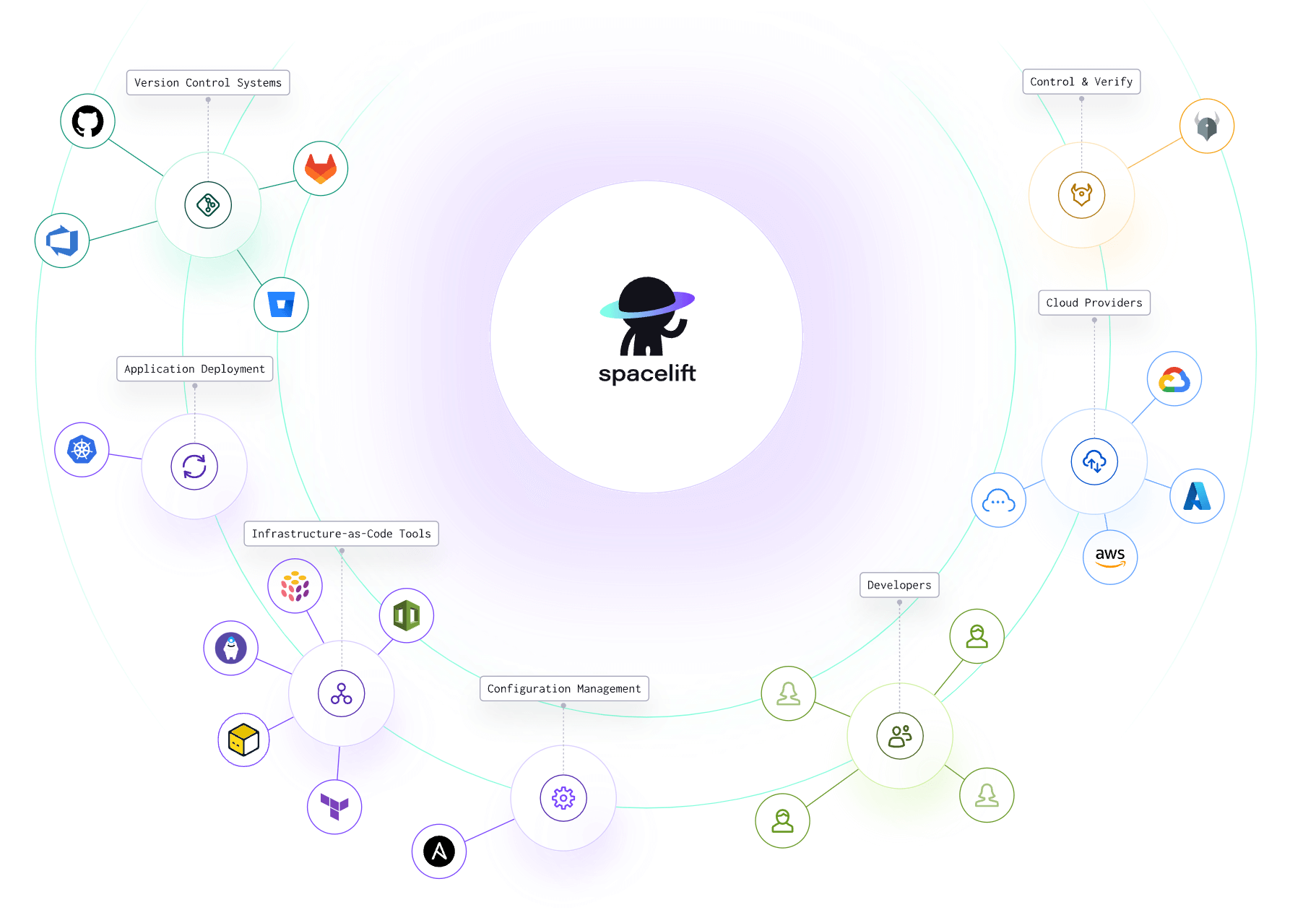
Spacelift is an IaC management platform that helps you implement DevOps best practices. Spacelift provides a dependable CI/CD layer for infrastructure tools, including OpenTofu, Terraform, Pulumi, Kubernetes, Ansible, and more, letting you automate your IaC delivery workflows.
You can use Spacelift and its Custom Inputs feature to integrate tfsec, Checkov, Terrascan, Kics, and others in your workflows. Security is one of Spacelift’s biggest priorities, so there are also state-of-the-art security solutions that are embedded inside the product, like Policy as Code, Encryption, Single Sign-On (SSO), MFA, and Private Worker Pools.
Spacelift is designed for your whole team. Everyone works in the same space, supported by robust policies that enforce access controls, security guardrails, and compliance standards. You can manage your DevOps infrastructure much more efficiently, without compromising on safety.
With Spacelift, you get:
- Policies to control what kind of resources engineers can create, what parameters they can have, how many approvals you need for a run, what kind of task you execute, what happens when a pull request is open, and where to send your notifications
- Stack dependencies to build multi-infrastructure automation workflows with dependencies, having the ability to build a workflow that, for example, generates your EC2 instances using Terraform and combines it with Ansible to configure them
- Self-service infrastructure via Blueprints, enabling your developers to do what matters – developing application code while not sacrificing control
- Creature comforts such as contexts (reusable containers for your environment variables, files, and hooks), and the ability to run arbitrary code
- Drift detection and optional remediation
Read more about integrating security tools with Spacelift. And if you want to learn more about Spacelift, create a free account or book a demo with one of our engineers.
The future of IaC testing
Artificial intelligence (AI) is already transforming testing workflows. AI can analyze infrastructure patterns, generate test cases, predict failures, and suggest fixes. AI-powered test generation analyzes existing infrastructure and automatically generates test cases that cover key scenarios. This reduces the manual effort required to write comprehensive test suites.
Machine learning models trained on historical data predict which changes are most likely to cause issues. Self-healing tests and systems can automatically adapt to infrastructure changes. When resource properties change, AI updates test assertions rather than failing. This will further reduce test maintenance burden.
Intelligent test prioritization selects which tests to run based on code changes. Run only tests likely to be affected rather than the entire suite. This accelerates feedback while maintaining coverage.
Policy frameworks continue to mature and grow through community contribution, and we expect policy testing to become a standard practice. We see IaC testing being integrated more deeply with platform engineering initiatives and standardized across various IaC tools.
Internal platforms increasingly provide standardized infrastructure components with built-in testing. Automated governance will ensure platform standards are maintained, while non-compliant resources will be automatically flagged or rejected.
Key points
In this blog post, we analyzed the different types of IaC testing and reviewed common tools and their testing approaches. We also discussed common testing patterns that are useful across tools and envisioned the future of IaC testing.
Solve your infrastructure challenges
Spacelift is a flexible orchestration solution for IaC development. It delivers enhanced collaboration, automation, and controls to simplify and accelerate the provisioning of cloud-based infrastructures.