Keeping a handle on drift is one of the biggest challenges in enterprise-scale cloud environments. The ability to efficiently detect and resolve drift is key to avoiding compliance violations, security breaches, and service disruption.
Drift happens when infrastructure differs from its expected state, causing resources to become misconfigured or insecure. When you’re operating at enterprise scale, there are many more places for drift to occur, so you’re more likely to run into problems.
In this blog post, we’ll explain the effects of drift on enterprise operations. We’ll share the different causes of drift and discuss techniques for managing it at scale. By the end of the article, you should be ready to take control of drift in your own environments.
What we’ll cover:
TL;DR
Enterprise drift is when your cloud infrastructure, configurations, or policies gradually diverge from the approved, documented baseline, so the real environment no longer matches what you think you deployed.
What is enterprise drift? Types, causes, and effects
Drift is the difference between what should be deployed and what’s actually running. It can occur in several places throughout the DevOps stack. Understanding where and how drift happens is the first step towards successfully managing it.
The four main types of drift are as follows:
- Infrastructure drift: Infrastructure drift is where the state of your cloud infrastructure resources differs from what you expect. It can happen when you create resources outside of your IaC and CI/CD processes, or if a failed deployment leaves a resource in an unexpected state.
- Configuration drift: Configuration drift is unplanned changes to the settings that govern your infrastructure. A common cause is manually changing a rule or installing a package in order to resolve a live incident, then forgetting to revert the change afterwards. Automatic updates can also introduce configuration changes that break expected behavior.
- Policy and security drift: This type of drift occurs when compliance policies, security rules, and deployment gates stop functioning the way they should. It’s often caused by not keeping changes to your teams and user accounts synced with your IAM policies. It also happens when you forget to reverse short-term policy exceptions added to live environments.
- Environment drift: Environment drift is the differences that appear in specific environments. For instance, production could be running a different version of a dependency compared to your test environments. This can lead to confusing bugs and compliance violations.
All of these types of drift can seriously disrupt enterprise operations. Moreover, drift tends to accumulate silently over time, making it difficult to detect until an incident occurs. As you add more infrastructure resources, environments, and policies, it becomes increasingly important to adopt a structured drift management strategy.

How to manage drift at enterprise scale
Drift is an unavoidable reality for cloud-native enterprises. It’s not feasible to completely eliminate it: the urgent hotfixes, unwanted updates, and other ad hoc changes that cause it will eventually happen in large organizations, no matter how hard you try to prevent them.
Whereas drift in smaller teams tends to be confined to individual resources and operations, enterprise drift quickly grows a larger footprint. Enterprise environments may have tens of thousands of resources, each with differing relationships to each other. Drift in one component can set off a chain reaction of reconciliation errors across your fleet, so drift management strategies must be capable of quickly confining drift to the places where it originates.
For instance, a drift in a Kubernetes deployment could cause health checks for other components that depend on the service to fail. Those components could then attempt to self-heal, potentially introducing more drift into your system. This means it’s crucial to find and fix drift as fast as possible.
To robustly manage enterprise drift, you must therefore take a pragmatic view of the situation. By acknowledging drift’s inevitability, you can better prepare your organization to properly handle the risks. You can then combine automated tools and purpose-built processes to deal with drift as it happens.
The scale of enterprise operations renders conventional drift management strategies unsuitable for many scenarios. For example, whereas standard DevOps workflows may include static drift scans targeting a known set of environments, enterprise drift management should be able to auto-discover new resources across your cloud fleet. This helps defend against the threat of new components being missed when deployments change frequently.
Taken together, these factors mean enterprise drift management hinges on four main capabilities:
- Continuous detection of suspected drift, as it happens.
- Accurate analysis of detected drift, to identify what’s changed and find the root cause.
- Automated alerting that notifies operators of scan results in real-time.
- Automated remediation to bring systems back to the correct state, without needing operator intervention.
Together, these pillars of drift management create a continuous cyclical workflow: drift is detected, analyzed, and fixed, then the cycle starts again. The use of automation ensures that stages seamlessly flow into each other, letting the workflow scale effortlessly to meet enterprise needs.
Let’s now take a closer look at what to implement in each stage.
Stage 1. Continuous drift detection
Drift detection must be both continuous and fully automated to succeed at enterprise scale. Use the change plans generated by your IaC tools, alongside Git repository data and stored infrastructure state files, to periodically compare your live resources to their expected configurations. Automating this process lets you run it continually in the background, providing constant drift protection without increasing team workloads.
Aim to use purpose-built infrastructure orchestration tools that connect directly to your cloud accounts and IaC repositories.
Platforms like Spacelift have full visibility into your infrastructure landscape, removing the need to manually configure complex resource discovery processes. Automatically discovering active IaC resources helps improve scan coverage and accuracy when you’re working across multiple cloud accounts and regions.
Stage 2. Precise drift analysis
Once drift has been detected, it needs to be analyzed to determine its effects and the probable root cause. For this stage, use observability solutions and audit tools to link drift to preceding events.
Surfacing relevant context, such as recent deployments or manual changes made outside IaC allows you to unpack where the drift originated, even in sprawling enterprise environments.
Precise root cause analysis also allows you to make data-driven improvements to prevent drift from reappearing in the future.
For instance, your analysis could reveal that drift is happening because teams regularly perform direct infrastructure interactions. You could then tighten up infrastructure access so that only approved workflows can be used.
Actionable, context-linked analysis cuts through noise so you can apply targeted optimizations within your enterprise.
Stage 3. Real-time drift alerts
Infrastructure operators need to know when drift occurs, even when the response is mostly automated. Real-time notifications are a crucial control that keeps stakeholders informed of what’s happening in the environments they’re responsible for.
Targeted alerts are especially important at the enterprise level. When your environments include thousands of distinct assets, operators need to be guided straight to the ones actually impacted by drift.
Notifications also help address the time sensitivity of drift: sending a notification as soon as drift’s detected lets team members start taking action earlier, before the problem has time to propagate throughout your infrastructure.
Stage 4. Automated drift remediation
Automated drift reconciliation is essential at enterprise scale. Manually resolving drift isn’t practical when there are so many environments and cloud providers at play. It slows you down and risks team members applying incorrect actions under pressure. In comparison, automated remediation accelerates incident response while still allowing operators to govern when and how fixes are applied.
Automated drift remediation tools work by reapplying the plans generated by your IaC tools. For instance, if drift is detected in a Terraform resource, then the remediation system would run terraform apply to restore the correct state. The response can happen immediately after drift’s detected, minimizing the time that resources spend misconfigured.
While automated resolution takes the pain out of drift management, it’s important to set appropriate governance policies that let you hold risky changes for approval.
For example, if an auto-generated resolution plan would delete resources, then it may be best to request a human review before the plan is applied. Aim to integrate policy-as-code tools with your drift resolution system to evaluate generated plans against your policies.
With Spacelift, you can detect, resolve, and govern drift within one platform. Spacelift automatically reconciles drift while keeping you in control using powerful Rego policies. Your policies can prevent drift reconciliation from proceeding if there are risky changes or if internal approval conditions aren’t met.
Operational considerations and best practices for enterprise drift management
We’ve discussed the key components of an enterprise drift management strategy, but there’s still more you can do to prevent drift from damaging your operations. Here are five best practices to follow as you implement drift detection and reconciliation workflows.
1. Integrate drift management with your incident response, governance, and audit systems
Drift is a type of incident, so it should be integrated with your broader incident response systems. Doing so helps align drift management with your existing operational processes, enabling you to page relevant team members to investigate new drift events.
Including drift in governance and audit systems also enables effective oversight of the causes of drift in your infrastructure.
2. Use metrics to measure the drift’s effects and how they’re changing
Metrics such as drift frequency, time to resolution, and the most affected components provide critical insights into the effects of drift on your infrastructure.
Use observability tools and insights from infrastructure orchestration platforms to collate this data, then analyze how you’re improving over time.
3. Prefer cloud-led dynamic drift detection over static approaches
You can detect drift from two main perspectives: “static” scans based on the resources known in your IaC files, or “dynamic” whole-cloud scans that cover everything in your cloud accounts.
When you detect drift using terraform plan, you’re only finding drift in the resources you already know about. With dynamic scans, tools search your entire cloud inventory to also detect new assets that have been added outside of IaC. This creates a more complete picture of what’s happening in your environments.
4. Clearly define the roles of different stakeholders in managing drift
Everyone has a role to play in reducing the effects of drift. Developers and operators must stick to the provided tools when interacting with infrastructure, instead of falling back to ad hoc methods. Meanwhile, platform teams must implement effective guardrails to block unapproved workflows from being used. Educate, document, and define clear responsibilities to prevent drift from creeping into your infrastructure.
5. Regularly review your drift management strategy as you scale
Drift doesn’t stand still, so neither should your drift management strategy. Use your audit trails, metrics, and incident response data to regularly fine-tune your processes.
Identify where drift is happening most, then implement workflow changes to improve your defenses. Automated detection and reconciliation systems can scale with you as you grow, but you’ll need to keep refining your governance policies to get the most out of them.
Drift management with Spacelift
Spacelift includes a powerful drift management feature that automates drift detection and reconciliation for your IaC resources.
Spacelift periodically compares your live infrastructure to the current state defined in your IaC configuration. If any differences are found, then a reconciliation job is automatically created to restore the correct state.
Drift reconciliation jobs execute as tracked Spacelift runs. You can govern them using Spacelift’s standard policy features, ensuring required criteria are met before any changes get applied. For instance, you may enforce that manual approval is needed before a reconciliation run can start.
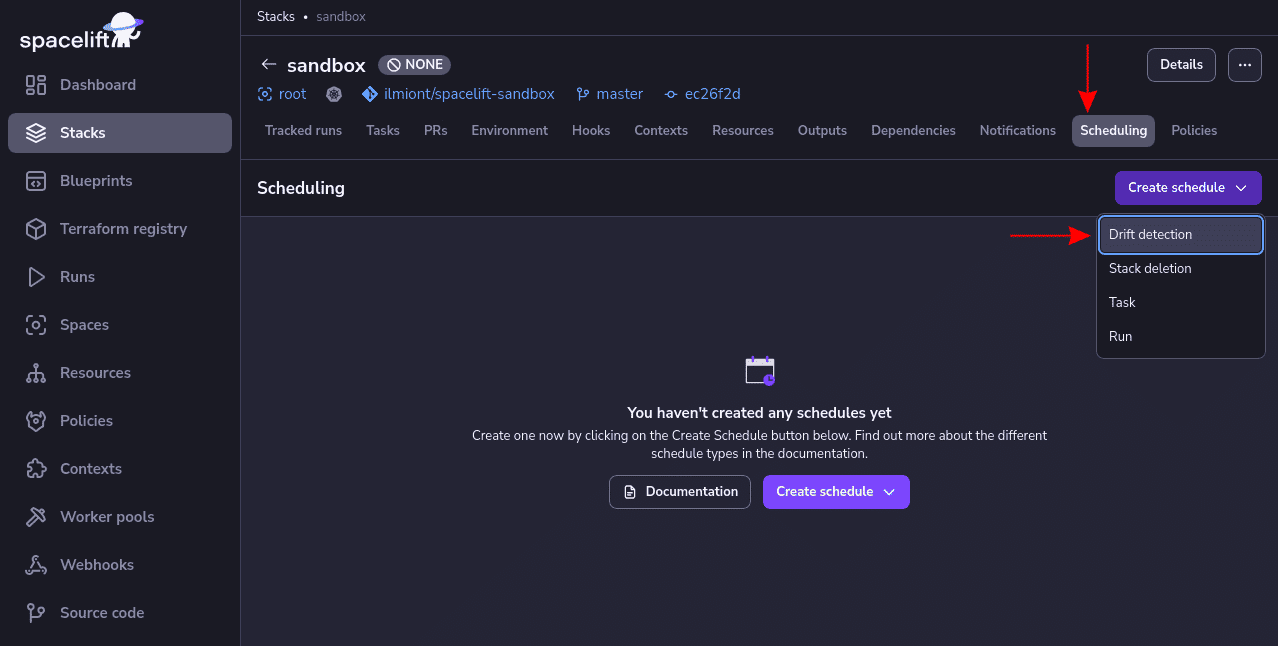
To get started enabling drift detection for a Spacelift stack, head to your stack’s Scheduling tab and select Create schedule > Drift detection:
Next, enter a cron expression to define your drift detection schedule. Ensure the “Reconcile” toggle button is enabled to have Spacelift automatically create reconciliation runs:
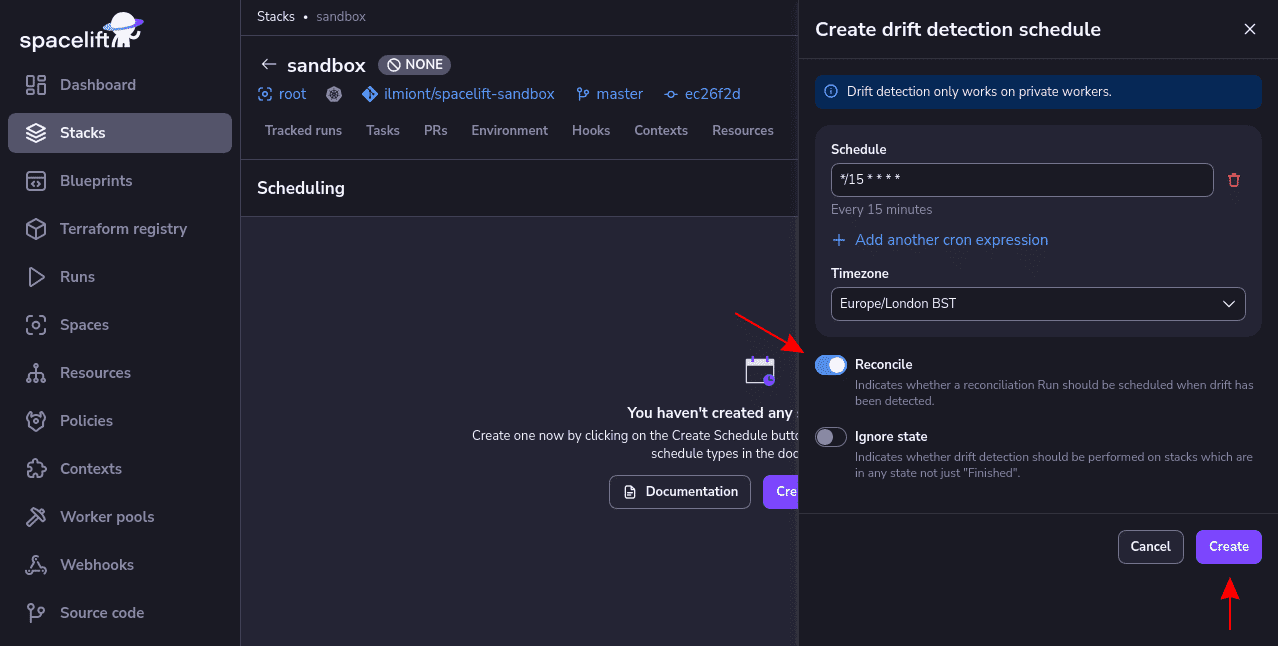
Your drift detection config will activate when you press the “Create” button. Jobs will start scheduling to detect the drift in your live infrastructure once your stack enters the Finished state. You can monitor your drift detection schedule and inspect drift detection runs in your Stack’s Scheduling tab.
Would you like to see it in action, or just want a tl;dr? Check out this video, where we demonstrate how drift can be automatically detected and remediated with Spacelift:
Key points
Cloud drift is inevitable at enterprise scale: it’s what you do to manage it that matters. You can mitigate risks by anticipating where drift might occur, then implementing automated detection and resolution tools to limit the fallout from unplanned changes.
Following the strategies outlined above will let you efficiently monitor, control, and resolve drift throughout your enterprise DevOps lifecycle. Just remember to stay focused on managing drift rather than wasting resources endlessly trying to eliminate it.
Ready to jump in and automate infrastructure drift detection and remediation? Check out Spacelift to take control of drift across your stack. Book a demo with one of our engineers to see how Spacelift detects, flags, and fixes drift on a schedule, without making you manually configure any extra tools.
Detect and remediate drift with Spacelift
Drift happens, so let Spacelift deal with it. Spacelift provides drift detection capabilities to any IaC provider to enable the desired state for application infrastructure across teams, applications, and clouds.
Frequently asked questions
What are the key metrics to measure the effectiveness of drift management?
Effective drift management is measured by how quickly and reliably you detect, correct, and prevent configuration divergence without causing instability. Track detection latency and drift frequency, plus remediation lead time, success rate, and rollback rate to ensure fixes are safe. Also monitor compliance pass rate, mean time between drift incidents, percentage of fleet in desired state, and alert noise (false positives, actionable alerts).
What is drift management?
Drift management is the practice of detecting and correcting differences between the desired configuration of systems, defined in code or policy, and what is actually running in production. In DevOps and IaC, it typically involves continuously comparing live infrastructure to the declared state, alerting on changes, and reconciling them by reapplying code, rolling back manual edits, or updating the source of truth.
What is the difference between normal drift and enterprise drift?
Normal drift is a mismatch between your declared desired state (IaC, config, policies) and what is actually running, usually scoped to a single stack or environment and caught via plan/apply or a basic scan. Enterprise drift is the same issue handled at org scale, with centralized visibility, multi-account scanning, RBAC, audit trails, policy enforcement, and automated alerting or remediation workflows.
Which teams should own enterprise drift management?
Enterprise drift management should be jointly owned by Platform Engineering (primary) and Security/GRC (policy and risk oversight), with app teams accountable for their workloads. A single owner rarely works because drift spans infrastructure, runtime config, access, and compliance controls.
Should drift always be auto-remediated?
No, drift should not always be auto-remediated. Auto-fix is great for low-risk, policy-backed drift like tags, security groups, or baseline configs, but it can break production if the drift was an intentional hotfix or if state is stale. A solid pattern is selective automation: enforce drift correction automatically in dev and staging, and in prod gate it behind policy checks, approvals, maintenance windows, and an explicit “allow drift” exception process.