Drift management is the practice of detecting, triaging, and resolving the gap between what your infrastructure as code (IaC) says should exist and what is actually running in your cloud accounts. You detect it by comparing live resources to your IaC state, usually with a refresh-based execution plan.
You resolve it by either reapplying your configuration to overwrite the change, or updating your code and state to adopt it. At any real size, you automate both steps on a schedule instead of running them by hand.
Infrastructure drift is the difference between live resources and the state defined in your IaC config files. It causes errors, unexpected behavior, and compliance violations, and it gets harder to unwind the longer it sits
In this article, we’ll cover what causes drift, how to detect it with your IaC tooling, how to decide whether to revert or adopt each change, and how to automate the whole loop with Spacelift.
What is drift in cloud infrastructure?
Drift in cloud infrastructure refers to the situation where the actual state of the infrastructure in a cloud environment deviates from the desired state defined by infrastructure as code (IaC) or configuration management tools. It is the discrepancy between what should be running and what’s actually running.
When you provision infrastructure with an IaC tool, you expect that your resources will match the IaC code you applied. But in practice, it’s common to find differences after your resources have been running for a while. Resources tend to drift away from the correct state.
Drift can be caused by several different factors:
- Manual changes: One of the most common sources of drift is when engineers modify live infrastructure directly, often using local CLIs and other unmanaged tools.
- Conflicting tools: Combining multiple IaC and CI/CD tools can enable more powerful infrastructure workflows, but it may also cause drift if tools conflict and overwrite each other’s changes.
- Automatic updates: Auto-updates keep you protected from zero-day security issues, but they can mean your live resources end up running different versions than those listed in your IaC files.
- External dependencies: Dependencies may trigger drift if they’re broken, incorrectly configured, or enter a failed state. For instance, if your IaC file uses an external service to provision a resource, drift may occur if that service releases a breaking change that produces a different output.
- AI-generated and agent-driven changes: Coding assistants generate infrastructure changes faster than review can absorb them, and agents holding cloud credentials call the provider API directly, bypassing your IaC pipeline entirely. It is the same failure mode as a console edit, happening more often.
These factors fall into two main groups: changes introduced by actors outside your IaC tool, whether human, scripted, or AI-driven, and dependencies on external systems that affect your IaC configurations.
It’s not possible to completely prevent drift. Buggy tools, essential auto-updates, and unavoidable manual config changes all mean drift should be expected. Hence, it’s crucial to configure tooling that efficiently detects and resolves drift when it occurs.
Types of cloud infrastructure drift
The types of cloud infrastructure drift include:
| Type of drift | Description | Examples |
| Configuration drift | Misaligned settings or parameters in cloud services. | Security group rules modified, encryption settings disabled. |
| Resource drift | Resources created or deleted outside the defined IaC. | Unplanned S3 bucket created, missing EC2 instance. |
| Security drift | Security policies altered, reducing protection or compliance. | IAM roles changed, public access enabled on storage. |
| Network drift | Unplanned changes in networking components. | Routing table modified, firewall rules altered. |
| State drift | Resource lifecycle states don’t match expectations. | Instance stopped when it should be running, database in maintenance mode. |
| Performance drift | Changes affecting resource behavior or scaling. | Autoscaling thresholds changed, instance performance downgraded. |
| Policy drift | Non-compliance with governance rules or standards. | Missing resource tags, cost policy overrides. |
| Dependency drift | Alterations in connections or dependencies between services. | Lambda pointing to the wrong endpoint, database connection modified. |
What is drift management?
Drift management is the process of identifying, tracking, and correcting discrepancies between the desired state of your cloud infrastructure and its actual state. Drift happens when infrastructure changes outside a controlled process, through manual console edits, out-of-band scripts, automated agents, or provider-side updates, leaving live resources that no longer match the baseline defined in code.
How to manage cloud infrastructure drift
Managing drift is essential to ensure consistency, security, and compliance across your cloud environment. Here are the key steps to manage cloud infrastructure drift effectively:
1. Detecting drift
You can detect cloud infrastructure drift by comparing the state of the live resources in your cloud accounts to the declared configuration in your IaC files. If there’s a difference, then drift has occurred and should be corrected. Developers need to be able to quickly find drift to apply effective mitigations.
The simplest way to detect drift is your IaC tool’s built-in execution plan. terraform plan refreshes state against your provider before comparing it to your configuration, so any action it proposes when your code has not changed points to drift.
To inspect drift without proposing infrastructure changes, use a refresh-only plan:
terraform plan -refresh-onlyThis shows what would be written to state if you accepted the live values, and it changes nothing. The -refresh-only flag arrived in Terraform 0.15.4 and replaces the older terraform refresh subcommand, which overwrites your state file without showing you what changed. OpenTofu supports the same flag.
For a scheduled CI check, add -detailed-exitcode so the job exits non-zero when drift appears and your alerting can key off it.
The equivalent in Pulumi is a preview-only refresh:
pulumi refresh --preview-onlyThis queries each resource’s provider for its live configuration, compares it to the stack’s recorded state, and prints a diff without touching state or cloud resources.
IaC CLIs allow you to perform one-off checks for drift, but they do not hold up for ongoing detection across dozens or hundreds of stacks. Implementing continuous infrastructure monitoring allows you to find drift as it happens, mitigating its effects on your infrastructure.
Spacelift runs this loop for you. On a cron schedule you define, it executes a proposed run against your stack and checks the plan for changes. If the plan is non-empty, the stack is flagged as drifted, and the affected resources appear in the Resources view at both stack and account level. Enable the Reconcile option, and Spacelift opens a tracked run to bring infrastructure back to the declared state.
2. Analyzing drift patterns
Effective drift management requires regular analysis of the causes of drift incidents. If drift keeps occurring for the same reasons, then this indicates an opportunity to improve your processes. For instance, you may find that developers using a local kubectl CLI to manipulate staging environments are causing drift in your Kubernetes deployments.
Comparing newly detected drift to previous events lets you spot these patterns so you can prevent future drift. This enables a more proactive approach to drift management. Instead of waiting for drift to happen, you’ll be able to anticipate possible sources of drift and implement safeguards sooner.
3. Handling drift resolution
Every piece of drift resolves in one of two directions, and picking the wrong one is how drift remediation causes an outage.
Revert. The change was unintended, so you reapply your configuration and overwrite it. Run terraform apply (or trigger a reconciliation run) and the live resource returns to what your code declares.
Adopt. The change was correct and should stay, so you move your code and state to match reality instead. Accept the values into state with terraform apply -refresh-only, then update your configuration so the next plan comes back clean. If the drift is an untracked resource someone created by hand, bring it under management with an import block. Terraform 1.5 and later support configuration-driven import, which lets you review the import in the normal plan-and-apply flow rather than running one-off CLI commands.
Always read the plan before you reconcile. Some cloud attributes are one-way doors: once changed, the provider has no API path back, and the only plan the tool can compute is a destroy and recreate. Reverting that drift automatically, with no human in the loop, will take the resource down. This is the main reason to gate reconciliation behind an approval policy on anything production-facing.
After you resolve drift, confirm it stayed resolved. Re-run your execution plan on the next scheduled pass and check that the plan comes back empty.
What happens when drift goes unmanaged
Leaving drift uncorrected can quickly cause more serious problems in your infrastructure. Not only does drift impede visibility into your resources, but it also threatens the stability and reliability of your apps. Configuration drift could introduce errors that prevent your app from working properly, causing disruption for users. Depending on the resources that are impacted, drift may even pose a security risk if it means that correct policies are no longer applied.
These drifts can lead to:
- Security vulnerabilities: Misconfigurations expose systems to breaches and compliance violations.
- Operational instability: Inconsistent infrastructure may cause unexpected downtime or performance issues.
- Increased costs: Resource sprawl or misallocated services can result in excessive cloud spend.
- Compliance risks: Drift can lead to non-compliance with regulations and policies.
- Inefficient debugging: Diagnosing issues becomes harder when the infrastructure state is unpredictable.
Drift often becomes harder to resolve when it’s left for longer periods of time. Drift in one service can impact others, creating drift chains that are more challenging to investigate and correct. More extensive drift makes it more likely that restoration will be disruptive, such as when resources change so much that they must be recreated instead of reverted.
For these reasons, it’s crucial to regularly monitor for drift and resolve problems as soon as they’re detected. This will minimize the risk of disruption to apps and users and prevent drift-induced disasters.

Best practices for managing cloud infrastructure drift
Now that you know how to detect and resolve drift, here are some best practices that will help keep your infrastructure running reliably.
- Make IaC and CI/CD the only way to apply infrastructure changes: Ensuring all changes are applied by automated workflows ensures developers can’t introduce discrepancies or overwrite previous revisions.
- Prevent unauthorized changes by restricting user privileges: Locking down infrastructure access further prevents accidental changes from being made. Use central platforms like Spacelift to provide safe self-service access to just the users who need it.
- Regularly run IaC drift detection and reconciliation tools: Drift detection tools enable continuous scanning for discrepancies, while automated reconciliation makes it easy to restore the correct state.
- Implement instant drift detection alerts: Send drift notifications to Slack, Microsoft Teams, or a webhook so they surface within minutes of the scheduled scan rather than at the next deploy. The shorter the gap between drift appearing and someone seeing it, the smaller the cleanup.
- Reduce external infrastructure dependencies: Avoiding external dependencies reduces your infrastructure’s exposure to drift. Only add dependencies if they’re trusted services with proven reliability.
- Educate developers on the causes of drift: Helping developers understand the causes of drift makes mistakes less likely. Devs will be able to anticipate where drift could occur, allowing them to proactively avoid it.
- Store all IaC code in central repositories: Ensuring all IaC code is stored centrally prevents infrastructure configuration from becoming fragmented. There’s a single place for new changes to be made, preventing drift caused by devs working from different unsynchronized repositories.
- Immediately commit infrastructure hotfixes back to IaC repos: Urgent bugs and vulnerabilities sometimes need to be patched in production. Bypassing IaC pipelines enables a faster rollout but causes drift if the change isn’t immediately reflected in the IaC repository. Commit all hotfixes as soon as they’re applied so they are not lost the next time your IaC tool runs.
- Manage your drift detection config as code: Defining schedules in a UI means they drift too. Declare them alongside your infrastructure so they are versioned and reviewable.
- Decide the revert-or-adopt policy before you automate: Teams that turn on auto-reconciliation without agreeing which resource types are safe to overwrite are the ones who find out during an incident.
- Automation and consistency are the two main themes of these best practices. Drift will be less common and easier to fix when infrastructure is exclusively managed using IaC and CI/CD tools.

“With Spacelift, one of the first things we did was a big drift detection. We overhauled our drift detection, drift remediation, how to handle and solve it, and how to prevent it from happening. Spacelift handles all of that for us automatically now.” Trevor Rae, Cloud platform engineer at 1Password
Drift management with Spacelift
Spacelift detects and reconciles drift for every IaC tool it supports, including Terraform, OpenTofu, Pulumi, CloudFormation, Kubernetes, and Ansible.
On the schedule you define, Spacelift executes a proposed run against your stack. If the plan comes back non-empty, the stack is flagged as drifted and you can see exactly which resources changed in the Resources view. With Reconcile enabled, Spacelift opens a tracked run to restore the declared state.
That reconciliation run is a normal tracked run, so it obeys the same rules as anything else you deploy. It respects your stack’s auto-deploy setting, and it goes through your approval and plan policies. Drift remediation does not bypass your governance. It goes through it.
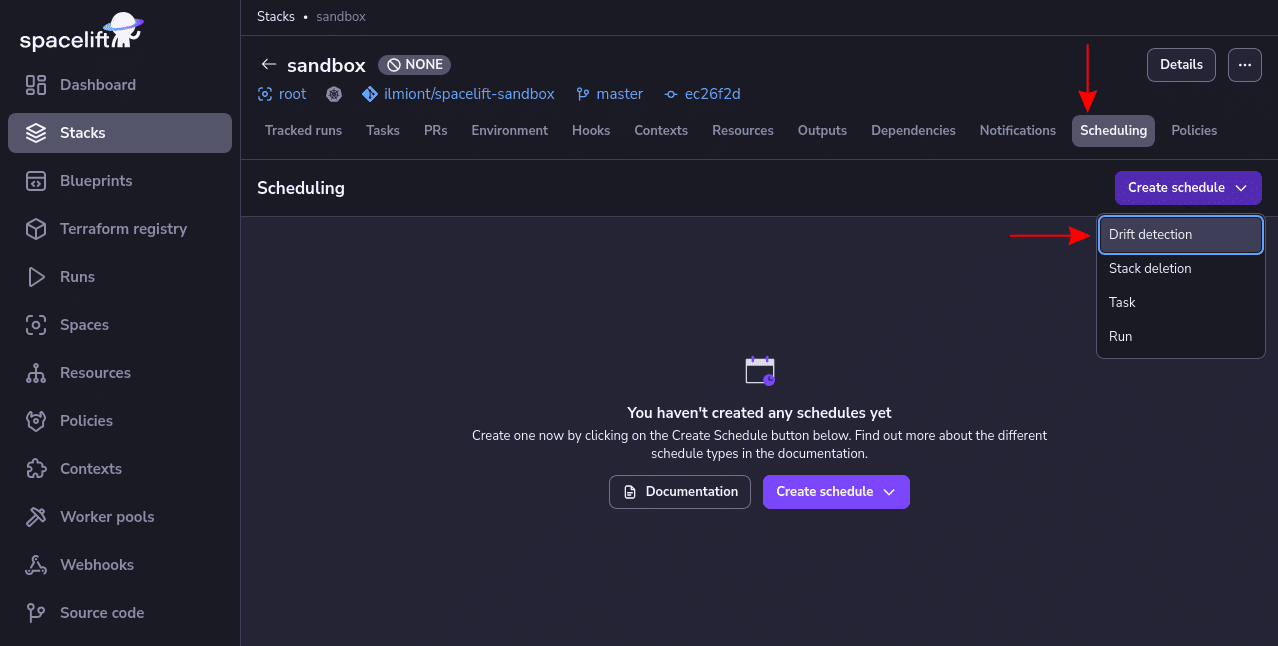
To get started enabling drift detection for a Spacelift stack, head to your stack’s Scheduling tab and select Create schedule > Drift detection:
Next, enter a cron expression to define your drift detection schedule. Ensure the “Reconcile” toggle button is enabled to have Spacelift automatically create reconciliation runs:
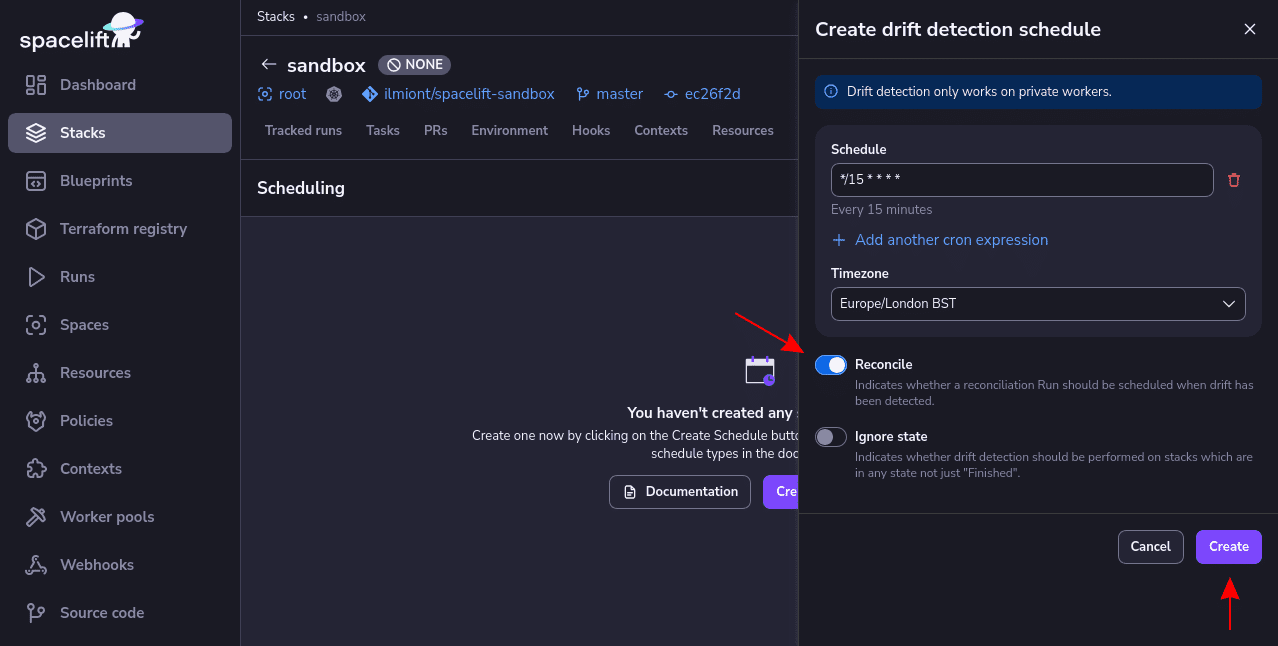
Two options are worth setting deliberately here. Reconcile controls whether Spacelift opens a tracked run when it finds drift. Ignore state controls whether detection runs on a stack in any final state, or only on stacks that are in the Finished state, which is the default.
Your schedule activates as soon as you press Create. You can monitor it and inspect individual detection runs from the stack’s Scheduling tab, or filter all runs by the drift detection parameter under Account > Runs.
Configure drift detection as code
A schedule clicked into a UI is invisible to code review and impossible to reproduce. The Spacelift Terraform provider exposes drift detection as a resource, so detection lives in the same repository as the infrastructure it watches:
# Production: detect, notify, never auto-revert
resource "spacelift_drift_detection" "production" {
  stack_id  = spacelift_stack.production.id
  schedule  = ["0 */2 * * *"]
  timezone  = "UTC"
  reconcile = false
}


# Staging: detect every six hours and remediate automatically
resource "spacelift_drift_detection" "staging" {
  stack_id     = spacelift_stack.staging.id
  schedule     = ["0 */6 * * *"]
  timezone     = "UTC"
  reconcile    = true
  ignore_state = true
}
schedule takes a list of cron expressions evaluated in timezone, and ignore_state lets detection run on stacks in any final state rather than only Finished. reconcile opens a tracked run when drift is found, and that run obeys the stack’s autodeploy setting and plan policies, so set autodeploy = true on staging if you want the fix applied without a human. With reconcile = false you still get drifted resources flagged in the Resources view and a webhook marked driftDetection to hang alerts off.
Would you like to see it in action, or just want a tl;dr? Check out this video, where we demonstrate how drift can be automatically detected and remediated with Spacelift:
If you want to take your infrastructure automation to the next level, create a Spacelift account today or book a demo with one of our engineers.
Key points
Drift management is the process of detecting and resolving cloud infrastructure configuration drift. Drift commonly occurs when changes are made outside IaC or your configuration depends on unreliable external dependencies. Addressing these issues will help reduce drift in your environments, but it’s still possible that some problems will occur.
Scheduled scans plus automated reconciliation are the practical way to manage drift. Spacelift runs detection on the cadence you set, shows you exactly which resources moved, and opens a reconciliation run when you want one. Policies decide when that run is allowed to apply, so you can revert small changes automatically and hold anything destructive for a human.
Detect and Remediate Drift with Spacelift
Drift happens, so let Spacelift deal with it. Spacelift provides drift detection capabilities to any IaC provider to enable the desired state for application infrastructure across teams, applications, and clouds.
Frequently asked questions
What’s the difference between drift detection and drift remediation?
Drift detection finds when infrastructure differs from its desired state. Drift remediation fixes those differences to restore alignment with the defined configuration.
How often should you check for infrastructure drift?
Hourly to every few hours for production and compliance-critical stacks, every six to 12 hours for staging, and daily or on demand for development. Match the cadence to how expensive the drift would be, not to every stack you own.
Should you fix drift automatically?
In lower environments, yes. In production, detect automatically and require approval before reverting. Some cloud attributes cannot be changed back in place, so an unattended revert can force a destroy and recreate.