Cloud provisioning is the process of deploying the cloud infrastructure resources that your apps depend on. It’s how you create the compute nodes, storage devices, and networking rules that serve your environments.
Building an efficient cloud provisioning workflow is a key strategy for increasing software delivery throughput. Automating cloud provisioning lets you dynamically scale infrastructure resources and empower developers to start new instances on demand.
In this article, we explain the various types of cloud provisioning and their impact on the DevOps lifecycle. We’ll discuss strategies and best practices for implementing resilient provisioning processes that reduce operational toil.
What is cloud provisioning?
Cloud provisioning is the process of configuring and deploying the infrastructure resources required to run applications in a cloud environment. It involves setting up compute instances, networking, storage, IAM policies, and other services in a new or existing cloud account.
It’s the steps you take to prepare your DevOps infrastructure. New cloud accounts are empty by default: Provisioning is the process of filling them with the resources you need for your operations.
Common provisioning tasks include:
- Creating compute nodes with the correct size and base image
- Creating and attaching storage volumes
- Preparing object storage buckets
- Assembling networking infrastructure, such as load balancers
- Deploying database instances
- Launching managed Kubernetes clusters
Each of these tasks allocates new resources in your cloud accounts. This is cloud provisioning in a nutshell, but there are plenty of nuances to understand before you begin creating your infrastructure components. Let’s take a closer look at the three primary methods for implementing cloud provisioning:
Types of cloud provisioning
You can provision cloud resources manually, automatically, or on demand via self-service platforms. Each of these approaches has its own use cases and drawbacks.
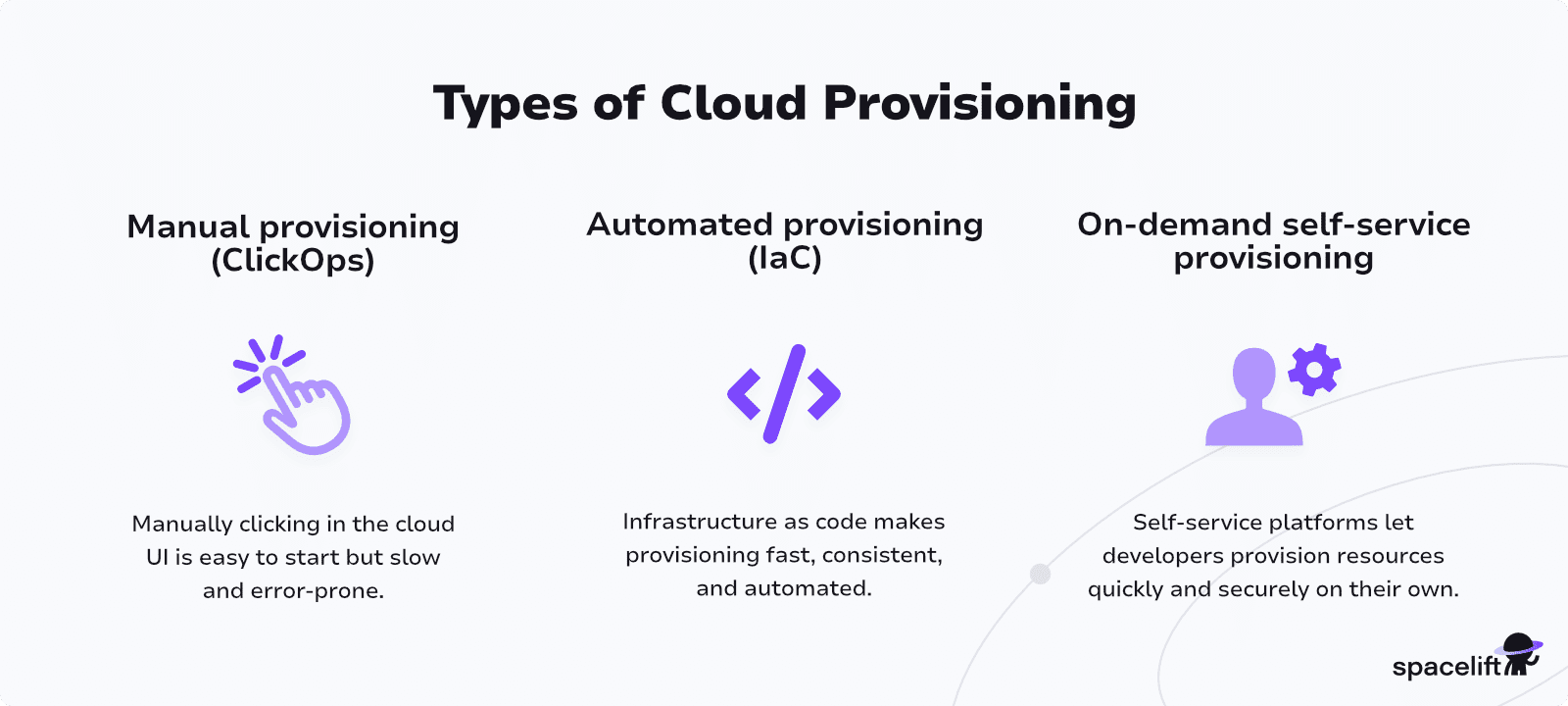
1. Manual provisioning (ClickOps)
Manual provisioning is the traditional basic method. It involves creating your resources by using your cloud provider’s control panel to click through forms. This process is often described as ClickOps.
ClickOps is usually perceived as the easiest way to get started. It’s accessible, but it’s also tedious and prone to errors.
You must log in to your cloud account and follow the correct sequence of steps each time you need to provision a new resource. Inconsistencies can easily occur between resources if certain steps are missed.
2. Automated provisioning (IaC)
Automated provisioning involves creating your infrastructure using IaC tools. With IaC, you can describe your infrastructure’s required state as code, then run the tool to automatically update the resources in your cloud accounts. Combining IaC with CI/CD pipelines lets you deploy your changes immediately after you change your IaC files.
Adopting automated provisioning requires upfront work to prepare your IaC and CI/CD systems. However, once configured, it’s fast, repeatable, and much less susceptible to errors. You can continuously compare your live resources to your repository’s files to detect drift as it happens.
Automated provisioning allows you to tightly integrate infrastructure management with your DevOps workflows, improving throughput at scale.
3. On-demand self-service provisioning
On-demand cloud provisioning builds upon automated provisioning processes to enable self-service access for developers. It’s the practice of making infrastructure provisioning tasks accessible within developer-facing internal platforms.
On-demand provisioning allows developers to create the infrastructure resources they need on their own terms. It eliminates time spent waiting for operations teams to start new environments or prepare staging database instances.
Self-service access also improves infrastructure security: Cloud access keys are stored exclusively within the platform and don’t need to be distributed to each developer.
Benefits of cloud provisioning
Modern cloud provisioning and IaC deliver these core benefits for engineering, DevOps, and platform teams:
- Faster cloud provisioning and deployment – Reduce manual tickets and spin up cloud infrastructure in minutes, not days.
- Consistent, repeatable cloud environments – Use templates and IaC to eliminate config drift and “it works on my machine” issues.
- Improved cloud security and compliance – Apply policy as code, guardrails, and audit trails to every provisioned resource.
- Lower cloud costs and waste – Standardize stacks, auto-teardown idle resources, and track ownership to optimize spend.
- Higher DevOps and platform team productivity – Replace ad-hoc scripts and manual processes with automated cloud provisioning workflows.
- Reduced risk of outages and misconfigurations – Preview changes, detect drift early, and roll back safely when needed (Read more: What Is Cloud Misconfiguration & How Do You Prevent It?)
- Better developer experience and faster delivery – Enable safe self-service infrastructure so teams ship features faster with fewer blockers.
Is cloud provisioning the same as cloud configuration?
Cloud provisioning and cloud configuration are different but closely related topics. They’re both infrastructure automation tasks, but they’re used at different stages of the infrastructure lifecycle.
Cloud provisioning is the process of creating your infrastructure resources. It generates them within your cloud accounts. It’s followed by cloud configuration, the process of preparing provisioned resources for use.
The difference is easiest to understand with an example: You use IaC tools like Terraform or Pulumi to provision a compute instance in your cloud account, and then a configuration management tool, such as Ansible, to install packages, create user accounts, and apply security policies on that instance.
In practice, provisioning and configuration processes frequently overlap. They can sometimes be managed using the same tools.
Nonetheless, it’s worth thinking of them as separate workflows that can operate independently. For instance, platform teams may be responsible for provisioning pools of infrastructure resources that developers can then configure for specific workloads or use cases.
How to automate cloud provisioning process
As we’ve outlined above, cloud provisioning processes are fastest and most reliable when they’re fully automated. Relying on ClickOps-powered provisioning strategies isn’t practical when you’re operating apps at scale. Switching to automated provisioning can feel disorienting at first, but there are only three main steps involved.
Here’s the high-level path to follow.
Step 1. Adopt IaC tools
IaC tools are the bedrock of automated cloud provisioning. They’re how you describe what you want to be provisioned.
There are plenty of different options to choose from for different use cases; some popular choices include:
- Terraform: One of the best-known IaC tools, with an accessible config format and excellent cloud support
- OpenTofu: A widely-adopted, fully open-source Terraform fork, managed by the Linux Foundation
- Pulumi: An IaC solution that lets you define resources using conventional programming languages, including Go, Java, Node.js, Python, and more
- CloudFormation: An AWS-specific IaC tool that works with the AWS CLI, SDK, and external integrations
First, evaluate which tool aligns best with your technical requirements. Compare each tool’s supported config languages and cloud providers to identify which are most suitable for you. You can then start writing your IaC files to provision your infrastructure in your cloud accounts.
Step 2. Layer in CI/CD
IaC is only the first step in an automated cloud provisioning strategy. Although IaC tools automate the interactions with your cloud provider, you’re still responsible for manually running terraform apply or pulumi up after you change your IaC files.
CI/CD pipelines provide the next layer of automation. Pipelines create automated workflows that run in response to events, such as pushing code or opening a pull request.
By using CI/CD services like GitHub Actions, GitLab CI/CD, and Azure Pipelines, you can invoke your IaC tool automatically after you commit new files. This improves speed, consistency, and security by removing manual roadblocks from provisioning operations.
Step 3. Enable self-service access
Enabling self-service developer access is the final stage in cloud provisioning automation. It enables developers to provision infrastructure on demand, even if they’re unfamiliar with your IaC tool and its config format.
Devs shouldn’t be writing IaC files just to bring up new environments — this distracts from real engineering work and requires specialist knowledge that doesn’t fall within a typical developer skillset.
You can implement self-service access using developer platform tools, such as Backstage and Port. These solutions provide a framework for platform teams to publish catalogs of prebuilt services. Developers can then use these services to provision cloud infrastructure in just a few clicks.
Integrating infrastructure provisioning into self-service platforms isn’t always necessary for smaller teams. If developers rarely need to interact with infrastructure resources, then the investment could take a long time to pay off.
However, self-service access is an effective way to improve development efficiency when engineers must regularly start new environments or perform interactions with previously provisioned infrastructure. You could use platform services to enable developers to check the states of infrastructure components and retrieve recent logs, for instance.
Bonus day-2 tasks: Ensure visibility and scan for drift
Beyond the three main steps discussed above, automated cloud provisioning workflows should also be instrumented for clear visibility. This ensures you can monitor what’s running and track provisioning activity over time. Without actionable data, it’s more likely that previously provisioned resources will be forgotten about after they’re no longer required.
Implementing automated drift detection is another important day-2 provisioning task. Regularly scanning for drift enables you to resolve misconfigurations earlier, before they escalate into larger problems.
You can set up a basic drift detection workflow by configuring a CI/CD pipeline to generate your IaC tool’s provisioning plan to run periodically. If the plan reports changes are needed, then it indicates your environment has drifted from the expected state defined in your repository.
How Spacelift simplifies cloud provisioning
Spacelift is an infrastructure orchestration platform that supports Terraform, OpenTofu, Pulumi, CloudFormation, Terragrunt, Ansible, Kubernetes, and more, acting as a single control plane for multi-IaC environments. It accelerates and simplifies cloud provisioning tasks.
Spacelift runs your IaC tools automatically as you commit changes to your repositories. This lets you provision infrastructure by simply pushing new IaC files. Direct cloud integrations allow you to visualize the resources you create in your Spacelift account, eliminating the need to create long-lived cloud security credentials.
Spacelift also supports self-service developer workflows. You can define infrastructure Blueprints that let developers provision approved resources on demand. Blueprints are resource templates that can be customized with inputs each time they’re used. They ensure each resource is configured consistently while allowing a degree of flexibility.
Spacelift includes built-in policy-as-code compliance controls and automated drift detection features. Our platform can also automatically reconcile drift, if permitted by your enabled policies.
Spacelift lets you provision infrastructure fast, then ensures your resources stay exactly as you configured them. It enables flexible and reliable cloud operations at scale.
With Spacelift, you get:
- Multi-IaC workflows
- Stack dependencies – You can create dependencies between stacks and pass outputs from one to another to build an environment promotion pipeline more easily.
- Unlimited policies and integrations – Spacelift allows you to implement any type of guardrails and integrate with any tool you want. You can control how many approvals you need for a run, which resources can be created, which parameters those resources can have, what happens when a pull request is open, and where to send your notifications data.
- High flexibility – You can customize what happens before and after runner phases, bring your own image, and even modify the default workflow commands.
- Self-service infrastructure via Blueprints – You can define infrastructure templates that are easily deployed. These templates can include policies/integrations/contexts/drift detection for reliable deployment.
- Drift detection & remediation – Ensure the reliability of your infrastructure by detecting and remediating drift.
Best practices for effective cloud provisioning
To ensure your cloud provisioning process is successful, try to implement the following best practices within your strategy:
- Automate everything using IaC – Automating cloud provisioning using IaC improves speed, consistency, and reliability. This is the best way to optimize cloud provisioning processes for long-term scalability.
- Allow developers to provision on-demand via self-service workflows – Build internal platforms and portals that let developers provision infrastructure components on demand, such as a new staging Kubernetes cluster or deployment environment. This prevents developers from becoming stuck waiting for operations teams to prepare new resources.
- Consistently tag your resources to simplify monitoring – Applying consistent metadata to each of your cloud resources makes it easier to identify their purpose and who’s responsible. It also makes monitoring data more useful by allowing you to drill down to specific dimensions, such as resources associated with a particular team or project.
- Continuously review and right-size provisioned infrastructure to reduce costs –The cloud infrastructure lifecycle continues after provisioning. Regularly review your infrastructure inventory and prune or rightsize any resources that are no longer required. This improves operating efficiency and prevents unnecessary costs.
- Use policy-as-code tools to enforce compliance guardrails – Misconfigured infrastructure components can have serious security and compliance consequences. Protect your provisioning processes using Policy-as-Code tools to prevent non-compliant resources from being added to your accounts. Embedding Policy-as-Code within your CI/CD pipelines lets you block pipelines that would deploy vulnerable IaC configurations.
These tips will help ensure your cloud provisioning goes smoothly, leading to more positive DevOps outcomes.
Key points
Cloud provisioning is the process of filling an empty cloud account with the necessary infrastructure components for your apps. You can provision resources manually using ClickOps, but this approach is slow, risky, and difficult to scale. Automated workflows built on IaC, CI/CD, and self-service developer platforms address these challenges, enabling you to safely manage infrastructure while minimizing overheads.
Ready to solve your cloud provisioning challenges? Spacelift provides a single automated platform to provision, configure, and govern your infrastructure. Get started with a free trial or book a demo today.
Solve your infrastructure challenges
Spacelift is a flexible orchestration solution for IaC development. It delivers enhanced collaboration, automation, and controls to simplify and accelerate the provisioning of cloud-based infrastructures.
Frequently asked questions
What does the provisioning process mean?
Provisioning refers to the process of preparing and configuring the necessary resources, such as infrastructure, software, or user access, to make a system or application operational. It typically includes setting up servers, storage, networking, and installing required software or services. A well-defined provisioning process is critical for scalability, disaster recovery, and CI/CD pipelines.
How are cloud services provisioned?
Cloud services are provisioned through automated systems that allocate computing resources such as servers, storage, and networking based on user-defined parameters. This process can be manual, semi-automated, or fully automated via infrastructure as code (IaC) or orchestration tools.
What are the key considerations for security in cloud provisioning?
Key security considerations in cloud provisioning include:
- Identity and access management (IAM): Enforce least privilege using role-based access, temporary credentials, and multi-factor authentication.
- Resource isolation: Use VPCs, subnets, and security groups to separate environments and control traffic flow.
- Encryption: Apply encryption for data at rest and in transit, with proper key management using services such as AWS KMS or HashiCorp Vault.
- Automation and auditing: Automate provisioning with tools like Terraform while enabling logging (e.g., CloudTrail) to monitor changes.
- Secret management: Avoid hardcoding credentials; use secure vaults or secrets managers to inject them at runtime.
Can I automate provisioning across multiple cloud providers?
Yes, you can automate provisioning across multiple cloud providers using infrastructure as code (IaC) tools that support multi-cloud deployments.
Tools including Terraform, Pulumi, or Crossplane allow you to define and manage infrastructure resources from different cloud providers (such as AWS, Azure, and Google Cloud) in a single configuration. These tools abstract provider-specific APIs into declarative or programmatic code, enabling consistent provisioning workflows across environments.