Getting started with Terraform is as easy as installing the Terraform binary on your local machine, typing a few lines of HCL into main.tf and running terraform apply. This description glosses over a few details, including installing providers, authenticating to provider platforms, running terraform plan, and more, but the general idea is valid.
Running Terraform at scale for an entire organization is a different story. First of all, you may have a large number of teams running Terraform.
In this context, you don’t want to allow developers to freely roam and do as they please. This is not necessarily because you don’t trust your developers, but your organization has a reputation to uphold, and one or more governance frameworks to abide by.
When you reach a certain Terraform footprint in your organization, there is a clear need for compliance and governance around the use of Terraform in order to just stay in business.
In this blog post, we will learn about compliance and governance for Terraform, and the concept of policy as code will be central in this discussion.
What we’ll cover:
TL;DR
- Terraform compliance and governance is the practice of ensuring Terraform-managed infrastructure meets external regulatory frameworks (SOC 2, PCI-DSS, HIPAA, DORA, NIST) and internal organizational rules around cost, tagging, naming, and access.
- The primary mechanism is policy as code (PaC): rules written in a policy language and enforced by an engine that scans Terraform plans before apply.
- The most widely used PaC frameworks for Terraform are Open Policy Agent (OPA), HashiCorp Sentinel, and Checkov.
What is Terraform compliance and governance?
Terraform is one of the most popular tools for infrastructure as code (IaC). With Terraform you declaratively define a desired state of your cloud infrastructure (and non-cloud infrastructure) using code written in the domain-specific HashiCorp Configuration Language (HCL).
Terraform is provider agnostic. It works the same way, no matter which provider ecosystem you are provisioning infrastructure to. The differences lie in how each provider behaves. Terraform is also able to provision infrastructure to multiple provider ecosystems at the same time.
Each provider ecosystem includes internal compliance and governance features and services (e.g., Azure policy, AWS Service Control Policies, GCP organization policies, and more). Implementing governance controls on each of these different providers using their own internal services results in a lot of (duplicate) work.
To combat this problem, you can apply compliance and governance features for your Terraform configurations. This works in a unified way for all target providers, and allows you to implement these features at a common scope, e.g., early in the CI/CD process or in the automation platform you use to run Terraform (e.g., Spacelift).
The primary mechanism for implementing compliance and governance in Terraform is policy as code (PaC). In the next section, we will go through the PaC concept.
Why Terraform compliance and governance matter?
When you talk about Terraform compliance and governance, it generally means the infrastructure you configure with Terraform should adhere to a specific compliance and governance framework.
The frameworks applicable to your organization depend on your industry type.
- In the banking industry, you may have to follow a large number of compliance and governance frameworks, not the least DORA (Digital Operational Resiliency Act), which all banks and other financial institutions operating in the EU have to adhere to.
- If you manage card payments, you have to be PCI-DSS (Payment Card Industry Data Security Standard) compliant.
- If you work in the defense industry, you may have to live up to CMMC (Cybersecurity Maturity Model Certification) and various NIST (National Institute of Standards and Technology) frameworks. There are many more examples.
Each framework can be expressed as a set of rules that your cloud infrastructure (and other infrastructure) should meet. Since Terraform is expressed as HCL code, Terraform compliance and governance boil down to controlling what you write in your Terraform configurations.
What is policy as code?
In the previous section, we arrived at the conclusion that Terraform compliance and governance are about controlling the code you type into your Terraform configurations.
How you do this is often through policy-as-code (PaC). Policies are rules that you define through code using a policy language. To enforce policies for your infrastructure, you use a policy engine. A PaC framework is the combination of a policy language and a policy engine.
Three popular PaC frameworks for Terraform are Open Policy Agent (OPA) with the Rego policy language, HashiCorp Sentinel, and Checkov. There are plenty of other options available, for instance, tfsec.
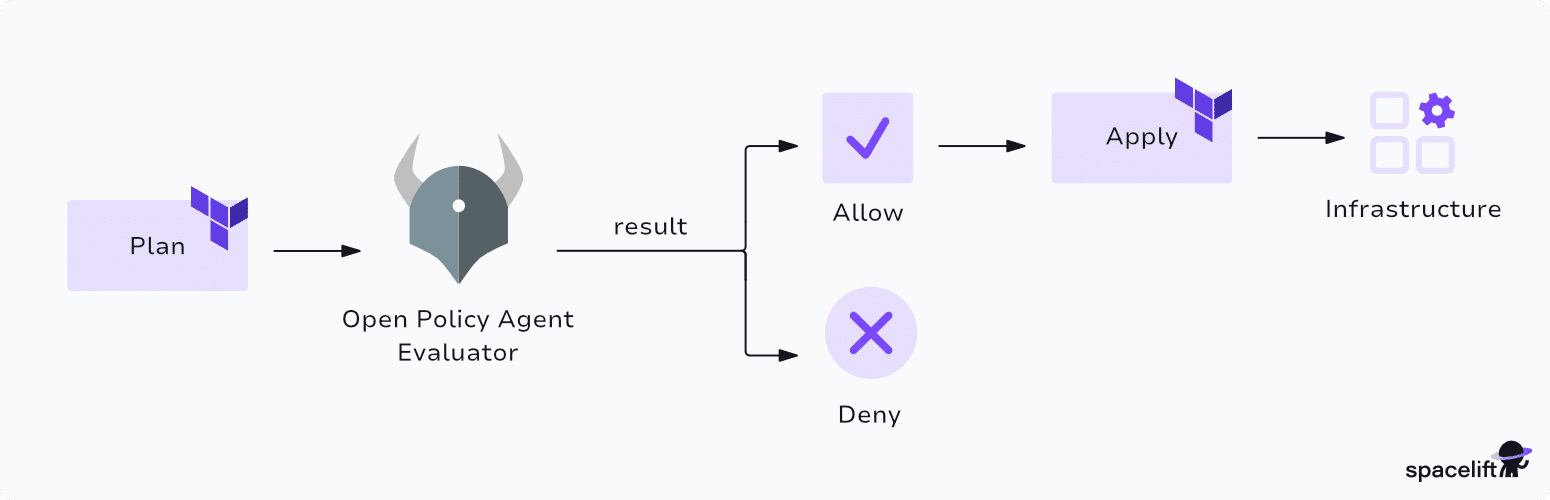
The general idea of PaC is that you write a number of policies to check how different resources within your Terraform configurations are configured, and you send these policies together with the Terraform configurations, planned changes (output from terraform plan), and related metadata into the policy engine. Based on this input, the policy engine determines if the infrastructure configuration is approved or denied.
The policies you write should reflect internal IaC guidelines and rules within your organization, as well as external rules from the compliance and governance frameworks your infrastructure must meet.
Every change to your Terraform configuration must pass through the policy layer. How you enforce this depends on the specific automation platform or CI/CD system you use to run Terraform. Generally, if you use an automation platform (e.g., Spacelift), this is easier to enforce than building a custom solution.
How to enforce compliance and governance in Terraform workflows
In this section, we will go through an example of how to implement Terraform compliance and governance using OPA/conftest in a GitHub Actions workflow.
This environment uses GitHub to illustrate the steps, but the exact implementation details vary depending on the platform you run Terraform on (e.g., Spacelift) and the policy framework you use.
What is OPA and conftest?
Before we go through hands-on how to use OPA and conftest for Terraform, it makes sense to briefly discuss what they are.
OPA (Open Policy Agent) is a PaC framework primarily geared towards Kubernetes environments but applicable for many other domains as well. OPA is highly customizable, which could lead to complexity in how you implement it. To alleviate this, there are tools available for common workflows.
One of these tools from OPA is conftest. With conftest you can write policies for many common configuration languages, among them HCL for Terraform.
Conftest is based on OPA but uses a few opinionated conventions in the policies you write and includes a CLI to streamline enforcing policies. This blog post is not a deep dive into OPA or conftest. You can learn more about OPA in the documentation, and more about conftest in its documentation.
Installing conftest and OPA
Before we can use conftest, we must install it. Follow the guidance for your OS in the documentation.
The GitHub Actions workflow we will configure later will use Ubuntu, so we can install conftest using these steps:
$ VERSION=0.68.2
$ wget "https://github.com/open-policy-agent/conftest/releases/download/v${VERSION}/conftest_${VERSION}_Linux_x86_64.tar.gz"
$ tar xzf conftest_${VERSION}_Linux_x86_64.tar.gz
$ sudo mv conftest /usr/local/bin
In the example above, we pin the version to 0.68.2, which is the latest available version at the time of writing. It is generally best practice to pin the version you are using and deliberately upgrade to a newer version in a controlled fashion.
Verify that conftest was installed correctly:
$ conftest --version
Conftest: 0.68.2
OPA: 1.15.2
Writing a policy
You will likely have many different policies, each checking for a specific violation in your Terraform infrastructure. In the following example we will configure a single policy. A full coverage of the Rego language for OPA is beyond the scope of this blog post.
By default, conftest will look for policies in a directory named policy. You can tell conftest to look in a different directory by passing the --policy flag with the value of your policy directory.
Create a new policy file named lambda.rego in a directory named policy. Add the following policy definition to lambda.rego:
package main

deny contains message if {
  some name
  some function in input.resource.aws_lambda_function[name]
  not function.code_signing_config_arn
  message = sprintf("Lambda `%v` has no code signing config", [name])
}
OPA/conftest policies are written in the Rego language. Despite what the documentation says, the Rego language is not intuitive unless you have a background from functional programming.
In simplified terms, the policy above says that any aws_lambda_function resource in a Terraform configuration that has not configured a code_signing_config_arn argument violates this policy. This rule illustrates that we want the code that executes on our Lambda functions to be signed.
You access the input passed to the policy in the input variable. With Terraform files as input you can access resources using an input.resource.<resource type> expression, and using similar expressions to access any other configuration block in HCL.
Running this policy for a Terraform configuration is simple. You do not have to tell conftest what format your input use. Simply run the conftest test command and pass it the Terraform configuration file or a directory with many Terraform files.
For a basic Terraform configuration (placed in a directory named terraform) with a single aws_lambda_function resource that do not include the required argument, we get this output:
$ conftest test terraform/
FAIL - terraform/main.tf - main - Lambda `web` has no code signing config

1 test, 0 passed, 0 warnings, 1 failure, 0 exceptions
Conftest checks for values in any set named deny, warn, or violation (same as deny but with a more detailed output). This is one opinionated part of conftest that differs from normal OPA, where the naming is arbitrary. Let’s update the policy to this:
package main

warn contains message if {
  some name
  some function in input.resource.aws_lambda_function[name]
  not function.code_signing_config_arn
  message = sprintf("Lambda `%v` has no code signing config", [name])
}
Re-running conftest with the same Terraform configuration as before now gives us this output:
$ conftest test terraform/main.tf
WARN - terraform/main.tf - main - Lambda function `web` has no code signing config

1 test, 0 passed, 1 warning, 0 failures, 0 exceptions
In this way, you can introduce new policies as warnings, informing your Terraform consumers that something in their infrastructure configuration violates a policy, but it is currently not stopping them from proceeding.
There is much more you can do with conftest and OPA, but let’s move on for now.
Putting everything together into a GitHub Actions workflow
We can introduce conftest into a simple GitHub Actions workflow that runs anytime we open a PR targeting the main branch. This way, we can verify that any proposed change to the main branch passes our policies before it is merged.
This is an example of what this workflow can look like:
name: Terraform CI

on:
  pull_request:
    branches:
      - main

permissions:
  contents: read

jobs:
  ci:
    runs-on: ubuntu-latest
    steps:
      - uses: actions/checkout@v6
      - name: Install conftest
        run: |
          VERSION=0.68.2
          wget "https://github.com/open-policy-agent/conftest/releases/download/v${VERSION}/conftest_${VERSION}_Linux_x86_64.tar.gz"
          tar xzf conftest_${VERSION}_Linux_x86_64.tar.gz
          sudo mv conftest /usr/local/bin
      - name: Enforce policies
        run: |
          conftest test terraform/
This workflow can easily be extended to include additional steps if needed.
Scale this approach for Terraform compliance and governance in an organization
The example in the previous sections is not directly applicable to a large organization, because users could easily bypass the policy evaluation by simply omitting it from their workflows.
To extend this exact approach (using GitHub Actions and conftest) you have to implement additional steps:
- Create one or more repositories where you configure all policies that your Terraform configurations must abide by.
- Create shared workflows that run conftest in a unified manner using the policies from the policy repositories.
- Set up repository rulesets that apply to all Terraform repositories on GitHub that require any change to Terraform code to pass one or more of these shared workflows.
You should also enforce that any change to your AWS environment (or any other target provider) is allowed only through your GitHub environment. This can be achieved by configuring an OIDC trust relationship between these two platforms and restricting any other access to AWS to read-only permissions.
Alternatively, you can implement a similar approach using a different platform where policy enforcement is built-in on the platform. Two examples of this:
- Use Spacelift for all Terraform automation and utilize the built-in support for OPA policies.
- Use HCP Terraform for all Terraform automation and utilize the built-in support for HashiCorp Sentinel or OPA.
Best practices for Terraform compliance and governance
Keep the following best practices in mind when introducing Terraform compliance and governance and working with PaC.
1. Use an established policy as code framework
Sometimes it can be tempting to build your own custom PaC framework to fulfill a specific need. This approach does not scale. If needed, you can use multiple third-party policy frameworks to cover different needs.
If you use a platform with built-in support for a specific policy framework, then the decision should be relatively simple.
2. Use pre-written policies if possible
You can often find official implementations of specific compliance and governance frameworks for a given PaC. This streamlines the work of applying these policies in your environment and shifts the burden of implementing and maintaining them to an external actor.
Just make sure that the policy libraries you bring in are written by a trusted source and are regularly kept up to date.
3. Enforce policies early in your workflows
Shifting security left is an important concept to catch security issues in your code at an early stage of development. Similarly, you should shift compliance and governance checks left to catch violations early in the process.
One example is enabling developers to easily run policies on their infrastructure during code implementation. This does not necessarily have to be available on their own developer laptops, but it should be readily available in a convenient manner to encourage running it often.
The opposite of shifting left is when you rely on scheduled policy checks on the respective platforms (e.g., AWS, Azure, etc) that result in resources being flagged as violating a given policy and presented as a red dot on a dashboard somewhere. These policy violations will likely not be prioritized for a fix unless a developer’s job depends on it.
4. Introduce new policies gradually
When introducing new policies in your environment, such as a new compliance and governance framework, do so gradually to avoid disrupting your Terraform workflows.
You can introduce policies in an advisory mode, where they will inform you if your infrastructure violates the policy, but it won’t be enforced, and stop your Terraform workflow from continuing. We saw an example of how to do this with conftest earlier in this blog post, where we used “warn” instead of “deny”.
Give your teams a deadline for when new policies will go from advisory to enforcement. This gives your teams a chance to implement the necessary changes for their infrastructure.
5. Test your policies
Treat your policies like any other code and include tests to ensure they behave as intended. Introducing a new untested policy in an environment could mean every resource in every Terraform workflow is flagged as violating the policy, and your Terraform environment grinds to a halt.
A good idea is to use real Terraform configurations to generate the input needed for your tests, including examples that satisfy and violate each policy. Use the same Terraform binary version as well as provider versions that your Terraform consumers use when generating the input data.
You can set up tests in conftest and run them with the conftest verify command.
6. Make it easy for your Terraform consumers to succeed
As a Terraform consumer, it should be easy to live up to the policies that are enforced in your environment. This means outputting enough information from failing policies so that it is clear why a specific policy was breached and what must be done to be compliant.
You should also offer Terraform modules for common infrastructure components that are compliant with every policy out of the box.
7. Communicate the why behind policies, compliance and governance
Policies, compliance, and governance can seem like a big hurdle from a developer’s perspective. You need to clearly communicate why certain policies are in place in your environment, and what the consequences of violating policies are.
If everyone understands the shared responsibility for compliance and governance, everyone will be better off.
How to improve your infrastructure governance with Spacelift
Spacelift is an infrastructure orchestration platform that gives you centralized governance and visibility across Terraform, OpenTofu, Pulumi, CloudFormation, Ansible, Kubernetes, and other infrastructure tools.
Spacelift defends against secrets sprawl by orchestrating your IaC tools within a single automated workflow. Instead of relying on long-lived static credentials, Spacelift integrates with your provider’s IAM systems to automatically generate temporary tokens for each deployment. Because tokens are destroyed after they’re used, you can scale your IaC processes without risking secrets sprawl.
Security is built into the product with policy as code, encryption, SSO, MFA, and private worker pools. Spacelift is SOC 2 Type II audited, provides compliance artifacts through the Spacelift Trust Center, and is the first IaC orchestration platform to receive FedRAMP authorization.
Once you create a stack, changes to IaC files in your repository are automatically applied to your infrastructure. Pull request integrations show which resources will be affected, and policies enforce automated compliance checks before anything is deployed. Drift detection periodically checks for discrepancies and can launch reconciliation jobs to restore the correct state.
Spacelift can help you with:
- Policy as code: Spacelift supports PaC through OPA, and you build policies to restrict certain resources and certain resource parameters, require multiple approvals for runs, control what happens when a PR is merged, and where to send notifications
- Drift detection and remediation: With Spacelift, you get out-of-the-box drift detection and remediation, so that you can easily detect changes that were made outside of your IaC processes and remediate them with a click of a button
- Lifecycle hooks: Spacelift lets you control what happens before and after each runner phase, so you can easily embed any guardrail tool into your workflow. You can also leverage Spacelift’s built-in plugins for this (there are plugins available for Checkov, Trivy, Wiz, and others)
- Self-service: You can implement self-service using Blueprints and Templates, making it easy to enforce all the guardrails you need. Spacelift also integrates with Backstage and ServiceNow, making it easy for your developers to self-serve infrastructure from the tools they already know and use
- AI-powered diagnostics: Spacelift Intelligence adds an AI layer that helps you troubleshoot failed runs, understand error context, and get operational insight across your infrastructure workflows
If you want to see how Spacelift can help you implement Terraform guardrails, book a demo with one of our engineers.

1Password, a global leader in identity security, used to rely on a small team of cloud platform engineers to manage infrastructure-as-code (IaC) operations for the entire organization. However, with Spacelift’s guardrails and security in place, much of that IaC management is delegated to the teams that own it, while the cloud platform engineering team gets on with the business of providing expertise.
Key takeaways
Terraform compliance and governance are about controlling how the infrastructure you manage using Terraform is configured. You do this to comply with internal rules on infrastructure as code in your organization and to meet external compliance and governance frameworks your organization is expected to uphold.
This is often implemented using policy-as-code. Policies are rules defined in a domain-specific language. Policies are enforced through a policy engine. Each change to your Terraform configurations is processed by the policy engine together with all policies, and the output is an approved or denied decision.
In this blog post, we saw an example of enforcing policies using OPA/conftest on GitHub Actions.
Work with Terraform compliance and governance using best practices, including:
- Use established PaC frameworks, not custom-built solutions.
- Use pre-written policies from trusted sources if they are available.
- Shift policy-enforcement left.
- Introduce new policies in an advisory (warn but do not block) mode, giving teams time to adjust their infrastructure to fulfill new policies before they are enforced.
- Test your policy code as you would test any other code.
- Make it easy for your Terraform consumers to succeed by providing Terraform modules that fulfill policies out of the box and use descriptive violation messages from your policies.
- Make sure everyone has an understanding of why compliance and governance matter.
Manage Terraform better with Spacelift
Orchestrate Terraform workflows with policy as code, programmatic configuration, context sharing, drift detection, resource visualization, and more.
Frequently asked questions
What is Terraform compliance?
Terraform compliance is the practice of validating Terraform configurations against security, regulatory, and organizational standards before infrastructure is provisioned. It’s typically enforced through policy-as-code tools like Sentinel, OPA, or Checkov, which scan plans for violations during the CI/CD workflow.
What's the difference between compliance and governance in Terraform?
Compliance in Terraform focuses on meeting specific external standards (SOC 2, HIPAA, PCI DSS), while governance is the broader system of internal rules controlling how infrastructure is provisioned, including cost limits, tagging, naming, and approval workflows. Compliance is a subset of governance.
What compliance frameworks does Terraform help address?
Through policy-as-code and scanning tools, Terraform helps enforce CIS Benchmarks, SOC 2, PCI DSS, HIPAA, NIST 800-53, ISO 27001, FedRAMP, and GDPR. Solutions like Checkov, Sentinel, and pre-built compliant modules map specific controls to Terraform resource configurations.
What are the common Terraform compliance challenges?
Common challenges include drift between deployed state and declared configuration, inconsistent enforcement across teams, mapping abstract framework controls to concrete resources, handling exceptions without permanent suppressions, and proving continuous compliance to auditors rather than point-in-time snapshots.