You will inevitably face infrastructure drift when you work with infrastructure as code (IaC), especially at scale. You might introduce drift to fix some high-severity issues, but it is important to incorporate all these changes into your IaC to avoid them being reverted when you deploy your infrastructure again.
Terraform and its open-source alternative, OpenTofu, are the most popular IaC tools in the ecosystem, and infrastructure drift is one of the most common problems you can face by using them alone.
In this article, we will explore:
TL;DR
Terraform Cloud drift detection checks whether your actual infrastructure still matches your last applied Terraform state, surfacing out of band changes and often generating a plan so you can reconcile safely. You can enable it per workspace with a schedule and alerts, and then resolve drift by updating code, importing, or reverting changes.
If you need more coverage or automation, you can use CI-based periodic plans or cloud config monitoring, and platforms like Spacelift can centralize drift detection across environments and IaC tools with more flexible workflows and optional remediation.
What is Terraform drift?
Terraform drift refers to manual or automatic changes made outside your Terraform code. Drift refers to changes from the desired state of your infrastructure (as defined in your Terraform configuration and state) to its actual state.
For example, you may code five AWS EC2 instances with Terraform code, deploy them with terraform apply, and have them created in your AWS account. Then someone can go to the AWS console, change the parameters for these instances, or even manually delete one of them. Such changes made outside of your IaC process are drift.
To understand what can cause drift, check out Top 7 Causes of Infrastructure Drift.
Note: If your Terraform code doesn’t define a resource and you create it manually, that is not drift. However, this manual approach means you don’t have control over the resource through your process, and creating multiple resources manually will incur costs your team won’t know about.
You will also have to update these resources manually, which can be time-consuming for a large number of infrastructure resources.
Read more: The hidden impacts of infrastructure drift
How does Terraform Cloud drift detection work?
Terraform Cloud (HCP Terraform) is one of the most popular platforms for managing your Terraform code. Apart from managing your Terraform state for you or helping you implement policy as code (PaC), it can also help you detect drift.
In Terraform Cloud, drift detection works by running terraform plan against your infrastructure to compare the actual state of your resources with what is recorded in your state file. This runs periodically, and if it detects that your infrastructure doesn’t match the state, it will record it as drift.
Key features of Terraform Cloud drift detection
Terrafrom Cloud drift detection offers you:
- Periodical runs to check if there is any infrastructure drift
- A summary of the drift in the UI, making it easy to understand which resources have drifted
- The ability to send notifications to Slack or apps that support webhooks
- A remediation workflow to make your VCS the single source of truth, as it should actually be in any GitOps workflow
How to enable drift detection in TFC?
To enable drift detection in TFC, you will first need to ensure that you are at least on the HCP Standard plan.
Next, select the workspace you want to enable drift detection for, go to Settings, and then select Health:
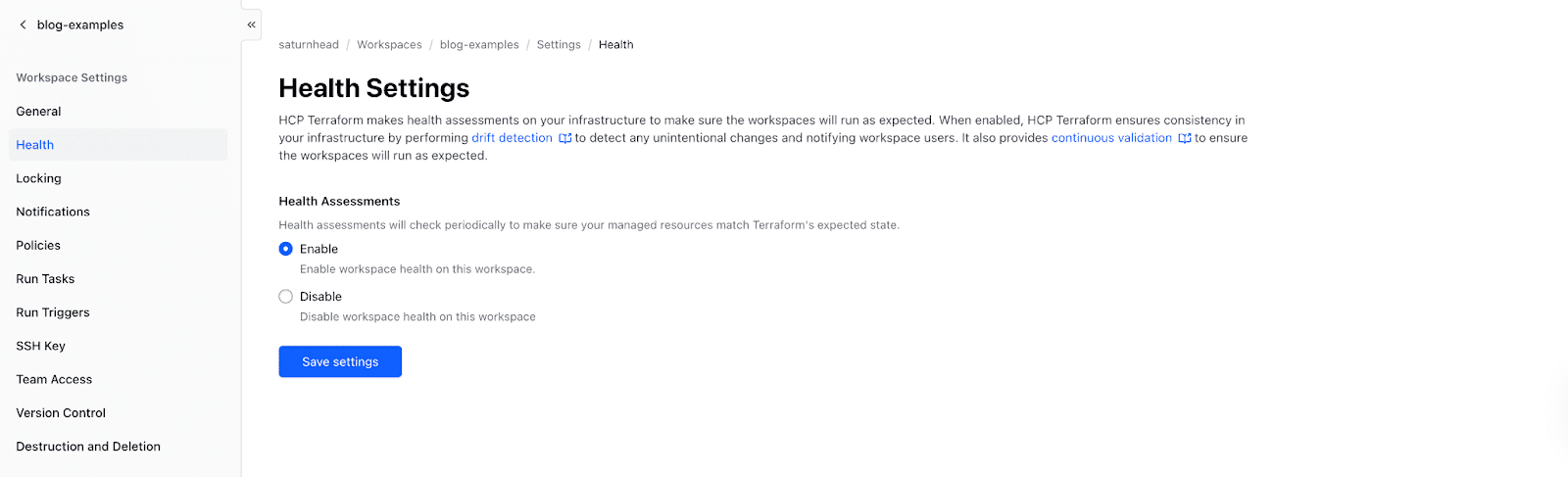
In here, you should enable the Health Assessments and then select “Save settings” as shown above.
Next, at the workspace level, go to Health, and then select Drift. Here, you will see all the information related to drift:
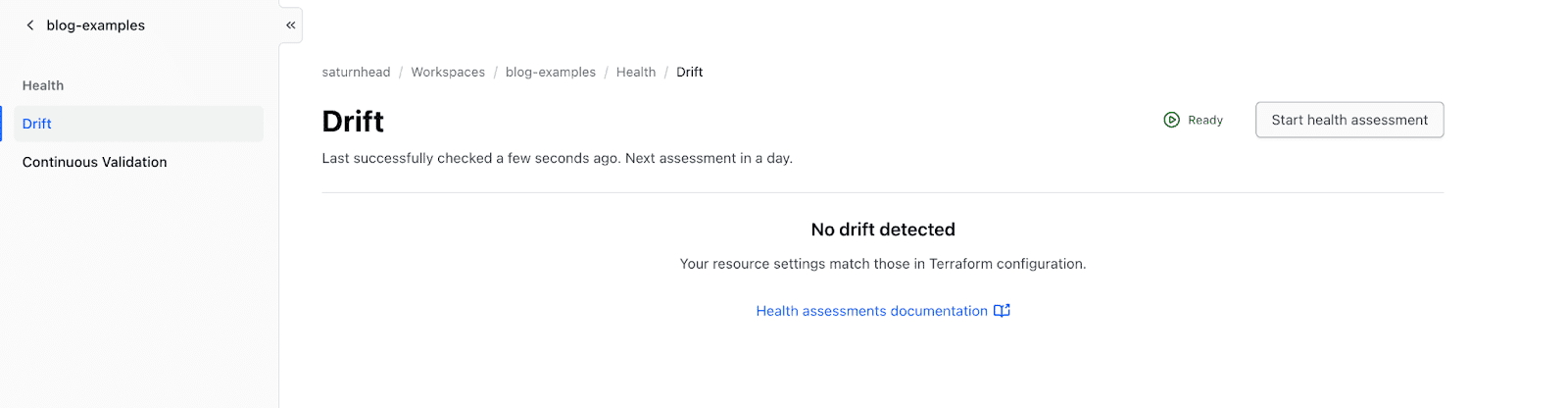
By default, this runs daily, but you can start a new health assessment that includes drift detection.
What to do when drift is detected?
There are three main things you can do when drift is detected:
1. Reapply your code to fix the drift by reverting it to its previous state
Reapplying your code to fix the drift by reverting it to its previous state is a valid solution. Somebody made a manual change, maybe to test a new feature out.
It may have been best practice to make that change to the Terraform code and test it in lower environments, but you will probably want to remove the manual change. Reapplying the code from your VCS will actually revert the changes to the previous state.
2. Incorporate the manual changes into your code
Incorporating the manual changes into your code is another valid solution.
Imagine your SRE team was pinged at 2 AM to fix a high-severity issue. Production was down, and many customers were complaining that the platform wasn’t up and running. Your team identified the issue and tried various fixes.
Trying different fixes in Terraform would have meant going through the entire pull-request process, which could have wasted precious debugging time.
In this case, when a solution is found and drift detection is evaluated, you can understand, at a glance, what changed and then incorporate that in your code to ensure that these changes persist.
3. Ignore the drift
Ignoring drift is very dangerous and not recommended, as it can have unwanted consequences for your infrastructure. If you choose to ignore a drift, you can have unwanted downtime.
Imagine you are managing your infrastructure at scale and choose to ignore drift across several configurations. In this case, no one will actually know what your infrastructure looks like, which resources exist and which do not, or how they are configured. Ignoring drift is the biggest mistake one can make.
It’s very important not to ignore drift and to always choose between reverting to the previous state or incorporating the new changes into Terraform.
Alternative methods for detecting Terraform drift
You can think of drift detection as a terraform plan that runs periodically and checks if there are any changes. In a standard GitOps workflow, your VCS should reflect the actual state of your infrastructure.
When you run terraform plan on any Unix-based system, exit code 2 indicates that your infrastructure has changed if you use the -detailed-exitcode flag.
Let’s take a look at an example in which we have created two Kubernetes namespaces using the Kubernetes Terraform provider:
kubernetes_namespace.this["namespace2"]: Creating...
kubernetes_namespace.this["namespace1"]: Creating...
kubernetes_namespace.this["namespace1"]: Creation complete after 0s [id=namespace1]
kubernetes_namespace.this["namespace2"]: Creation complete after 0s [id=namespace2]

Apply complete! Resources: 2 added, 0 changed, 0 destroyed.
Our namespaces have a color label, and now we’ve changed the color to one of them, and we are running a terraform plan -detailed-exitcode:
terraform plan -detailed-exitcode
kubernetes_namespace.this["namespace2"]: Refreshing state... [id=namespace2]
kubernetes_namespace.this["namespace1"]: Refreshing state... [id=namespace1]

Terraform used the selected providers to generate the following execution plan. Resource actions are indicated with the following symbols:
 ~ update in-place

Terraform will perform the following actions:

 # kubernetes_namespace.this["namespace1"] will be updated in-place
 ~ resource "kubernetes_namespace" "this" {
       id                               = "namespace1"
       # (1 unchanged attribute hidden)

     ~ metadata {
         ~ labels           = {
             ~ "color" = "green" -> "black"
           }
           name             = "namespace1"
           # (4 unchanged attributes hidden)
       }
   }

Plan: 0 to add, 1 to change, 0 to destroy.
Now, if we check the exit code, we can easily see that this has returned a 2:
echo $?
2
This is very useful because, based on it, we can build a drift detection workflow within a generic CI/CD pipeline, for example.
In GitHub Actions, you could, for example, build a workflow that runs periodically and checks whether the exit code returned by terraform plan -detailed-exitcode is 2. You can potentially integrate this workflow with Slack or MS Teams to receive notifications when drift is detected.
Apart from building something from scratch, there are a couple of third-party tools that can help you detect drift, such as driftctl (which right now is in maintenance mode), Snyk IaC, or cloud-concierge.
Drift detection with Spacelift
Spacelift is an infrastructure orchestration platform that works with Terraform, OpenTofu, Pulumi, CloudFormation, Ansible, Kubernetes, and more.
It helps you enforce policy as code, provide developer self-service with guardrails, and control what happens before and after each run phase. You can also define dependencies between stacks and share outputs across them.
And because Spacelift is purpose-built for stateful infrastructure workflows, it can detect drift continuously and optionally remediate it automatically — without you having to bolt this onto a generic CI/CD pipeline.
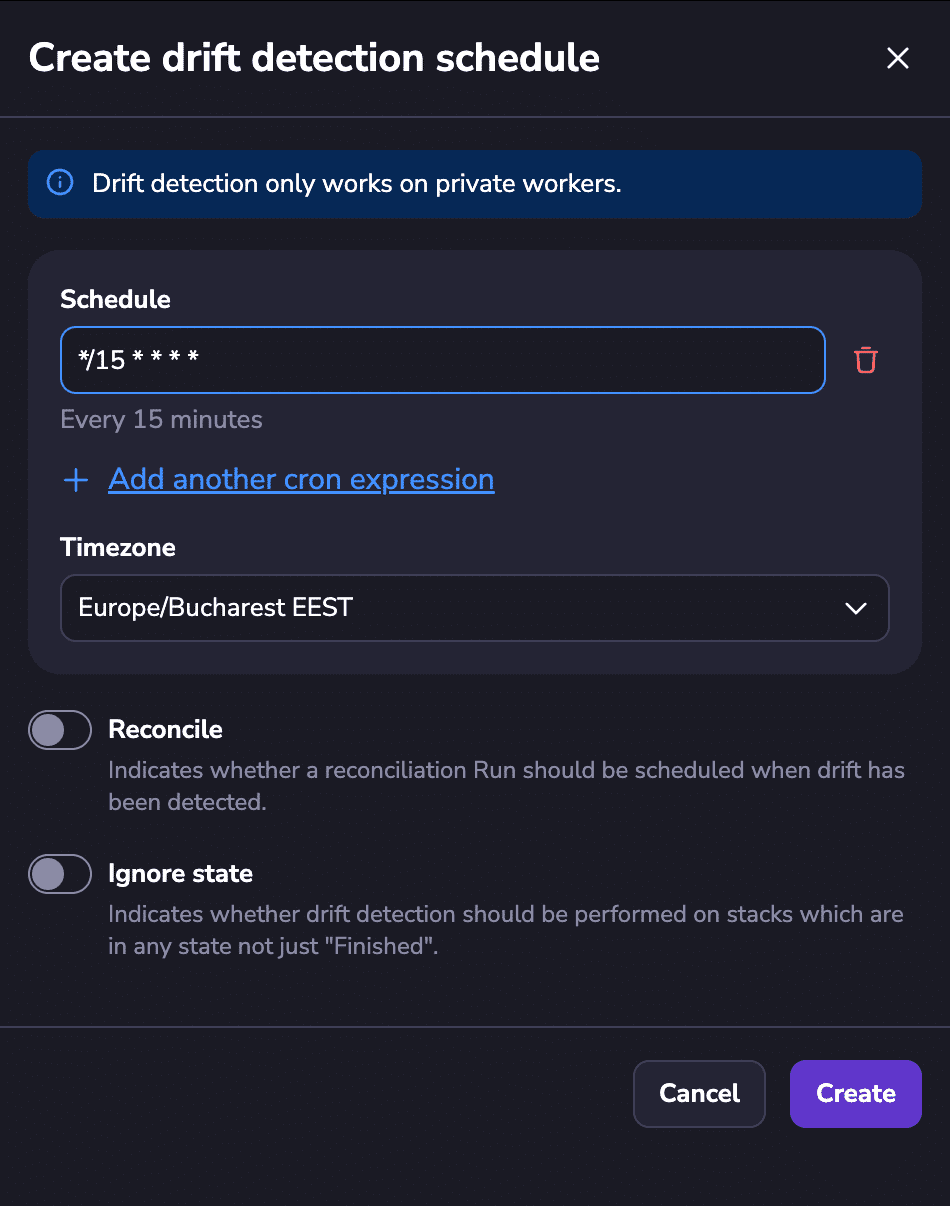
Spacelift executes runs periodically (you can easily set the schedule) against your stacks to see if there are any changes in the actual deployed infrastructure when compared to your infrastructure state.
As soon as changes are identified, Spacelift marks the drift and shows you exactly what has changed. If you enable automatic remediation, Spacelift will automatically execute a tracked run that will revert these changes to make your infrastructure reflect your VCS code.
This process, paired with the notification policy, makes it easy to alert your team about identified drift, ensuring that no drift goes unnoticed. For example, you can even send targeted alerts to the engineers who made the last commit to the repository that the drifted stack used.
Spacelift offers drift detection for Terraform, OpenTofu, Pulumi, and even CloudFormation.
Note: Drift detection works on private workers only. Learn more about the differences between public and private workers.
Check out this video to learn more about drift detection with Spacelift:
Key points
Terraform drift is inevitable, but leaving it unattended can incur downtime, unexpected costs, or even security vulnerabilities.
Drift detection and remediation is a must-have feature when you are working with infrastructure as code, as it makes the difference between a reliable, auditable infrastructure and one that has an unpredictable state in which none of your engineers are aware of what is running in production.
Spacelift can easily help you with drift detection and remediation, ensuring that the right people are notified. By leveraging everything Spacelift offers, you will get unparalleled workflows that give your team full control over your infrastructure lifecycle, all within a unified platform.
If you want to learn more about how Spacelift can help you with drift detection, book a demo with one of our engineers.
Detect and remediate drift with Spacelift
Drift happens, so let Spacelift deal with it. Spacelift provides drift detection capabilities to any IaC provider to enable the desired state for application infrastructure across teams, applications, and clouds.
Frequently asked questions
How do you prevent Terraform drift?
Best practices that work well together:
- Run Terraform only in CI with a locked-down role, enforce branch protection and code review.
- Use remote state with locking, for example, S3 plus DynamoDB, Terraform Cloud, or similar.
- Add policy-as-code (Sentinel, OPA, Conftest) to prevent unsafe changes and require tags, regions, and owners.
- Import existing resources and codify defaults, avoid “clickops” and unmanaged modules.
- Reduce noisy diffs by setting stable inputs, pin provider versions, and use lifecycle options sparingly (ignore_changes only when truly necessary).
How to detect Terraform drift?
Terraform drift is detected by comparing what is deployed in real infrastructure to what Terraform expects from your configuration and state, typically using a refresh and a plan. The most reliable workflow is to run a plan that reads live resource attributes, then checks whether Terraform would change anything to reconcile reality back to code.
How often does Terraform Cloud check for drift?
Terraform Cloud (now HCP Terraform) checks for drift about once every 24 hours when Health Assessments are enabled on a workspace.
What is the difference between HCP Terraform and Terraform Cloud drift detection?
There is no functional difference, HCP Terraform is the current name for Terraform Cloud, so “HCP Terraform drift detection” and “Terraform Cloud drift detection” refer to the same capability.