Infrastructure drift is one of the most common issues you will face when working with infrastructure as code (IaC). Enterprises with hundreds of Terraform configurations to manage and deploy their infrastructure are even more prone to infrastructure drift.
Fortunately, engineering teams can adopt approaches and tools that mitigate its effects on your workloads.
In this article, we will explore:
TL;DR
In enterprise environments, Terraform drift happens when real infrastructure no longer matches code, often because of manual or out-of-band changes. Terraform Enterprise detects this through workspace health assessments, which compare infrastructure with the workspace state and configuration.
Terraform drift in enterprise environments
In enterprise environments, especially when you are managing thousands of infrastructure resources, you will most likely encounter drift. You probably have many Terraform configurations that share dependencies. At this scale, a single untreated infrastructure drift might have serious consequences for your uptime and affect many resources.
Regardless of how many policies you implement in your cloud accounts to prevent changes outside your IaC process, some engineers will still exploit breaches. They do this to avoid going through your organization’s process, mainly because they need to fix high-severity issues quickly, or because the process is too slow and they want to test new features fast.
In any case, drift is inevitable, especially in enterprise environments, and while trying to prevent it as much as possible is good, you also need to take measures to respond when it happens.
Note: Shift left as much as possible to prevent misconfigurations, vulnerabilities, or drift, but also implement mechanisms that help you at runtime, or in drift’s case, take advantage of drift detection.
How does Terraform Enterprise drift detection work?
Terraform Enterprise is the self-hosted version of Terraform Cloud (now HCP Terraform), which helps you manage your Terraform workloads by offering features such as remote state management, policy as code, integrations with third-party tools, drift detection and remediation, and more.
In Terraform Enterprise, as in Terraform Cloud, drift detection is a Terraform plan job that compares the current state of your deployed infrastructure with the last known state recorded in the state file. This can help you detect if changes were made to your infrastructure outside of your Terraform deployment process.
Drift detection minimizes blind spots in your infrastructure by alerting you to unexpected changes.
You can configure drift detection in Terraform Enterprise to notify you about drift whenever it occurs on Slack, email, or any application that supports webhooks.
How to enable drift detection in Terraform Enterprise
To enable drift detection in Terraform Enterprise, either implement it at the organization level (for all the workspaces in the organization) or at the workspace level. The process is similar for both:
- Organization-wide drift detection: Navigate to your Organization Settings, select Health, and then select the Enable Health Assessment option
- Workspace drift detection: Navigate to your Workspace Settings, select Health, and again select the Enable Health Assessment option
Note: If you enforce organization-wide drift detection, this will override the workspace-level settings.
What to do when drift is detected?
When drift is detected, you should consider two options: Either incorporate the changes in your code or revert the infrastructure to what you currently have in your VCS system.
You could also ignore the drift, but this will create many problems in the long run because resulting issues will mount until nobody on your engineering team knows what is happening with your infrastructure.
To understand what issues you can face when you leave drift unattended, read about the hidden impacts of drift.
You should incorporate the changes into your code when a manual change fixes an issue in your infrastructure.
For example, one of your engineers has noticed an issue with a security group that wasn’t allowing traffic from the load balancer to the auto scaling group (ASG) instances and manually fixed it.
Although this manual change has created drift, in this case it makes sense to embed this change into your code so that your VCS holds a working infrastructure configuration.
On the other hand, there are cases in which you should revert the infrastructure to what currently exists in your VCS system.
For example, an engineer may have opened all inbound traffic to your EKS Kubernetes nodes to speed up some infrastructure changes he was trying to make in your development environment, and now your EKS nodes are exposed.
Now, when your drift detection system catches this change, you should revert to the previous state to ensure that you don’t expose your infrastructure.
Best practices for enterprise drift management
Here are some best practices for managing drift when working in an enterprise:
- Try to prevent drift as much as possible. Minimize the number of engineers on your team who can make changes outside your deployment process. Implement policies that restrict these capabilities at the cloud provider level, but ensure that between one and three engineers can assume root roles for the console.In this case, ensure these credentials are implemented with JIT (just in time), as persistent root credentials can be easily compromised, and attackers can perform lateral movement from a single system, gaining access to other products.
- Understand that drift is inevitable and not all drift is bad. Remember that a drift detection and remediation mechanism is necessary. Some drift is not bad (e.g., someone fixes an issue manually) and should be incorporated into your Terraform code.
- Integrate alerts with drift detection. Detected drift should alert the engineers managing the affected configuration so they can choose the best remediation path (Codify the drift or revert to the previous version.).
- Set up a proper cadence for running drift detection. Running drift detection jobs too often leads to alert fatigue in your engineering team. However, running the jobs once or twice every two days means drift won’t be spotted in time. Setting the cadence depends significantly on your organization. Some organizations need to run drift detection every hour , whereas twice a day is sufficient for others.
- Implement drift detection differently depending on your environment. Drift shouldn’t be a high-severity issue in a development environment, so it is not necessary to alert about it every single time. However, in a production environment, it should be treated as a serious issue that must be fixed as fast as possible in most cases (#6 will explain some corner cases).
- Understand that not all drift is equal. It’s one thing to detect a manual change where a tag was added to a resource, and a totally different one to see that all your network is exposed. AI assistants can be leveraged, for example, to triage detected drift and allocate different severities based on what has happened.
Drift detection with Spacelift
Spacelift offers out-of-the-box drift detection and remediation capabilities for Terraform, OpenTofu, Pulumi, and CloudFormation.
With Spacelift, you get many other features that help you with orchestrating your infrastructure tools, such as a module registry, self-service infrastructure with Blueprints and Templates (both can use drift detection), integrations with any third-party tools, and more.
Spacelift’s policy-as-code engine, which offers several policies, can also be used in conjunction with drift detection. Plan policies, for example, can be used to add extra controls for drift detection (for example, you might want an engineer to look at a remediation run before doing the actual remediation), and notification policies can be used to alert about detected drift, and even tag the person who has made the latest change on the Stack that has drift.
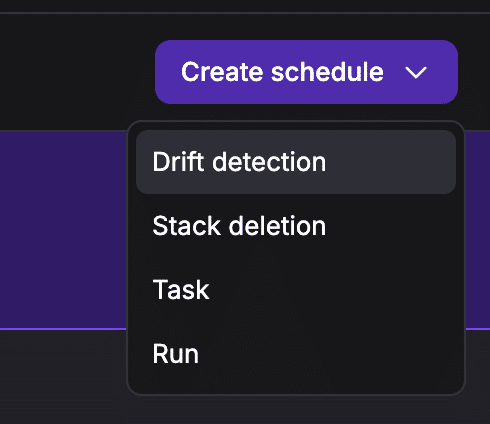
To set up drift detection for a Spacelift stack, you can simply go to Scheduling, select Create schedule, and then choose Drift detection:
You will have the option to set the schedule for how often to run drift detection jobs, select whether or not you want reconciliation to be enabled, and also have the option to ignore the state, meaning that drift detection can run on that particular stack, regardless of it being in a Finished state.
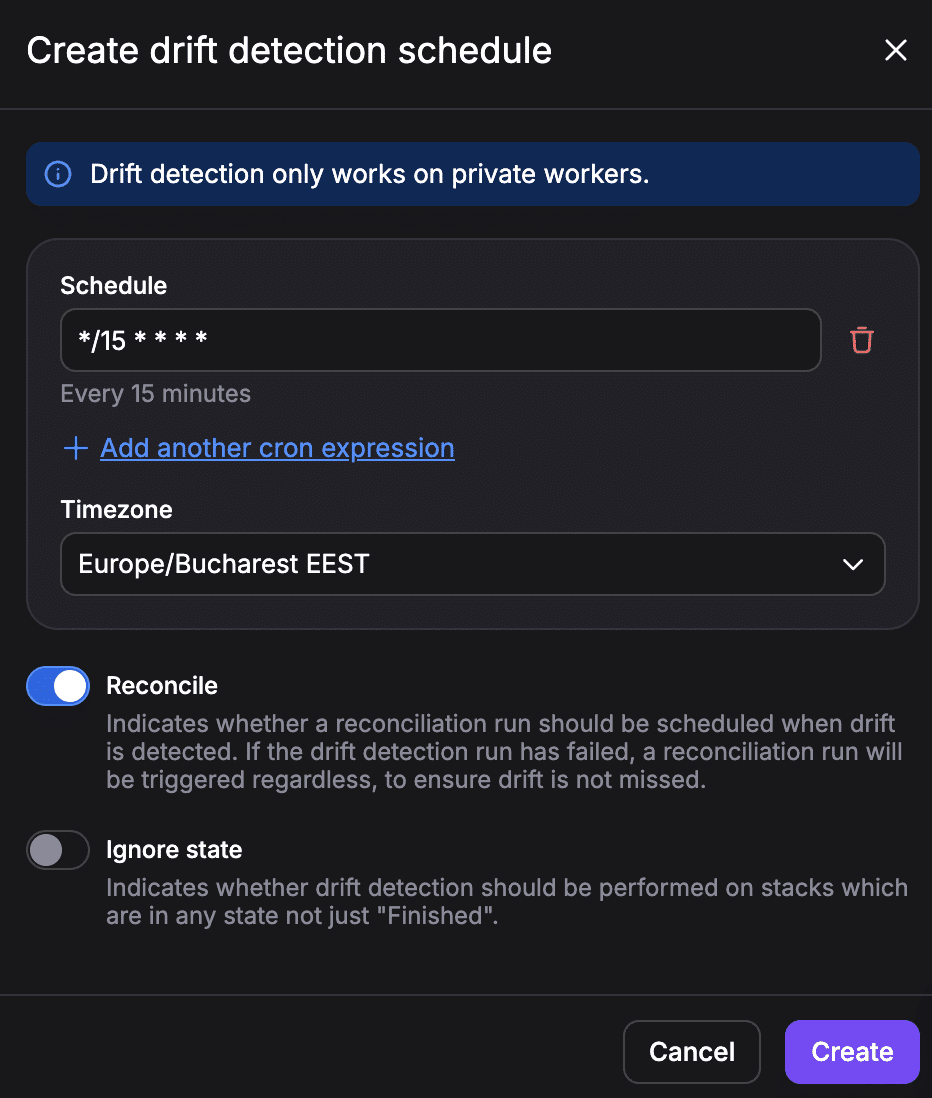
Note: Drift detection works only on private workers.
Check out this article for more information on how to detect and solve drift.
Learn more about drift detection with Spacelift:
Key points
When you are working with infrastructure at scale, drift is inevitable, but you should remember that not all drift is equal, and not all drift is bad. There are several cases in which infrastructure drift solves issues that you should integrate into your Terraform code, while in others, reverting to a previous state makes more sense.
To learn more about how Spacelift can help you with infrastructure orchestration and how it helps you solve drift, book a demo with one of our engineers.
Detect and remediate drift with Spacelift
Drift happens, so let Spacelift deal with it. Spacelift provides drift detection capabilities to any IaC provider to enable the desired state for application infrastructure across teams, applications, and clouds.
Frequently asked questions
What triggers drift detection in Terraform Enterprise?
In Terraform Enterprise, drift detection is triggered by health assessments on an eligible workspace. The first assessment runs a few minutes after health assessments are enabled, or after an active speculative plan completes, and later assessments run on the configured schedule when no run is active. If the latest run errors, cancels, or is discarded, drift detection pauses until a successful run completes.
What is the difference between Terraform Enterprise drift detection and Terraform Cloud drift detection?
Terraform Enterprise and Terraform Cloud, now HCP Terraform, use essentially the same drift detection capability, including scheduled health assessments, on-demand checks, and similar reporting of infrastructure changes outside Terraform. The real difference is deployment model: Terraform Cloud is HashiCorp-managed SaaS, while Terraform Enterprise is self-hosted, so the feature behaves similarly but the operational ownership is different.