Terraform’s declarative model doesn’t fit every situation. If you want to restart a VM after pushing a new configuration or to invoke a Lambda once your stack is up, Terraform’s support for this wasn’t first-class. Until recently, this was handled with null_resource, local-exec provisioners, external CI scripts, or Bash wrappers.
Once Terraform 1.14 was released, HashiCorp introduced a new block called action that brings imperative, provider-defined operations into the Terraform language. This new feature is called actions, and it executes around your resources without becoming part of the state, which means you can finally express day-two operations declaratively.
In this article, we will walk through what the Terraform action block is, how it differs from resources and data sources, which providers currently support Terraform actions, how to invoke a Terraform action, and some practical use cases.
What we’ll cover:
TL;DR
- The Terraform action block, introduced in Terraform 1.14, runs imperative, provider-defined operations like invoking a Lambda, restarting a VM, or invalidating a CloudFront cache, replacing
null_resource,local-exec, and bash workarounds. - You invoke a Terraform action two ways: from the CLI with
terraform apply -invoke, or by binding it to a resource lifecycle with anaction_triggerblock (create and update events only, no destroy yet). - Provider support is still early (AWS, Azure, Ansible, and Local), so Terraform actions fit day-two tasks like CDN cache invalidation, schema migrations, deployment notifications, and cost-saving VM scheduling.
What is the Terraform action block?
The action block was introduced in Terraform 1.14 and allows you to declare a provider-defined operation that runs imperatively when invoked. There are many operations, such as calling a Lambda function, restarting an EC2 instance, or sending a Slack message.
These are not CRUD operations against managed resources, they are actually one-shot tasks that must be performed as part of your infrastructure workflow.
The action block replaces workarounds like null_resource with local-exec, terraform_data triggers, or pre/post-apply bash scripts in your CI pipeline. So, actions are implemented as part of the provider binary, just like resources, data sources, and therefore they benefit from typed inputs and validation.
Action block syntax and structure
The basic syntax of an action block looks similar to this:
action "<TYPE>" "<LABEL>" {
 config {
   <provider-specific arguments>
 }
}
The action TYPE is defined by the provider, for example, aws_lambda_invoke, and the LABEL can be named as you wish, as you do for your resources. You can reference the action wherever you want in your configuration using the action.<TYPE>.<LABEL> syntax.
Using the AWS provider, let’s see an example of how to invoke a Lambda function:
action "aws_lambda_invoke" "notify_team" {
 config {
   function_name = "deployment-notifier"
   payload = jsonencode({
     environment = "production"
     event       = "deployment_complete"
   })
 }
}
In the config block, you can find the provider-specific arguments. What you can add inside it depends entirely on the action type.
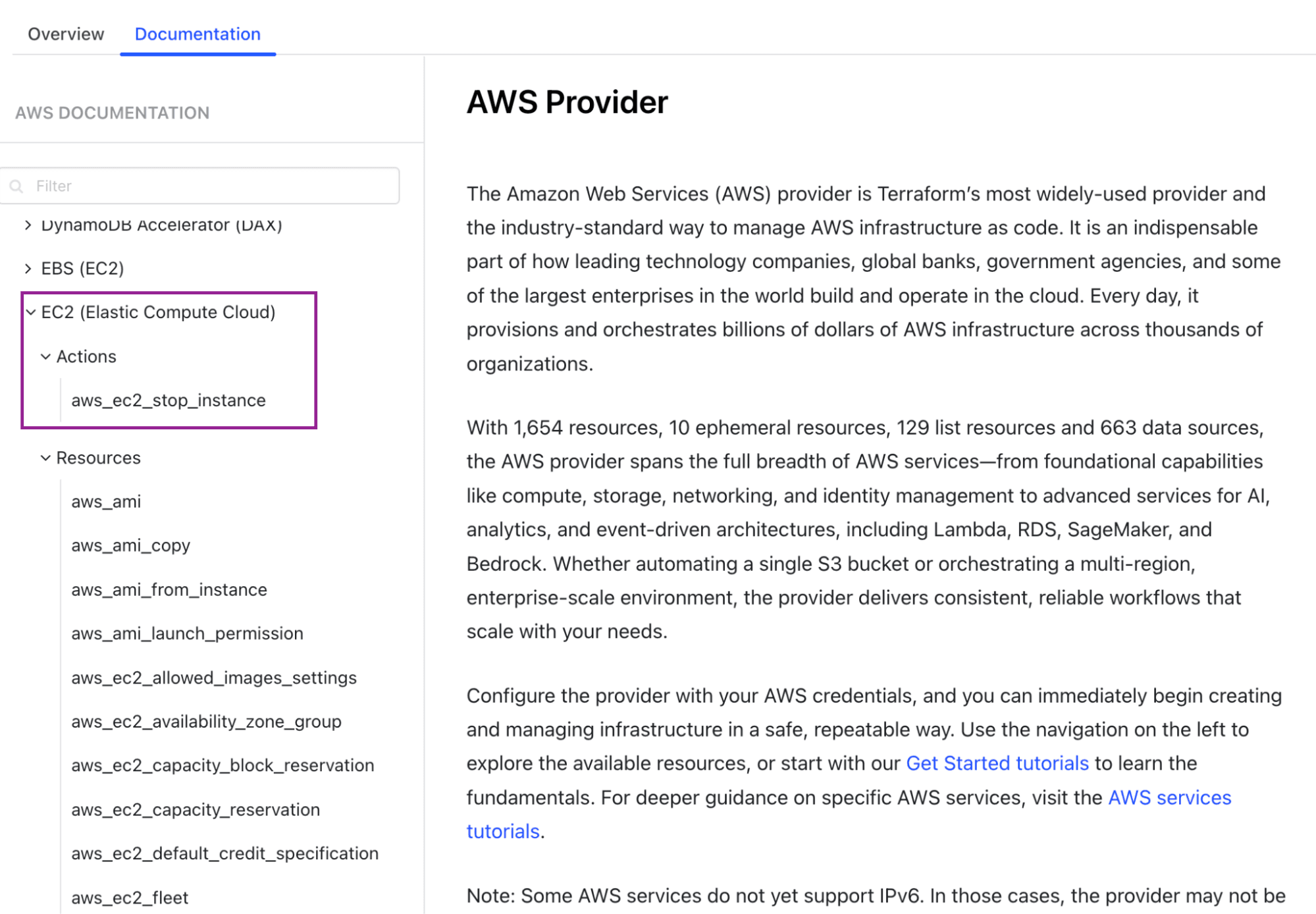
You can check your provider’s documentation for the available action types and their config arguments. These are available under each category of resources that support them in the same way as resources and data sources are.
Supported meta-arguments in action blocks
Action blocks support a subset of meta-arguments you already know from resources. You can use:
count: so you can run the same action multiple times with the same configurationfor_each: used for running the action once per element of a map or set of stringsprovider: with which you can pin the action to a specific provider configuration (if you are using multiple providers in your configuration)
Let’s see an example using count and provider:
action "aws_lambda_invoke" "example" {
 count    = 3

 config {
   function_name = "my_function"
   payload = jsonencode({
     instance = count.index
   })
 }
}
In this example, as count was used, you won’t be able to leverage for_each. As with resource blocks, they cannot be used simultaneously.
How action blocks differ from resources and data sources
As you already know, resources are stateful. Terraform creates resources, tracks them in state, reconciles any drift, and destroys them when you remove them from configuration if you run terraform apply again. Data sources are read-only and fetch information about existing infrastructure to use in your plan and apply.
Actions are different. Unlike stateful resources and read-only data sources, action blocks are stateless, lifecycle-free operations you explicitly invoke to execute, with results that aren’t tracked in state or available at plan time.
Here is a list of characteristics that highlight their uniqueness:
- They have no state: Terraform does not store the results of actions in state. There is no drift detection, and no reconciliation from Terraform’s side.
- There is no lifecycle: As actions are not created, updated, or destroyed, they don’t have the same lifecycle management you are accustomed to. Actions are executable operations.
- You have to invoke an
actionblock explicitly, either via CLI or through anaction_trigger, in order to execute it. - Action results are not known at plan time, which means you cannot branch logic in Terraform based on what an action returned.
- You cannot use the result of an action in a
depends_onfor another resource; there are no result-based dependencies.
Which providers currently support Terraform actions?
The catalog of provider support for action is small but still growing. This is understandable as it is in its early days. You can find below the current list of providers that support Terraform actions:
- AWS provider: offers the most actions so far, including
aws_lambda_invoke,aws_ec2_stop_instance, andaws_cloudfront_create_invalidation - Azure provider: currently has
azurerm_virtual_machine, which helps you start, stop, or restart VMs - Local provider: has
local_commandfor running local commands, useful for testing and simple workflows
You can check the Terraform Registry to see whether your provider has shipped action types. Other major providers, such as GCP and Kubernetes, are still catching up.
OpenTofu, for example, does not yet support action blocks, but has an open issue (#3309) for it.
What are the limitations of Terraform actions?
Before deciding to refactor your codebase and to use actions, be aware that, while actions solve real problems, they also come with constraints. Here are the main limitations as of Terraform 1.14:
- Destroy-time events are not supported yet: in Terraform 1.14, action_trigger only fires on
before_create,after_create,before_update, andafter_update. You cannot run an action as part of the destroy phase - Resources cannot depend on action results, as those results are not known at plan time. You cannot pass the output of one action into a resource’s
depends_on, as you cannot use it in another resource’s configuration. - Long-running actions blocking apply: if your action takes 15 minutes to complete, your terraform apply is blocked for that entire time
- You cannot use actions for conditional branching: you cannot express logic like ” if this action succeeds, then do X.”
- Limited provider coverage: Not many providers have implemented actions so far. This can be an issue if the action you need for your stack is not yet available.
- No state: you are in charge and responsible if you want to run an action as many times as you want
How to invoke a Terraform action
There are two ways to invoke an action: by CLI or by action_trigger. Let’s take them one by one.
Using the CLI
So, the simplest way to run an action is from the command line. You can use the -invoke flag with the terraform plan or terraform apply commands, passing the full name of the action:
terraform apply -invoke=action.aws_lambda_invoke.exampleWhen you invoke an action via CLI, Terraform runs only the action and excludes all other configuration changes. This helps a lot for day-two operations, such as stopping dev VMs to save costs overnight or triggering a deployment notification on demand.
Using the action trigger block
The second way to invoke an action is by binding it to a resource’s lifecycle events using the action_trigger block:
resource "aws_lambda_function" "api_handler" {
 function_name = "my-api-handler"
 runtime       = "python3.14"
 handler       = "index.handler"
 role          = aws_iam_role.lambda_role.arn
 filename      = "function.zip"

 lifecycle {
   action_trigger {
     events  = [after_create, after_update]
     actions = [action.aws_lambda_invoke.notify_team]
   }
 }
}

action "aws_lambda_invoke" "notify_team" {
 config {
   function_name = "deployment-notifier"
   payload = jsonencode({
     message = "Lambda function deployed"
   })
 }
}
The action_trigger block supports three arguments:
- events: the supported events are:
before_create,after_create,before_update, andafter_update - actions: here you specify the action to invoke when the event fires. When using an action, it needs to be referenced by its full name.
- condition (optional): an expression must evaluate to true for the action to execute. If the condition evaluates to false, Terraform skips the action event if the triggering event occurs.
You can add multiple action_trigger blocks in the same lifecycle block. Once you run the terraform apply command, Terraform evaluates all triggers and invokes the actions whose conditions are satisfied. If an action fails, Terraform will stop further executions.
Practical use cases for Terraform actions
Here are the use cases where you will reach for an action block most often:
- CDN cache invalidation: after you deploy some new static objects in the S3 bucket, you need to use
aws_cloudfront_create_invalidationto automatically invalidate your CloudFront distribution - Lambda invocation for schema migration: you need to invoke a Lambda function that runs your migration scripts after you create or update a database resource
- VM power management: whenever you apply a configuration change, you may restart an Azure VM using
azurem_virtual_machine_power - Automation for cost savings: you can use a standalone CLI action to stop EC2 instances at the end of the day, then start them again in the morning
- Deployment notifications: you can keep your team informed about each successful apply by sending them a Slack or Teams notification via a Lambda
- Smoke test: you can run an HTTP health check or webhook against a freshly deployed endpoint to verify if it is responding correctly
Actions are a great choice for day-two operations that sit between or around your CRUD resources. They can be highly useful when you want side effects to be visible in your Terraform plan output instead of forgotten in a Makefile or CI script.
Managing Terraform resources with Spacelift
Action blocks are powerful, but on their own, they won’t solve the problems you have with running Terraform safely at scale. In most cases, you need policy enforcement, drift detection, run visibility, and a way to manage multiple stacks across cloud providers.
Spacelift is the infrastructure orchestration platform built for the AI-accelerated software era, managing the full lifecycle of both traditional IaC and AI-provisioned infrastructure.
It helps you manage all your IaC, Ansible, and Kubernetes from a single control plane, making it easy to implement a GitOps workflow that handles all your governance, including built-in policy as code, drift detection and remediation, dependency management across your stacks, self-service infrastructure with Templates, and more.
Spacelift Intelligence adds an AI-powered layer for natural language provisioning, diagnostics, and operational insight across both your traditional and AI-driven workflows.
Learn more about what you can do with Spacelift here.
You can take advantage of running Terraform actions directly through binding them to a resource’s lifecycle events, or, if you’d like to replicate the CLI approach, you can take advantage of the built-in Spacelift Tasks for your Stacks.
Key takeaways
You no longer have to lean on null_resources, local-exec provisioners, or external bash wrappers to invoke Lambda, restart a VM, or hit a webhook. The action block feature shipped by Terraform 1.14 will help you with these tasks natively.
The action block feature is still in its early days, so it has plenty of room for improvement. As mentioned, provider coverage is limited, destroy-time events are not yet supported, and you cannot use action results as dependencies for other resources.
Spacelift can help you to take your Terraform workflows further, including configurations that use action blocks. It provides an orchestration layer to manage everything in one place, with policies, drift detection, and run visibility.
If you want to learn more about Spacelift, book a demo with one of our engineers.
Orchestrate Terraform deployments with Spacelift
Orchestrate your Terraform workflows and build governed pipelines using policy as code, programmatic configuration, context sharing, drift detection, resource visualization, and many more.
Frequently asked questions
When were actions added to Terraform?
Actions were announced at HashiConf 2025 and shipped in Terraform 1.14.0, released GA on November 19, 2025.
What providers currently support Terraform actions?
At launch, actions were available in AWS, Microsoft Azure, and the Red Hat Ansible Automation Platform (AAP) providers (plus the Local provider), but since actions are provider-defined, support varies by provider. Check each provider’s Registry docs.
How is an action block different from a resource block?
A resource is managed through the full create/read/update/delete cycle and tracked in state, whereas actions are preset provider operations that trigger automations outside Terraform and do not affect resource state.
What's the difference between an action and a provisioner?
With a provisioner, you write your own script (coupling infrastructure to external CLIs), while an action is defined by the provider and runs using the provider’s existing authentication and context, eliminating the need for external CLIs, making actions the modern replacement for most provisioner and null_resource workarounds.