Using high availability in your infrastructure-as-code (IaC) configurations will help you if an availability zone goes down. But what can you do in case of a disaster that takes your entire region down? Disaster recovery strategies help your teams prepare for these kinds of emergencies when natural disasters occur.
As Terraform is one of the most popular IaC tools in the market, it makes sense to implement disaster recovery for it when you have critical workflows. This will reduce your downtime and ensure that your teams don’t get pinged at 2 AM to firefight these kinds of issues.
In this article, we will walk through:
TL;DR
- Terraform disaster recovery uses infrastructure as code to rebuild or fail over production environments during regional outages, with strategies ranging from simple backup and restore to fully active multi-site deployments.
- Choose your approach based on how much downtime (RTO) and data loss (RPO) your business can tolerate.
- Always store state remotely in S3 with versioning, cross-region replication, and DynamoDB locking, and test your DR plan quarterly with real failover drills.
What is disaster recovery in Terraform?
Disaster recovery in Terraform uses IaC to rebuild or reprovision your environments during an outage (typically, you would use DR for your production environment). One of the most common examples of failures is natural disasters that take down an entire region.
If something goes down in your production environment, DR will help you rebuild your infrastructure faster or automatically fail over to a standby production environment, if you have one.
Key disaster recovery concepts
Let’s explore some of the most common terms associated with disaster recovery:
- Recovery Time Objective (RTO): This measures the maximum time that your systems can be down after a disaster. If your RTO is 15 minutes, your DR plan must recover everything within that time.
- Recovery Point Objective (RPO): When setting your RPO, consider how much data loss you are willing to accept. For example, if you set your RPO to 1 hour, you could lose up to 1 hour of data.
- Failover: This means switching traffic from your primary environment to your DR environment.
- Failback: This is the opposite of the failover, which helps with returning operations to the primary environment after being restored.
- Infrastructure drift: This helps identify the differences between your Terraform code and what actually exists in your cloud environment.
Terraform disaster recovery strategies
The most common strategies that you can implement with Terraform are backup and restore, pilot light, warm standby, and multi-site active/active.
1. Backup and restore
This is the simplest approach and can be used for non-critical systems. It involves creating backups of your data, such as S3 replication or EBS snapshots, in a secondary region.
When a disaster occurs, you only provision the compute (for example, launch an EC2 instance from an AMI and restore the data volumes from EBS snapshots), along with the required networking resources. The downside of this strategy is that it results in high RTOs and RPOs.
2. Pilot light
This approach is more complex and expensive than the backup-and-restore approach. It keeps minimal infrastructure running in the DR region at all times, so replication will be active on your database, but your EC2 instances are shut down or scaled to zero.
In case of a disaster, you need to scale up your EC2 instances and redirect traffic. Using Terraform for this strategy will help you define both the minimal and full environments in code and make it easy to scale resources up in the event of a disaster.
3. Warm standby
With warm standby, you keep a fully functional version of your application running in the DR region, which is live but has a reduced capacity.
When a disaster occurs, you only need to scale up to full production capacity and then redirect traffic. Because traffic already exists in your DR environment, the RTO will automatically be much lower.
4. Multi-site active/active
This is the most complex and expensive strategy. In this case, your environment will have full-capacity replicas across two or more regions, with traffic distributed across all of them. If one of them fails, then the others continue serving. Because of its rerouting strategy, the RPO and RTO can be reduced to seconds.
When deciding which strategy to adopt, you need to consider your system’s complexity, budget, and required RTO and RPO.
How to implement DR with Terraform (example)
Implementing DR with Terraform is not as difficult as it sounds. For this example, we will use two EC2 instances in two different regions and Route 53 to change the record to the DR instance in the event of a disaster.
First, we need to configure the providers for primary and DR regions:
terraform {
 required_version = ">= 1.5.0"

 required_providers {
   aws = {
     source  = "hashicorp/aws"
     version = "~> 5.0"
   }
 }
}

provider "aws" {
 region = "us-east-1"
 alias  = "primary"
}

provider "aws" {
 region = "us-west-2"
 alias  = "dr"
}
Next, in the main.tf file, we will create two EC2 instances — one in the primary region and the other in the DR region — and we will run a web server on both.
For the VPCs, we will use their default values in this example, but in production, you need to define them explicitly.
resource "aws_security_group" "primary_web" {
 provider    = aws.primary
 name        = "primary-web-sg"
 description = "Allow HTTP traffic"

 ingress {
   from_port   = 80
   to_port     = 80
   protocol    = "tcp"
   cidr_blocks = ["0.0.0.0/0"]
 }

 egress {
   from_port   = 0
   to_port     = 0
   protocol    = "-1"
   cidr_blocks = ["0.0.0.0/0"]
 }

 tags = {
   Name = "primary-web-sg"
 }
}

resource "aws_instance" "primary_web" {
 provider      = aws.primary
 ami           = data.aws_ami.primary.id
 instance_type = "t2.micro"

 vpc_security_group_ids = [aws_security_group.primary_web.id]

 user_data = <<-EOF
   #!/bin/bash
   yum install -y httpd
   systemctl start httpd
   systemctl enable httpd
   echo "<h1>Primary Region - us-east-1</h1>" > /var/www/html/index.html
 EOF

 tags = {
   Name = "primary-web-server"
 }
}

resource "aws_eip" "primary" {
 provider = aws.primary
 instance = aws_instance.primary_web.id
 domain   = "vpc"

 tags = {
   Name = "primary-web-eip"
 }
}

# DR
resource "aws_security_group" "dr_web" {
 provider    = aws.dr
 name        = "dr-web-sg"
 description = "Allow HTTP traffic"

 ingress {
   from_port   = 80
   to_port     = 80
   protocol    = "tcp"
   cidr_blocks = ["0.0.0.0/0"]
 }

 egress {
   from_port   = 0
   to_port     = 0
   protocol    = "-1"
   cidr_blocks = ["0.0.0.0/0"]
 }

 tags = {
   Name = "dr-web-sg"
 }
}


resource "aws_instance" "dr_web" {
 provider      = aws.dr
 ami           = data.aws_ami.dr.id
 instance_type = "t2.micro"


 vpc_security_group_ids = [aws_security_group.dr_web.id]

 user_data = <<-EOF
   #!/bin/bash
   yum install -y httpd
   systemctl start httpd
   systemctl enable httpd
   echo "<h1>DR Region - us-west-2</h1>" > /var/www/html/index.html
 EOF

 tags = {
   Name = "dr-web-server"
 }
}

resource "aws_eip" "dr" {
 provider = aws.dr
 instance = aws_instance.dr_web.id
 domain   = "vpc"

 tags = {
   Name = "dr-web-eip"
 }
}
Next, we will configure Route 53 with health checks and failover routing. The health checks will monitor the primary instance, and if the instance becomes unhealthy, Route 53 will direct the DNS queries to the DR instance (this typically happens after 3 failed health checks):
resource "aws_route53_health_check" "primary" {
 ip_address        = aws_eip.primary.public_ip
 port              = 80
 type              = "HTTP"
 resource_path     = "/"
 failure_threshold = 3
 request_interval  = 30

 tags = {
   Name = "primary-health-check"
 }
}

resource "aws_route53_record" "primary" {
 zone_id = var.zone_id
 name    = var.domain_name
 type    = "A"
 ttl     = 60
 records = [aws_eip.primary.public_ip]

 set_identifier  = "primary"
 health_check_id = aws_route53_health_check.primary.id

 failover_routing_policy {
   type = "PRIMARY"
 }
}

resource "aws_route53_record" "dr" {
 zone_id = var.zone_id
 name    = var.domain_name
 type    = "A"
 ttl     = 60
 records = [aws_eip.dr.public_ip]

 set_identifier = "dr"

 failover_routing_policy {
   type = "SECONDARY"
 }
}
You also need to create your variables.tf file, in which you must specify your default zone_id and your default domain_name. You can replace the default values here or add them in a terraform.tfvars file or even as environment variables.
variable "zone_id" {
 description = "Route 53 hosted zone ID"
 type        = string
 default     = "YOUR_ZONE_ID"
}

variable "domain_name" {
 description = "Domain name for the failover record"
 type        = string
 default     = "app.yourdomain.com"
}
We will also add outputs so you can get the IP addresses for both instances and the DNS record after the apply finishes.
In addition, we will add the ARN of the primary instance to make it easy to stop it from the CLI and simulate a failover.
output "primary_ip" {
 value = aws_eip.primary.public_ip
}

output "dr_ip" {
 value = aws_eip.dr.public_ip
}

output "app_url" {
 value = "http://${var.domain_name}"
}

output "primary_instance_arn" {
 value = aws_instance.primary_web.arn
}
The last step is to create your data.tf file. This automatically fetches an Amazon Linux AMI in each region.
data "aws_ami" "primary" {
 provider    = aws.primary
 most_recent = true
 owners      = ["amazon"]

 filter {
   name   = "name"
   values = ["al2023-ami-2023.*-x86_64"]
 }

 filter {
   name   = "state"
   values = ["available"]
 }
}

data "aws_ami" "dr" {
 provider    = aws.dr
 most_recent = true
 owners      = ["amazon"]

 filter {
   name   = "name"
   values = ["al2023-ami-2023.*-x86_64"]
 }

 filter {
   name   = "state"
   values = ["available"]
 }
}
With this configuration, you have two EC2 instances in two different regions and a Route 53 record that redirects traffic between them. The traffic will stay in your primary instance in us-east-1 as long as the Route 53 health check passes.
If the checks fail, Route 53 automatically redirects traffic to your DR instance in us-west-2.
Managing Terraform state in a DR context
As the source of truth for your infrastructure, the state file needs to be kept safe because if it gets corrupted, Terraform will lose its ability to map your configuration to real resources. In a DR context, state management becomes even more critical.
Let’s explore some of the key practices you should follow when managing Terraform state in a DR context:
- You should store your state remotely with versioning enabled: Enable versioning for your S3 bucket. This will help if the state file gets corrupted because you can roll back to a previous version instead of manually importing every resource.
- Enable state locking: This helps prevent two people from running
terraform applyat the same time against the same state, which can lead to corruption and resource conflicts. - Set up lifecycle rules for state versions: To manage your cloud spending, you can configure lifecycle rules to retain a reasonable number of versions. For example, you can keep the last ten non-current versions and let the rest expire if they are older than 30 days.
- In the DR region, replicate your state: You should always enable cross-region replication to your S3 bucket for your safety. If a disaster occurs and your state bucket is only in the primary region, recovery becomes much more difficult.
How to test your Terraform DR plan
You should always test your DR plan to ensure your Terraform configuration is working as expected.
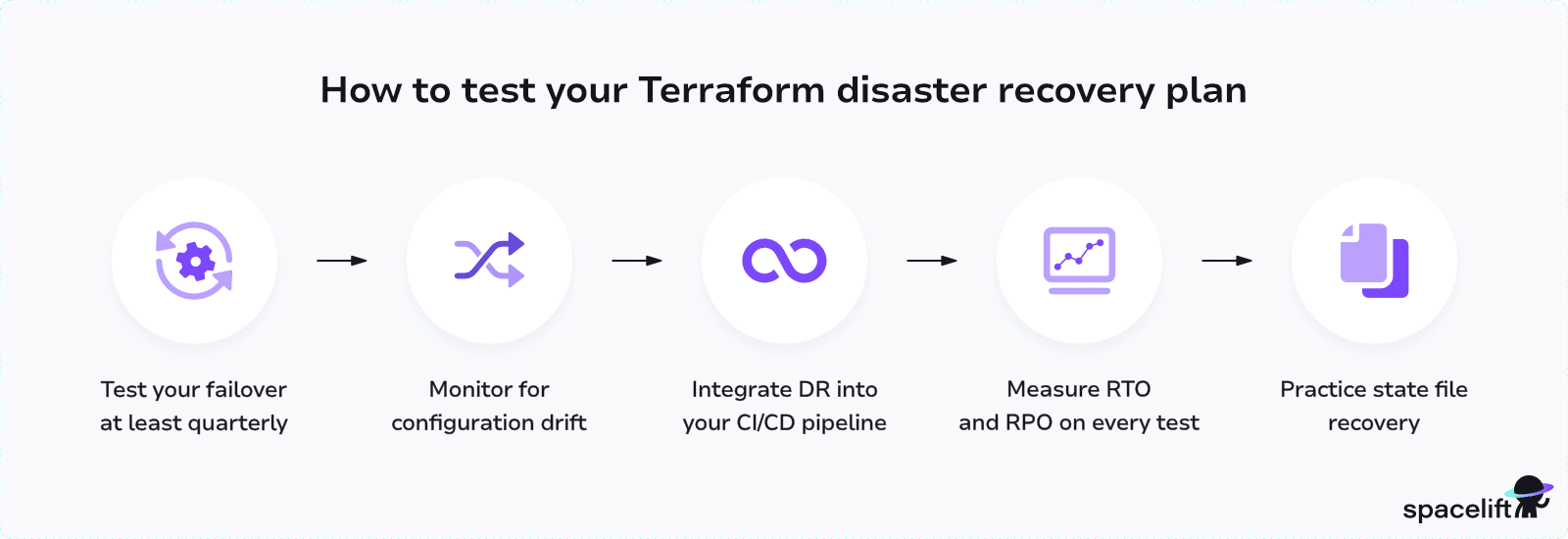
Here are some ways to test your Terraform configuration:
- Test your failover at least quarterly. You can do that by going through the full process (trigger the failover, verify if the application works, check data integrity, and then fail back to primary).
- You should leverage drift detection. At a minimum, you should run
terraform planon your DR configuration regularly. Platforms like Spacelift can automate drift detection and remediation so issues are caught before they affect your recovery capability. - To ensure that your DR plan is valid, you can integrate it into your CI/CD pipeline or infrastructure orchestration platform. In this case, you can use a scheduled pipeline that applies your DR configuration to a test environment.
- You need to measure your RTO and RPO during tests to determine whether the strategy you are using is the right one for your use case, or you need to adjust it (for example, move from pilot light to warm standby).
- Testing your state file by corrupting it intentionally in a test environment and then practicing recovering it from your versioned backups. This will prepare your team to respond more effectively in the event of a real incident.
How Spacelift simplifies Terraform disaster recovery
When managing Terraform DR at scale, you will deal with many factors beyond your configuration, such as dependencies between configurations, policy enforcement, and secure credential management.
Spacelift can help you with your disaster recovery strategies by:
- Catching drift detection. Spacelift runs drift detection periodically (according to your proposed plans). Whenever Spacelift detects drift in your configuration, it can optionally auto-remediate by triggering a tracked run that brings resources back in line.
- Implementing stack dependencies for orchestrated recovery. The DR recovery often involves running resources in a specific order. Spacelift, on the other hand, can help you model their relationships using stack dependencies. So, if one step fails, subsequent steps do not run, leaving you unable to debug a partially recovered environment.
- Spacelift uses the Open Policy Agent to enforce rules for your DR workflows. For example, you can specifically require manual approval before a drift reconciliation applies changes in production, or restrict which resource types are allowed in your DR region.
- Spacelift offers out-of-the-box dynamic credentials. You do not need to store long-lived AWS access keys; Spacelift generates short-lived cloud credentials for each run. Using dynamic credentials provides stronger security and helps your DR workflows obtain the credentials they need.
- Implement self-service infrastructure with Templates. By using self-service templates when deploying a particular environment, you can ensure that the DR environment has identical infrastructure resources. This makes it truly reproducible.
Let’s see how we can run the above example using Spacelift.
I’ve added the above code to a GitHub repository and will create a Spacelift Stack based on it to deploy the resources. In your Spacelift account, go to Stacks and select Create Stack. Add a name to your stack, select a Space in which it should operate, and an optional description:

In the next configuration screen, select your VCS repository that contains the example code, and then you can skip until cloud integrations, where you should select an AWS integration that can assume a role that has permissions to create EC2 and Route53 resources:

Now that the stack is created, our code still requires two variable values:
zone_iddomain_name
Go to your stack, select Environment, and then add the variables. As these are environment variables, don’t forget to prefix them with TF_VAR.

Now, we can run the code and wait for the plan to finish:
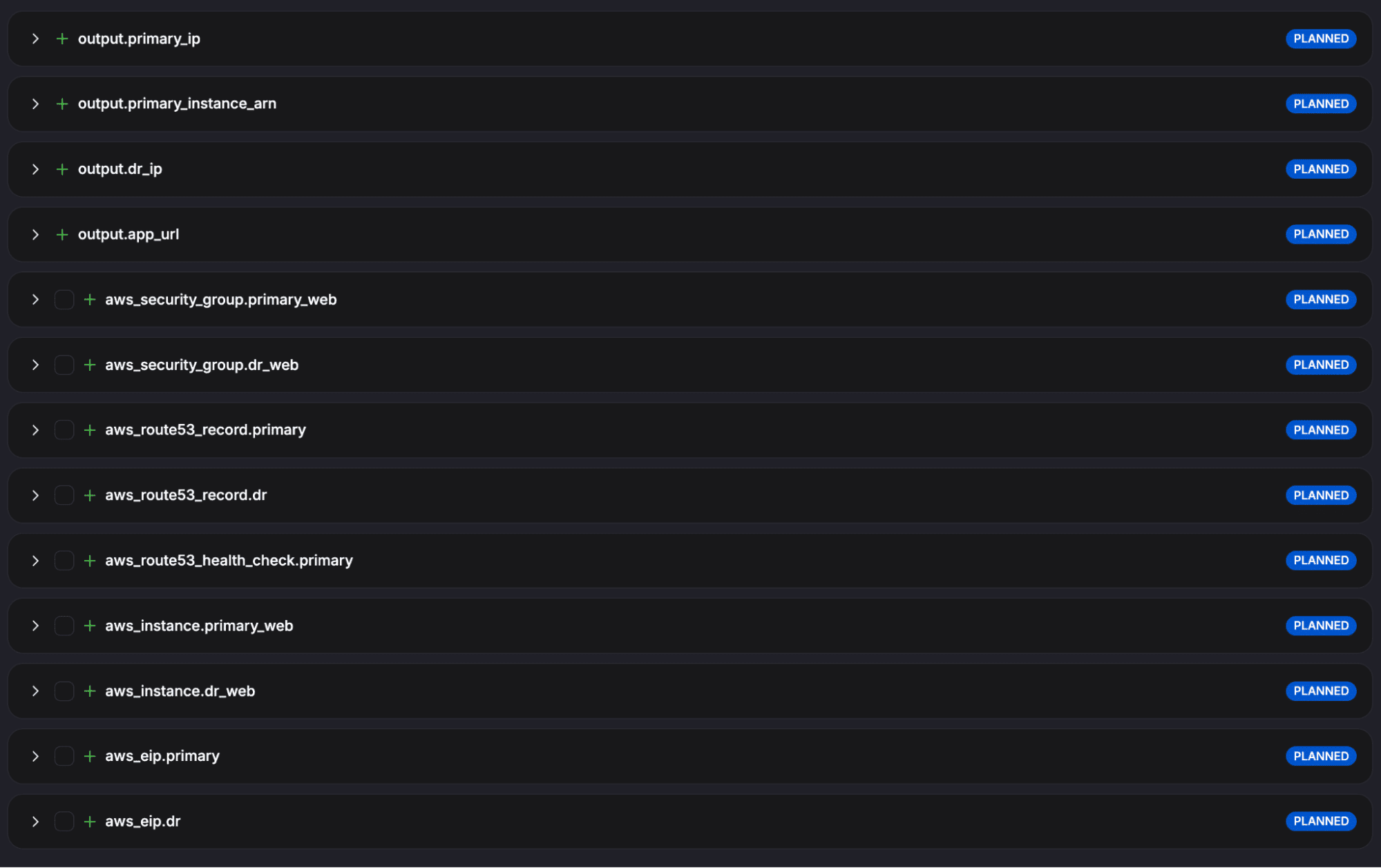
We can see at a glance all the resources and outputs this run will create, and we can confirm the run once we are happy with what it creates.
After the resources are created, you can access the record you have created, and it should respond with the primary instance:

Next, go to Tasks and run a stop command on the primary instance. After this command completes, and Route53 receives three failed health checks, the traffic will switch to the DR instance:

Key points
Knowing the key disaster recovery concepts (RTO, RPO, failover, failback, and infrastructure drift) will help you choose your DR strategy and configure your Terraform modules.
When deciding on a DR strategy, it is important to consider your tolerance for downtime and data loss, as well as your budget. In addition, make sure you store your state remotely with versioning enabled, replicate it to your DR region, and practice recovering it. All of these actions will help you respond quickly and with minimal downtime if a disaster occurs.
If you want to make disaster recovery easier, book a demo with one of Spacelift’s engineers to understand how the platform can help.
Note: New versions of Terraform are placed under the BUSL license, but everything created before version 1.5.x stays open-source. OpenTofu is an open-source version of Terraform that expands on Terraform’s existing concepts and offerings. It is a viable alternative to HashiCorp’s Terraform, being forked from Terraform version 1.5.6.
Manage Terraform better with Spacelift
Orchestrate Terraform workflows with policy as code, programmatic configuration, context sharing, drift detection, resource visualization, and more.
Frequently asked questions
What is Terraform disaster recovery?
Terraform disaster recovery is the practice of using infrastructure as code to rebuild, restore, or fail over environments after an outage, data loss, or regional failure, ensuring resources can be recreated reliably from version-controlled definitions.
What is the best backend for Terraform disaster recovery?
S3 with versioning and cross-region replication is widely used, since it preserves state history, supports DynamoDB locking, and allows quick restoration from prior versions during a recovery event.
Can Terraform replace manual disaster recovery runbooks?
Yes, Terraform can codify most recovery steps like provisioning replacement infrastructure, restoring DNS records, and reattaching storage, though some operational tasks like data restores or stakeholder communication still require human runbooks.
How do I test my Terraform disaster recovery plan?
Test it by regularly running terraform plan against a staging environment, simulating regional failovers, restoring from state backups, and validating that recreated resources match production through automated drift detection.
How do I recover a lost or corrupted Terraform state file?
Recover by restoring a previous version from your backend’s versioning history, importing existing resources with terraform import, or rebuilding state from a backup file using terraform state push after verifying its integrity.