
Provisioning infrastructure using a declarative infrastructure-as-code (IaC) tool such as Terraform or OpenTofu consists of two major steps: First, you write the code, and then the tool handles the rest.
Once the tool takes over, you can do little to influence how quickly resources are provisioned. Some resources require a significant amount of time to provision.
However, you can take some steps to reduce the time it takes to provision a specific Terraform configuration. One of these is to control the parallelism of operations that Terraform performs.
In this blog post, we will explore Terraform parallelism: what it is, how to manage it, and best practices for configuring parallelism in Terraform.
What we’ll cover:
- What is Terraform parallelism?
- How to manage parallelism in Terraform?
- Managing Terraform parallelism in external systems
- Best practices for managing parallelism in Terraform
Disclaimer: Most details in this blog post apply equally to Terraform and OpenTofu, with certain differences when managing parallelism in third-party systems (e.g., HCP Terraform does not support OpenTofu).
What is Terraform parallelism?
Terraform parallelism controls the number of concurrent resource operations during a terraform apply or terraform destroy. It is set using the -parallelism flag, with a default value of 10.
How Terraform parallelism works
Terraform is an IaC tool. You use Terraform to provision resources in remote systems using their APIs through Terraform providers. Terraform is declarative, meaning that you describe the desired state of the infrastructure you want to provision. You describe how resources are related by configuring implicit and explicit dependencies between them.
Apart from this, you do not instruct Terraform how to provision resources or in which order to provision them. Terraform issues several API calls under the hood to provision resources in a predetermined order in the target system.
Terraform is aware of resource dependencies through the dependency graph that it builds from your Terraform configuration. Resources and data sources are represented as nodes in this graph, and dependencies appear as edges between the nodes. During Terraform commands, the graph is traversed depth-first, where a node is visited once its dependencies have been visited. This graph traversal happens in parallel.
Resources that have no dependencies on each other can be provisioned in parallel. When resources are provisioned in parallel, Terraform issues API commands to provision the resources simultaneously. Resource provisioning is not precisely synchronized, but it appears to occur at exactly the same time.
With an imperative IaC tool, you are responsible for configuring parallelism at a lower level in your code, whereas a declarative tool enables parallelism by having multiple resources with no dependencies between them.
If you’d rather watch a video, check out the one below:

How to manage parallelism in Terraform?
There are two primary mechanisms for managing parallelism for a single Terraform configuration:
- Manage resource dependencies
- Set the parallelism flag in Terraform commands
There is a third mechanism to consider in specific circumstances: splitting a Terraform configuration into multiple independent Terraform configurations.
The following sections will describe these three mechanisms.
1. Manage resource dependencies
If a resource or data source has a dependency on another resource or data source, Terraform knows to create these resources or read the remote data sources in the correct order.
In the following example, the three random_pet resources from the random provider will be created in parallel before Terraform creates the random_shuffle resource that has implicit dependencies on all the random_pet resources:
resource "random_pet" "one" {}

resource "random_pet" "two" {}

resource "random_pet" "three" {}

resource "random_shuffle" "winner" {
  input = [
    random_pet.one.id,
    random_pet.two.id,
    random_pet.three.id,
  ]
  result_count = 1
}

output "winner" {
  value = random_shuffle.winner.result
}
To maximize the number of resources and data sources that can be handled in parallel, your Terraform configuration must contain as few dependencies (implicit and explicit) as possible.
As an example, the following Terraform configuration contains five resources that have no dependency on any other resource:
resource "random_string" "word1" {
  length = 100
}

resource "random_string" "word2" {
  length = 100
}

resource "random_string" "word3" {
  length = 100
}

resource "random_string" "word4" {
  length = 100
}

resource "random_string" "word5" {
  length = 100
}
All five resources in this Terraform configuration can be created in parallel. This can be visualized using the terraform graph command and turning the output into an image file:
$ terraform graph -type=plan -draw-cycles | dot -Tpng > graph.pngThe graph in graph.png looks like this:
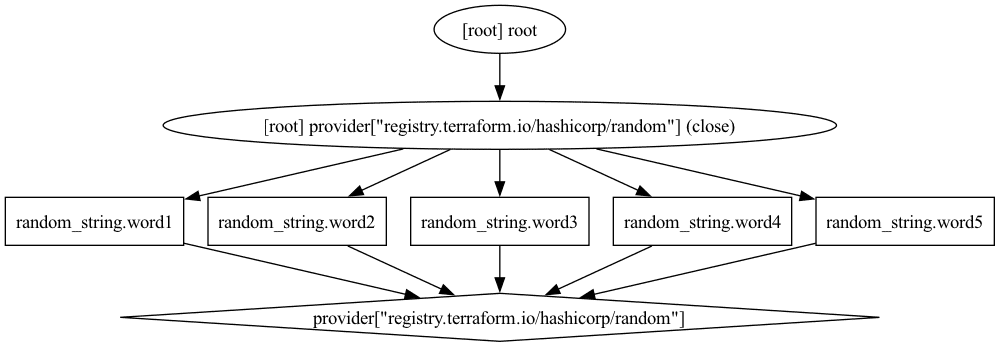
We see that the five random_string resources are created in parallel.
If we introduce an explicit dependency between the resources using the depends_on meta argument we limit what can be provisioned in parallel:
resource "random_string" "word1" {
  length = 100
}

resource "random_string" "word2" {
  length     = 100
  depends_on = [random_string.word1]
}

resource "random_string" "word3" {
  length     = 100
  depends_on = [random_string.word2]
}

resource "random_string" "word4" {
  length     = 100
  depends_on = [random_string.word3]
}

resource "random_string" "word5" {
  length     = 100
  depends_on = [random_string.word4]
}
Running the same command to generate a graph gives us this result:
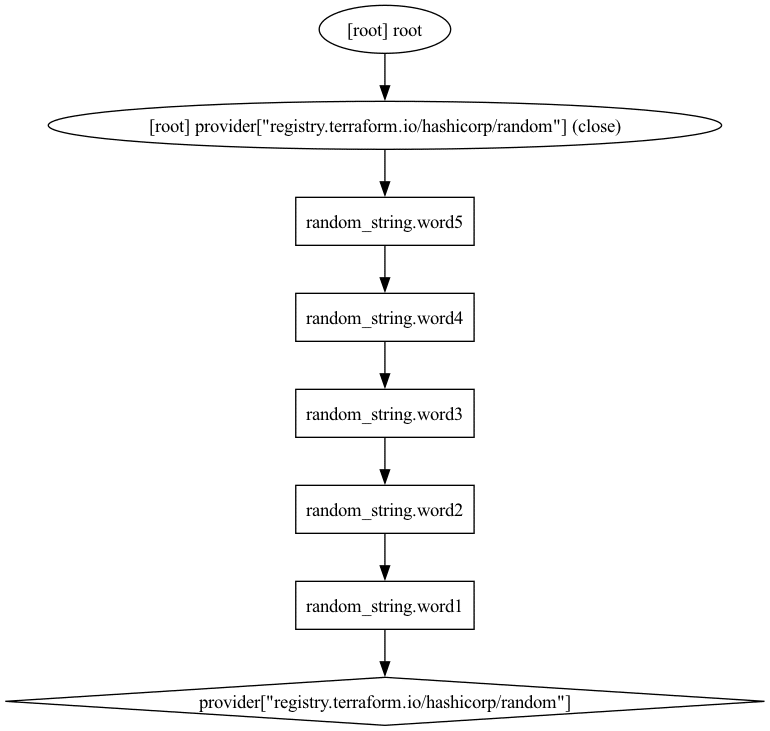
Here, the dependency chain looks completely different, and no resource can be created in parallel.
It is clear that how your resources and data sources depend on each other in your Terraform configuration will greatly influence what can be provisioned in parallel.
2. Set the parallelism flag in Terraform commands
You can control the number of parallel operations Terraform performs by setting the parallelism flag for the terraform apply command.
The value you set for the parallelism flag will be the maximum parallel operations that Terraform can perform. However, the actual value will also depend on your Terraform configuration and dependencies between your different resources and data sources, as discussed in the previous section.
To see this in action, consider the Terraform configuration from above, which includes five resources with no dependencies between them. Run a terraform apply command and set the parallelism flag to 1 (the output is truncated for brevity):
$ terraform apply -auto-approve -parallelism=1
Terraform will perform the following actions:
…
Plan: 5 to add, 0 to change, 0 to destroy.
random_string.word1: Creating...
random_string.word1: Creation complete after 0s [id=<truncated>]
random_string.word4: Creating...
random_string.word4: Creation complete after 0s [id=<truncated>]
random_string.word3: Creating...
random_string.word3: Creation complete after 0s [id=<truncated>]
random_string.word5: Creating...
random_string.word5: Creation complete after 0s [id=<truncated>]
random_string.word2: Creating...
random_string.word2: Creation complete after 0s [id=<truncated>]

Apply complete! Resources: 5 added, 0 changed, 0 destroyed.
You see from the ordered output that one resource is created at a time. Once a resource is provisioned, a new resource is processed.
Destroy the resources and re-run the command, but now with a parallelism of five:
$ terraform apply -auto-approve -parallelism=5
…
Plan: 5 to add, 0 to change, 0 to destroy.
random_string.word5: Creating...
random_string.word2: Creating...
random_string.word4: Creating...
random_string.word3: Creating...
random_string.word1: Creating...
random_string.word4: Creation complete after 0s [id=<truncated>]
random_string.word1: Creation complete after 0s [id=<truncated>]
random_string.word3: Creation complete after 0s [id=<truncated>]
random_string.word2: Creation complete after 0s [id=<truncated>]
random_string.word5: Creation complete after 0s [id=<truncated>]
In this case, you see that all five resources are provisioned at once, and they are complete at roughly the same time.
The default value of the parallelism flag is 10, and for many Terraform configurations, this value will be enough. Changing the value of the parallelism flag is considered an advanced operation, and it will usually have less impact than reviewing and reworking resource dependencies (see the previous section).
If you think your Terraform configuration would benefit from a higher value of parallel operations, you can experiment by increasing the value of the parallelism flag.
Changing the value of the parallelism flag is considered an advanced operation and should not be the default
Apart from terraform apply, you can also use the parallelism flag for the terraform destroy, terraform plan, and terraform refresh commands that similarly traverse the full Terraform configuration.
3. Split a Terraform configuration into multiple configurations
Sometimes it makes more sense to split a Terraform configuration into multiple configurations and deploy them in parallel. Each deployment can then use any of the other methods to increase parallelism.
This method is highly context-dependent, but if your Terraform configuration is growing to the point where a terraform plan and terraform apply take a long time due to the sheer number of resources, splitting the Terraform configuration into multiple configurations is the only viable option left.
Using this method introduces additional challenges, such as the need to pass data between Terraform configurations. Ideally, you can split a Terraform configuration without introducing dependencies between the different configurations.
Managing Terraform parallelism in external systems
You can often manage the Terraform parallelism in third-party systems where you execute Terraform commands. How this works varies depending on the level of control you have in the given system.
Generic CI/CD pipeline
In a generic CI/CD pipeline where you control which commands are run and which flags you set, you can use the parallelism flag directly, similar to what we saw earlier in this blog post.
If you run Terraform commands in a GitHub Actions workflow or similar system, you can add the parallelism flag to the relevant commands.
In the following example, we define an environment variable named PARALLELISM and set it to 20. Then we use this environment variable in the subsequent Terraform commands:
name: Terraform

on:
  push:
    branches:
      - main

env:
  PARALLELISM: 20

jobs:
  terraform:
    runs-on: ubuntu-latest
    steps:
      - uses: actions/checkout@v5
      - uses: hashicorp/setup-terraform@v3
      - run: terraform init
      - run: |
          terraform plan \
            -parallelism=${{ env.PARALLELISM }} \
            -out=actions.tfplan
      - run: |
          terraform apply \
            -parallelism=${{ env.PARALLELISM }} "actions.tfplan"
The number of parallel Terraform deployments you can run varies between CI/CD systems. If you are using self-managed runners where Terraform executes, you can often increase the parallel runs to any desired level simply by provisioning more runners.
If you use GitHub-managed runners for your actions workflows on GitHub Enterprise, you can run up to 1000 jobs at the same time. This is an extreme limit and should suffice for most large Terraform environments.
Spacelift
If you want to modify the default commands that are run during a Terraform run on Spacelift, you could configure this using the workflow tool stack setting.
Create a file under the .spacelift directory of your Terraform configuration repository named workflow.yml. Add a configuration similar to the following (only a subset of the configuration is shown for brevity):
init: terraform init -input=false

plan: terraform plan -input=false -parallelism=20 -lock={{ .Lock }} {{ if not .Refresh }}-refresh=false {{ end }}-out={{ .PlanFileName }} {{ range .Targets }}-target='{{ . }}' {{ end }}

apply: terraform apply -auto-approve -parallelism=20 -input=false "{{ .PlanFileName }}"
See the documentation on the workflow tool for additional details.
On Spacelift, you have access to managed worker pools and you can set up your own private worker pools. This allows you to control how many concurrent Terraform runs can take place in your Spacelift environment and thus increase the parallelism of Terraform operations. The number of worker pools you can have depends on your pricing plan.
See the Plans and Pricing page for details. And to elevate your Terraform management, create a free Spacelift account today or book a demo with one of our engineers.
HCP Terraform (Terraform Cloud)
On HCP Terraform (formerly known as Terraform Cloud) you can control the value of the parallelism flag by setting the TFE_PARALLELISM environment variable for your workspace.
When you run Terraform commands using the Terraform binary directly, the default value of TFE_PARALLELISM is 10.
You can create a variable set that is applied to your whole organization if you want to change the default value of the parallelism flag for all your workspaces. Workspaces can override this value by setting the TFE_PARALLELISM environment variable as a workspace variable with a different value.
The number of concurrent Terraform runs across all your workspaces depends on the pricing plan. For the premium plan, you can run up to 200 plan or apply operations at the same time using managed runner agents. This number is higher for self-hosted agents.
Best practices for managing parallelism in Terraform
There are a few best practices to keep in mind when managing parallelism in Terraform.
1. Avoid unnecessary resource dependencies
The primary obstacle to parallelism for a given Terraform configuration is the presence of dependencies between resources and data sources. If you have a Terraform configuration with five resources that have dependencies between them (similar to what we saw earlier in this blog post), then there is no way to influence the number of parallel operations that Terraform can perform.
Many dependencies exist for a reason, and they cannot be removed, but you should seek to determine whether you have superfluous dependencies that you can eliminate.
A simple example is to remove a data source that other resources depend on. For instance, if you have a data source for an Azure resource group that you know exists, you could instead rely on this knowledge and remove the data source from your configuration.
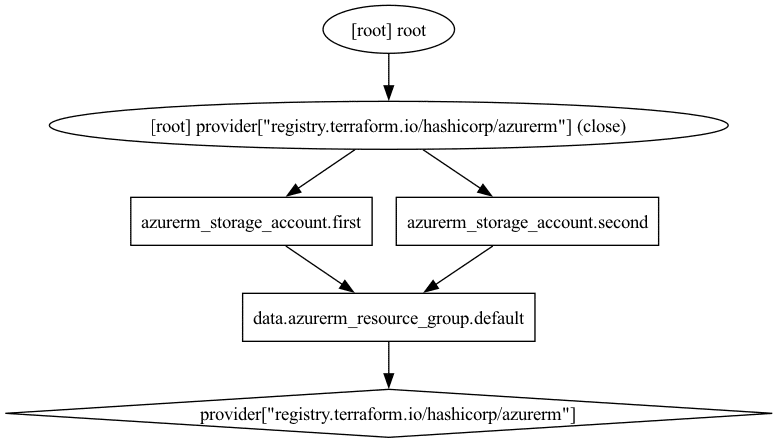
The following Terraform configuration has a data source for a resource group that two storage account resources read:
data "azurerm_resource_group" "default" {
  name     = "rg-storage-accounts"
  location = "swedencentral"
}

resource "azurerm_storage_account" "first" {
  name                     = "spaceliftstorage001"
  resource_group_name      = data.azurerm_resource_group.default.name
  location                 = data.azurerm_resource_group.default.location
  account_replication_type = "LRS"
  account_tier             = "Standard"
}

resource "azurerm_storage_account" "second" {
  name                     = "spaceliftstorage002"
  resource_group_name      = data.azurerm_resource_group.default.name
  location                 = data.azurerm_resource_group.default.location
  account_replication_type = "LRS"
  account_tier             = "Standard"
}
If we look at the dependency graph for this configuration, we see that Terraform will first read the data source before it provisions the two storage accounts:
Contrast this with the following configuration, where we remove the data source and use hard-coded values for the resource group name and location (we could have used variables as well, but the conclusion stays the same):
resource "azurerm_storage_account" "first" {
  name                     = "spaceliftstorage001"
  resource_group_name      = "rg-storage-accounts"
  location                 = "swedencentral"
  account_replication_type = "LRS"
  account_tier             = "Standard"
}

resource "azurerm_storage_account" "second" {
  name                     = "spaceliftstorage002"
  resource_group_name      = "rg-storage-accounts"
  location                 = "swedencentral"
  account_replication_type = "LRS"
  account_tier             = "Standard"
}
The dependency graph in this case is flatter:
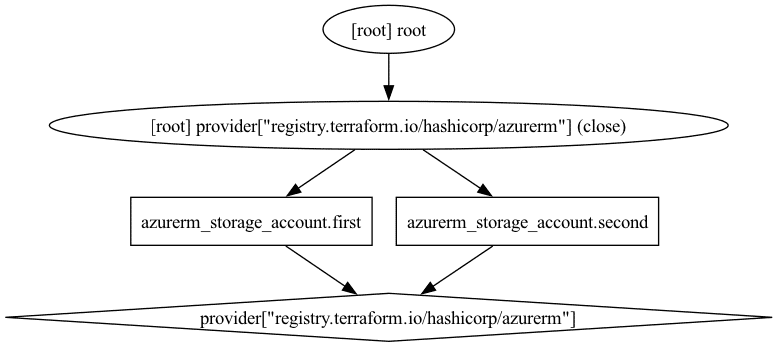
This is a simple example, and the time savings would be minimal, but similar opportunities can be identified in many Terraform configurations.
2. Respect cloud API rate limits
The factor limiting the number of parallel operations Terraform can perform may derive from the resource provider you are targeting. This is common among cloud service providers that often enforce a rate limit on their APIs.
You can often request to have this limit increased for your account, but at some point, you will hit a hard limit. Monitor your current API rate limits for your target provider and adjust the parallelism flag accordingly.
Note that if you provision resources to the same cloud account using multiple different Terraform configurations simultaneously, you may reach the rate limit even if each deployment uses a low value for parallelism.
Providers will often retry a request if it is throttled by a rate limit. Check whether your provider supports configuration of rate limits. For instance, the AWS provider allows you to configure the token bucket rate limit capacity of the underlying AWS SDK client instance:
provider "aws" {
  token_bucket_rate_limiter_capacity = <number>
}
3. Increasing parallelism is not equivalent to better performance
Ultimately, setting a high value for the parallelism flag will not necessarily accelerate Terraform.
A good example of this is whenever Terraform performs operations on the local system where it runs. Imagine you want to generate five very long random strings using the random provider:
terraform {
  required_providers {
    random = {
      source  = "hashicorp/random"
      version = "3.7.2"
    }
  }
}

resource "random_string" "words" {
  count = 5
  length = 10000000
}
Apply this configuration using different values of the parallelism flag and measure the time it takes. The following examples are run on a MacBook with an M4 processor and the time is measured using the time command in a Zsh environment:
$ TIMEFMT=$'\nTotal\t%*E' # <-- set the time output format
$ time terraform apply -auto-approve -parallelism=1
…
Total	13.695
Destroy the resources and re-run terraform apply using a higher value for the parallelism flag:
$ time terraform apply -auto-approve -parallelism=5
…
Total	22.860
This simple example illustrates that, although it was possible to provision all five resources in parallel, it took longer than it would have done if they were provisioned one by one. Keep this in mind when using providers that primarily use the local system (e.g., the local, random, and TLS providers, among others).
Key takeaways
You can use three primary mechanisms to increase Terraform parallelism:
- Manage dependencies between the resources in your Terraform configuration. The fewer dependencies there are, the more resources can be provisioned in parallel.
- Change the value of the parallelism flag from its default value of 10 to a higher number. This flag is used for the
terraform plan,terraform apply,terraform destroy, and terraform refreshcommands. - Split your Terraform configuration into multiple Terraform configurations that can run simultaneously on different runners.
If you use a third-party system or a CI/CD pipeline, you can often adjust the parallelism either by directly setting the value for the parallelism flag (e.g., in a GitHub Actions workflow) or by setting an environment variable or system setting that controls the parallelism flag.
Keep in mind that Terraform will not necessarily work faster even if you use a higher number for the parallelism flag. Sometimes, the limit to the number of parallel operations you can perform is determined by the target API you are working with (e.g., cloud provider APIs).
Spacelift can greatly enhance workflows for both OpenTofu and Terraform. To learn more about it, create an account today or book a demo with one of our engineers.
Terraform management made easy
Spacelift effectively manages Terraform state, more complex workflows, supports policy as code, programmatic configuration, context sharing, drift detection, resource visualization, and includes many more features.