Terraform providers are plugins that enable Terraform to interact with external APIs and provision the resources that make up your application and system infrastructure.
Providers are published as separate binaries. Each provider binary is released in new versions as features and enhancements are introduced and bugs are corrected. As with any versioned dependency for another configuration or programming language, you must manage the provider versions that your Terraform configuration uses.
In this blog post, you will learn how to manage Terraform provider upgrades for your Terraform configurations and modules. Note that this blog post covers Terraform, but everything discussed below applies equally to OpenTofu.
What are Terraform providers?
At a high level, Terraform consists of two parts: the Terraform core and provider plugins.
The responsibilities of the Terraform core include parsing and interpreting your HCL configuration syntax, building the dependency graph that describes how your infrastructure is connected, comparing your current state with the desired state, finding and downloading provider plugins, orchestrating the work of the providers, and more.
Terraform provider plugins, or just providers, represent the facades for external system APIs, e.g., AWS, Microsoft Azure, or Google Cloud. You use the AWS provider to provision infrastructure on the AWS platform, you use the Azure Resource Manager (AzureRM) provider to provision infrastructure on Microsoft Azure, and so on.
Several utility providers, including the TLS provider, generate certificates as part of your infrastructure and the local provider to create files on your local file system.
How does Terraform provider versioning work?
Each Terraform provider is published as its own binary following its own separate software development lifecycle. During a terraform init, Terraform downloads the required provider binaries to a local .terraform directory inside your working directory. Provider binaries are versioned following semantic versioning.
With semantic versioning, the binary version number takes the form <major version>.<minor version>.<patch number>:
- The
<major version>is increased when a new release includes backward-incompatible changes. Upgrading the major version of a provider you use often requires updating how you use it. - The
<minor version>is increased when a new release includes changes that are backward-compatible. - The
<patch number>is increased for bug fixes and similar changes you often want to incorporate into your configurations.
Note: You might find a minor version release that includes a breaking change. While Terraform providers aim to follow semantic versioning, this is not guaranteed in practice. One common reason is that the Terraform provider has default values that differ from those set in the underlying API. Aligning the provider with the API is treated as a feature or a bug fix. This is one reason why it is important to read each version’s release notes and not trust semantic versioning unquestioningly.
How to manage Terraform provider upgrades
How you approach Terraform provider upgrades depends in large part on which version component (major, minor, or patch) is changing.
This section will cover the general case and the steps required to upgrade a provider version. The following sections discuss specific things to look out for during different version component upgrades and considerations when producing and consuming Terraform modules.
Let’s assume we start building a greenfield Terraform configuration for some infrastructure on AWS. We add a terraform block to our code where we configure which AWS provider version we intend to use:
terraform {
  required_providers {
    aws = {
      source  = "hashicorp/aws"
      version = "6.51.0"
    }
  }
}
The examples in this section use exact version constraints for illustrative purposes. In the following sections, you will see how version constraints can be relaxed a bit.
The first time you run terraform init for this configuration Terraform will find the requested provider version and create the dependency lock file (the output is truncated to only show the relevant details):
$ terraform init
Initializing provider plugins...
- Finding hashicorp/aws versions matching "6.51.0"...
- Installing hashicorp/aws v6.51.0...
- Installed hashicorp/aws v6.51.0 (signed by HashiCorp)
Terraform has created a lock file .terraform.lock.hcl to record the provider
selections it made above …
At this point, we can inspect the dependency lock file .terraform.lock.hcl to reveal its contents:
provider "registry.terraform.io/hashicorp/aws" {
  version     = "6.51.0"
  constraints = "6.51.0"
  hashes = [
    "h1:QWxF…",
    "zh:03fce…",
    …
  ]
}
The dependency lock file has recorded which version was selected (in the version argument), and which version constraint was used (the constraints argument). Since we used an exact version constraint, both the version and constraints arguments have identical values.
The AWS provider is one of the most frequently updated Terraform providers, so within a few weeks, version 6.51.0 is already replaced by 6.52.0, and you would now like to upgrade to that version.
The general steps to follow for any type of Terraform provider version upgrade are:
- Review the provider’s release notes to identify the changes in this version.
- Update the version constraint for the provider in your Terraform configuration.
- Implement any required configuration changes you identified in step 1.
- Make sure that any module you use has a compatible version constraint for the same provider. If not, you must update the modules before you can proceed.
- Run
terraform init -upgradeto force Terraform to reevaluate the version constraint, download the new provider plugin binary, and update the dependency lock file. Note that if you don’t add the-upgradeflag, Terraform will simply reuse the provider version referenced in the dependency lock file. - Run
terraform validateandterraform planand fix any issues you encounter. This step could require a few cycles to complete. - Commit your changes, including the updated dependency lock file to source control.
- Provision the updated configuration through your infrastructure automation platform (e.g. Spacelift).
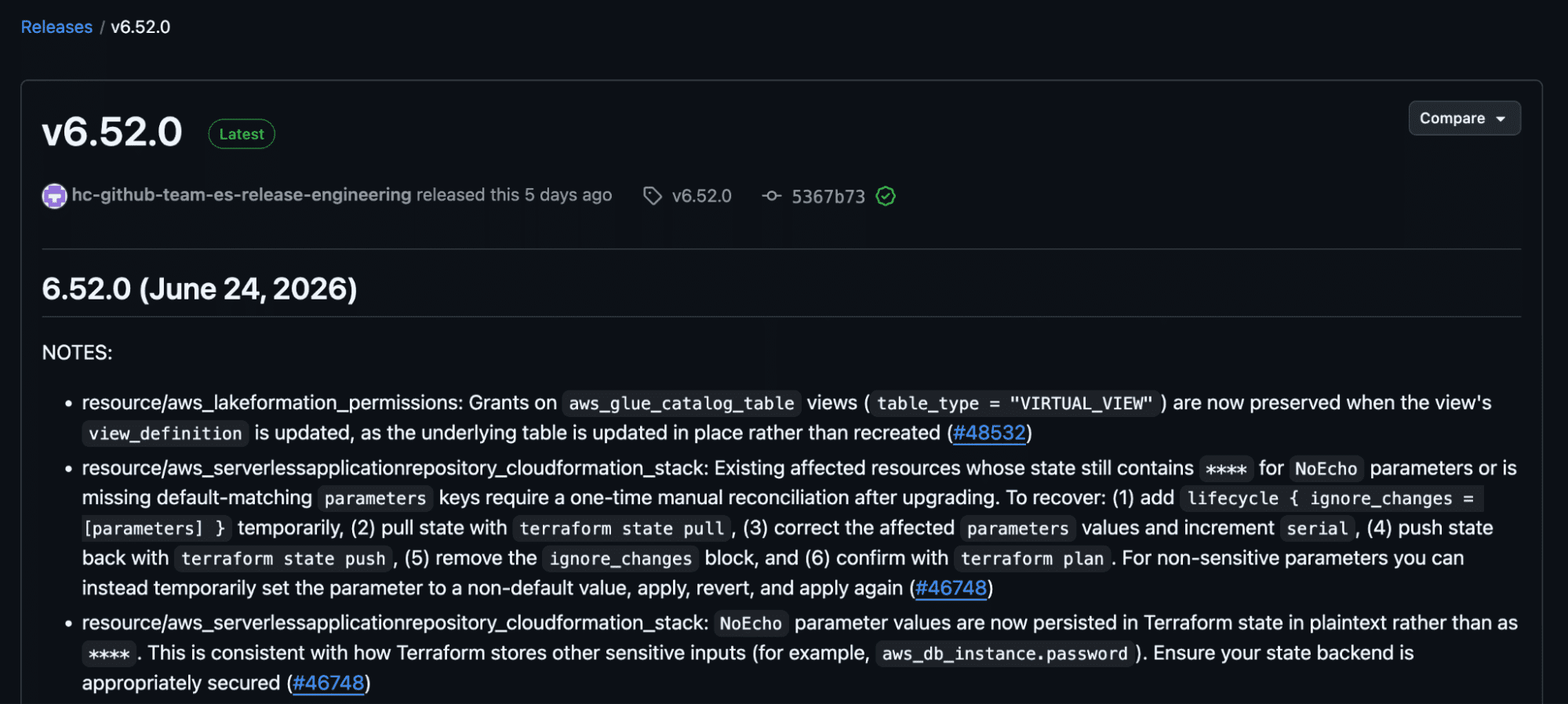
Following these steps for our example Terraform configuration, we would first go through the release notes for version 6.52.0 of the AWS provider:
The next step is to update the version constraint for the AWS provider to 6.52.0:
terraform {
  required_providers {
    aws = {
      source  = "hashicorp/aws"
      version = "6.52.0" # updated this
    }
  }
}
The release notes show a number of notes, features, enhancements, and bug fixes in this release.
For the sake of this walkthrough, we assume no changes are required to our code, so we can skip step three in the list above. We also assume that we do not use any external Terraform modules, so we skip step four as well (see the sections on modules later in this blog post for details).
For step five, we run the initialize command with the -upgrade flag to force Terraform to upgrade the provider version:
$ terraform init -upgrade
Initializing provider plugins...
- Finding hashicorp/aws versions matching "6.52.0"...
- Installing hashicorp/aws v6.52.0...
- Installed hashicorp/aws v6.52.0 (signed by HashiCorp)
Terraform has made some changes to the provider dependency selections recorded
in the .terraform.lock.hcl file.
The output informs us that version 6.52.0 was downloaded and that the dependency lock file has been updated. We can confirm that this is the case by inspecting the dependency lock file:
provider "registry.terraform.io/hashicorp/aws" {
  version     = "6.52.0"
  constraints = "6.52.0"
  hashes = [ … ]
}
For the sixth step in the process, we run terraform validate and terraform plan to confirm that our configuration does not generate any errors. Since we didn’t make any changes to the configuration itself, we do not expect any errors, but you should not take that for granted.
For the last steps, we commit our changes and allow our infrastructure automation platform or CI/CD pipeline to provision the changes.
In the following sections, we cover what to expect from upgrading a patch number, minor version and major version for a provider.
Managing patch number upgrades
A patch number upgrade typically contains bug fixes. These upgrades are generally safe to perform, and if the specific bug fix is for an object within the provider that you are using, you should definitely consider upgrading the provider.
As a case study, consider version 6.35.1 of the AWS provider. The release notes contain three bug fixes:
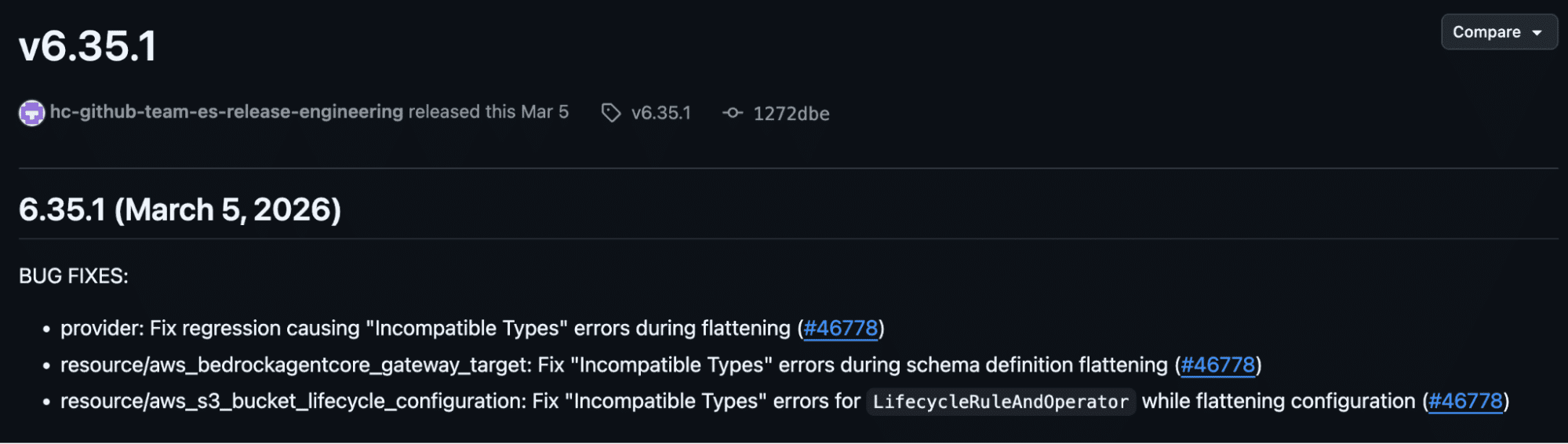
These were bugs affecting the provider itself and two specific resources.
A common practice for Terraform is to automatically allow Terraform to upgrade to new patch release versions. To achieve this you can use the following type of version constraint in your configuration:
terraform {
  required_providers {
    aws = {
      source  = "hashicorp/aws"
      version = "~> 6.35.0"
    }
  }
}
The ~> operator means “use at least version 6.35.0, but if there is any newer patch version available then use that instead”.
Managing minor version upgrades
A minor version upgrade covers backward-compatible features and is generally safe to perform, but should still be handled with some care.
Note that minor versions often introduce new resources and data sources. If you start using these new objects you may no longer be able to roll back to an older version of the provider.
If you want to automatically upgrade to any new minor version release you can do so using the ~> syntax in the version constraint:
terraform {
  required_providers {
    aws = {
      source  = "hashicorp/aws"
      version = "~> 6.52"
    }
  }
}
The version constraint above means “use at least version 6.52.0 or any later available minor or patch version but do not increase the major version”. It is equivalent to version = ">= 6.52.0, < 7.0.0". Automatically upgrading minor versions like this is not recommended, but in some environments this can be accepted.
Managing major version upgrades
A major version upgrade covers new features and behaviors that are not backward-compatible, and could often break your current Terraform code. Common major version upgrades include:
- Deprecating an old authentication method for the provider.
- Deprecating old resource and data source attributes or even the resources and data sources themselves.
An example of the experience of upgrading a major version of a provider starts with the following provider configuration:
terraform {
  required_providers {
    azurerm = {
      source  = "hashicorp/azurerm"
      version = "3.117.1"
    }
  }
}

provider "azurerm" {
  features {}
}
This configuration uses version 3.117.1 of the Azure provider. This was the last version before the release of version 4.0.0.
In version 3.x.x of the Azure provider you did not have to explicitly set the Azure subscription ID as a configuration value in the provider block. Instead, this could automatically be inferred from the Azure CLI authentication context if it was available. You could then simply run terraform plan and terraform apply for the configuration above with no errors.
After upgrading this configuration to use version 4.0.0 of the Azure provider, you meet the following error message during the next terraform plan (the -input=false flag is added here to avoid being prompted for the missing subscription ID, this is typically how you would run terraform plan in a CI/CD pipeline):
$ terraform plan -input=false

│ Error: Missing required argument
│
│   on main.tf line 14, in provider "azurerm":
│   14: provider "azurerm" {
│
│ The argument "subscription_id" is required, but no definition was found.
It appears that version 4.0.0 of the provider no longer reads the subscription ID from your Azure CLI context. Instead, the provider now expects you to provide the subscription ID in the provider block:
provider "azurerm" {
  features {}
  subscription_id = "..."
}
Alternatively, you could provide the subscription ID using an environment variable named ARM_SUBSCRIPTION_ID.
This is a behavior change that could impact all of your Terraform workflows targeting Azure. With an excessively generous version constraint in the required_providers block (e.g. version = ">= 3.0") together with terraform init -upgrade or no committed dependency lock file, you could encounter these types of problems.
Note: To be fair, this specific behavior with the subscription ID was reverted back to the previous behavior in version 4.35.0 as long as the provider is configured with use_cli = true (which is its default value).
Manage provider upgrades as a module producer
As a module producer writing Terraform modules for others to consume it is important to test your module with multiple different provider versions.
A sound approach is to find the oldest possible provider version your module is compatible with (e.g., version 6.0.0 of the AWS provider) and the most recent version it is compatible with and tested against (e.g. version 6.52.0), and use a version constraint similar to the following within your module configuration:
terraform {
  required_providers {
    aws = {
      source = "hashicorp/aws"
      version = ">= 6.0.0, <= 6.52.0"
    }
  }
}
This version expression says “use any provider version greater than or equal to 6.0.0 but at most 6.52.0”. A version constraint like this is suitable for a wide range of module consumers by not forcing them to use a specific version of the provider.
It is important that you also test your module for the versions that you support whenever you introduce changes and publish new module versions. Using the Terraform test framework allows you to configure multiple different test cases using different provider versions, each referencing your module code. The exact setup of these tests is outside the scope of this blog post.
Manage provider upgrades as a module consumer
Your Terraform configuration may contain several resources, data sources, check blocks, actions, and more. These objects may be directly affected by provider upgrades (e.g., a resource attribute may get removed in a major provider version upgrade).
Apart from the objects defined directly in your root module, you may have multiple child modules. As we saw in the previous section, modules have their own provider version constraints, and you must ensure that any provider version you upgrade for your root module is also compatible with the version constraints defined in your child modules.
As an example, imagine you have been using version 5.x.x of the AWS provider for some time and you now want to upgrade to one of the latest versions. You upgrade the version constraint for the AWS provider in your root module:
terraform {
  required_providers {
    aws = {
      source  = "hashicorp/aws"
      version = "~> 6.50.0"
    }
  }
}
One of your child modules uses the following version constraint for the AWS provider:
terraform {
  required_providers {
    aws = {
      source  = "hashicorp/aws"
      version = ">= 5.0.0, < 6.0.0"
    }
  }
}
It is compatible with version 5.x.x but not version 6.x.x. You would end up with the following error message during a provider upgrade:
$ terraform init -upgrade
...
Error: Failed to query available provider packages

Could not retrieve the list of available versions for provider hashicorp/aws: no available releases match the given constraints >= 5.0.0, < 6.0.0, ~> 6.50.0
As you can see from the error message, the version constraints from your root module, together with all your child modules must be satisfied at the same time.
You can run the terraform providers command to see which provider constraints are in use at different levels of your Terraform configuration:
$ terraform providers
Providers required by configuration:
.
├── provider[registry.terraform.io/hashicorp/aws] ~> 6.50.0
└── module.web
    └── provider[registry.terraform.io/hashicorp/aws] >= 5.0.0, < 6.0.0
Make sure you plan for this when upgrading the Terraform provider. If you are using a third-party Terraform module, this could become a bottleneck that prohibits you from upgrading to your desired provider version.
Best practices for Terraform provider upgrades
Keep the following best practices in mind when upgrading the Terraform provider:
1. Read provider changelogs
Every Terraform provider should keep a changelog that describes what changes each new version contains. As a few examples, see the release pages on GitHub for the AWS provider, Azure provider, and Google Cloud provider.
The changelogs are usually split into a few different sections:
- Notes
- Deprecations
- Features
- Improvements/enhancements
- Bug fixes
It can be very useful to go through each new release to learn about it before introducing it for your Terraform configurations. The notes section usually indicates if there are any important breaking changes to watch out for.
2. Subscribe to provider version upgrades
A follow-up to the previous best practice is to subscribe to provider version upgrades. This is a great way to stay current on the Terraform providers you are using.
One way to do this is to install the RSS app in a Slack channel. With the app installed, you can subscribe to RSS feeds in that channel using a slash command similar to the following (this example is for the AWS provider):
/feed subscribe https://github.com/hashicorp/terraform-provider-aws/releases.atomThe Slackbot confirms you are subscribed:

3. Use version constraints and make provider upgrades intentional
Terraform provider version constraints make your provider upgrades intentional. The strictest form of version constraint is to use a specific version:
terraform {
  required_providers {
    azurerm = {
      source  = "hashicorp/azurerm"
      version = "4.77.0"
    }
  }
}
An alternative and more explicit way to express an exact version constraint equivalent to the one above is version = "=4.77.0". With this version constraint in place version 4.77.0 of the Azure provider will be used, and it will not change even if you run terraform init -upgrade.
It is often safe to allow the patch version number to change if a new version becomes available. To tell Terraform to use the latest available patch number for a given major/minor version change the version constraint to version = "~> 4.77.0".
4. Add your dependency lock file to version control
The first time you run terraform init, Terraform will create the dependency lock file .terraform.lock.hcl. This file describes the provider selection that was made and each provider is recorded with a number of hash values representing the footprint of that provider binary.
If Terraform tries to use a provider binary that doesn’t match the recorded hash values then Terraform will error and stop. This is a small security feature to protect you from using a binary that is different from what you expect.
If you don’t commit the dependency lock file together with your Terraform configuration, you risk using a new provider version every time you run terraform apply (depending on which version constraint you have provided for the provider).
With the dependency lock file, you can expect the same Terraform provider version for each terraform apply, and you should get the same end result each time.
5. Introduce new provider versions gradually in a large environment
If your Terraform footprint is large, you should consider introducing new provider versions gradually.
For a platform team managing an internal developer platform or similar system, a bad provider version upgrade could cause significant damage. In this case, it is important that your deployment strategy includes multiple environments or deployment rings or canaries.
Similarly, a development team managing multiple environments for a given application should take provider upgrades through one or more staging or development environments before a production environment.
Even if a terraform plan completes successfully, you could still encounter unexpected behavior during the following terraform apply.
Managing Terraform resources with Spacelift
Terraform is powerful, but a secure GitOps workflow needs more than a CLI. You need a platform that orchestrates your infrastructure workflows with the guardrails, visibility, and control to match.
Spacelift takes Terraform further with purpose-built infrastructure orchestration, including:
- Policy as code with Open Policy Agent (OPA): Control approvals, restrict the resources teams can create, validate configuration parameters, and define how runs behave when pull requests are opened or merged.
- Multi-IaC workflows: Orchestrate Terraform alongside Kubernetes, Ansible, OpenTofu, Pulumi, CloudFormation, and other tools. Model dependencies between workflows and share outputs across them.
- Governed self-service infrastructure: Use Templates to give developers a curated catalog they deploy from by filling out a form. Inputs are validated before anything runs, and every version is pinned to a VCS commit for repeatable results. Platform teams define what can be deployed and how, so developers self-serve without learning the underlying IaC. Blueprints remain available when you just need to create an independent, editable stack.
- AI-assisted provisioning with Spacelift Intelligence: An Infrastructure Assistant that understands your stacks, state, and runs, so you can ask questions, diagnose failed runs, and create policies in plain language. It pairs with Intent, an agentic deployment model that provisions non-critical infrastructure from natural language, no HCL required, while your policies, credentials, and audit trail still apply.
- Integrations with third-party tools: Connect Spacelift to the tools your teams already use, and extend governance across them. For example, you can integrate security tools into your workflows using Custom Inputs.
Keep IaC and GitOps as the system of record for production, and use Intent for fast, governed provisioning of tests, demos, and POCs.
Spacelift also lets you run private workers inside your own infrastructure, so you can execute workflows within your security perimeter. Read the documentation to learn more about configuring private workers.
Try Spacelift by creating a trial account or booking a demo. Spacelift supports teams that want developer self-service without giving up governance, auditability, or control.
Key takeaways
Terraform consists of two parts: the core and provider plugins. The core is responsible for parsing your configuration, managing state, and orchestrating the work of the providers. A provider is the plugin to an external API, such as AWS or Microsoft Azure.
Providers are separate binaries that are published following semantic versioning with a major version, a minor version and a patch number. Managing Terraform provider upgrades comes down to managing which provider versions are in use across your Terraform configurations and modules.
The general steps to perform a provider upgrade for a given Terraform configuration are:
- Review the provider release notes to learn what’s new.
- Update the provider version constraint in your Terraform configuration.
- Implement any required changes identified in step 1.
- Update any module you use to be compatible with the new provider version.
- Run terraform init -upgrade to tell Terraform to perform a provider upgrade.
- Run terraform validate and terraform plan and fix any issues you encounter.
- Commit your changes, specifically the dependency lock file.
- Provision your changes using your automation platform or CI/CD pipeline.
Upgrading a patch number or a minor version is often safe, while upgrading a major version likely requires changes to your code or provider authentication.
Best practices for managing Terraform provider upgrades include:
- Read and subscribe to provider release notes to stay up to date.
- Use suitable version constraints and make provider upgrades intentional.
- Add the dependency lock file to version control to avoid surprise provider upgrades.
- Introduce new provider versions gradually instead of doing big-bang version upgrades.
Manage Terraform better with Spacelift
Orchestrate Terraform workflows with policy as code, programmatic configuration, context sharing, drift detection, resource visualization, and more.