Terraform has been the default choice for infrastructure as code (IaC) for years, but it is no longer the only serious option. Teams now look at Terraform alternatives for plenty of reasons: licensing and governance changes, a tighter fit with a single cloud provider, support for general-purpose programming languages instead of HCL, or simply a clearer open-source roadmap.
This post walks through 10 Terraform alternatives worth knowing in 2026. We won’t cover Terraform itself in depth. We assume you already know the basics and want to see what else is out there.
When we discuss IaC, we have to consider a generic set of features based on its usage. These are not tool-specific features, but choosing an IaC tool involves answering the following questions:
- Which language is used to write IaC?
- How does the tool maintain the relationships between the configuration and the cloud resources managed via these configurations?
- Is it cloud-agnostic or cloud-adherent?
- What does a team development workflow look like?
- Is it open source or proprietary?
- What does the architecture of a particular IaC tool look like?
- What are the deployment requirements?
- Is there any plugin ecosystem or community support?
To help you choose the right IaC tool, we will explore a few Terraform alternatives related to the pointers above.
Many teams are also reevaluating Terraform usage after HashiCorp switched Terraform from the permissive MPL 2.0 license to the more restrictive Business Source License (BSL) in 2023. This has driven interest in community-governed, fully open-source alternatives like OpenTofu, as well as vendor-neutral management layers.
How we review software at Spacelift
We aim to make our recommendations practical and vendor-neutral. For each tool we include, we evaluate category fit, core capabilities, integrations, documentation quality, security/governance features (when relevant), and pricing transparency. We also reference public review signals to validate common strengths and limitations. Review data is included for context and reflects what was publicly available at the time of writing.
The best Terraform alternatives include:
TL;DR
Terraform isn’t your only option anymore. Since HashiCorp’s 2023 license change, the alternatives sort into:
- open-source drop-ins (OpenTofu)
- programming-language tools (Pulumi, AWS CDK)
- cloud-native services (CloudFormation, Bicep, Google Cloud Infrastructure Manager)
- configuration management (Ansible)
- Kubernetes-native provisioning (Crossplane).
Pick based on your language, your cloud, and how much you value open-source governance, and note that CDKTF is now archived and Google’s Deployment Manager has reached end of support.
1. OpenTofu
- Adoption signals: ~29k GitHub stars, frequent releases in the last 12 months
OpenTofu is an open-source Terraform alternative that expands on Terraform’s existing concepts and offerings. It was forked from Terraform 1.5.6 and, in April 2025, was accepted as a Sandbox project in the Cloud Native Computing Foundation (CNCF). This gives teams additional confidence that the project is governed in a vendor-neutral, community-driven way.
OpenTofu began as a drop-in replacement, and for day-to-day work it still is having the same HCL, the same provider ecosystem, and the same state file format. Migration is usually a binary swap, since tofu reads your existing Terraform state without changes.
What has changed is that OpenTofu now moves ahead of Terraform’s open-source CLI in a few places. Native state encryption (added in v1.7), early variable evaluation, and provider-level for_each all ship in OpenTofu first and have no equivalent in Terraform’s free version.
This example uses HCL to declare an S3 bucket and enable versioning, the same syntax you would write in Terraform.
resource "aws_s3_bucket" "assets" {
  bucket = "my-app-assets"
}

resource "aws_s3_bucket_versioning" "assets" {
  bucket = aws_s3_bucket.assets.id
  versioning_configuration {
    status = "Enabled"
  }
}
The community dictates the direction of OpenTofu, which will offer greater flexibility in developing new features, considering what is important for users. OpenTofu works with your existing Terraform state file, so you won’t have any issues when you migrate to it.
Key advantages of using OpenTofu instead of Terraform:
- Open-source nature: There are no restrictions on how you can use OpenTofu, either for commercial or personal use. OpenTofu is the future of the Terraform ecosystem, and its main priority is being a truly open-source project that supports all your IaC needs.
- Dynamic community: Developer contributions will make the project more resilient and adaptable to different use cases. Bugs and issues will be identified and resolved quickly to ensure reliability and stability.
- Fast, reliable support: The growing community behind OpenTofu allows everyone to influence the development of new features and supplies the resources to ensure these features and bug fixes will be introduced rapidly.
- Minimal risk: OpenTofu is published under the MPL and governed by the Linux Foundation. In April 2025 it was accepted into the CNCF at the Sandbox maturity level, which gives teams added confidence that it will stay community-governed.
- State encryption: The ability to encrypt the state and ensure your secrets stay safe
Check the Contribution Guide to learn how to contribute to OpenTofu. The easiest way to do so is by opening an issue, and every major change will be made through an RFC.
OpenTofu is the future of the Terraform ecosystem, and its main priority is being a truly open-source project that supports all your IaC needs.
2. Pulumi
- Adoption signals: ~25.5k GitHub stars, frequent releases in the last 12 months
One of the biggest advantages of using Pulumi for developing IaC is that you can use programming languages you already know. Cloud resources are described using languages like TypeScript, JavaScript, Python, Go, C#, Java, and YAML. Due to this varied support, most developers already know one of the languages, enabling them to get started with Pulumi.
At a high level, Pulumi’s architecture consists of a language host where script files are developed, a CLI and deployment engine that create cloud resources based on the scripts and ensure consistency, and a state management mechanism that stores the last deployed state information for future operational reference.
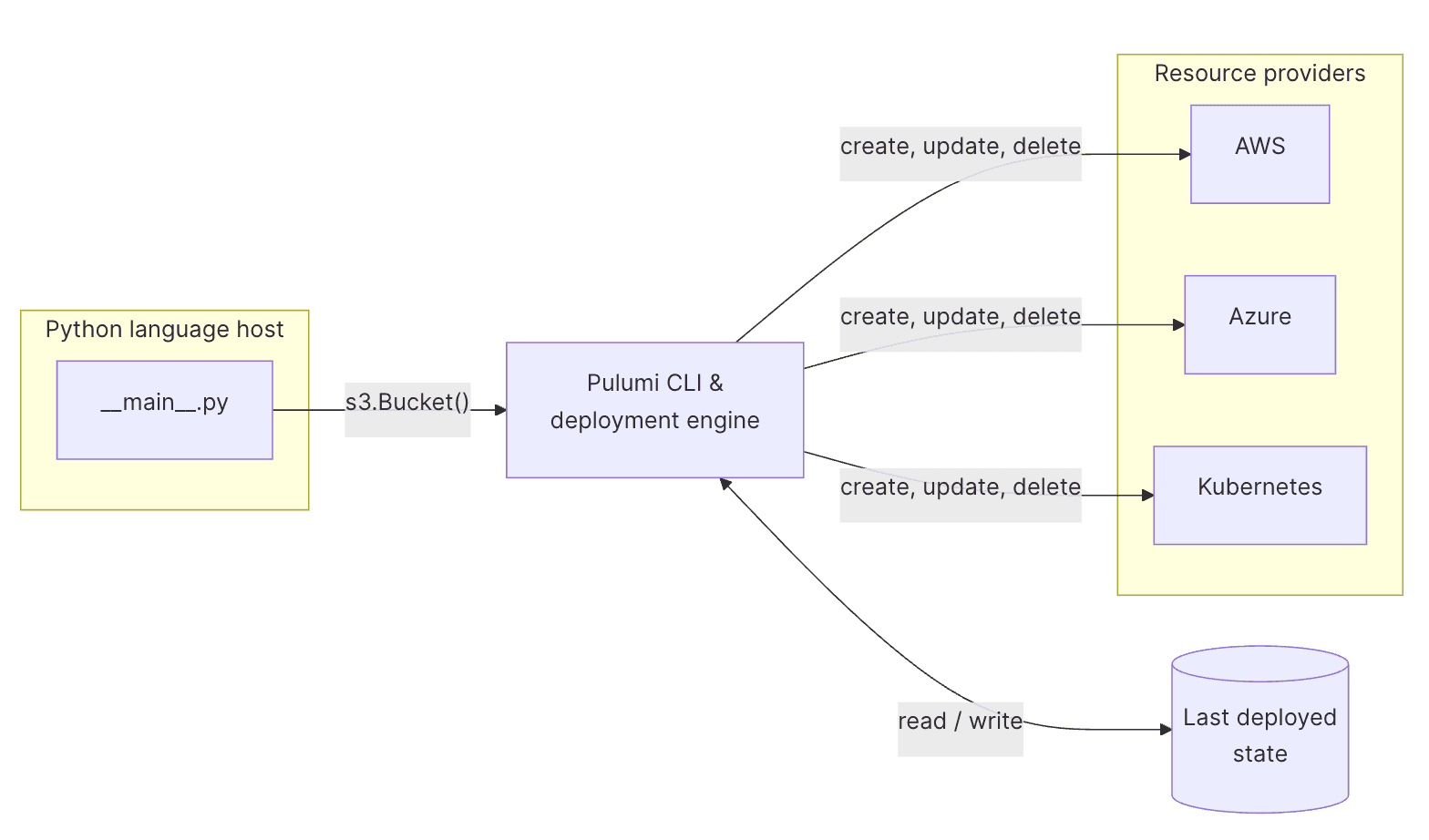
The state is usually managed in Pulumi Cloud, the managed online backend that is the default for any operation. However, it is possible to self-host Pulumi Cloud and run it internally. Additionally, Pulumi supports self-managed (DIY) state backends like AWS S3, Azure Blob Storage, and Google Cloud Storage.
State management is also possible on the local filesystem with an explicit local flag.
This Python program creates the same bucket, turns on versioning, and exports the bucket name, all in a general-purpose language.
import pulumi
import pulumi_aws as aws

assets = aws.s3.BucketV2("assets", bucket="my-app-assets")

aws.s3.BucketVersioningV2(
    "assets-versioning",
    bucket=assets.id,
    versioning_configuration={"status": "Enabled"},
)

pulumi.export("bucket_name", assets.bucket)
Infrastructure expressed in one of the Pulumi languages is considered declarative. When the Pulumi binary executes the program files, it provides the deployment engine with information about the desired existence of a cloud resource.
The deployment engine, in turn, checks against the state backend and decides whether to create, update, or delete the resource.
Pulumi SDK for the language of your choice uses provider plugins that consist of resources. In Pulumi, a provider corresponds to a cloud platform such as AWS, Microsoft Azure, and GCP. A resource corresponds to the services these cloud platforms provide.
Providers use cloud platform APIs to perform the deployment operation as per the supplied program files.
Pulumi is a cloud-agnostic IaC tool with a growing community. It supports a range of cloud providers, including AWS, Azure, and Google Cloud.
Check out Pulumi vs. Terraform and the 13 best Pulumi alternatives.
3. AWS CloudFormation
CloudFormation is a service provided by AWS to manage cloud resources in a more automated, reliable, consistent, and predictable manner. As the name suggests, AWS CloudFormation is a service from AWS that enables you to design, deploy, and manage AWS infrastructure.
This YAML template provisions an S3 bucket with versioning and returns its name as a stack output:
Resources:
  AssetsBucket:
    Type: AWS::S3::Bucket
    Properties:
      BucketName: my-app-assets
      VersioningConfiguration:
        Status: Enabled
Outputs:
  BucketName:
    Value: !Ref AssetsBucket
Infrastructure is defined using CloudFormation templates, which use JSON or YAML syntax. The format is very familiar and user-friendly, so you can get started with CloudFormation templates quickly. However, the abundance of services and related attributes makes it difficult to define the infrastructure in CloudFormation templates from scratch.
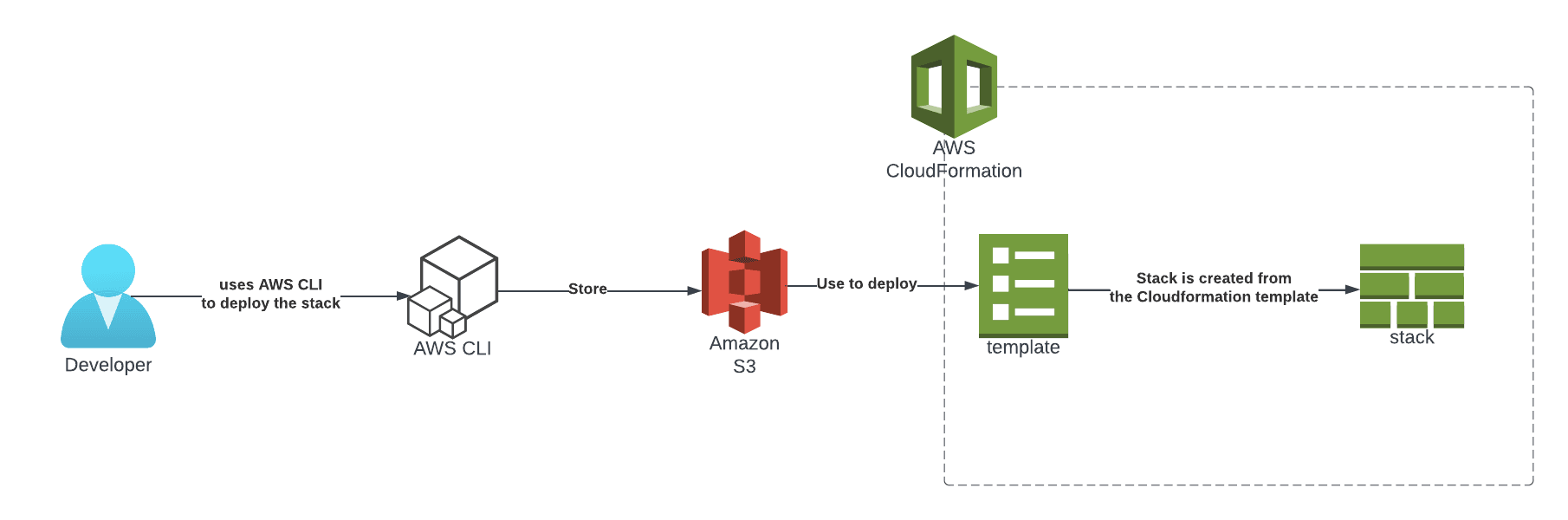
The CloudFormation template is created and validated to create the infrastructure as defined. This infrastructure is stored as a stack, a set of infrastructure managed using a specific template that also provides various parameters and attribute information.
For example, it tracks the creation and destruction of infrastructure, performs drift detection, protects against accidental termination, and outputs the desired values from the infrastructure creation events.
Updating an existing infrastructure managed by CloudFormation templates creates change sets that let you preview the changes that will be applied. They highlight the creation, deletion, and update activities that will be performed due to the template modifications.
AWS CloudFormation templates help manage AWS infrastructure in a consistent, repeatable way, reducing the potential for human error. AWS also provides a number of quick-start templates with pre-defined solutions. All actions performed in the AWS CloudFormation web console can also be performed using the AWS CLI. AWS also maintains a CloudFormation-specific CLI.
Learn more: Terraform vs. AWS CloudFormation: The Ultimate Comparison
4. Azure ARM Templates
Azure ARM templates serve a similar purpose to CloudFormation templates for AWS, but with a few differences. To start, the Azure Resource Manager (ARM) Template is the Azure-native way to manage infrastructure as code.
ARM templates use JSON format to declare the desired state of infrastructure. You can develop ARM templates using the VS Code extension developed by Microsoft to create ARM templates, and also on the Azure portal.
This JSON template declares a single Azure storage account, which shows how much boilerplate ARM needs for one resource.
{
  "$schema": "https://schema.management.azure.com/schemas/2019-04-01/deploymentTemplate.json#",
  "contentVersion": "1.0.0.0",
  "resources": [
    {
      "type": "Microsoft.Storage/storageAccounts",
      "apiVersion": "2023-01-01",
      "name": "myappassets",
      "location": "eastus",
      "sku": { "name": "Standard_LRS" },
      "kind": "StorageV2"
    }
  ]
}
Infrastructure in Azure is managed by subscription ID and resource group. ARM templates serve as inputs to ARM, which interprets them and makes appropriate REST API calls to provision resources. The resources thus created are always associated with a particular subscription and resource group.
After the portal, the most common options for deploying ARM templates are Azure CLI and PowerShell CLI. The deployment can be verified by visiting the Resource Group page, which provides details about successful and failed deployments.
The ARM templates implement a function that accepts input variables and generates output variable values after successful deployment. They also support certain template functions that help query resources at runtime. This helps build dynamic, flexible ARM templates by avoiding the hardcoding of certain values.
Unlike AWS CloudFormation change sets, when ARM templates are updated with new resources or older resources are removed, the action is triggered without a prior verification step.
5. Google Cloud Infrastructure Manager
Note: Google Cloud ended support for Deployment Manager on March 31, 2026, and recommends migrating to Infrastructure Manager or another alternative.
Infrastructure Manager (often shortened to Infra Manager) is Google Cloud’s managed infrastructure as code service, and it is the recommended replacement for Deployment Manager. Instead of defining its own template format, Infrastructure Manager runs standard Terraform configurations for you. In practice, it is Terraform as a managed service that lives inside your Google Cloud project.
It is worth being clear about what kind of alternative this is. Infrastructure Manager runs Terraform under the hood, so it does not replace the Terraform language. What it replaces is the work of operating Terraform on Google Cloud, and it picks up where Deployment Manager’s GCP-native approach left off.
You hand Infrastructure Manager a Terraform configuration, which Google calls a blueprint, stored in a Cloud Storage bucket, a Git repository, or a local directory. The service creates a Cloud Build job that runs the usual plan and apply workflow, provisions the resources, and stores the resulting state for you.
Because state management and locking are handled by the service, you don’t set up or maintain a separate remote backend.
A deployment is the unit Infrastructure Manager works with, and each change creates a new revision, so you keep a clear history of what was applied and when.
You can also create preview deployments to see how a change would affect your infrastructure before committing to it, which closes the gap that Deployment Manager left with its missing verification step.
This example provisions a Cloud Storage bucket with versioning using a standard Terraform blueprint, then hands it to Infrastructure Manager to deploy:
# main.tf
resource "google_storage_bucket" "assets" {
  name     = "my-app-assets"
  location = "US"
  versioning {
    enabled = true
  }
}
gcloud infra-manager deployments apply \
projects/my-project/locations/us-central1/deployments/assets \
--service-account=SERVICE_ACCOUNT \
--local-source=./terraformInfrastructure Manager has no direct charge of its own. You pay for the Cloud Build minutes and Cloud Storage it uses, both of which have free tiers.
6. AWS CDK
To deploy cloud applications on AWS while developing the IaC using familiar programming languages, AWS CDK is the right choice. With AWS CDK, you can develop IaC on AWS while using the advantages offered by CloudFormation templates.
As seen in the AWS CloudFormation section, it offers several infrastructure management features using IaC in JSON and YAML. AWS CDK uses all those features while letting developers express and deploy their infrastructure using programming languages such as TypeScript, JavaScript, Go, C#, Python, and Java.
For example, this TypeScript stack creates a versioned S3 bucket using a high-level construct that compiles down to CloudFormation:
import { Stack, StackProps } from "aws-cdk-lib";
import { Bucket } from "aws-cdk-lib/aws-s3";
import { Construct } from "constructs";

export class AssetsStack extends Stack {
  constructor(scope: Construct, id: string, props?: StackProps) {
    super(scope, id, props);

    new Bucket(this, "AssetsBucket", {
      bucketName: "my-app-assets",
      versioned: true,
    });
  }
}
However, AWS CDK offers far more than the ability to leverage CloudFormation features in familiar programming languages. It is a way to develop applications and the infrastructure on which they run in the same IDE. Thus, every iteration results in a fully deployed and functional application.
AWS CDK uses constructs that define infrastructure components with proven defaults and the flexibility to override them. The AWS Constructs library provides constructs for many AWS services that help wrap complex functionality and ensure interoperability between multiple services.
Multiple constructs are combined to form a stack, analogous to CloudFormation stacks. Similarly, multiple stacks can be part of a single app, enabling interconnectivity between services across multiple stacks. Importing existing CloudFormation templates into the AWS CDK is also possible, as is importing the AWS CDK into CloudFormation.
AWS Constructs also correspond to the CloudFormation resource types. These constructs come in three flavors.
- L1 – with a 1:1 correspondence to the CloudFormation service. It is as good as using the AWS CDK version of the CloudFormation template defined for any service on AWS.
- L2 – also known as curated, is a use-case-specific construct that may employ one or more AWS services to satisfy a specific use case.
- L3 – these are pattern-level constructs that define the full architecture of an application.
AWS CDK comes with a developer-friendly CLI that helps initialize a new application infrastructure, modify existing infrastructure, analyze the changes before deployment, and finally deploy the infrastructure.
Given its support for multiple programming languages, AWS CDK offers much more flexibility than CloudFormation templates. However, it synthesizes CloudFormation templates under the hood, so it adheres to the AWS cloud platform.
7. CDKTF
Note: As of December 10, 2025, HashiCorp has sunset and archived the Cloud Development Kit for Terraform (CDKTF). The repo is now read-only, with no maintenance, updates, fixes, or compatibility work. The code remains available on GitHub under the Mozilla Public License, but continued use is at your own risk. Community forks can continue development.
CDKTF is a cloud development kit from HashiCorp. HashiCorp’s IaC tool, Terraform, uses the proprietary HashiCorp Configuration Language (HCL) and JSON. CDKTF offered a way to develop infrastructure using familiar programming languages like TypeScript, Python, Java, C#, and Go.
It is similar to AWS CDK, but it uses Terraform’s full infrastructure lifecycle management abilities. It is also cloud-agnostic. Unlike AWS CDK, CDKTF converts the script file written in the language of choice into Terraform configuration files in JSON format.
CDKTF provides its own set of CLI commands that help initialize the project, generate Terraform configuration files, and deploy resources to the target cloud platform. Terraform is the underlying operational layer, but you don’t have to worry about the Terraform CLI commands.
Another important CDKTF component is the cdktf package, which contains the core libraries that help convert scripts to Terraform configuration files. Using cdktf, it is possible to convert the existing Terraform configuration defined in HCL to the preferred language in CDKTF. However, the configurations defined in CDKTF can only be translated to JSON-formatted Terraform configuration.
CDKTF employs an application design architecture similar to AWS Constructs. Here, applications are wrapped into an app that may contain multiple stacks, each a collection of cloud resources. Resources defined in stacks in the same application can communicate with each other.
CDKTF gained traction because it let developers define infrastructure in a familiar programming language while leveraging Terraform’s lifecycle management. With the project now archived, teams that relied on it are generally moving to standard HCL/OpenTofu, or to the AWS CDK where they’re tied to AWS.
8. Microsoft Bicep
Microsoft Bicep is an open-source domain-specific language that provides a syntax for deploying Azure resources. As a domain-specific language, it has its own set of syntax, which might add a learning curve for developers. It works with Azure Resource Manager to create and manage Azure cloud components, so it is not cloud-agnostic.
As discussed in earlier sections, ARM templates use JSON format to express the IaC, which can become cumbersome when developing large infrastructure sets. Microsoft Bicep allows for a programming experience that results in an easily traceable IaC.
This Bicep file declares the same Azure storage account as the ARM example, in far fewer lines:
resource assets 'Microsoft.Storage/storageAccounts@2023-01-01' = {
  name: 'myappassets'
  location: 'eastus'
  sku: {
    name: 'Standard_LRS'
  }
  kind: 'StorageV2'
}
Under the hood, Bicep files are submitted to ARM, which then provisions the resources on the Azure cloud.
Developing IaC using Microsoft Bicep supports modularity, allowing you to develop and reuse infrastructure components. It also implements a verification step that shows the operations that would be performed before they are executed.
State management is handled by storing all state information in Azure. You can only query this information.
9. Ansible
- Adoption signals: ~69k GitHub stars, frequent releases in the last 12 months
Red Hat Ansible is primarily a configuration management tool. It offers many product features, but for this post we will focus on Ansible’s IaC and infrastructure lifecycle management capabilities.
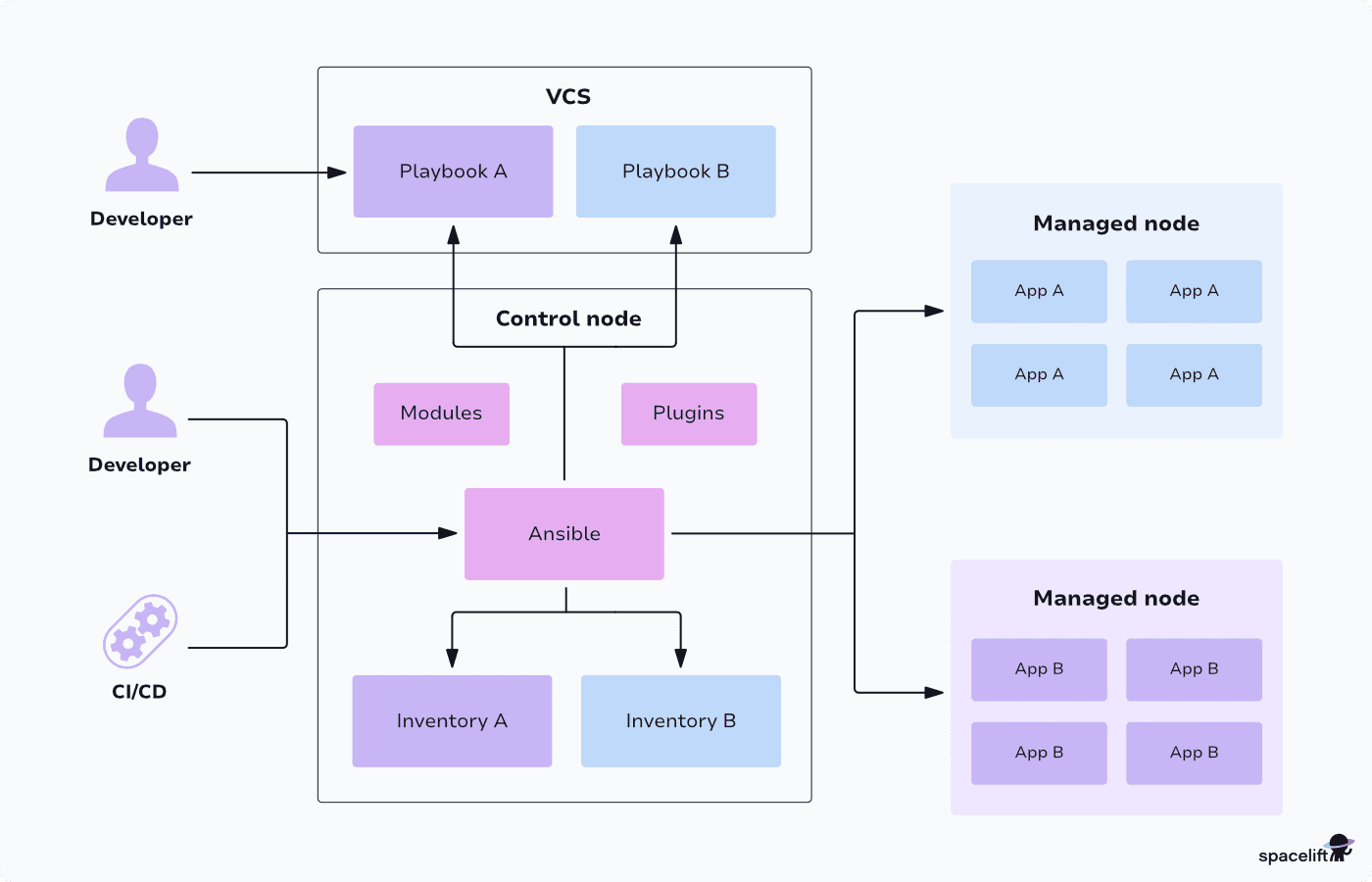
Ansible uses the concept of a playbook, a YAML-formatted file that describes the sequence of activities the Ansible host should perform. This principle also applies to public cloud provisioning.
This example playbook runs a single task that creates an S3 bucket with versioning, with no agent required on the target host:
- name: Provision app storage
  hosts: localhost
  tasks:
    - name: Create S3 bucket
      amazon.aws.s3_bucket:
        name: my-app-assets
        state: present
        versioning: true
Ansible is cloud-agnostic. It supports hundreds of modules for AWS, GCP, OpenStack, and Microsoft Azure, helping manage compute, databases, networks, containers, and related infrastructure.
Unlike other tools for configuration management, such as Chef, Puppet, and Salt Stack, Ansible is agentless. This eliminates the need to install agents to manage software patches and application versions on target host machines.
Instead, Ansible relies on SSH for Unix-based OSes and WinRM for Windows OSes to log in to resources and perform actions.
10. Crossplane
- Adoption signals: ~12k GitHub stars, frequent releases in the last 12 months
Crossplane runs inside a Kubernetes cluster and lets you provision cloud infrastructure using Kubernetes-style declarative configurations. This gives you a consistent, API-centric approach that fits existing Kubernetes workflows, operators, and tools. Crossplane is a graduated CNCF project, so its governance and maturity are well established.
As it is deployed inside K8s, you can take advantage of Helm and Kustomize when you are declaring your infrastructure resources. You can also leverage ArgoCD, Flux, and Spacelift to deploy your Crossplane resources.
The Kubernetes manifest below defines an S3 bucket as a managed resource that Crossplane reconciles inside your cluster:
apiVersion: s3.aws.upbound.io/v1beta1
kind: Bucket
metadata:
  name: my-app-assets
spec:
  forProvider:
    region: us-east-1
  providerConfigRef:
    name: default
If you are not using a Kuberentes cluster, the overhead of installing, configuring, and managing it may not be worth the effort, but it can make sense to use it if you are already invested in Kubernetes.
See the direct comparison of Crossplane vs Terraform.
How does Spacelift support Terraform and other IaC tools?
Spacelift is the infrastructure orchestration platform built for the AI-accelerated software era. Spacelift gives you everything you need to automate running your Terraform stacks, so you don’t have to build and babysit your own CI pipelines. That matters most when you have several stacks to connect together, and it does not stop there.
Spacelift supports Terraform and OpenTofu, and on top of those, you get Pulumi, Kubernetes, CloudFormation, Ansible, and Terragrunt, so every workflow your team runs has a home.
Spacelift’s pricing is based on concurrency, so you won’t need a calculator on hand to predict your bill. Pricing stays predictable.
With Spacelift you:
- get policies across every decision point
- build dependencies between stacks and share outputs from one to another
- detect infrastructure drift and optionally remediate it
- bring your own image and control what happens between runner phases
- integrate any tool you want
- build self-service infrastructure with Blueprints and Templates
- understand, diagnose, and provision infrastructure in plain English with Spacelift Intelligence
- and do plenty more
If you need an IaC management platform that handles Terraform and the rest of your tooling, create a free account with Spacelift today or book a demo with one of our engineers.

Before Affinity migrated to Spacelift in February 2023, the infrastructure team struggled to get Terraform to work as they wanted. Their IaC provider’s approach to representation did not map well to the way Affinity’s developers think about infrastructure and the various environments they work with, and the overall experience was frustrating. Since Affinity adopted the Spacelift platform, however, even developers who are not Terraform fans have been enthusing about the smoothness of the experience.
Conclusion
Alternatives to Terraform cater to a range of IaC needs. Your options include OpenTofu, Pulumi, AWS CloudFormation, Ansible, Crossplane, and others. Each offers different features and capabilities, so careful comparison will help you decide which one best suits your organizational goals and technical environment.
Automate Terraform deployments with Spacelift
Automate your infrastructure provisioning and build more complex workflows based on Terraform using policy as code, programmatic configuration, context sharing, drift detection, resource visualization, and more.
Frequently asked questions
What’s the best open-source drop-in alternative to Terraform?
The best open-source drop-in alternative to Terraform today is OpenTofu. It is explicitly designed to preserve Terraform workflows, using the same HCL configuration style and remaining backward compatible with Terraform 1.x-era projects, including broad provider and module ecosystem compatibility.
What’s the best Terraform alternative for AWS-only teams?
For AWS only teams, AWS CloudFormation is the best direct Terraform alternative because it is native, fully supported by AWS, and covers essentially all AWS services with predictable lifecycle behavior.
What’s the best Terraform alternative if we want to use general-purpose languages?
Pulumi is usually the best Terraform alternative when you want real general purpose languages, because you define infrastructure with TypeScript, Python, Go, C#, or Java instead of HCL, while still getting plan and state management.
Why are teams looking for Terraform alternatives?
Teams look for Terraform alternatives mainly because licensing and governance changes created uncertainty, and some want a tool with a clearer open-source roadmap or tighter ecosystem fit. Others switch due to operational friction, like state management complexity, upgrade churn, or slower workflows at scale.