Managing cloud infrastructure at scale introduces multiple challenges. Surprise bills. Security gaps that slip through. Compliance audits that turn into week-long fire drills.
A manual approach is too slow, and it is difficult to keep internal documentation up to date.
The alternative is governance as code. You write policies as code, version them like software, and enforce them automatically. Developers don’t have to remember to tag resources or enable encryption, and reviews stop becoming bottlenecks that slow deployments.
This guide covers what governance as code is, how it works across cloud providers, and how to integrate it into your pipelines.
What we’ll cover:
What is governance as code?
Governance as code is the practice of defining, enforcing, and auditing organizational policies using executable, machine-readable code, rather than relying on manual documentation. It ensures that rules are automatically applied wherever infrastructure and services are deployed.
In practice, governance as code extends infrastructure as code by encoding policies around security, access control, cost limits, and compliance. While infrastructure as code focuses on provisioning resources, governance as code defines how those resources must behave and which constraints they must follow.
Cloud adoption brings flexibility but also complexity. Without governance, teams over-provision resources, violate budgets, or create vulnerabilities. Governance as code bridges the gap between your policies and what actually gets deployed.
Typical policies cover these areas:
- Security controls: Requirements for encryption, who can access what, and how networks should be configured
- Cost management: Limits on resources, tags that track budgets, and spending caps.
- Compliance requirements: Automated enforcement of regulations like GDPR, HIPAA, or SOC 2
- Operational standards: Naming conventions, configuration patterns, and deployment best practices
Why is governance as code important?
Manual governance breaks at cloud scale. As your infrastructure grows, keeping track of who can do what, ensuring compliance, and preventing misconfigurations becomes overwhelming.
Here’s why governance as code matters:
- Deployment speed: Manual approvals create bottlenecks that slow down every release. Automated policy checks enable teams to deploy quickly while remaining compliant. This reduces the need for dedicated governance personnel who manually review every change.
- Consistency everywhere: When policies exist as code, they apply the same way in development, staging, and production. This eliminates configuration drift between environments, ensuring that what works in development also works in production.
- Audit readiness: Every policy decision is logged with context, including what was checked, who requested it, and the reason for its approval or rejection. When auditors show up, you have a complete history, rather than scrambling to piece together what happened.
- Team collaboration: Version-controlled policies enable security, operations, and development teams to review changes together, suggest improvements, and understand the rationale behind rules. Governance becomes a shared responsibility rather than something only one team understands.
- Scalability: Governance as code works the same whether you’re managing ten resources or 10,000. Manual processes fall apart as infrastructure grows, but automated enforcement keeps up with whatever pace your team needs.
Is governance as code the same as policy as code?
Policy as code defines specific, enforceable rules. Things like “S3 buckets must be encrypted” or “EC2 instances can’t exceed t3.large size.” Each policy is a single, testable check that returns a pass or fail result.
Governance as code is a comprehensive system that encompasses those policies. This involves managing the entire lifecycle of how those rules operate within your organization, encompassing policy creation, approval workflows, deployment across environments, exception processes, audit logging, and compliance reporting.
Traditional governance lives in Wiki pages and Confluence documents. Someone writes down the rules, and teams try to follow them manually. This breaks down fast because documentation gets outdated, people forget steps, and there’s no way to enforce consistency across hundreds of deployments.
Governance as code automates all of this and determines which policies apply to which environments, who can approve exceptions, what happens when someone violates a rule, and how you track everything for audits. The policies themselves are just one piece. Governance as code is the framework that makes them actually work at scale.
How does governance as code work?
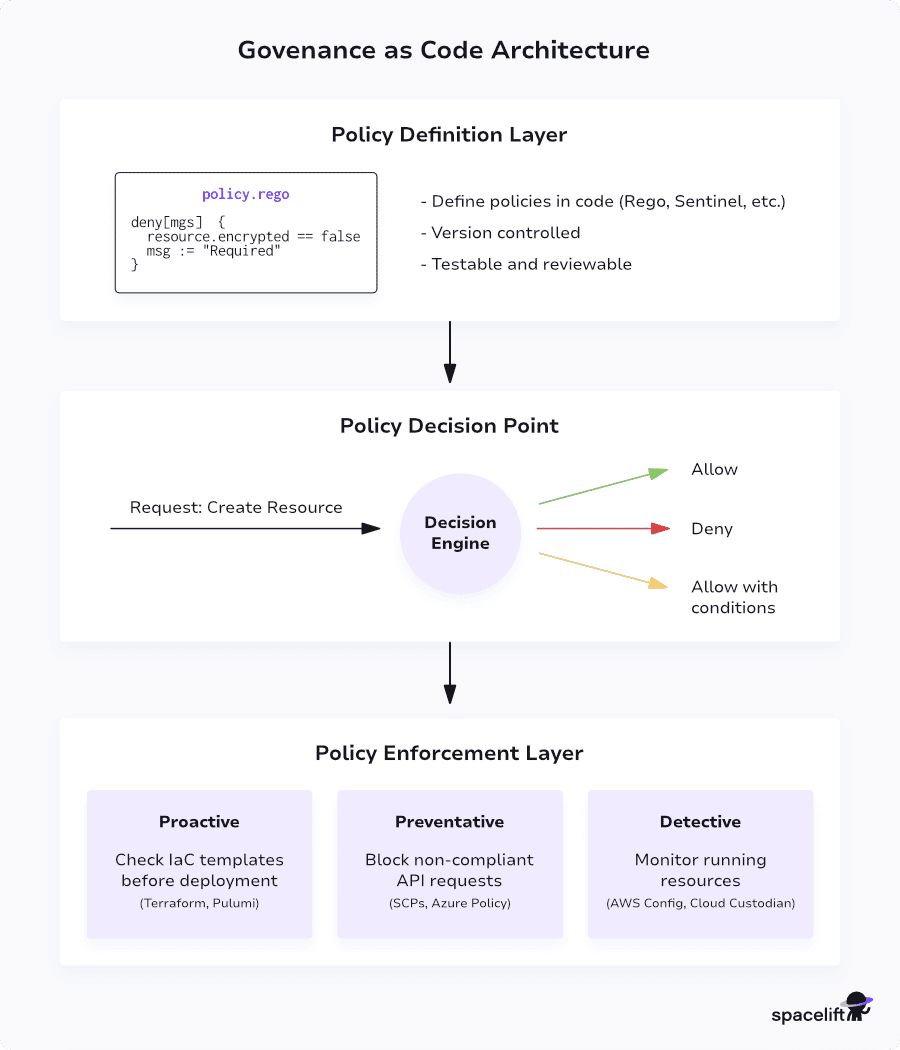
Governance as code runs through a three-layer system that evaluates requests, makes decisions, and enforces rules.
The architecture
The system has three layers that work together:
- Policy definition layer: You write governance rules using a policy language. Open Policy Agent uses Rego, a declarative language built for expressing logic over complex data structures.
The code describes your requirements in a testable format.
- Policy decision point: When someone tries to create or modify a resource, this layer evaluates the request against your policies. It looks at who’s requesting, what they want to do, and what resources are involved.
Then it returns a decision: allow, deny, or allow with conditions.
- Policy enforcement point: This actually enforces the decision. Enforcement can happen at different stages depending on your needs:
-
- Proactive controls: Scan infrastructure templates before deployment to catch issues early in the development process
- Preventative controls: Block non-compliant actions in real-time as they’re attempted, stopping problems before they happen
- Detective controls: Continuously monitor deployed resources and alert when they drift from approved configurations
How it works in practice
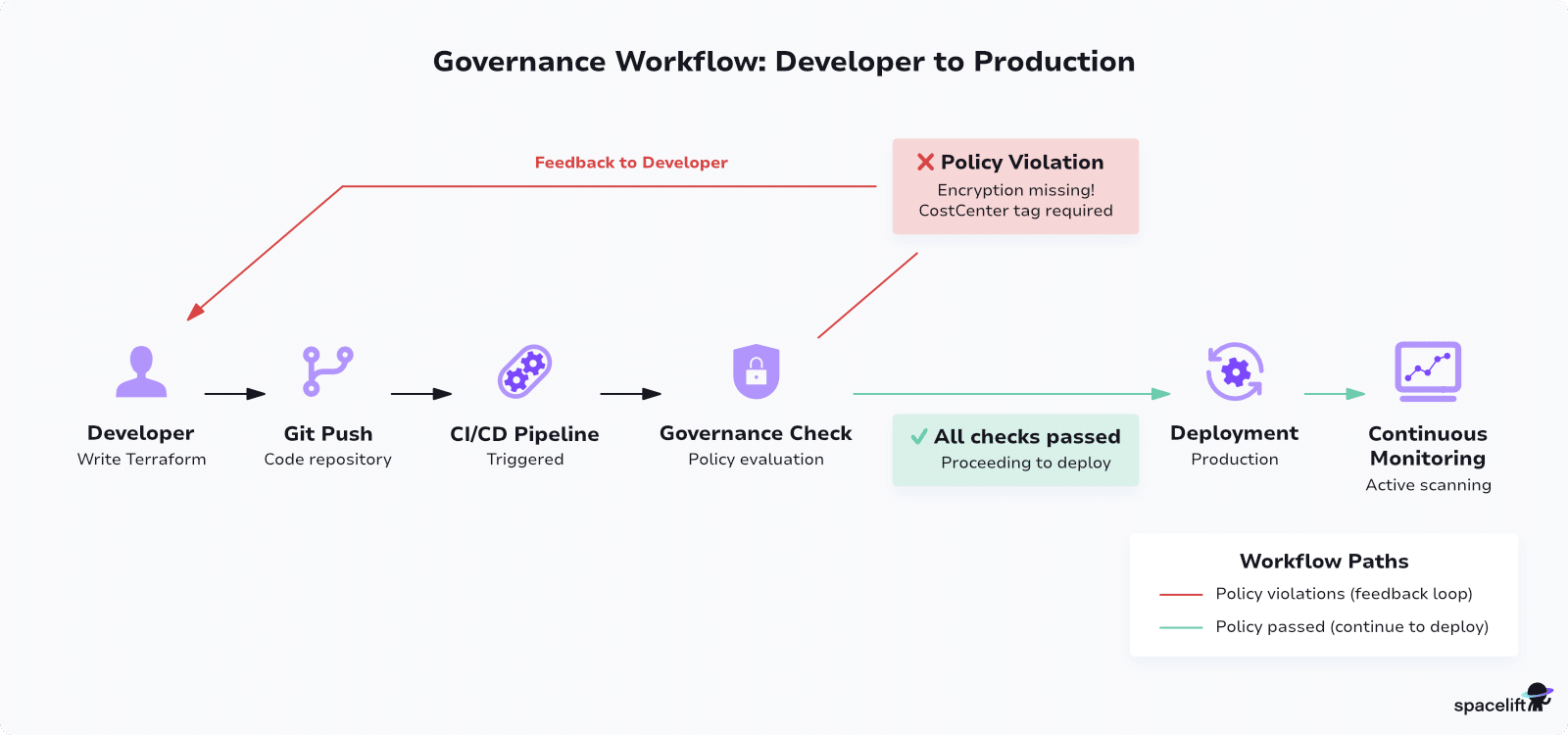
Let’s say your organization requires all database instances to have encryption enabled and cost center tags. Then, a developer writes Terraform code for a new RDS instance but forgets encryption.
The Terraform code enters your CI/CD pipeline, which triggers a governance check. The engine evaluates the Terraform plan against your policies:
package aws.rds

deny[msg] {
  resource := input.resource_changes[_]
  resource.type == "aws_db_instance"
  not resource.change.after.storage_encrypted
  msg := sprintf("RDS instance %v must have encryption enabled", [resource.name])
}

deny[msg] {
  resource := input.resource_changes[_]
  resource.type == "aws_db_instance"
  not resource.change.after.tags["CostCenter"]
  msg := sprintf("RDS instance %v must have CostCenter tag", [resource.name])
}
The policy returns a failure and blocks deployment. The developer immediately sees feedback about what went wrong. They fix the code by adding encryption and the tags, then rerun the pipeline. This time, it passes all checks and deploys.
Continuous monitoring
Governance doesn’t stop at deployment. You need to continue monitoring your infrastructure after it goes live. Resources get checked regularly against your policies, and if anything changes from what you approved, you’ll get an alert.
Remediation can occur automatically for simple fixes, such as adding a missing tag, whereas more complex changes require manual intervention.
This continuous approach detects configuration changes that happen outside normal deployments, whether they’re accidental or malicious modifications.
Governance as code across different cloud providers
Each major cloud provider has native governance tools with different names and capabilities. Understanding these helps you build a strategy that works across your infrastructure.
Governance as code in AWS
AWS gives you several services that work together to control access and enforce policies across your organization. The main ones are:
- Service Control Policies: SCPs act as guardrails at the organizational level, defining maximum permissions for accounts. You can manage them programmatically through infrastructure-as-code tools.
Every AWS API request undergoes IAM authentication and authorization, making SCPs a powerful way to set boundaries on what can happen in your accounts.
- AWS Config: Evaluates resource configurations against desired states using Config Rules. You write custom rules in Lambda or use AWS-managed rules. Config monitors resources continuously and reports compliance status.
- AWS Control Tower: Builds on Config and Security Hub to simplify multi-account governance. It provides preventative, detective, and proactive controls across your organization.
Example Config rule checking S3 bucket encryption:
def evaluate_compliance(configuration_item):
    if configuration_item['resourceType'] != 'AWS::S3::Bucket':
        return 'NOT_APPLICABLE'

    encryption = configuration_item.get('supplementaryConfiguration', {}).get('ServerSideEncryptionConfiguration')

    if encryption:
        return 'COMPLIANT'
    return 'NON_COMPLIANT'
Governance as code in Azure
Azure’s governance is built on policy definitions and blueprints that help you set standards and enforce them across your subscriptions. The main components are:
- Azure Policy: Defines and enforces organizational standards. Policies can audit resources, deny non-compliant deployments, or auto-remediate issues. Azure Policy uses JSON definitions stored in version control, allowing you to view changes and roll back if necessary.
- Azure Blueprints: Packages policies, role assignments, and ARM templates into repeatable, governed environments. Infrastructure as code plus governance as code combined.
- Management Groups: Organize subscriptions hierarchically with inherited policies. Apply different governance standards to different parts of your organization.
Example policy requiring specific tags:
{
  "mode": "Indexed",
  "policyRule": {
    "if": {
      "field": "tags['Environment']",
      "exists": "false"
    },
    "then": {
      "effect": "deny"
    }
  }
}
Governance as code in Google Cloud
Google Cloud Platform organizes governance through its Organization Policy Service, which operates in a hierarchical structure. You can set constraints at different levels – organization, folder, or project. The main tools are:
- Organization Policy Service: Provides centralized resource control. Define constraints at organization, folder, or project level. They cascade down to resources, so you can set broad policies at the top and get more specific as you go down the hierarchy.
- Security Command Center: Continuously monitors your GCP environment for security and compliance issues. Surfaces violations in a unified dashboard.
- Cloud Asset Inventory: Tracks all resources and their configurations. Query for compliance and detect changes over time.
Multi-cloud governance
Most organizations use multiple clouds, which complicates governance. You need policies that work the same way, regardless of where your resources are. Consider these approaches:
- Cloud-agnostic policy engines: Open Policy Agent, HashiCorp Sentinel, and Cloud Custodian work across providers. OPA uses Rego and integrates with Kubernetes, Terraform, CI/CD pipelines, and custom applications. These tools enable you to write policies once and apply them everywhere.
- Infrastructure code validation: Integrate checks directly into your Terraform, Pulumi, or CloudFormation workflows. Tools like Checkov, tfsec, and Terrascan scan templates across all providers, catching issues before deployment. (Read more: Top 7 Terraform Scanning Tools You Should Know)
- Unified governance platforms: Commercial platforms like Spacelift provide consistent governance across AWS, Azure, Google Cloud, and other cloud environments. These platforms provide a single place to manage policies, regardless of where your resources live.
The key is maintaining consistent policies while respecting provider-specific features. Your tagging standards should apply everywhere; however, the implementation of encryption will differ between AWS KMS and Azure Key Vault.
How to integrate governance as code into CI/CD pipelines
Integrating governance into your pipeline shifts enforcement left, catching issues before they reach production. Here’s how to build it into your workflow.
Pipeline architecture
A governance-enabled pipeline follows a natural progression from code to production. When a developer pushes code, automated policy validation kicks in immediately to scan for violations. The build and test stages only proceed if policies pass.
Before deployment, the governance engine validates the specific changes about to be made. For high-risk changes, you can add an optional approval gate that requires a review of the plan.
Once approved, deployment happens to the target environment. After deployment, continuous monitoring is initiated to identify any drift or issues that develop.
GitHub Actions implementation
GitHub Actions makes it straightforward to add governance checks:
name: Infrastructure Deployment with Governance

on:
  pull_request:
    branches: [main]
  push:
    branches: [main]

jobs:
  governance-checks:
    runs-on: ubuntu-latest
    steps:
      - name: Checkout code
        uses: actions/checkout@v3

      - name: Setup OPA
        uses: open-policy-agent/setup-opa@v2
        with:
          version: latest

      - name: Validate Terraform
        run: |
          terraform init
          terraform plan -out=tfplan.binary
          terraform show -json tfplan.binary > tfplan.json
          opa eval --data policies/ --input tfplan.json \
            "data.terraform.deny" --format pretty

      - name: Check violations
        run: |
          if opa eval --data policies/ --input tfplan.json \
            "data.terraform.deny[_]" | grep -q "true"; then
            echo "Policy violations found"
            opa eval --data policies/ --input tfplan.json \
              "data.terraform.deny" --format pretty
            exit 1
          fi

      - name: Security scan
        uses: bridgecrewio/checkov-action@master
        with:
          directory: .
          framework: terraform

  deploy:
    needs: governance-checks
    runs-on: ubuntu-latest
    if: github.ref == 'refs/heads/main'
    steps:
      - name: Checkout code
        uses: actions/checkout@v3

      - name: Deploy
        run: |
          terraform init
          terraform apply -auto-approve

      - name: Verify compliance
        run: ./scripts/compliance-scan.sh
This workflow blocks non-compliant code at PR time, provides clear feedback on violations, and only deploys when checks pass.
GitLab CI implementation
GitLab CI offers similar capabilities:
stages:
  - plan
  - deploy
  - verify
  - validate


policy-validation:
  stage: validate
  image: openpolicyagent/opa:latest
  script:
    - opa test policies/ -v
  only:
    - merge_requests
    - main

terraform-compliance:
  stage: plan
  image: hashicorp/terraform:latest
  script:
    - terraform init
    - terraform plan -out=tfplan.binary
    - terraform show -json tfplan.binary > tfplan.json
    - opa eval --bundle policies/ --input tfplan.json "data.terraform.allow" --fail
  only:
    - merge_requests
    - main

cost-check:
  stage: plan
  image: infracost/infracost:latest
  script:
    - infracost breakdown --path . --format json --out-file cost.json
    - |
      COST=$(cat cost.json | jq '.totalMonthlyCost')
      if (( $(echo "$COST > 1000" | bc -l) )); then
        echo "Monthly cost exceeds budget"
        exit 1
      fi

deploy-infrastructure:
  stage: deploy
  image: hashicorp/terraform:latest
  script:
    - terraform apply -auto-approve
  only:
    - main
  when: manual
Integration patterns
These patterns work well in most pipeline setups:
- Run checks early: Put lightweight validation, such as syntax checks and basic policy validation, before expensive operations. This gives developers faster feedback and saves compute resources on builds that would fail anyway.
- Provide clear context: When policies fail, explain which policy was violated, which resources are affected, and what needs to change. Generic error messages, such as “Policy violation detected,” waste everyone’s time.
- Organize by concern: Different teams are responsible for different policies. Use policy bundles or tags to separate security, cost, and operations checks. This makes it easier to route failures to the right people.
- Start in audit mode: Begin new policies by logging violations without blocking deployments. This illustrates the impact and provides teams with time to adapt. Move to enforcement once everyone understands the requirements.
- Include cost governance: When deployments exceed budget thresholds, require approval from finance teams. Tools like Infracost can automatically verify whether cost estimates comply with your policies.
Handling exceptions
Not every violation should block deployment. You need a way to handle real edge cases without losing control.
resource "aws_instance" "legacy_app" {
  # governance:exception
  # reason: Legacy app requires specific config
  # approved_by: security-team
  # expires: 2025-06-30

  ami           = "ami-legacy-version"
  instance_type = "m5.large"
}
Governance engines can recognize these annotations, validate the approvals, and allow the exception while tracking it for review. The system verifies whether the approver has authority, the reason is documented, and the exception has an expiration date.
When the expiration approaches, it automatically creates a reminder to review whether the exception is still needed or if the underlying issue can be fixed properly.
Some teams implement a tiered approval process where low-risk exceptions require one approver, whereas high-risk exceptions require multiple sign-offs.
Others integrate with ticketing systems so every exception creates an audit trail in Jira or ServiceNow.
Best practices for implementing governance as code
Getting governance as code right takes more than just tools. You need support from across the organization and a thoughtful approach.
1. Build a clear framework first
Before writing any policies, you need to establish the organizational foundation that enables effective governance. Focus on these key elements:
- Define ownership clearly: Identify who owns each policy type (security, cost, compliance) and who is responsible for enforcing them. Successful initiatives often extend from a Cloud Center of Excellence, where governance becomes a natural extension of cloud best practices.
- Document standards first: Write governance requirements in plain language before turning them into code. Everyone needs to understand why policies exist, not just what they enforce. This creates buy-in and helps developers view governance as an enabler rather than a blocker.
- Get cross-functional buy-in: Include representatives from dev, ops, security, and finance in planning. If security writes all the policies alone, developers will find ways to circumvent them.
- Prioritize based on impact: Start with high-impact areas, such as security and compliance. Expand to operational excellence and cost optimization once your foundation is solid.
2. Start small and build
Don’t try to govern everything at once. Use a phased approach that gives teams time to adjust:
Phase 1 – Observe: Run policies in audit mode only. Collect violation data without blocking deployments. This shows you the current state and helps identify patterns. You might discover that seemingly reasonable policies conflict with legitimate use cases.
Phase 2 – Advise: Add warnings to your pipelines. Violations get reported, but don’t fail builds. Many teams will start fixing issues voluntarily when warnings are clear about what needs to change.
Phase 3 – Enforce: Start blocking deployments that violate critical policies. Focus on clear, objective rules, such as encryption requirements that have few legitimate exceptions.
Phase 4 – Optimize: Expand to operational and cost policies. Add sophisticated rules that consider context and environment. By this point, teams understand governance and see its value.
3. Write maintainable policies
Policy code requires the same level of care as application code. Here’s what to focus on:
- Keep policies simple: Complex policies are often ignored, whereas simple guidelines are more likely to be followed. Each policy should excel in one area. A policy that attempts to check five different requirements simultaneously is difficult to debug and even more challenging to understand.
- Use clear names: Future you will appreciate seeing
require_encryption_at_restinstead ofpolicy_17when something breaks. Good naming makes it obvious what a policy does and why it exists. - Test your policies: Write unit tests that verify policies catch violations and allow compliant configurations. A policy that accidentally blocks everything is worse than no policy at all, and you only find out through testing.
- Version control everything: Track changes to policies so you can see what changed when something breaks. Being able to quickly roll back a problematic policy update saves you from a lot of pain.
4. Make governance visible
Governance shouldn’t feel like a mysterious black box. Build visibility into every aspect:
- Clear error messages: When blocking a deployment, provide a clear explanation of the issues and how to fix them. “S3 bucket needs encryption. Add
server_side_encryption_configurationto your Terraform resource” beats “Policy violation detected.” - Compliance dashboards: Show your current state in real-time. Teams should identify which resources comply with policies, which violate them, and how these trends evolve over time. This visibility helps teams take ownership.
- Regular reporting: Give leadership metrics on how policies are being adopted, violation trends, exceptions you’ve granted, and time you’re saving through automation. These numbers show the value and help secure ongoing support.
- Exception tracking: Document why every exception exists, who approved it, and when it expires. Review them regularly to ensure temporary workarounds don’t become permanent.
5. Automate operations
Manual processes don’t scale. As environments grow, they create gaps in governance and inconsistent enforcement.
Automation ensures all policies are aligned by deploying updates simultaneously across all environments, preventing version drift across environments. It also treats compliance like code — when requirements change, we update policies, test them, and roll them out automatically to stay aligned with current regulations.
Automation also enables teams to respond faster to risks. We can automatically remediate safe, low-risk issues such as missing tags or accidentally public S3 buckets, while flagging complex violations for human review.
Continuous drift detection scans live environments for changes made outside approved workflows and creates tickets or pull requests to bring systems back into compliance.
6. Provide escape hatches
Governance should help teams move faster, rather than hinder their progress. You need flexibility for real edge cases:
- Emergency bypass process: Set up a clear process for urgent deployments that can’t wait. Ensure they are documented and set to expire automatically so they don’t remain active indefinitely.
- Time-bound exceptions: Every exception needs an expiration date. When it expires, conduct a review to determine whether it’s still required or if the issue can be fixed properly.
- Quick policy rollback: If a new policy causes unexpected issues, disable it immediately while investigating. Waiting for approvals isn’t acceptable.
- Context-aware enforcement: Development environments can have looser policies than production environments because the risk is lower. Adapt rules based on where resources run rather than applying strict requirements everywhere.
7. Invest in people
Technology alone won’t make governance work. People need to understand it, trust it, and see how it helps them do their jobs. That starts with ongoing training. Teams should be regularly trained on security, compliance, and best practices, especially as governance evolves and new policies are introduced. Clear education on what policies do, why they exist, and how to work with them reduces friction and builds confidence.
Governance also improves when knowledge is shared, and feedback flows both ways. When teams solve a tricky policy problem, document it and add it to a shared knowledge base so others don’t have to reinvent the solution.
Reinforce the value of governance by celebrating wins when governance prevents real issues from reaching production. Create clear feedback channels — and use them. Teams closest to the work often know which policies provide real protection and which just slow things down.
8. Measure what matters
Track metrics that show whether governance is actually working:
- Policy effectiveness: How many issues does each policy catch? Look for patterns in violations that might indicate training gaps or policies that need adjustment.
- Resolution time: How long does it take teams to fix violations? Consistently slow resolution suggests policies are too complex or unclear.
- False positive rate: Are policies blocking legitimate work? False positives erode trust and train people to look for workarounds.
- Coverage gaps: What issues slip through? Security incidents or compliance findings that governance didn’t catch reveal where new policies are needed
- Developer productivity: Is governance speeding up deployments by catching issues early, or slowing things down? Track velocity and quality together to gain a comprehensive view.
Use these metrics to improve continuously. Retire ineffective policies, introduce new ones where gaps exist, and adjust enforcement based on the data.
How to improve your infrastructure governance with Spacelift
Spacelift is a platform designed to manage IaC tools such as OpenTofu, Terraform, CloudFormation, Kubernetes, Pulumi, Ansible, and Terragrunt, allowing teams to use their favorite tools without compromising functionality or efficiency, taking cloud automation and orchestration to the next level.
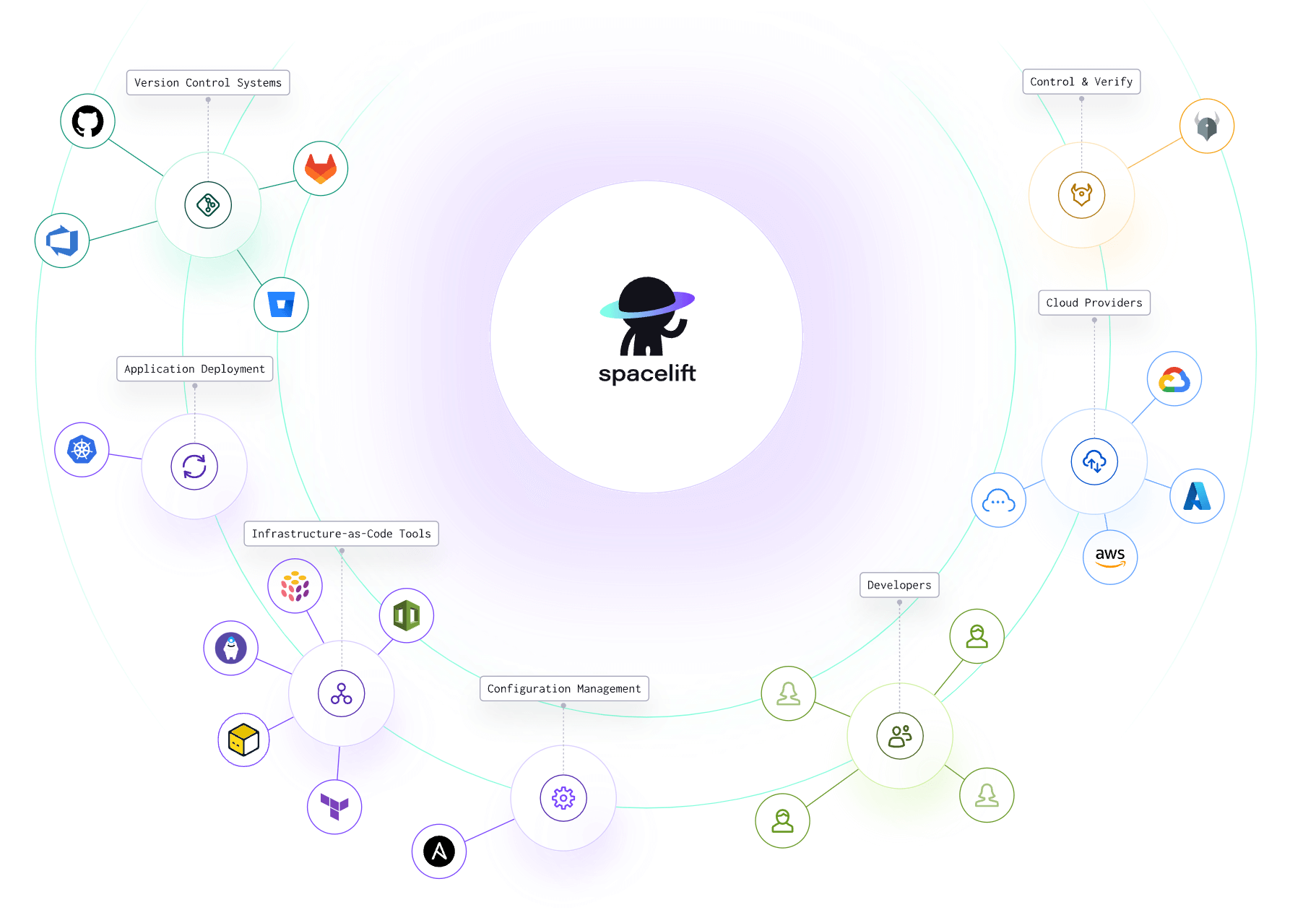
Spacelift provides a unified interface for deploying, managing, and controlling cloud resources across various providers. Still, it is API-first, so whatever you can do in the interface, you could do via the API, the CLI it offers, or even the OpenTofu/Terraform provider.
The platform enhances collaboration among DevOps teams, streamlines workflow management, and enforces governance across all infrastructure deployments. Spacelift’s dashboard provides visibility into the state of your infrastructure, enabling real-time monitoring and decision-making. It can also detect and remediate drift.
You can leverage your favorite VCS (GitHub/GitLab/Bitbucket/Azure DevOps), and executing multi-IaC workflows is a question of simply implementing dependencies and sharing outputs between your configurations.
With Spacelift, you get:
- Policies to control what kind of resources engineers can create, what parameters they can have, how many approvals you need for a run, what kind of task you execute, what happens when a pull request is open, and where to send your notifications
- Stack dependencies to build multi-infrastructure automation workflows with dependencies, having the ability to build a workflow that, for example, generates your EC2 instances using Terraform and combines it with Ansible to configure them
- Self-service infrastructure via Blueprints, enabling your developers to do what matters – developing application code while not sacrificing control
- Creature comforts such as contexts (reusable containers for your environment variables, files, and hooks), and the ability to run arbitrary code
- Drift detection and optional remediation
If you want to learn more about Spacelift, create a free account today or book a demo with one of our engineers.
Key points
Governance as code transforms cloud infrastructure control by treating compliance rules and guardrails as software that can be versioned, tested, and automatically enforced.
The approach automates policy validation at multiple points, from code commit through production deployment, replacing manual governance practices that can’t keep pace with cloud velocity.
Implementation requires both technical and organizational change. You need to select the right tools, integrate them into CI/CD pipelines, and define clear ownership, approval, and exception workflows.
Start small with high-impact controls, progress through observe–advise–enforce phases, and clearly communicate expectations and regulatory value. The goal is to make governance automatic, visible, and enabling — turning policy enforcement from a bottleneck into an accelerator that helps teams ship faster with confidence.
Solve your infrastructure challenges
Spacelift is a flexible orchestration solution for IaC development. It delivers enhanced collaboration, automation, and controls to simplify and accelerate the provisioning of cloud-based infrastructures.
Frequently asked questions
What tools can I use to implement governance as code?
You can implement governance as code using tools like Terraform and Open Policy Agent to define and enforce infrastructure policies declaratively. Spacelift adds policy-driven governance, approval workflows, and drift detection for Terraform, OpenTofu, Pulumi, and CloudFormation. HashiCorp Sentinel and AWS Config Rules are also commonly used in regulated environments.
What problems does governance as code solve?
Governance as code solves inconsistent policy enforcement, manual compliance errors, and slow audit processes. It enables policies to be versioned, tested, and automatically enforced across environments. This reduces configuration drift, improves regulatory compliance, and makes governance scalable, repeatable, and transparent within modern DevOps workflows.
Will governance as code slow my pipelines?
It can, but it usually does not if you design it well. Governance as code introduces additional policy evaluation steps (for example, OPA/Conftest checks, IaC scanning, or admission policy tests), which cost CPU time and sometimes require fetching rule bundles or calling external services. Keep rules local and cached, run checks in parallel, scope policies to changed files, and reserve deep scans for merge gates to maintain low pipeline latency.