Cloud Asset Management (CAM) is the process of identifying, organizing, and managing the resources in your cloud accounts. It’s how you govern your cloud environments to avoid problems such as waste and compliance breaches.
Efficient CAM processes make it easier to monitor cloud resources. They allow you to centrally audit your resource inventory, allowing you to identify anomalies more quickly. However, it can be challenging to implement CAM strategies that remain effective at scale.
In this article, we will unpack the benefits of adopting a structured approach to cloud asset management. You’ll gain a solid understanding of the importance of CAM and how it fits into cloud operations. We’ll also share best practices for implementing CAM workflows.
- What is a cloud asset?
- What is cloud asset management (CAM)?
- Benefits of cloud asset management
- What happens if you forget cloud asset management?
- How to implement cloud asset management (CAM)
- Best practices for cloud asset management
- Key features of CAM tools
- CAM vs. CSPM vs. CMDB vs. ITAM
First, let’s explore what we mean by a “cloud asset.”
What is a cloud asset?
Put simply, a cloud asset is any resource that you’ve created in the cloud. Compute nodes, application deployments, and object storage buckets are some of the most common cloud asset types, but others include:
- Managed database instances
- Container deployments to PaaS environments
- Serverless functions
- VPCs
- Load balancers
- Cloud GPU instances
- AI inference infrastructure
Each of these resources contributes specific business value. In other words, they’re assets that need to be protected. Although cloud assets are intangible items that can’t be held, at a business level, they are as important as physical equipment and intellectual property.
What is cloud asset management (CAM)?
Cloud Asset Management (CAM) is the discipline of identifying, tracking, and governing all resources deployed in cloud environments to ensure visibility, control, and accountability. It focuses on managing virtual assets such as compute instances, storage, databases, networks, and licenses that are created and changed dynamically.
Unlike physical assets that rely on tags and static inventories, cloud assets are ephemeral and can be provisioned or removed in minutes, often across multiple providers and accounts.
To begin with, large organizations often have thousands of cloud assets deployed across multiple cloud service providers. Moreover, cloud inventories are often highly dynamic as new resources can be frequently added and removed. You might provision and then destroy test environments each time your CI/CD pipelines run, for example. This means cloud assets can’t be managed using static lists.
CAM solves these problems using automated tools and structured processes. It allows cloud operators and business leaders to efficiently monitor cloud resource fleets, understand the roles of different components, and identify potential issues.
CAM systems usually offer the following capabilities:
- Centralized visibility into all deployed cloud assets, including when multiple cloud providers are used
- Automated enforcement of compliance policies, such as requiring owner and project tags for all new assets
- Alerts for when anomalies are detected, such as a new asset unexpectedly appearing in a cloud account
- The ability to analyze asset activity to understand cloud usage patterns and reduce operating costs
These features enable you to reliably govern your cloud assets, even when you’re working with extremely large fleets.
Benefits of asset management in cloud environments
Investing in a dedicated CAM strategy offers clear benefits for organizations with large cloud asset fleets. It unlocks security, efficiency, and scalability improvements by giving you clear visibility over the assets you depend on.
Here’s a summary of five key ways in which CAM supports cloud operations:
- Enhances operational efficiency – CAM increases operational efficiency by providing structured processes to follow when interacting with your cloud asset fleet. It removes the need to manually search for assets in cloud provider dashboards. This frees up time for operators to complete more meaningful tasks, instead of painstakingly organizing cloud assets.
- Simplifies cloud governance to ensure continual security and compliance – CAM improves cloud governance processes by standardizing how resources are managed. Structured CAM systems ensure cloud assets are correctly tagged, labelled, and organized. They can also enforce that relevant security policies are applied at all times. This helps reduce governance overheads.
- Exposes cost optimization opportunities – Improving cloud asset visibility often reveals opportunities for cost optimization. For example, you may identify assets that are underutilized or no longer required. The cost of implementing CAM is offset by long-term savings, creating a positive ROI.
- Recognizes cloud assets for the value they create – Building a CAM strategy forces you to acknowledge the true value of your cloud assets. Because cloud resources are intangible, they’re easy to overlook when you’re analyzing what makes your business a success. CAM ensures cloud assets are recognized as business value creators, not just technical utilities.
- Enables robust cloud asset access management and activity logging – CAM provides a framework for unifying cloud asset access management and monitoring controls. Centralizing asset inventories enables you to monitor your fleet in one place, making it easier for you to see who’s interacting with different resources. This helps mitigate the threat of unauthorized access and stops rogue assets from being silently added to your cloud accounts.
What happens when you neglect cloud asset management?
Failing to implement robust CAM practices makes it harder to govern cloud fleets at scale. Resources are likely to become misconfigured or go unused. This leads to excess costs, compliance breaches, and unexpected operational errors.
Left unchecked, your security posture will gradually deteriorate, and it’ll become harder to regain control of your cloud asset fleet.
CAM weaknesses also add friction to day-to-day development processes. Not knowing who owns an asset or which service it belongs to means developers and operators spend more time waiting for information from each other. It increases the risk of dangerous conflicts due to developers mistakenly interacting with incorrect resources.
Overall, ineffective cloud asset management makes cloud operations unnecessarily complex. It slows you down and obscures issues, preventing timely responses to new risks.
Investing in effective CAM processes protects against disorganization, compliance breaches, and runaway cost increases.
How to implement cloud asset management (CAM)
Cloud asset management depends on two main things:
- Visibility into cloud asset inventories, including the policies associated with each asset
- Predictable asset organization, such as by setting consistent labels and tags
In practice, CAM is an inventory pipeline combined with governance controls that transform “what exists” into “what is compliant,” without relying on humans.
Start with visibility: aggregate asset discovery from each cloud (AWS Systems Manager, AWS Config, Google Cloud Asset Inventory, Azure Resource Graph) into one normalized inventory, and enrich every asset with IAM bindings, org policies, network exposure, owner, and deployment provenance.
Then define predictable organization: a mandatory tag/label taxonomy (owner, app, env, cost-center, data-class, compliance) and a resource hierarchy model (accounts/projects, org units, folders).
Automate enforcement using IaC as the source of truth, plus policy as code (OPA/Conftest, Terraform Sentinel, AWS SCPs, Azure Policy, Google Cloud Org Policy) to prevent drift and to block or auto-remediate untagged, mislocated, or over-privileged assets.
Finally, close the loop by linking inventory changes to CI/CD events and IaC runs, so newly created resources are discovered quickly, tagged consistently, and continuously evaluated against policy.
Implementing cloud asset management with Spacelift
Spacelift is an IaC orchestrator that provides a complete infrastructure provisioning, configuration, and governance workflow.
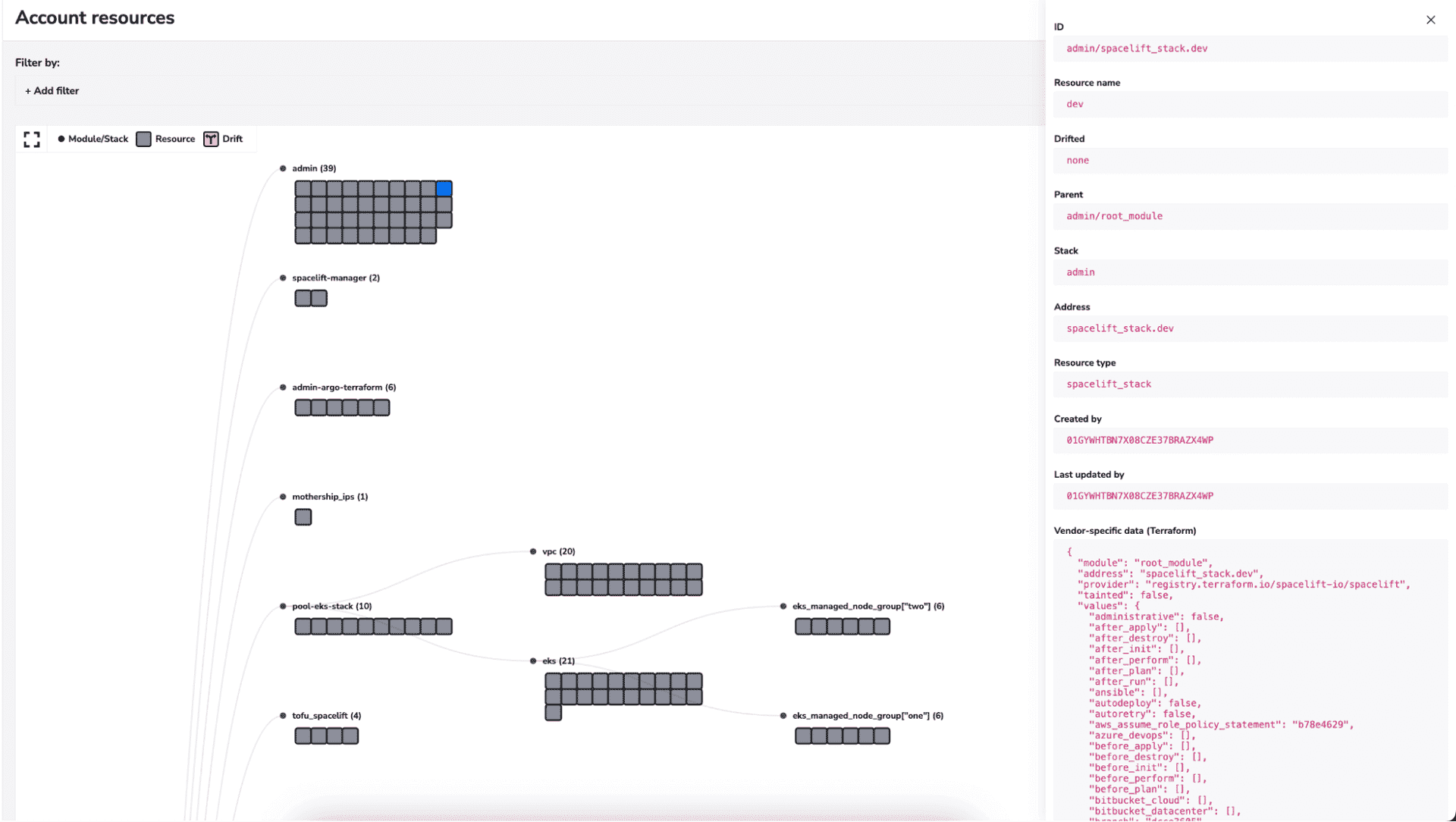
Spacelift runs your IaC tools in automated CI/CD pipelines, and it also lets you see all your deployed resources in one place. This removes the need to inspect individual cloud provider dashboards or manually scrape information from IaC state files.
Spacelift’s Resources view provides clear visibility into your cloud asset fleet. It works across IaC tools and cloud providers, providing a single destination to view what’s running and identify anomalies. You can filter by metadata labels and drill down to specific resource states, such as assets that have drifted from their IaC configuration.
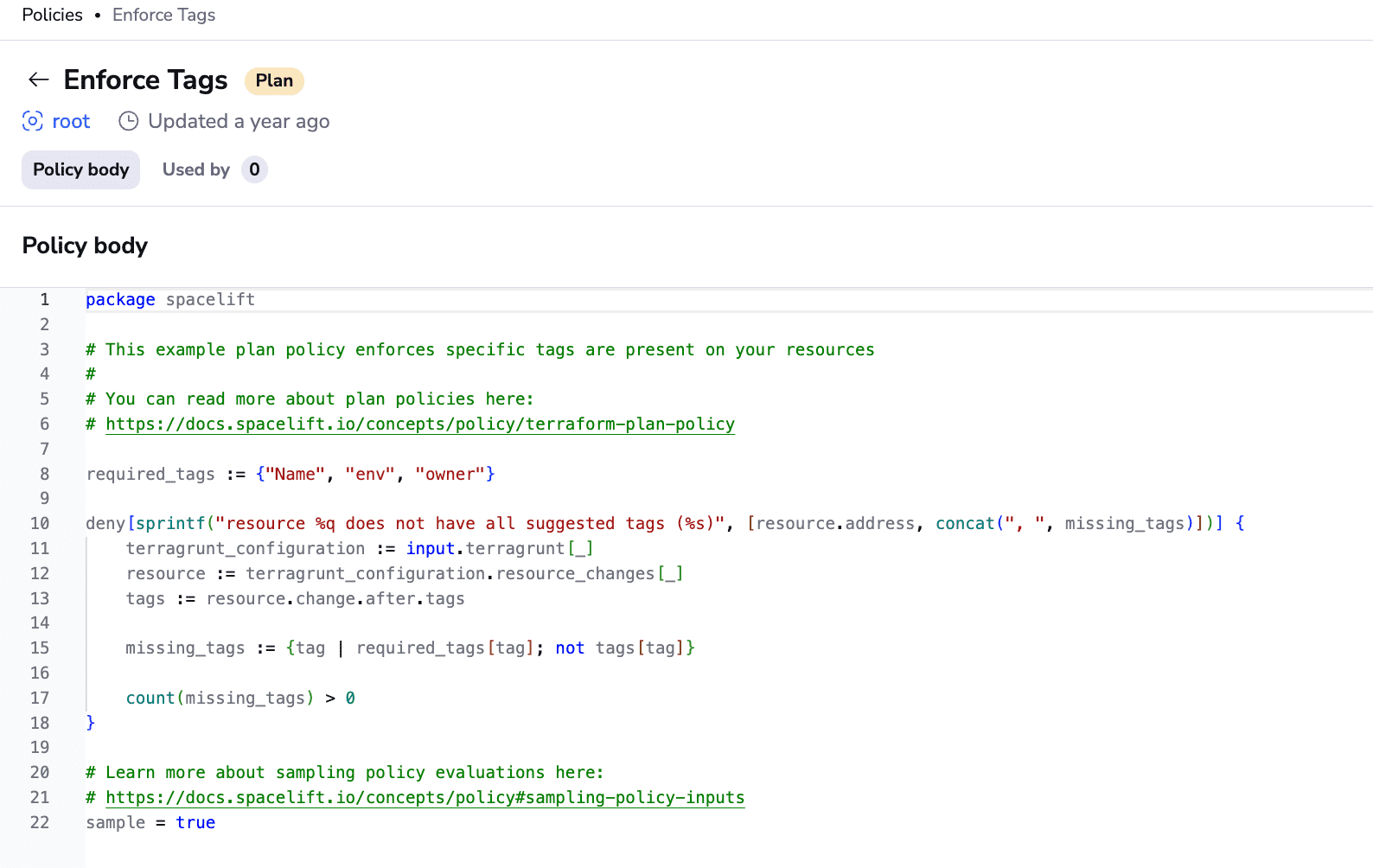
You can also use Spacelift’s policy-as-code capabilities to enforce your internal CAM requirements. For example, operators could create a Plan policy that checks new Terraform resources have specific labels attached. This allows you to automatically reject misconfigured cloud assets that could pose problems.
If you want to learn more about Spacelift, create a free account today or book a demo with one of our engineers.
Best practices for cloud asset management
Cloud asset management strategies require careful planning. You need to build systems that protect your asset fleet without adding roadblocks to developer workflows. Here are five best practices that improve CAM outcomes.
- Maintain a centralized inventory of cloud assets – Access to a live inventory of active cloud assets is the most basic CAM requirement. Centralizing information about your asset fleet provides a single source of information for decision-making. Use cloud provider dashboards, IaC files, and orchestration platforms to gain insight into what’s running in your clouds.
- Use consistent tagging practices throughout your cloud asset fleet – Consistently tagging cloud assets with relevant metadata allows you to reliably identify each resource. Tagging all assets with their owner, service group, and the ID of the IaC deployment pipeline that created them enables you to quickly access relevant information, without having to manually hunt for it. You can then filter through your inventory to find matching assets as you investigate problems.
- Choose tools that provide automatic visibility into deployed cloud assets –Tools that automatically provide visibility into cloud asset deployments simplify CAM adoption. These solutions allow you to monitor what’s running in each of your clouds, without requiring any additional configuration. For instance, Spacelift’s Resources view gives you a complete picture of all the cloud assets created by your IaC runs.
- Regularly audit your cloud assets to detect misconfigured and redundant resources – You need to follow the new CAM processes that you adopt. Regularly auditing your cloud asset inventories allows you to identify issues such as underutilized or improperly organized assets. It’s similar to conducting a stock-take of your physical equipment. You can then make changes to your cloud asset fleet or introduce more CAM controls to improve consistency.
- Utilize AI to simplify your CAM workflows – AI can be really valuable in CAM. Connecting AI agents to your cloud environments lets you automate asset inventory audits. This can save operator time and facilitate real-time anomaly detection. AI could also suggest and apply missing asset metadata, such as by analyzing an asset’s purpose, criticality, and linked business unit.
Key features of CAM tools
CAM tools help organizations discover, track, and manage cloud resources across multiple providers. They provide visibility into cloud assets, reduce misconfigurations, support cost control, and improve security and compliance by maintaining an accurate, real-time inventory of cloud infrastructure.
Key features of CAM tools:
- Asset discovery & inventory – Automatically identify and catalog cloud resources across accounts and regions
- Multi-cloud visibility – Unified view of assets across AWS, Azure, GCP, and others
Change tracking – Monitor configuration changes and resource lifecycle events - Security & compliance insights – Detect misconfigurations, policy violations, and unmanaged assets
- Cost & usage awareness – Identify unused or over-provisioned resources
- Tagging & ownership management – Enforce tagging standards for accountability and reporting
Common CAM tools include AWS Config and AWS Resource Groups, Azure Resource Graph and Azure Policy, and Google Cloud Asset Inventory, which are used for discovery and inventory purposes.
Multicloud options include ServiceNow ITOM, Flexera One, VMware Aria (vRealize) Cloud Management, and Morpheus Data. Many teams also use CloudHealth (VMware) for inventory, plus cost and governance.
CAM vs. CSPM vs. CMDB vs. ITAM
CAM, CSPM, CMDB, and ITAM overlap on “knowing what you have,” but they optimize for different outcomes: cloud spend and inventory (CAM), cloud security misconfigurations (CSPM), service dependency mapping (CMDB), and lifecycle and financial governance (ITAM).
- CAM means Cloud Asset Management, tracking cloud resources and their usage/costs across accounts and providers.
- CSPM continuously assesses cloud configurations against best practices and compliance policies, then flags or helps remediate drift (for example, publicly exposed storage).
- A CMDB stores configuration items and, crucially, their relationships so you can do impact analysis for incidents and changes (for example, “this API depends on these VMs and this database”).
- ITAM governs assets through their lifecycle with ownership, licensing, and cost controls, often guided by standards like ISO/IEC 19770-1.
Key points
Cloud asset management (CAM) is the process of cataloging and organizing your cloud resources. Effective CAM systems improve DevOps governance workflows by giving you clear visibility into the cloud assets you depend upon. You can centralize your cloud resource monitoring and ensure compliance policies are consistently applied.
Automated IaC, CI/CD, and infrastructure orchestration solutions provide the best foundation for building CAM workflows. Unifying your IaC tools in a single platform lets you easily track resource deployments in multi-cloud environments.
You can use Spacelift to provision and govern your infrastructure across all your IaC tools and cloud providers, for example, ensuring you never lose sight of your cloud inventory.
Solve your infrastructure challenges
Spacelift is a flexible orchestration solution for IaC development. It delivers enhanced collaboration, automation, and controls to simplify and accelerate the provisioning of cloud-based infrastructures.
Frequently asked questions
What counts as a “cloud asset”?
A cloud asset refers to any resource with business value, including compute, storage, databases, networking, identities/policies, secrets, images, Kubernetes objects, serverless functions, data pipelines, and AI models.
What is the role of tagging in cloud asset management?
Tagging is the primary way to add consistent metadata (like owner, environment, cost center, and compliance scope) to cloud resources, so you can group, search, and automate management at scale. It enables accurate cost allocation, policy enforcement (via IAM/ABAC and governance rules), lifecycle actions (cleanup, backups), and faster incident response by making assets discoverable and accountable.
What tags are mandatory for effective CAM?
For effective cloud asset management, mandatory tags typically cover ownership, cost attribution, and lifecycle control, enabling assets to be consistently found, billed, and governed. A practical set is:
- Owner (person or team responsible)
- CostCenter (billing chargeback)
- Environment (prod, staging, dev)
- Application (service or product name)
- DataClassification (public, internal, confidential)
Do I still need CAM if I use IaC?
Yes, you still need CAM, but it shifts from manual controls to policy and governance around your IaC workflows. IaC makes infrastructure changes repeatable and reviewable, yet you still need ownership, approval rules, drift detection, audit trails, and access controls. Treat CAM as the process layer, with IaC as the implementation mechanism.
What KPIs prove CAM is working?
To prove that cloud asset management is working, track KPIs that demonstrate better visibility, reduced waste, tighter governance, and faster remediation. The strongest signals are: percentage of assets discovered and correctly tagged, untagged or orphaned asset rate, policy compliance rate, time to detect and remediate misconfigurations, cost from idle resources, budget variance, and license or reservation utilization.