
Securing your infrastructure is critical for the success of your business. Failure to take security seriously can result in major damage, including fines, loss of customer confidence, or the inability to carry out crucial business functions.
The growth of Infrastructure as Code tools and CI/CD systems has allowed developers to integrate infrastructure management into our typical development workflows, improving quality and delivery speed. At the same time, in order to manage your infrastructure, the CI/CD system used needs access to sensitive credentials.
At Spacelift, we aim to give our users the maximum balance between flexibility and security. Because of this, we provide multiple options for connecting your Azure subscriptions to Spacelift, including setting static credentials, using our fully managed integration, as well as utilizing private workers to avoid sharing credentials at all. You can also use workload identity federation (OIDC) to avoid storing long-lived secrets. Private workers can be combined with managed identities to keep credentials inside your environment.
In this post, we wanted to give you an overview of how the Spacelift Azure integration works from a technical perspective, as well as discuss some of the issues we encountered and solved while designing and developing it. We use the current Microsoft naming (Microsoft Entra ID, formerly Azure AD) where relevant.
As a CI/CD system, we do quite a lot of work to integrate with other systems that our users use. Occasionally, like in the case of Azure, things get non-trivial. If you’re keen to learn more, read on, no Azure knowledge required!
Concept
Let’s start with a quick description of how our cloud integrations work. The overall workflow is very simple and looks something like this:
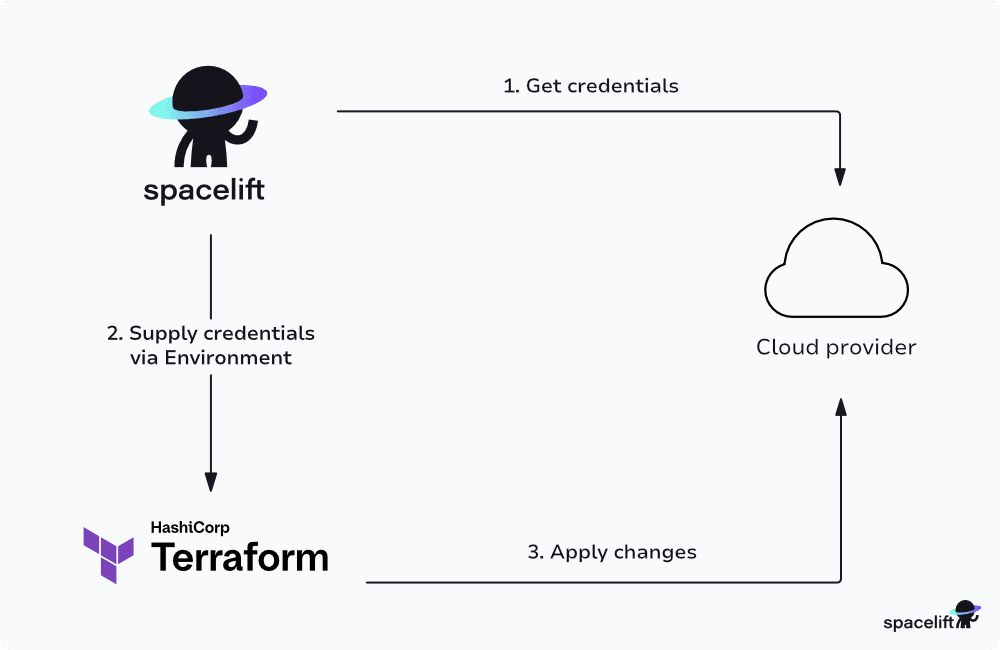
Breaking the requirements down, we need to be able to get management credentials for a user’s cloud provider account and pass them to Terraform via environment variables, at which point Terraform can run an apply with access to the customer’s infrastructure.
Note: For simplicity, this post uses Terraform in all its examples, but this overall approach also applies to the other tools that we support, for example, Pulumi.
The concept behind the Azure integration was to provide a similar experience to our AWS and GCP integrations, but for our Azure customers. The following diagram shows a simplified outline of how the AWS integration works:
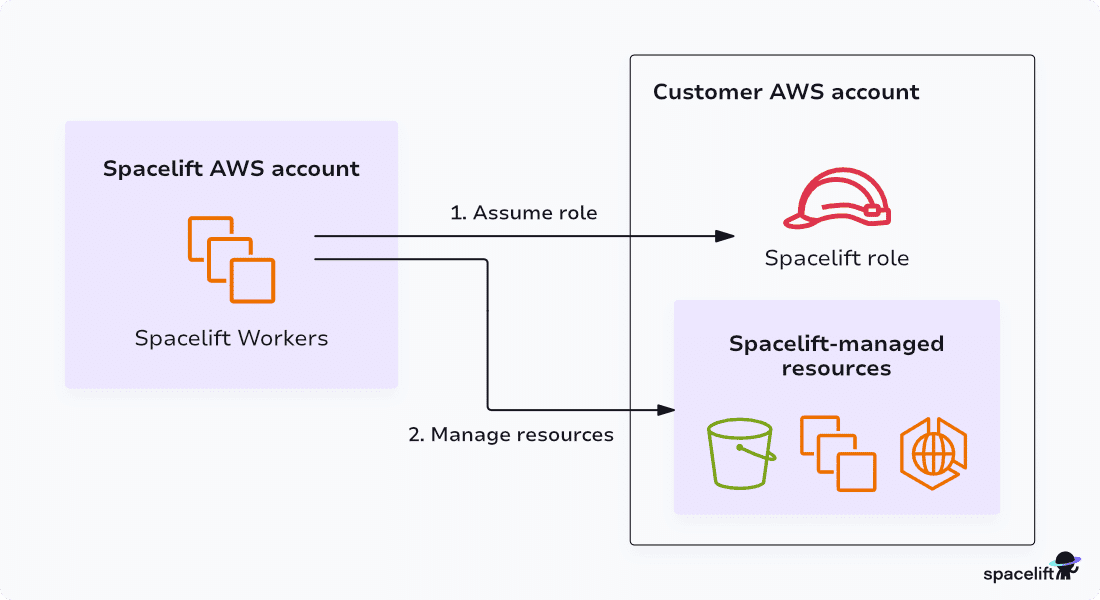
AWS provides the ability to temporarily assume a role in another AWS account. This allows our users to create a role in IAM with any permissions they might want to give Spacelift. They can then set up a trust relationship for this role with our AWS account, which will allow our AWS account to assume the role.
Role assumption provides us with raw AWS credentials and works seamlessly with any AWS tooling, including the Terraform AWS provider. It additionally allows us to specify the validity duration, so each run can get its own credentials which are constrained to a short period of time.
Although Azure doesn’t have the same capability, it uses app registrations and service principals (in Microsoft Entra ID, formerly Azure AD) with role-based access control, and can also use OIDC federation to obtain short-lived tokens without storing client secrets. These are the resources that allow Spacelift to manage access to a customer’s Azure resources.
Azure Terminology
It’s worth explaining a few pieces of terminology that are used throughout the rest of this post:
- Microsoft Entra ID (formerly Azure Active Directory) – the identity and access management component of Azure.
- Directory / tenant – an individual instance of Azure AD owned by a company or individual.
- Subscription – the container for any Azure compute resources. This roughly corresponds to an AWS Account. A subscription is linked to a single Azure AD tenant, but multiple subscriptions can be linked to the same tenant.
- App registration (formerly Azure AD Application) – a way of creating external integrations with Azure AD.
- Enterprise application (service principal instance) – the service principal created when an app registration is installed in a tenant. This can be used to grant permissions that allow the application to manage Azure resources.
- Microsoft Graph API – the primary API for managing Entra ID and related Azure directory resources.
Goals
We set a number of goals for the integration:
- Making it really easy for customers to manage Azure infrastructure using Spacelift.
- Automatic handling of credential rotation so that customers don’t have to deal with this themselves, or use very long-lived credentials to avoid it entirely.
- Providing a mechanism for customers to configure granular permissions in Azure for different stacks or different types of runs (e.g. PRs vs Tracked Runs).
Quick guide to auth choices: (1) Spacelift-managed Azure integration (easiest), (2) OIDC federation (no stored secrets), (3) Private workers with managed identities (keep everything in your cloud).
Initial Approach
Initially, our idea was to create a single multi-tenant AD Application:
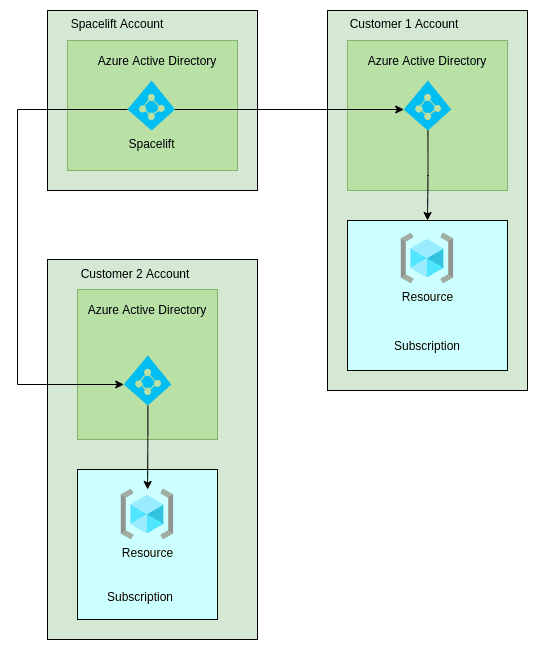
The idea was that we would generate an Access Token that could only be used for a specific customer directory, and pass that token to the Terraform Azure RM provider during runs. In the end, we had to revise our approach because of the following issues:
- The Terraform Azure RM provider doesn’t support authentication via an Access Token. Instead, you have to supply the underlying credentials for the account – either a Client Secret or a Client Certificate. In our case, that would have meant passing the credentials for our own multi-tenant application to Spacelift runs. Since that application would have been installed in the Azure AD tenants of any Spacelift user who had set up the integration, this could have allowed users to access other users’ Azure accounts (historical context). Today, OIDC federation is available and preferred for token-based auth without storing client secrets.
- The integration would have been less flexible. Using a single multi-tenant AD application would have prevented customers from creating more than one Azure integration per Active Directory tenant. The ability to create multiple integrations per tenant is useful because it allows different Azure permissions to be applied to each integration.
Revised Approach
After days of brainstorming on an alternative approach, we came up with a new architecture. We could programmatically generate a new app registration on our side for each Azure Integration created by Spacelift users.
This way, having access to the credentials for an app registration would only lead to having access to a single Entra ID Tenant on a user’s side. This approach allows Client Secrets to be passed to Spacelift runs without fear of inter-user permission leakage. The final design ended up as shown in the following diagram:
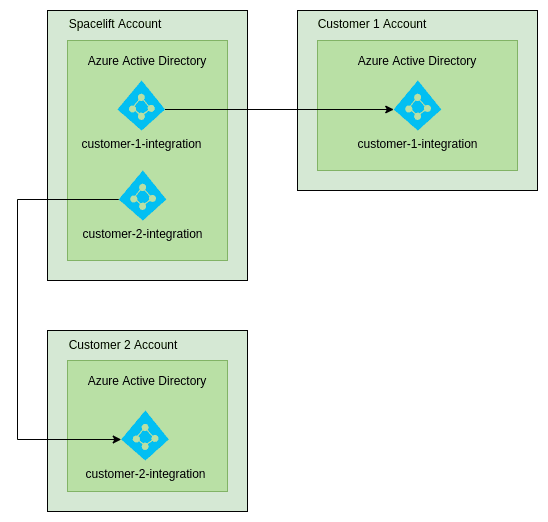
Applications are installed into a customer’s Active Directory tenant via a process called Admin Consent. After admin consent has been completed, a service principal (enterprise application) is created in the user’s Azure Active Directory to which the user can grant permissions. This allows users to decide the exact level of access that Spacelift has to their resources.
If you choose OIDC federation, the service principal can trust a token issuer (Spacelift) to mint short-lived tokens instead of using client secrets.
Credential Generation
The next issue we faced was related to generating credentials for a run. As described in the provider documentation, the Azure RM provider can be configured by setting certain environment variables. Initially, we took a basic approach of attempting to generate credentials during a Spacelift run. This is what we do for our AWS and GCP integrations, so we weren’t expecting major issues. The steps taken looked something like this:
- Run triggered.
- Generate a new Client Secret with a short expiry time.
- Populate the required environment variables.
- Execute terraform.
This seemed to work… but only some of the time.
While testing the integration, strange things were happening. As an example, the planning phase for a run would succeed, but the apply would fail with a permissions error from Azure. After investigating, we came to the conclusion that this was being caused by eventual consistency in Entra ID (Azure AD).
You can visualize the problem using the following diagram (note: this is just an illustration, and is not meant to be completely accurate):
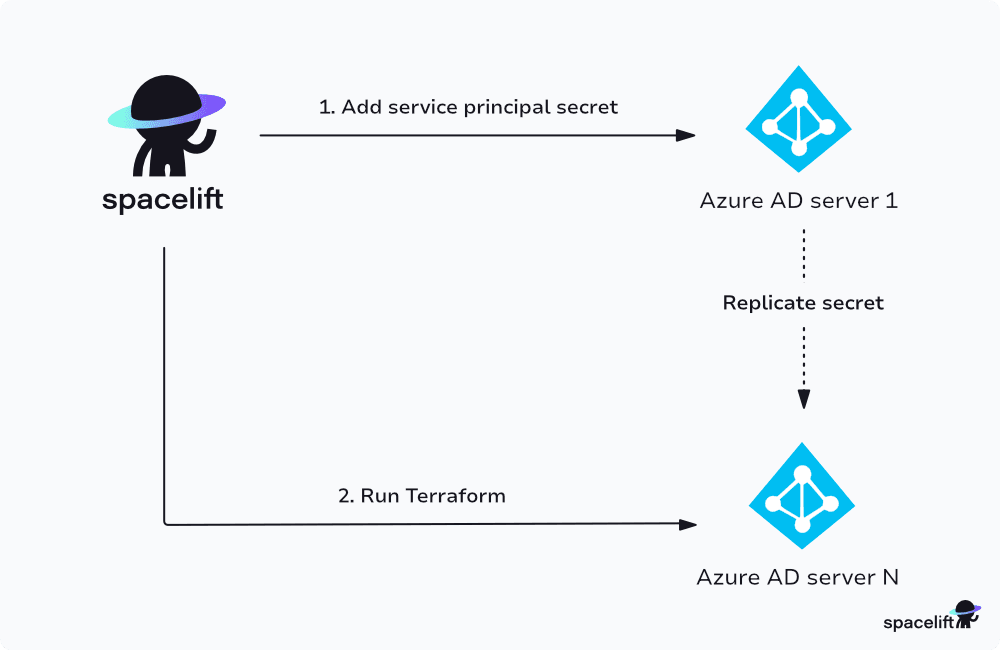
In the example above, step 2 may succeed or fail depending on whether the secret has managed to replicate to the Entra ID server that its request is routed to. Initially, we attempted to test whether or not the secret was usable by making an API request, and retrying until the request succeeded using an exponential backoff.
What we soon realized was that even then, subsequent requests could be routed to a different Entra ID instance, which still hasn’t received the new Client Secret, and potentially fail.
Even if it was possible to verify when the secret was fully replicated, waiting for replication to complete would have added a minimum of 30 seconds, and potentially another several minutes. Because of this, we decided to move credential generation and rotation out of the run flow, and into a scheduled task:
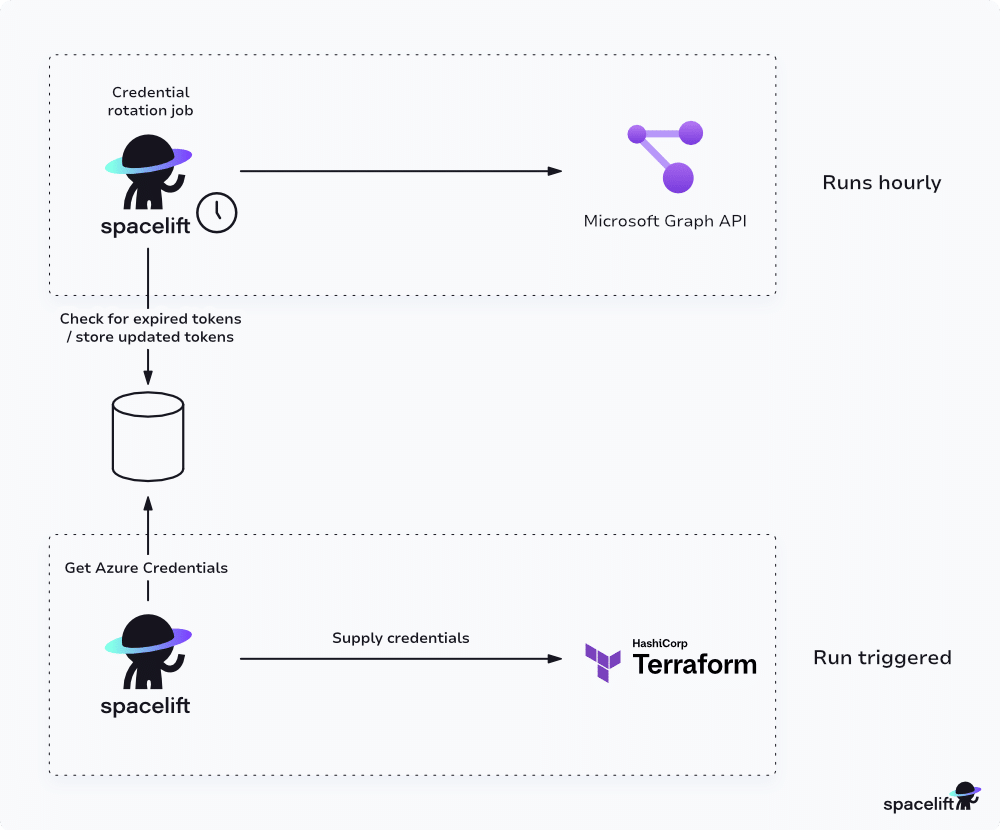
A background process rotates credentials on a regular cadence (roughly daily) and generates the next secret ahead of expiry so there’s always a valid one available.
When a new secret is generated, we use AWS’s Key Management Service to encrypt it so that it is never stored in plaintext.
When a run is triggered, we try to find the secret for the integration with the most amount of time until expiry. We also avoid using new secrets until roughly 10 minutes after generation to avoid the eventual consistency issues caused by Azure AD’s architecture.
You can visualize the secret lifecycle using the following diagram:
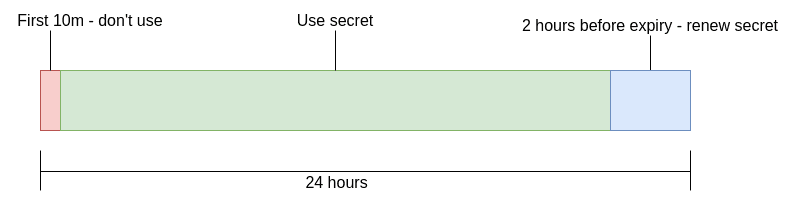
In addition, when creating a new integration, we immediately generate a secret. This helps to ensure that the secret will have successfully propagated within Azure AD by the time a run is triggered.
Credential Rotation for the Integration
The last major issue we faced was figuring out how to implement credential rotation for our own management account. The integration itself uses a service principal to manage customer app registrations using the Microsoft Graph API.
Because we run most of our own infrastructure in AWS, we didn’t have the option of using a managed identity for Azure resources (formerly MSI), meaning that we needed to handle credential rotation ourselves. In addition, our goal was to automate the process to avoid developers having to periodically perform a manual task, and to reduce the risk of forgetting to renew the credentials before expiry.
In the end, we decided to take the relatively simple approach of storing the certificate in Secrets Manager and writing a scheduled task to periodically check whether the certificate was ready to expire, similar to the approach we took for Client Secrets for the integration. When rotation is due, the task generates a new certificate and uploads it to both Secrets Manager and Entra ID.
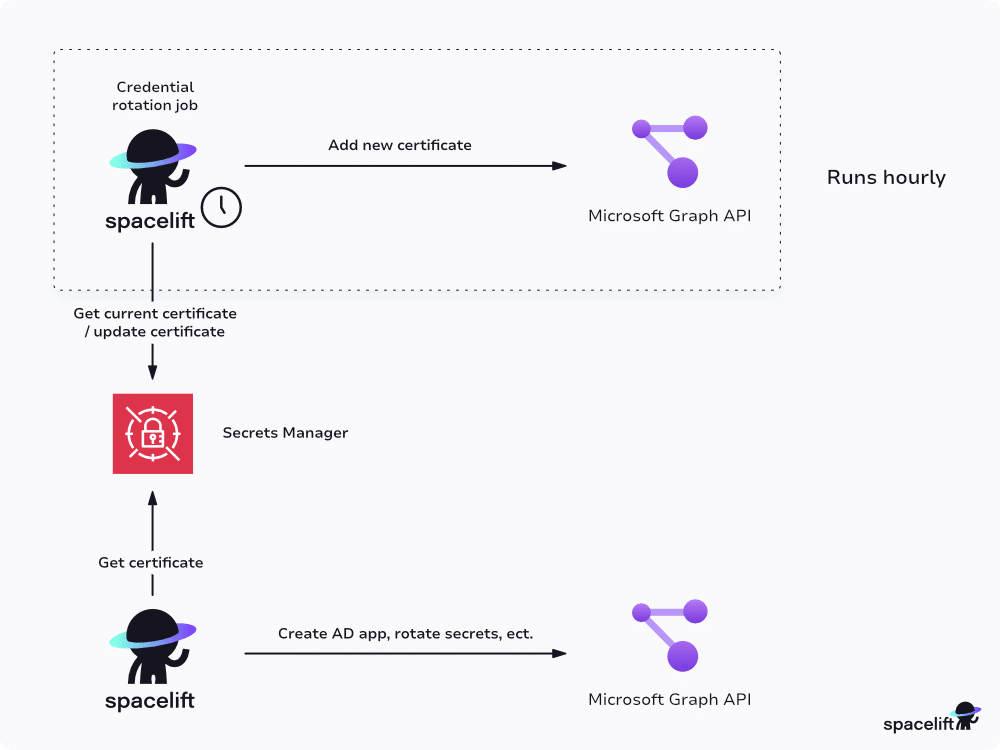
The parts of the system that need to use the client certificate for authentication periodically check for an updated certificate. As with client secrets, we allow brief propagation time before using a freshly uploaded certificate.
Similar to what happens with the integration client secrets, Secrets Manager uses AWS Key Management Service to encrypt the certificate at rest.
Wrapping Up
Hopefully, this post has given you a glimpse into the internals of Spacelift’s Azure integration, along with some of the problems we had to solve while implementing it. As you probably noticed, we’re willing to go to great lengths to ensure a secure and pleasant experience for our users.
To find out more, take a look at our Azure integration documentation available at Spacelift Documentation.
If you’re starting fresh, consider OIDC federation or managed identities to avoid storing long-lived secrets.
The most Flexible CI/CD Automation Tool
Spacelift is an alternative to using homegrown solutions on top of a generic CI. It helps overcome common state management issues and adds several must-have capabilities for infrastructure management.