As your infrastructure grows, your Terraform configurations quickly become dozens, then hundreds, and you will spend a lot of time figuring out who has access to what rather than actually shipping infrastructure.
Using an infrastructure orchestration platform, you can easily address these issues. Both HCP Terraform (formerly Terraform Cloud) and Spacelift have organizational features, but they were built using different approaches.
HCP Terraform introduced Projects to group workspaces, but they can also group policy sets, run tasks, and more. Spacelift built Spaces as a hierarchical system for organizing stacks, policies, contexts, and pretty much everything else in your account.
In this article, we discuss what Terraform Cloud Projects and Spacelift Spaces are in a detailed way, what the differences are between them, and when you should pick one over the other.
What we’ll cover:
What are Terraform Cloud (HCP) Projects?
Terraform Cloud (HCP) Projects helps you organize your workspaces. You can think of these projects as folders. So after you create your workspace, it will belong to exactly one project.
By default, any workspace you create will be assigned to the “Default Project” that HCP Terraform automatically generates for every organization.
The projects in the HCP Terraform repository serve two purposes: organization and access control.
On the organizational side, at the project level, you can group workspaces that are related and compatible with your team’s needs. You can organize your workspaces by business unit, application, environment, or team. For example, you can have a “Core” project that includes workloads for your DNS, networking, and shared services.
On the access control side, projects let you assign team permissions at the group level. If you have a platform team that needs access to all networking workspaces, you only need to give them permission to the project once, because every time a new workspace is created, they will inherit those permissions.
Also, projects let you control which version control repositories your workspace has access to, helping you enforce the principle of least privilege. These capabilities help teams organize the workspaces they are responsible for.
Additionally, you can specify project-level variable sets. If you want to assign a set of credentials to a project, all current and future workspaces in that project will inherit them without any extra configuration. You can also define a credential variable set to a specific team. In this way, you ensure those values aren’t exposed to workspaces that don’t require them.
The same applies to policy sets: you attach them at the project level, and they enforce governance standards across all workspaces in that project.
Here are some of the key characteristics of HCP Terraform Projects:
- There is no hierarchy between projects; they exist only at a single level under your organization.
- Workspaces belong to a single project, but they can be moved between projects.
- You can assign four preset roles to your team at the project level (Read, Write, Maintain, and Admin). These roles apply to all workspaces within your project. You can also define custom roles if the preset roles don’t match your requirements.
- Both variables and policy sets can be applied at the project level. They will automatically apply to all workspaces inside it.
What are Spacelift Spaces?
Spaces in Spacelift are logical containers for your resources. The majority of Spacelift resources are spaced, including stacks, policies, contexts, cloud integrations, worker pools, modules, and others.

Spaces’ structure is similar to a tree, and each user starts with a root space at the top. This means that a space can have child spaces, and those child spaces can also have their own children. You can create a structure with as many levels as you need.
One of the most powerful features of Spaces is inheritance. If you enable inheritance in a child space, it automatically grants it read access to all resources in its parent space. This means that if you create a set of policies or a context in a parent space, every child that inherits from it can use those resources. This becomes powerful when you have shared resources that many teams need.
Here’s a possible structure for Spaces in your Spacelift account:
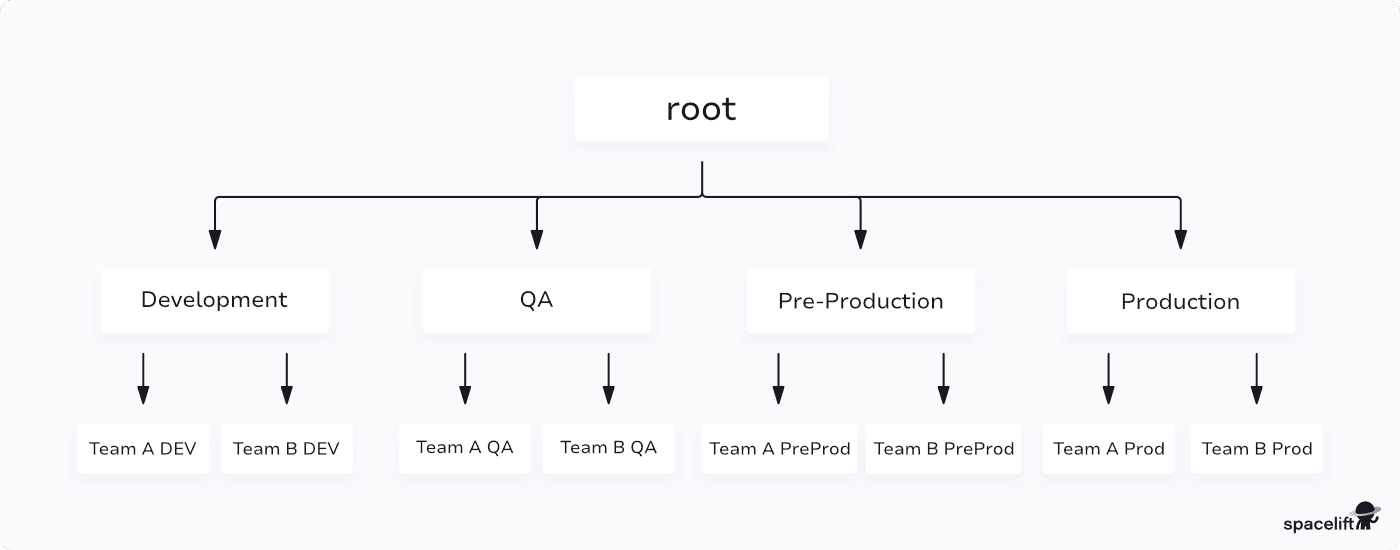
Based on this structure, if you place shared policies and worker pools in the Development, QA, Pre-Production, and Production spaces, all the team-specific spaces beneath them will inherit those resources. Additionally, each team has its own stack and contexts, isolated from other teams.
Here are some of the key characteristics of Spacelift Spaces:
- They can be organized into hierarchical parent-child relationships across many levels
- The child spaces can inherit resources from their parent
- Spacelift provides built-in roles such as Space Reader, Writer, and Admin, and offers custom roles with fine-grained permissions
- Spaces enable a multi-tenant setup where different teams or customers can operate in an isolated environment
- Spaces contain stacks, policies, contexts, cloud integrations, worker pools, and modules.
What are the key differences between Projects and Spaces?
HCP Terraform Projects and Spacelift Spaces both help you organize and govern infrastructure work across teams, but they take different approaches.
1. Structure
The structure of HCP Terraform is flat, so there is no parent-child relationship or inheritance. You simply have projects under your organization.
On the other hand, Spacelift Space’s structure is hierarchical. You can nest spaces at any depth, and resources can be inherited from parent spaces down to their children.
2. What they organize
Projects in HCP Terraform let you group workspaces and manage their access and variables at the project level. Spacelift Spaces help you organize everything in your account, such as stacks, policies, cloud integrations, contexts, worker pools, and modules.
3. Resource inheritance
In HCP Terraform, if you need to use the same variable set for two different projects, you should create an organization-wide variable set. There is no rule that lets one of your projects inherit resources from another project.
In Spacelift, inheritance exists and allows child spaces to access resources from parent spaces.
4. Access control
Another key difference between HCP Terraform and Spacelift Spaces is the depth of access control. HCP Terraform lets you set the project permission at the team level. This means you can assign a team a permission level (Read, Write, Admin, or Maintain) to a project, and that will apply to all workspaces in the project.
Spacelift Spaces supports built-in roles (Reader, Writer, or Admin) and also custom roles with granular permissions. For example, you can create a role that can trigger runs and read contexts but cannot modify stacks.
5. Multi-tenancy
Spacelift Spaces were designed with multi-tenancy in mind. They can give a team admin rights to their own space without giving them any visibility into other team spaces. HCP Terraform Projects can help you isolate teams, but its model is less suited for true multi-tenant scenarios.
Projects vs. Spaces: Table comparison
Below is the table comparison summarizing all the differences:
| Feature | HCP Terraform Projects | Spacelift Spaces |
| Structure | Flat | Hierarchical |
| What they organize | Workspaces, stacks | Stacks, policies, contexts, worker pools, cloud integrations, modules |
| Resource inheritance | No | Yes |
| Nesting | No | Unlimited depth |
| RBAC model | Team-level permissions on projects; custom permissions are also available | Built-in roles and custom roles with granular actions |
| Custom roles | Yes | Yes (compose from specific permissions) |
| Multi-tenancy | Basic isolation | Full multi-tenancy support |
| Variable sharing | Project-level variable sets, organization-wide variable set | Contexts (variables, mounted files, hooks) at the space level and inherited contexts from parent spaces |
| Policy scoping | Project-level policy sets | Multiple policy types (plan, approval, push, notification, trigger) at the space-level and inherited policies from the parent space |
| IaC tools supported | Terraform | Terraform, OpenTofu, Terragrunt, Pulumi, CloudFormation, Ansible, Kubernetes |
| Default project/space | Default Project (auto-created, cannot delete) | Root space auto-created |
When should you use Terraform Cloud Projects vs. Spacelift Spaces?
When choosing between Terraform Cloud Projects and Spacelift Spaces, consider your company’s needs, including complexity, IaC tooling, and the level of isolation required between teams.
When to choose HCP Terraform Projects:
- If you are already running HCP Terraform and your organizational needs are relatively simple.
- If your team is small to mid-sized, and uses only Terraform, and needs a way to group your configurations and assign team permissions, Projects will get the job done.
- Projects can also be a good fit if your team is already living in the HashiCorp ecosystem
- If your teams do not need to have deeply nested organizational requirements, variables set, and policy set scoping at the project level will cover most governance needs.
When to choose Spacelift Spaces:
- If you have many teams, multiple environments, and a need to isolate production from development while sharing certain resources, such as worker pools or cloud integrations across both, you should choose Spacelift because it offers the flexibility to model that. In this case, the hierarchical structure with inheritance means that you do not have to duplicate shared resources across every team boundary.
- Also, if you need multi-tenancy, choose Spacelift because it was built to isolate environments and supports multiple teams with different levels of permissions at the Space level.
- Spacelift Spaces supports multiple IaC tools, including Terraform, Pulumi, Terragrunt, and CloudFormation. This means that Spaces will let you organize all those workloads into a hierarchy tailored to your needs.
- You can also leverage custom RBAC roles with fine-grained permissions beyond standard roles like Read/Write/Admin. Spaces combined with Spacelift’s custom roles give you much more flexibility than HCP Terraform’s team-based permissions.
Key points
HCP Terraform projects have a flat structure and help you group your workspaces, manage your team permissions, and scope variable and policy sets at the project level.
On the other hand, Spacelift Spaces have tree-based organizational boundaries that contain stacks, policies, contexts, cloud integrations, worker pools, and modules. Spacelift Spaces were designed with built-in resource inheritance, making it easy to share resources from parent Spaces to child Spaces.
If your organizational requirements are simple and you are using only Terraform, HCP Terraform projects will help you get the job done.
Typically, no organization uses a single IaC tool, or, if they do, they still want a platform that can help them easily switch to another tool if needed. That’s what Spacelift offers: the ability to scale with your needs, not force you to buy an entirely new platform just to manage a new IaC or Configuration Management tool.
If you want to learn more about how Spacelift can help you make infrastructure management a breeze, book a demo with one of Spacelift’s engineers.
Cost-effective Terraform Cloud alternative
Spacelift is a highly cost-effective Terraform Cloud alternative that works with Terraform, Terragrunt, and many other IaC frameworks. It supports self-hosted on-prem workers, workflow customization, drift detection, and much more.