
Renewal season is the only time you have leverage with a vendor, but most teams waste it. When the quote arrives, someone forwards it to finance, justifies why the bill went up by 50%, and asks nothing about whether the deal still makes sense.
When it comes to Terraform Cloud (IBM HCP Terraform), renewals deserve more scrutiny than most. The product changed names, owners, pricing models, and tier structure.
In this article, we will explore what changed, how pricing works today, the questions to ask before you sign, and what a migration looks like if you decide not to renew.
TL;DR
The Terraform Cloud you renew in 2026 is not the product you signed for. New name (HCP Terraform), new owner (IBM), new license, and pricing that bills the size of your infrastructure inventory instead of your deployment activity.
- RUM pricing: $0.10/month per managed resource on Essentials, $0.47 on Standard, $0.99 on Premium. Hourly, on peak count, partial hours rounded up. 10,000 resources runs $1,000 to $9,900 a month on top of your cloud bill.
- The catch: every security group rule, every
countinstance, and every zombie workspace keeps billing until you destroy it. - Before you sign: count your resources, clean up the dead ones, and get your per-resource rate, overage rate, and concurrency cap in writing.
- If it no longer fits: Spacelift prices on concurrency, so 5,000 more resources changes nothing about your bill.
What changed in Terraform Cloud since you last signed?
There are many things that have changed in the last three years:
- The license: HashiCorp moved Terraform from MPL 2.0 to BSL in August 2023. The change is not retroactive, so anything at version 1.5.5 or below is unaffected, but everything else is subject to BSL terms. This is exactly what produced OpenTofu, a CNCF project today and a genuine alternative to Terraform.
- The name and the owner: Terraform Cloud became HCP Terraform in April 2024, and IBM completed its acquisition of HashiCorp at the end of February 2025.
- The tier structure: The old Free, Standard, and Plus lineup became Free, Essentials, Standard, and Premium. HashiCorp published its new per-tier public pricing in February 2026. In the past, almost everything had a “contact sales” wall.
- Feature-wise:
- Stacks: These give you a way to manage multiple components and repeated environments as a single unit
- Terraform Search and Terraform Actions: Add cross-workspace resource visibility and a framework for Day 2 operations outside of the plan/apply cycle
More information available in their Changelog.
How Terraform Cloud pricing works in 2026
The Terraform Cloud pricing page doesn’t list a free tier in its main table, but its FAQ confirms one still exists, capped at 500 managed resources.
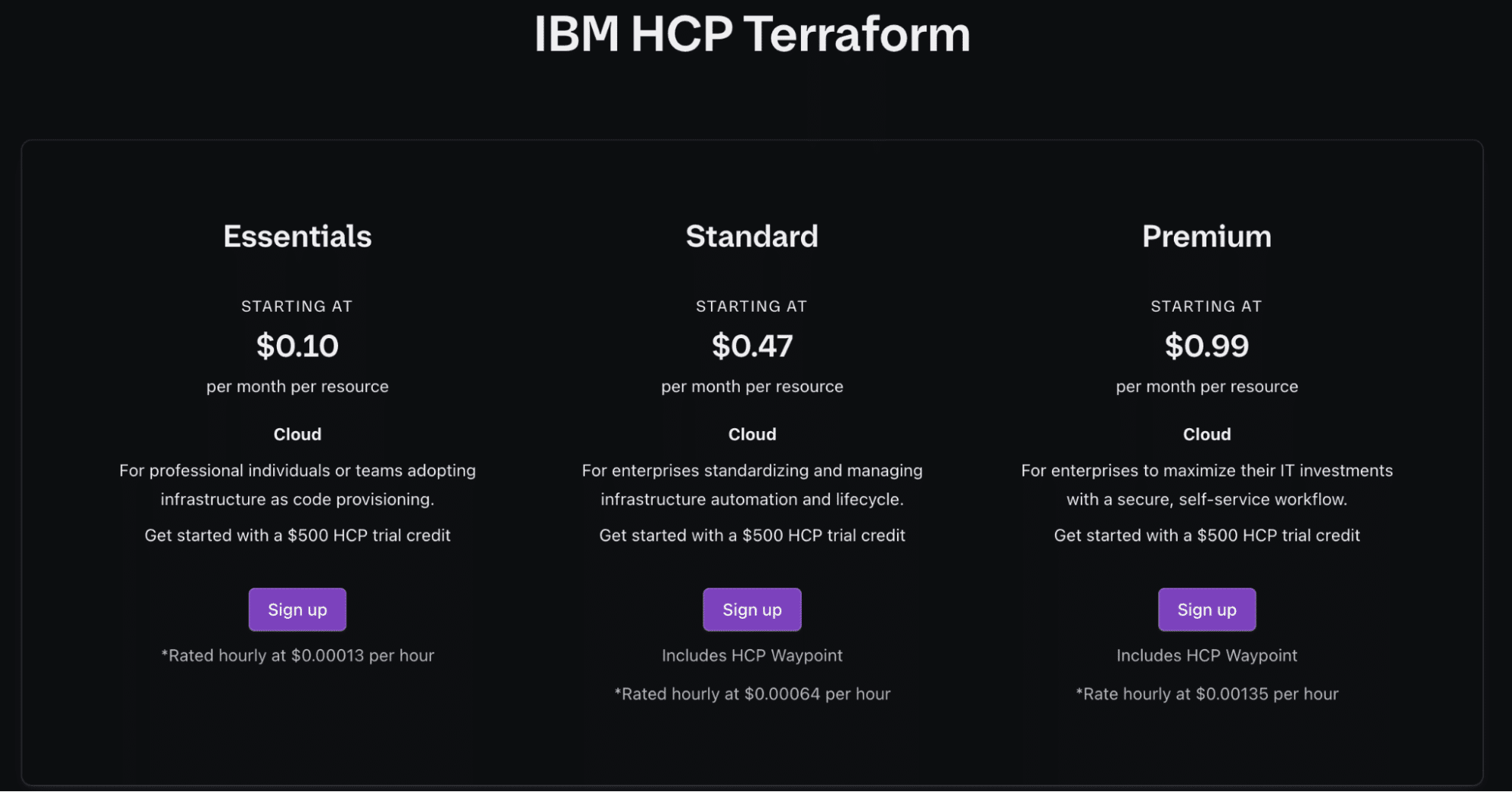
Tiers overview
Every new HCP organization gets $500 in trial credits, which expire in six months. For an organization that wants to be compliant, you need at least the Standard tier to get an audit trail.
| Tier | Price per managed resource | Limits |
| Free | $0 up to 500 resources | 1 concurrent run (1 remote, 1 agent); one policy set of up to 5 policies |
| Essentials | $0.10/month | 3 concurrent runs; project-scoped team permissions; no cost estimation, SSO, or VCS-connected policy sets |
| Standard | $0.47/month | 10 concurrent runs; policy enforcement, cost estimation, SSO (SAML), VCS-connected policy sets; can buy extra concurrency |
| Premium | $0.99/month | 30 concurrent runs; audit logging, custom RBAC, priority support, Stacks custom deployment groups |
| Enterprise | Quote-based | Self-managed; sold as IBM Terraform Enterprise |
See also: Terraform Cloud/Enterprise Pricing – Tiers Overview
How does Resources Under Management (RUM) work?
Terraform Cloud’s pricing uses RUM (resources under management) pricing, and a managed resource is defined as a resource in a Terraform Cloud managed state file where mode = “managed”. Counting begins at the first terraform apply that touches the resource, and it continues until the resource is destroyed.
The billing mechanics work like this:
- Billing is hourly, and you will be charged for the entire time the resource is in the state (you’ll have to either destroy it or remove it from management)
- Each partial hour is billed as a full hour
- The peak count in a given hour determines the hour’s cost, not the average: if you create 500 resources and destroy 200 within the same hour, you are billed on the peak of 700 resources, not the average or the end state
HashiCorp shows an example for 1,000 managed resources that run non-stop for a 30-day month on Essentials with a price of $97.85. If you scale that up, the numbers get frightening:
| Managed Resources | Essentials | Standard | Premium |
| 1,000 | ~$100 | ~$470 | ~$990 |
| 5,000 | ~$500 | ~$2,350 | ~$4,950 |
| 10,000 | ~$1,000 | ~$4,700 | ~$9,900 |
Note: Rating is hourly, so 31-day months cost about 3% more than 30-day months. These are additional costs on top of what you pay your cloud provider.
What counts as a managed resource and what doesn’t?
In AWS, if you create a security group with 50 rules, it doesn’t cost you anything. In Terraform Cloud, you will be billed for 51 managed resources because every security group rule is a Terraform resource.
Here are the resources that count as managed resources:
- Any resources that are provisioned by a provider (aws_vpc, azurerm_subnet, github_repository)
- Every instance of a resource created by count and for_each. If count is equal to 10, you will pay for 10 resources
- Resources inside modules
- Resources in both workspaces and Stacks
Here are some of the resources that don’t count as managed resources:
- null_resource
- terraform_data
- Data sources
True-up billing and RUM overages
Terraform Cloud offers two billing models, and they behave differently at renewals:
- Pay as you go has no true-up. You are billed hourly on peak consumption, and the usage summary stays an estimate until the statement finalizes at month-end. There is no commitment and no discount available
- HashiCorp Flex is the contracted model in which you commit a specific amount of spend upfront, with up to three years to consume it, and the balance draws down as you use services. If you make larger commitments, you might get better discounts, and your negotiated rates won’t be publicly available.
If you burn your balance early (exhaust the commitment before the term ends), without a new Flex contract in place, your organization will automatically transition to pay-as-you-go and will require a credit card. If you don’t have a card configured when payment comes due, HashiCorp reserves the right to suspend or terminate resources under the EULA.
At the same time, if you overcommit, the unused balance will not follow you anywhere, so you’ll end up paying for capacity you never consume.
You also don’t have an option to self-serve out of your plan. If you don’t have the option to edit your organization’s plan because of an active contract, you need to contact your account team. If you want to downgrade mid-term, you’ll need to negotiate, not just change settings.
Note: If you are using HCP Europe, HashiCorp Flex is not supported. All plans and billing options run through sales.
Terraform Cloud contract mechanics you need to understand before renewing
The pricing model is important, but when it comes to Terraform Cloud, you need to understand some other mechanics as well:
- The billing boundary is not your Terraform organization, but your entire HCP organization. A single HCP organization can hold multiple HCP Terraform organizations, and it serves as the billing boundary for all of them. If you are on an annual contract plan for other HCP services, you cannot use that to manage HCP Terraform billing for a pay-as-you-go plan
- Flex recommit contracts have no self-activation. This means that renewals go through your account manager.
- Cancellation windows are narrow
- Concurrency is contractual, and your edition caps organization-wide concurrent runs.
Common pain points teams report at renewal
These pain points come up consistently, from practitioner blog posts, forum threads, and the conversations we have with our Spacelift customers:
- Bill is hard to forecast: Teams complain that their bill is genuinely hard to forecast, and users report that the only thing you can actually predict is that the bill will most certainly go up, month over month.
- RUM penalizes doing IaC properly: Managing all resources in code is the industry-recommended practice. Under RUM, every additional resource you bring under management adds costs, which creates a quiet incentive to leave things out of Terraform
- Terraform-only scope: Terraform Cloud runs Terraform, and to some extent Terragrunt. If your platform needs OpenTofu, Ansible, Kubernetes, Pulumi, or CloudFormation, you need a different system
- Zombie resources keep billing: If you have forgotten resources that are still managed by Terraform, you will have to pay for them
- Ephemeral workloads bill badly: Partial hours are billed as full hours, and peak count sets that price
- Quote shocks: Odos faced a renewal quote that was several times higher than what they were paying before, so this triggered them to evaluate alternatives
Key questions to ask before you renew
Most teams walk into the renewal call with a quote and no numbers of their own. Go in with these answers instead, from HashiCorp and from your own team.
Questions to ask HashiCorp
It’s important to get these answers in writing, in the contract where possible, rather than hopping on a call with your account executive.
| Question to ask | Reasoning behind it |
| What is my exact per-resource rate at each tier under this contract? | This will help you choose the tier you are most comfortable with |
| What is the overage rate once my Flex balance is exhausted? | This confirms if you get your overage bills at your discounted rate or at a list |
| What resource count is this quote actually modeled on, and what happens if I double or triple the number? | Predict, as much as possible, how much you’ll need to spend in each scenario |
| What is my organization’s concurrency limit in this tier, and how much will I have to spend to increase it? | As you grow, you’ll need more concurrency, so you need to understand how much that will cost you. |
| What discounts are available on a multi-year commitment? | Understand if signing a contract for multiple years will be beneficial |
| What is the roadmap for the new features that I might need, and will they be available in my plan? | Understand if a new feature you need will be available in your tier, or if you need to pay extra for it |
| What is my support response SLA? | Support routes now through IBM, and support quality is a recurring complaint in practitioner forums |
Questions to ask your team
At the same time, ask your team questions to better understand your position.
| Questions to ask | Reasoning behind it |
| What is our current managed resource count, and how much has it increased in the last 12 months? | The growth rate will be your renewal forecast |
| How many of our resources are actually in use versus abandoned? | You need to clean up your environment before you get quoted to reduce the cost as much as possible |
| Do we need anything in the infrastructure space apart from Terraform? | If you need other tools such as Ansible, Kubernetes, Pulumi, OpenTofu, or others, you also need to count the cost of the second platform |
| What paid features would we actually need? | It doesn’t make sense to pay for a superior tier if you don’t need what it offers |
| How many concurrent runs do we need? | This can help you determine the tier you’ll be on |
The renewal decision framework
Renewing and leaving are both defensible. The answer depends on how your estate grows, what tools you run, and the rate you managed to negotiate.
When renewing Terraform Cloud is still the right call
Renewing Terraform Cloud makes sense if most of these are true at the same time for your organization:
- Your resource count is small and mostly stable
- You need only Terraform, and you expect to stay that way
- You negotiated a genuinely good rate
- You want to stay in the HashiCorp ecosystem
- You depend on something with no equivalent elsewhere (Sentinel policy libraries with significant investment, or a deep Stack implementation)
If you decide to renew, you should first clean up zombie workspaces, turn on usage alerting, model your growth, and negotiate the overage rate rather than accepting the default.
What to evaluate if you don’t renew
You should judge alternatives against the things that actually hurt you today:
- Pricing model: Does the pricing work differently, like concurrency or run volume?
- Tool coverage: Can a single platform run everything in my estate?
- Governance depth: Can I enforce policies at every decision point?
- Orchestration: Do I need dependencies between configurations with output sharing and ordering?
- Execution model: Can I run my workers in any scenario I might need? (on-prem, air-gapped, public)
- Migration path: How easy is it to migrate from Terraform Cloud to this platform?
- State portability: Can I migrate my state across cleanly?
Why do teams choose Spacelift over Terraform Cloud?
Spacelift is an infrastructure orchestration platform that supports Terraform, OpenTofu, Terragrunt, Pulumi, CloudFormation, Kubernetes, and Ansible, with a concurrency-based pricing model.
Here’s how Spacelift and Terraform Cloud compare on the dimensions that come up in renewal conversations:
| Spacelift | Terraform Cloud | |
| Pricing model | Concurrency based | Per managed resource (RUM) |
| Infrastructure tools support | Terraform, OpenTofu, Terragrunt, Pulumi, CloudFormation, Kubernetes, Ansible | Terraform, partially Terragrunt |
| Policy scope | OPA policies at every decision point | Focused on run stages |
| Dependencies | Stack dependencies with output sharing | Run triggers between workspaces; output sharing within Stacks |
| Resource management | Full inventory with visualization, search, and filtering | Per-workspace resource view |
| Workflow control | Full control over every phase, custom runner images | Predefined workflows, run task integrations |
Read more about why to migrate from Terraform Cloud here.
Here are some practical differences that are worth calling out:
- Your bill is predictable. It is set by how many parallel runs you need, so adding 5,000 resources to your state changes nothing about what you pay. Odos reported roughly a 5x reduction in IaC cost after migration, alongside a doubling of deployment speed
- You get one workflow for everything. You don’t need a separate tool if you are managing other infrastructure resources apart from Terraform
- Policies control every decision point: who can log in, who can access what, which pushes trigger runs, what a plan is allowed to contain, how many approvals are required, and where notifications go
- Dependencies are first-class objects; you can create dependencies between configurations that use the same infrastructure tool or different infrastructure tools and share outputs between them
- Spacelift Intelligence adds natural language provisioning, diagnostics, and operational insight on top of the standard workflows.

Lansweeper’s platform team supports developers across both an on-premises product and a cloud product, with a strict GitOps philosophy and an opinionated Terragrunt setup. When Terraform Cloud's pricing changed, support quality, and post-acquisition trajectory stopped working for them, they evaluated env zero, Atlantis, and Atmos, and even considered building their own platform. Spacelift won on flexibility: policies, dependency orchestration, and a platform that fits the team's existing workflow rather than dictating a new one.
How to migrate off Terraform Cloud
Spacelift’s migration tooling is called liftoff, a single static binary with no Docker, no runtime, and no services to stand up. It currently migrates from Terraform Cloud and Terraform Enterprise, with more sources planned.
liftoff pulls your entire Terraform Cloud estate into a local store, renders it as an OpenTofu configuration for you to review before anything is created, and hands it to a Spacelift admin stack you can apply to migrate. Everything runs in batches, and all steps are idempotent (re-running them is always safe).
Learn more about how to migrate off Terraform Cloud here. Want to see it in action? Check the video instead:
Realistic timelines and effort
The first batch you migrate will be the most expensive one, because setup and the first audit will show you every version mismatch and broken VCS binding at once. The later batches, however, will mostly be review time, and the manual effort scales with how much Sentinel policy needs rewriting in Rego, how many teams need custom permissions, and how many cloud roles trust Terraform Cloud’s dynamic credentials.
You should run discover and audit against your live organization before the renewal call. These commands change nothing, and the output is the most honest migration estimate you will get.
Key takeaways
Terraform Cloud is a different product than it was a couple of years ago. It has a new name, new owner, new tier names, and a new license. RUM bills on peak hourly resource count with partial hours rounded up, and tracks the size of your infrastructure inventory rather than your deployment activity.
Before you renew, always count your resources and clean up zombie resources. Almost every resource in that state will get billed. Also, keep in mind that renewing is a legitimate outcome for stable (from a resource-count point of view) Terraform-only estates with a good negotiated rate, not for everyone.
If the model no longer fits, and you need more infrastructure tools, predictable bills, and more features out of the box, migration is a supported path. Migrating to Spacelift is easy; just use our new migration kit, liftoff.
If you want to learn more about Spacelift or how we can help you migrate, book a demo with one of our engineers.
The best Terraform Cloud alternative
Spacelift is a Terraform Cloud alternative that works with Terraform, Terragrunt, and many other IaC frameworks. It offers a predictable pricing model and supports self-hosted on-prem workers, workflow customization, drift detection, and much more.
Frequently asked questions
Can I downgrade my Terraform Cloud plan mid-contract?
Pay-as-you-go and HashiCorp Flex customers can self-downgrade from the Plan & Billing page in HCP Terraform, including all the way to the Free Edition. Customers on an active committed contract cannot change tiers directly and must contact their HashiCorp account team to adjust the plan.
Does HCP Terraform support OpenTofu?
No. As of 2026, HCP Terraform’s managed runs execute the Terraform CLI only, with no option to select OpenTofu as the run engine. OpenTofu can still point at HCP Terraform’s remote backend purely for state storage, but not for runs, Sentinel, or no-code modules.
How long does a typical migration off Terraform Cloud take?
Most migrations take days to weeks. Policy rewrites, team permissions, and cloud credentials set the timeline more than workspace count does, and deploys freeze only for the batch you’re cutting over.