![How to Use Terraform with GitOps [Step-by-Step Tutorial]](/_next/image?url=https%3A%2F%2Fsecure.gravatar.com%2Favatar%2Ffdec2516452c20f52419d0d4c7215c33dbb89a1442c71a1870509965c20380a7%3Fs%3D96%26d%3Dmm%26r%3Dg&w=96&q=75)

Terraform GitOps means storing your Terraform configuration in Git and applying it through an automated pipeline instead of running commands locally. Every infrastructure change becomes a commit, reviewed in a pull request and applied by CI/CD.
In this article, we will examine how to use Terraform with GitOps, explaining both and their benefits. We will then move on to some practical examples showing how to implement and configure Terraform to create cloud infrastructure in Azure with an integrated git repository and pipeline.
If you’re new to Terraform or unfamiliar with GitOps, this article will get you up and running!
What we will cover:
What is Terraform?
Terraform is an infrastructure-as-code (IaC) tool developed by HashiCorp. It allows you to build, change, manage, and version your infrastructure through human-readable configuration files. It offers a unified way to define, provision, and manage resources across various cloud providers and services using Hashicorp Configuration Language (HCL) syntax, which is easy to learn and read.
Because Terraform lets you describe your infrastructure (servers, networks, storage, etc.) in code files, this enables version control, change tracking, collaboration, and repeatability when provisioning infrastructure, ensuring consistent deployments across environments and avoiding manual configuration errors.
Terraform supports infrastructure management across multiple cloud providers (AWS, Azure, Google Cloud) and on-premises data centers through plugins, which convert Terraform configurations into specific API calls for each platform.
Terraform uses a declarative approach. You define the desired state of your infrastructure, and Terraform then figures out the necessary steps to achieve that state. This is a simpler way to manage infrastructure than manually issuing commands or configuring resources through web interfaces.
Terraform fits into CI/CD pipelines, which is what makes the rest of this article possible. Your configuration lives in Git, a pipeline runs plan and apply, and provisioning stops being something anyone does by hand.
In August 2023, HashiCorp moved Terraform from MPL 2.0 to the Business Source License. Terraform 1.5.7 was the last release under the open-source license, and everything from 1.6 onward is source-available with some commercial uses restricted. IBM completed its acquisition of HashiCorp in February 2025, so Terraform is now an IBM product. Neither change affects teams who just run terraform apply against their own infrastructure, but both send platform teams back to their IaC strategy.
OpenTofu is the fork the community built from that last MPL release, governed by the Linux Foundation and a CNCF sandbox project since April 2025. The current release is 1.12.0.
What is GitOps?
GitOps is an operational framework that leverages the popular version control system Git to manage infrastructure and applications. It applies DevOps best practices used for application development, such as version control, collaboration, and CI/CD (continuous integration and continuous delivery), to automate infrastructure provisioning and deployments.
Git repositories serve as the central location to store and manage all infrastructure and application configurations, ensuring everyone works from the same source, enhancing collaboration, and establishing a single source of truth. Configuration changes are tracked through Git version control, allowing for easy rollbacks to previous versions and providing a clear audit trail.
You define the desired state of your infrastructure and applications declaratively, in HCL, YAML, or JSON, and dedicated tools work out how to reach it.
A CI/CD pipeline integrated with Git can automate various stages of the development lifecycle. For instance, when a configuration change is committed and merged to the main branch, the pipeline can automatically trigger, build the infrastructure or application based on the new configuration, and deploy it to the target environment.
Read more: 15 GitOps Best Practices to Improve Your Workflows
How does GitOps work?
GitOps typically involves a continuous feedback loop that ensures your infrastructure and applications always reflect the latest configuration stored in the Git repository.
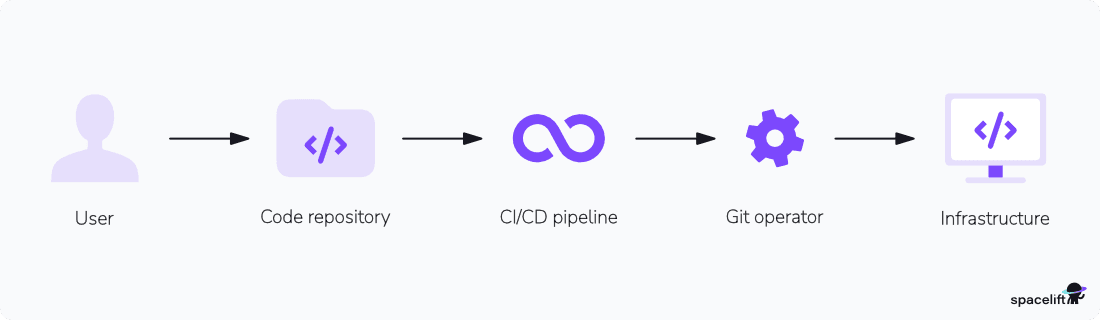
The GitOps workflow can include the following steps:
- Developers make a change: The developer modifies infrastructure or application configurations in the Git repository, following defined branching and pull request workflows for review and approval.
- CI/CD pipeline is triggered: Once a change is merged to the main branch, the CI/CD pipeline automatically kicks in.
- Configuration is applied: The CI/CD pipeline interacts with the Git repository to retrieve the latest configuration files.
- The desired state is enforced: The pipeline (or GitOps operator) translates the desired state into actions for the underlying infrastructure platform (e.g., creating VMs, and updating configurations).
- Infrastructure converges:The platform provisions or updates resources to match the desired state in Git. Convergence happens at the moment of the run. Keeping it converged between runs is a separate problem, covered in the drift detection section below.
As GitOps is a framework, it consists of a combination of multiple tools (or it uses platforms that provide total solutions, such as GitHub, Spacelift, and HCP Terraform (formerly Terraform Cloud)
| Category | Tools |
| Version control | Git (Azure DevOps, GitHub, GitLab, Bitbucket) |
| CI/CD | Azure DevOps Pipelines, Jenkins, GitHub Actions, GitLab CI/CD, CircleCI |
| Infrastructure as code | Terraform, Pulumi, Bicep, Cloudformation |
| Kubernetes | Helm, Kustomize, Argo CD, Flux |
| Monitoring and alerting | Prometheus, Grafana |
Benefits of using Terraform and GitOps
Here are some of the benefits of using Terraform and GitOps:
- Improved collaboration: GitOps brings development and operations teams together by using familiar Git workflows for infrastructure management.
- Increased reliability: One source of truth and declarative configuration make deployments repeatable, so the same code produces the same infrastructure in every environment.
- Simplified rollbacks: Version control allows you to easily roll back to previous configurations if issues arise during deployments.
- Auditability: Git records who changed what, when, and which review approved it. When an auditor asks how a production resource came to exist, the answer is a commit.
- Scalability: Makes it easier to manage complex, distributed systems at scale.
In practice, you’ll see two common patterns:
- Push-based GitOps – a CI/CD system or IaC platform (like Spacelift) reacts to Git events and pushes changes to your infrastructure.
- Pull-based GitOps – operators such as Argo CD or Flux watch Git and pull changes into Kubernetes clusters.
Most real-world setups combine both: Terraform/OpenTofu manages cloud resources, while GitOps operators manage in-cluster workloads.
How to implement GitOps with Terraform?
Using Terraform with GitOps starts with the following four steps:
1. Set up a Git repository
Create a version control repository that will contain all your Terraform configuration files and modules. Organize your repository logically with directories for different environments (e.g., development, staging, production) and modules for reusable components.
2. Configure the infrastructure with Terraform
Define your infrastructure code using Terraform configuration files (.tf). Specify the necessary resources, providers, and variables to describe your infrastructure.
3. Create a pipeline for Terraform
Set up a CI/CD pipeline to automate the application of your Terraform configurations. The pipeline should include steps to validate, plan, and apply the Terraform code, ensuring changes are reviewed and tested before deployment. Integrate this pipeline with your version control system so that any push or merge to the repository triggers the pipeline, enabling a consistent and automated deployment process.
4. Manage your infrastructure with pull requests
Implement a workflow where all changes to the Terraform code are made through pull requests (PRs). Team members propose changes via PRs, which are then reviewed and approved before being merged into the main branch.
Additional considerations
- State management: Store state in a remote backend with locking, never in Git.
- Secret management: Securely manage sensitive information (e.g., API keys and passwords) using cloud-specific secret management services or other tools.
- Monitoring and logging: Implement monitoring and logging for your CI/CD pipeline and infrastructure changes to ensure visibility and traceability.
- Identity and access: Prefer short-lived, federated credentials (OIDC, managed identities) instead of long-lived static keys. For example, Spacelift can assume roles in AWS or use managed identities in Azure without storing persistent secrets
Where Terraform state lives in a GitOps workflow
Git holds your configuration. It must never hold your state. State files contain resource IDs and, depending on your providers, plaintext secrets, and two runs writing state at the same time will corrupt it.
Use a remote backend with locking.
- On Azure, the
azurermbackend on a blob container locks through blob leases with no extra infrastructure. - On AWS, the
s3backend withuse_lockfile = truelocks through S3 conditional writes. - On Google Cloud, the
gcsbackend locks by default.
Spacelift can manage the state backend for you, or point at the one you already have.
Example - Setting up a GitOps pipeline for Terraform
In this example, we will run through setting up a deployment to a subscription in the Azure Cloud using Terraform to create a storage account and Azure DevOps pipelines.
1. Set up a Git repository and the service connection
Create a project in Azure DevOps to house your Git repository and CI/CD pipeline.
Next, create the service connection that lets the pipeline reach your subscription. Don’t create a service principal with a client secret. Microsoft’s guidance is workload identity federation, which trades the long-lived secret for a short-lived OIDC token minted per run. Secret-based options are documented as backwards compatibility only.
In Azure DevOps, go to Project settings > Service connections, click New service connection, and choose Azure Resource Manager. For identity type, pick App registration or managed identity. For credential, pick Workload identity federation. Choose the automatic option if you have the Owner role on the subscription, and Azure DevOps creates the app registration and federated credential for you.
Give the resulting identity Contributor on the subscription, and Storage Blob Data Contributor on the container holding your state file. Note the service connection name. The pipeline references it and never sees a credential.
Now, go to the repos section of your project and create a new repository.
2. Configure the infrastructure with Terraform
Define your infrastructure as code using Terraform configuration files. These files specify the desired state of your Azure resources.
terraform {
  required_version = ">= 1.10.0"


  required_providers {
    azurerm = {
      source  = "hashicorp/azurerm"
      version = "~> 5.0"
    }
    random = {
      source  = "hashicorp/random"
      version = "~> 3.6"
    }
  }
}
Set required_version to the floor you actually test, and match it to the version your pipeline installs. The AzureRM 5.0 upgrade guide recommends upgrading to the latest Terraform alongside the provider.
main.tf
provider "azurerm" {
  subscription_id = var.subscription_id

  # AzureRM 5.0 registers no Resource Providers by default.
  # Register only what this configuration needs.
  resource_providers_to_register = ["Microsoft.Storage"]

  features {}
}

resource "azurerm_resource_group" "main" {
  name     = var.resource_group_name
  location = var.location
}

resource "random_string" "suffix" {
  length  = 8
  special = false
  upper   = false
}

resource "azurerm_storage_account" "main" {
  name                     = "${var.storage_account_prefix}${random_string.suffix.result}"

  resource_group_name      = azurerm_resource_group.main.name
  location                 = azurerm_resource_group.main.location
  account_tier             = var.account_tier
  account_replication_type = var.account_replication_type

  tags = {
    environment = "demo"
  }
}
variables.tf
variable "resource_group_name" {
  description = "The name of the resource group"
  type = string
  default     = "myResourceGroup"
}

variable "location" {
  description = "The Azure region to deploy resources"
  type = string
  default     = "uksouth"
}

variable "subscription_id" {
  description = "The Azure subscription ID to deploy into"
  type        = string
}

variable "storage_account_prefix" {
  description = "Prefix for the storage account name; a random suffix is appended"
  type        = string
  default     = "tfgitops"
}


variable "account_tier" {
  description = "The tier of the storage account"
  type = string
  default     = "Standard"
}

variable "account_replication_type" {
  description = "The replication type of the storage account"
  type = string
  default     = "LRS"
}
Commit your Terraform configuration files to the Git repository in Azure DevOps.
3. Create a pipeline for Terraform
Create a new file to define your pipeline. The variables here are declared using environment variables directly in the pipeline, but you can also declare these in your Terraform code in a .tfvars file. If none are declared, then the default values set for the variables will be used.
your-azure-service-connection: the name of the service connection you created in Azure DevOps.your-tfstate-storage-account: the storage account holding your state file.tfstate: the blob container inside that storage account.demo.terraform.tfstate: the path to the state file inside the container.your-azure-subscription-id: the subscription you’re deploying into, passed to Terraform asTF_VAR_subscription_id.
azure-pipelines.yaml
trigger:
  branches:
    include:
      - main

pool:
  vmImage: 'ubuntu-latest'

variables:
  serviceConnection: 'your-azure-service-connection'
  backendStorageAccount: 'your-tfstate-storage-account'
  backendContainer: 'tfstate'
  backendKey: 'demo.terraform.tfstate'
  workingDirectory: '$(System.DefaultWorkingDirectory)'
  TF_VAR_subscription_id: 'your-azure-subscription-id'
  TF_VAR_location: 'uksouth'

stages:
  - stage: terraform
    displayName: 'Terraform'
    jobs:
      - job: terraform
        displayName: 'Init, validate, plan, apply'
        steps:
          - checkout: self

          - task: TerraformInstaller@1
            displayName: 'Install Terraform'
            inputs:
              terraformVersion: '1.15.8'

          - task: TerraformTask@5
            displayName: 'Terraform init'
            inputs:
              provider: 'azurerm'
              command: 'init'
              workingDirectory: $(workingDirectory)
              backendServiceArm: $(serviceConnection)
              backendAzureRmStorageAccountName: $(backendStorageAccount)
              backendAzureRmContainerName: $(backendContainer)
              backendAzureRmKey: $(backendKey)


          - task: TerraformTask@5
            displayName: 'Terraform validate'
            inputs:
              provider: 'azurerm'
              command: 'validate'
              workingDirectory: $(workingDirectory)

          - task: TerraformTask@5
            name: terraformPlan
            displayName: 'Terraform plan'
            inputs:
              provider: 'azurerm'
              command: 'plan'
              workingDirectory: $(workingDirectory)
              commandOptions: '-out tfplan'
              environmentServiceNameAzureRM: $(serviceConnection)

          - task: TerraformTask@5
            displayName: 'Terraform apply'
            condition: |
              and(
                succeeded(),
                eq(variables['terraformPlan.changesPresent'], 'true'),
                eq(variables['Build.SourceBranch'], 'refs/heads/main')
              )
            inputs:
              provider: 'azurerm'
              command: 'apply'
              workingDirectory: $(workingDirectory)
              commandOptions: 'tfplan'
              environmentServiceNameAzureRM: $(serviceConnection)
Once complete, commit this to your code repository.
Next, go to the Pipelines section in Azure DevOps, create a new pipeline, and select the file you uploaded to the repository. Click Run to trigger the pipeline.
4. Manage your infrastructure with pull requests
Azure DevOps pull requests (PRs) are a core feature for collaborating on code changes. They facilitate a code review process before merging changes into your main branch. You should enforce PRs in most team-based situations by enforcing branch policies on pull requests. These could include requiring a certain number of approvals, mandating code coverage checks, or enforcing clean builds before merging.
One way to enforce the use of PRs in Azure DevOps is by enabling the “Require a minimum number of reviewers” policy on the main branch. This will block any attempt to directly push code changes to the main branch.
- Go to your Azure DevOps project and navigate to Repos > Branches.
- Locate the main branch and click the “…” menu next to it.
- Select Branch policies.
- Under the Build section, you’ll likely see existing policies or an option to Add policy.
- Look for a policy named Require a minimum number of reviewers or similar wording. If it’s not there, click Add policy and choose Require a minimum number of reviewers.
- Enable the policy and set the minimum number of reviewers required (typically one or two).
- Developers can initiate a PR from the web portal in Azure DevOps or directly from their IDE, such as Visual Studio Code. Once created, the reviewers can accept or reject the merge or add comments to the code.
Using OpenTofu? The configuration above works unchanged. OpenTofu reads the same HCL, the same providers, and the same state format, so swapping terraform for tofu in your pipeline is the whole migration. Just install tofu, switch your Spacelift stack or CI job to use OpenTofu, and the GitOps workflow stays the same.
Managing Terraform with Spacelift
Terraform provisions infrastructure. It doesn’t review the change, enforce your policies, or tell you when someone edits a resource by hand. That’s the gap the pipeline above leaves open, and it’s the gap Spacelift fills.
Spacelift runs workflows for Terraform, OpenTofu, Terragrunt, Pulumi, AWS CloudFormation, AWS CDK, Kubernetes, and Ansible from one control plane, with policy as code on every run and drift detection between them.
Terraform is powerful, but a secure GitOps workflow needs more than a CLI. You need a platform that orchestrates your infrastructure workflows with the guardrails, visibility, and control to match.
Spacelift takes Terraform further with purpose-built infrastructure orchestration, including:
- Policy as code with Open Policy Agent (OPA): Control approvals, restrict the resources teams can create, validate configuration parameters, and define how runs behave when pull requests are opened or merged.
- Multi-IaC workflows: Orchestrate Terraform alongside Kubernetes, Ansible, OpenTofu, Pulumi, CloudFormation, and other tools. Model dependencies between workflows and share outputs across them.
- Governed self-service infrastructure: Use Templates to give developers a curated catalog they deploy from by filling out a form. Inputs are validated before anything runs, and every version is pinned to a VCS commit for repeatable results. Platform teams define what can be deployed and how, so developers self-serve without learning the underlying IaC. Blueprints remain available when you just need to create an independent, editable stack.
- AI-assisted provisioning with Spacelift Intelligence: An Infrastructure Assistant that understands your stacks, state, and runs, so you can ask questions, diagnose failed runs, and create policies in plain language. It pairs with Intent, an agentic deployment model that provisions non-critical infrastructure from natural language, no HCL required, while your policies, credentials, and audit trail still apply.
- Integrations with third-party tools: Connect Spacelift to the tools your teams already use, and extend governance across them. For example, you can integrate security tools into your workflows using Custom Inputs.
Keep IaC and GitOps as the system of record for production, and use Intent for fast, governed provisioning of tests, demos, and POCs.
Spacelift also lets you run private workers inside your own infrastructure, so you can execute workflows within your security perimeter. Read the documentation to learn more about configuring private workers.
Try Spacelift by creating a trial account or booking a demo. Spacelift supports teams that want developer self-service without giving up governance, auditability, or control.
Key points
In summary, GitOps streamlines infrastructure management by leveraging familiar tools like Git, pull request code reviews, and CI/CD pipelines. Terraform GitOps is particularly well-suited for managing cloud-native deployments, but the core principles can be applied to various infrastructure environments.
Manage Terraform better with Spacelift
Orchestrate Terraform workflows with policy as code, programmatic configuration, context sharing, drift detection, resource visualization, and more.